
Admin/permission help for software install plz

RustyNail

New member
Local time
5:44 AM
Messages
13
Hi. I'm stuck trying to activate PowerDVD. I keep getting a 'you need administrative permission' result window. This window pops up after entering the activation code. I've tried all the limited tricks I know of. I enable the hidden admin account and logged in and tried it that way. I used the right click on activate.exe and 'run as admin' method. Same for 'Take Ownership'. I also changed the UAC to it's lowest settings (basically off). None of these methods has worked so far.
I think I'm missing something simple but I just don't know what it could be. Haven't had this particular problem before. If someone has a suggestion that I haven't tried or doing something different that I have tried, that would be sweet! Thanks!

Rusty
 

Attachments
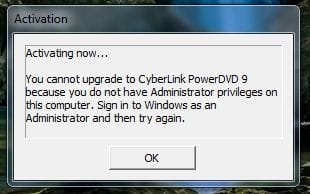
  • activate.jpg
    activate.jpg
    19.2 KB · Views: 814

My Computer My Computer

OS
Win 7 x64 Version 6.1.7600 Build 7600
CPU
QuadCore Intel Core i5 750, 3200 MHz (24 x 133)
Motherboard
Gigabyte GA-P55M-UD2
Memory
Corsair 8 GB DDR3
Graphics Card(s)
ATI Radeon HD 5700 Series
Right click on the program shortcut and select troubleshoot compatibility - then select the second choice - then check the 3rd option (The program requires additional permission) - Then Start The Program...
 

My Computer My Computer

OS
Windows Se7en Ultimate + Windows XP SP3
CPU
AMD Athlon64 X2 5200+
Motherboard
Gigabyte GA-MA770-DS3
Memory
CORSAIR DOMINATOR TWIN2X2048-8500C5D 2 GB
Graphics Card(s)
Ati Radeon HD3870
Monitor(s) Displays
Sony KDL32V4500
Screen Resolution
1920X1080X60Hz
Hard Drives
HITACHI 320GB SATA
HITACHI 80GB ATA
PSU
Point Of View 450 Watts
Internet Speed
20Mbits Cable Internet
Hi. I'm stuck trying to activate PowerDVD. I keep getting a 'you need administrative permission' result window. This window pops up after entering the activation code. I've tried all the limited tricks I know of. I enable the hidden admin account and logged in and tried it that way. I used the right click on activate.exe and 'run as admin' method. Same for 'Take Ownership'. I also changed the UAC to it's lowest settings (basically off). None of these methods has worked so far.
I think I'm missing something simple but I just don't know what it could be. Haven't had this particular problem before. If someone has a suggestion that I haven't tried or doing something different that I have tried, that would be sweet! Thanks!

Rusty

Run the program as admin by rightclicking and selecting that. If that doesnt work, uninstall and re-install.
 

My Computer My Computer

Computer Manufacturer/Model Number
Acer Veriton m261 (modded)
OS
Win 7 pro 64-bit, Ubuntu 9.10 64-bit
CPU
Intel Core 2 Duo 2.60 Ghz
Motherboard
Whatever came with the system
Memory
4 gb ddr2 667 Mhz
Graphics Card(s)
NVidia Geforce 9400 GS 1 gb ddr2 550 mhz GPU
Sound Card
Intergrated
Monitor(s) Displays
samsung SyncMaster 2494 24"
Screen Resolution
1080p
Hard Drives
80gb - IDE
750gb - SATA II
PSU
whatever came with the system
Case
whatever came with the system
Cooling
whatever came with the system
Keyboard
Apple Aluminium (Awesome)
Mouse
Some awesome Dell mouse, really good.
Internet Speed
100mbps
thanks for the replies. I finally got it working, though actually none of the suggestions worked. But now I at least know about the 'troubleshoot compatibility' option! What finally worked was uninstalling, unticked the disable admin option, logging in that way and installing from that account (Administrative). Admins, please mark this thread as solved and again thanks for the suggestions.

Rusty
 

My Computer My Computer

OS
Win 7 x64 Version 6.1.7600 Build 7600
CPU
QuadCore Intel Core i5 750, 3200 MHz (24 x 133)
Motherboard
Gigabyte GA-P55M-UD2
Memory
Corsair 8 GB DDR3
Graphics Card(s)
ATI Radeon HD 5700 Series
Back
Top