Administrator and User accounts question

herbc

New member
Member
VIP
Local time
9:11 AM
Messages
255
I noticed that when i log into my Administrator account it has different settings and programs and when i go back to my user account it's different as well, is this normal ?

I thought everything was the same regarding programs installed etc.. but when you wanted to make changes you had to use the admin password but i'm not sure.

Thanks for any help
 

My Computer

Computer type
Laptop
Computer Manufacturer/Model Number
asus U56E
OS
win 7 64 Home edition
CPU
2430 i5 intel
Motherboard
?Asus
Memory
6
Graphics Card(s)
imtegrated
Sound Card
Microsoft
Hard Drives
WDC WD6400BPVT-80HXZT3 ATA Device
Antivirus
Kaspersky trial AV 2014
Browser
chrome
Is it the same account, so you only revoke admin rights?
Or two totally different users?
 

My Computer

Computer type
Laptop
Computer Manufacturer/Model Number
ACER ASPIRE 5742G
OS
Microsoft Windows 7 Home Premium 64-bits 7601 Multiprocessor Free Service Pack 1
CPU
Intel(R) Core(TM) i3 CPU M 370 @ 2.40GHz
Motherboard
Acer Aspire 5742G
Memory
4,00 GB
Graphics Card(s)
ATI Mobility Radeon HD 5400 Series
Sound Card
(1) AMD High Definition Audio Device (2) Realtek High Defi
Screen Resolution
1366 x 768 x 32 bits (4294967296 colors) @ 60 Hz
Hard Drives
WDC WD5000BEVT-22ZAT0
Is it the same account, so you only revoke admin rights?
Or two totally different users?


It's just me but i have two separate user names. I probably screwed up somehow.
One account i have a simple password that gives me access quickly but when i want to change anything important i need to type in a Admin password.

The main Admin account i need to use the Admin password to log in but once in i'm it's functionality is the same . I still need to use the Admin password to make changes.
 

My Computer

Computer type
Laptop
Computer Manufacturer/Model Number
asus U56E
OS
win 7 64 Home edition
CPU
2430 i5 intel
Motherboard
?Asus
Memory
6
Graphics Card(s)
imtegrated
Sound Card
Microsoft
Hard Drives
WDC WD6400BPVT-80HXZT3 ATA Device
Antivirus
Kaspersky trial AV 2014
Browser
chrome
I noticed that when i log into my Administrator account it has different settings and programs and when i go back to my user account it's different as well, is this normal ?

I thought everything was the same regarding programs installed etc.. but when you wanted to make changes you had to use the admin password but i'm not sure.

Thanks for any help

Yes that's pretty normal. Every user account in Windows can be configured differently except programs are common for all (except user specific apps like Google Chrome, which you need to install separately on every user account).

Hope this helps. :)
 
How would i delete a guest account that i made by mistake, the only option i see is off/on? I have win 7 64 bit
 

My Computer

Computer type
Laptop
Computer Manufacturer/Model Number
asus U56E
OS
win 7 64 Home edition
CPU
2430 i5 intel
Motherboard
?Asus
Memory
6
Graphics Card(s)
imtegrated
Sound Card
Microsoft
Hard Drives
WDC WD6400BPVT-80HXZT3 ATA Device
Antivirus
Kaspersky trial AV 2014
Browser
chrome
You did not made the guest account. It's there by default. And it can't be deleted the normal way.

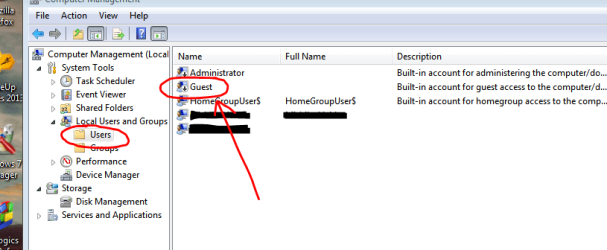
If you really want to delete it, then right click on Computer->Manage

Capture.PNG

Expand "Local users and groups" -> "Users"

Right click "Guest" -> Delete

Done.

Hope that helps.
 
Do not delete the Guest account. You might have guests. Just turn it off.

To avoid chronic confusion I would delete the Standard account and operate under the Admin one. Have User Accounts save your Standard account's files to desktop so you can distribute them via Explorer.
 
I heard using the Administrator account was not a smart thing to do and that you should just use a user account to prevent malware .

I am always the ONLY user, never will i have anybody use this computer, i don't even know anybody and live by myself. Whats the best way to go .

Thanks
 

My Computer

Computer type
Laptop
Computer Manufacturer/Model Number
asus U56E
OS
win 7 64 Home edition
CPU
2430 i5 intel
Motherboard
?Asus
Memory
6
Graphics Card(s)
imtegrated
Sound Card
Microsoft
Hard Drives
WDC WD6400BPVT-80HXZT3 ATA Device
Antivirus
Kaspersky trial AV 2014
Browser
chrome
You'll still get prompted with User Account Controls to keep anything from running without your approval, but using a Standard account you have to put in the Admin password to get past it which is a real PITA and unnecessary since UAC provides enough warning itself.

Many don't like those UAC warnings and turn them down/off anyway so I'm wary of suggesting making it even more onerous.

Others may disagree and I hope will post their brief, but my own opinion is that it's overkill.
 
Last edited:
So i'm gathering i could use the Admin account and it won't be anymore prone for allowing Malware to take control of my computer if i did get something bad.
 

My Computer

Computer type
Laptop
Computer Manufacturer/Model Number
asus U56E
OS
win 7 64 Home edition
CPU
2430 i5 intel
Motherboard
?Asus
Memory
6
Graphics Card(s)
imtegrated
Sound Card
Microsoft
Hard Drives
WDC WD6400BPVT-80HXZT3 ATA Device
Antivirus
Kaspersky trial AV 2014
Browser
chrome
Well, if you've decided to use the admin account but still fear malware, turn UAC on, that provides a good level of protection before any malicious code executes on your system. Also, get a good anti virus solution. I prefer ESET Smart Security.
 
OK, for some reason i am still having problems grasping this user account thing. When i switched over to my user account from the Admin account i get confused because i am not sure if my user account needs to be updated like i had just completed with the Admin account.

For some reason i think that both accounts are entirely separate and when i update my anti virus definitions on one i need to do the same for the other. I disabled autorun on the Admin account and then i'll go into my user account and attempt to do it there but i know it's just one registry.

I need more sleep obviously.

What am i missing.

Thanks guys
 

My Computer

Computer type
Laptop
Computer Manufacturer/Model Number
asus U56E
OS
win 7 64 Home edition
CPU
2430 i5 intel
Motherboard
?Asus
Memory
6
Graphics Card(s)
imtegrated
Sound Card
Microsoft
Hard Drives
WDC WD6400BPVT-80HXZT3 ATA Device
Antivirus
Kaspersky trial AV 2014
Browser
chrome
This is why I suggested deleting the Standard account: to avoid chronic confusion,
and you get no additional protections operating under Standard account with UAC enabled.
 
This is why I suggested deleting the Standard account: to avoid chronic confusion,
and you get no additional protections operating under Standard account with UAC enabled.

Though UAC doesn't block malicious code (in short, malware) from running, but it does ask the user if he/she wants to run it or not, so at least UAC gives the user a chance to decide whether to run the thing or not. :rolleyes:
 
I made that exact point earlier.

The discussion is about whether operating a Standard User account confers any additional protection than an Administrative-level account.

I was pointing out that both will warn of changes when UAC remains enabled, but the Standard account must also enter an Admin password to proceed with the changes.

This is unnecessary overkill if both are the same person since you've already been warned so why would you need to enter a password to approve your own actions?
 
Back
Top