administrator problem

angusm9

New member
Local time
1:23 AM
Messages
11
OK this is the problem:

I have 2 accounts on my computer, one has admin privilages and one is a regular account. I used regedit to hide the administrator account on the log in screen. But in order to un hide the admin account you have to use regedit again, but in order to change anything in the registry you have to be an administrator. I have also tried un hiding the secret admin account on windows 7 but in order to do that, you need to be and administrator.

Does any one have any ideas I could try, that would be really helpful, Thanks

I also know both passwords to the accounts...
 

My Computer

OS
Windows 7
You should be able to do this through a command prompt.


Go to a command prompt as the administrator.

  • type cmd in the search box and then right click when it is found and select Run as Administrator
  • Type Net User Administrator /active:yes
 

My Computer

Computer Manufacturer/Model Number
Asus G71G
OS
Win 7 Pro x64
CPU
Core 2 Duo T9400
Motherboard
ASUSTeK Computer INC. G71G
Memory
6.0GB Dual-Channel DDR2 @ 332MHz 5-5-5-15
Graphics Card(s)
Nvidia 9800m GTX
Sound Card
NVIDIA High Definition Audio
Monitor(s) Displays
17" HD display
Screen Resolution
1440x900
Hard Drives
Dual 250GB ST9250421AS ATA Device
If I try running cmd as admin a box pops up asking me to confirm, I cant press yes (no button) because im not on the admin account...
 

My Computer

OS
Windows 7
Crap...... Don't know if I can help with this one. Sorry. I'll chime back in if I find anything by googling.
 

My Computer

Computer Manufacturer/Model Number
Asus G71G
OS
Win 7 Pro x64
CPU
Core 2 Duo T9400
Motherboard
ASUSTeK Computer INC. G71G
Memory
6.0GB Dual-Channel DDR2 @ 332MHz 5-5-5-15
Graphics Card(s)
Nvidia 9800m GTX
Sound Card
NVIDIA High Definition Audio
Monitor(s) Displays
17" HD display
Screen Resolution
1440x900
Hard Drives
Dual 250GB ST9250421AS ATA Device
ok, I took a look on google but didnt notice anything..
 

My Computer

OS
Windows 7
OK this is the problem:

I have 2 accounts on my computer, one has admin privilages and one is a regular account. I used regedit to hide the administrator account on the log in screen. But in order to un hide the admin account you have to use regedit again, but in order to change anything in the registry you have to be an administrator. I have also tried un hiding the secret admin account on windows 7 but in order to do that, you need to be and administrator.

Does any one have any ideas I could try, that would be really helpful, Thanks

I also know both passwords to the accounts...
Hello angusm9, and welcome to Windows Seven Forums.

There was a workaround in Vista, here is a link to the tutorial: Solved User Account Password - Change from Win RE - Vista Forums

You will need to boot to your 7 Install DVD and open the command prompt, like is done in this tutorial: http://www.sevenforums.com/tutorials/20864-mbr-restore-windows-7-master-boot-record.html

Then type in the commands from the Vista tutorial, and when you reboot, you can enable the Default, built-in Administrator account and restore your hidden admin account.

I verified this on the laptop I am using now, so I know it works. Let us know if you have any difficulties?

Cheers!
Robert
 

My Computer

OS
...
  • Like
Reactions: JMH
ok I will try this but im not totally sure I can, I DL windows 7 from my university. I dont know if I will be allowed to download anything without having admin privilages, I might need to use another computer.
 

My Computer

OS
Windows 7
ok I will try this but im not totally sure I can, I DL windows 7 from my university. I dont know if I will be allowed to download anything without having admin privilages, I might need to use another computer.
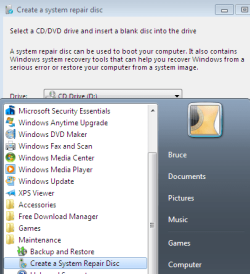
Can you burn a CD? Use the "Create a System Repair Disk" to burn a repair disk that you can boot to instead of the DVD.

create_repair_cd.png

Cheers!
Robert
 

My Computer

OS
...
oh ok that should help alot, I will try it later tonight hopefully. Thanks
 

My Computer

OS
Windows 7
haha I cant even create a system restore disk when im not an administrator
 

My Computer

OS
Windows 7
I might be missing something but if you know how to logon to the Admin account i don't understand the dilemna...
 

My Computer

Computer Manufacturer/Model Number
Self-Built
OS
Vista Ultimate X64/ Windows 7 Dual-boot
CPU
Q6600
Motherboard
ASUS P5K
Memory
4G OCZ PC2 8500 Platinum
Graphics Card(s)
EVGA 8800GTS Vid Card
Hard Drives
500G Seagate SATA
200G Seagate SATA
100G WD Caviar SATA
80G WD Caviar IDE
PSU
OCZ Elite 800W PSU
Case
RaidMax Smilodon Case
patio the reason i cannot log in is because i hid the admin account.
Thanks iseeyou, i will try that right now
 

My Computer

OS
Windows 7
Option 1: Sometimes pressing the CTRL-ALT-DEL keys twice quickly will show the hidden accounts.
Option 2: Login as whatever account, then do a Run as Administrator on the Command Prompt. Enter the password. Then type in the command prompt window:
net user Administrator /active:yes <enter>
net user Administrator pa$$word <enter>
 

My Computer

Computer type
PC/Desktop
Computer Manufacturer/Model Number
Dell OP7010
OS
Windows 7 Enterprise (x64); Windows Server 2008 R2 (x64)
Memory
16GB
Monitor(s) Displays
4 Dell 24" LCD
Screen Resolution
1280x1024
Keyboard
Dell
Mouse
Dell Optical
Internet Speed
40meg
First of all, why do u want to touch the most sensitive registry to hide the admin account? You can disable the account from computer management which is available under admin tools in control panel.

Once opened comp mgmt, expand local users and groups, select users. To the right all user accounts will be shown. If admin is one, right click on it, properties, uncheck account is locked out or disabled. Using this method, one can reset the password of admin too.

Try it and let us know.
 

My Computer

Computer Manufacturer/Model Number
MacBook Pro
OS
Lion
CPU
i5
Memory
4GB
Graphics Card(s)
Intel
Screen Resolution
1200x800
Hard Drives
Seagate FreeAgent GO 250GB Ext. HDD
ok well first I tried the sytem resotre disk and im not getting any luck with that.
I jsut tried to go to the computer managment, but the user i hid, does not have a check besides locked out or disabled. I then tried going to the built in admin account and tried to uncheck the disabled buttom. But to do that you have to be an administrator.

And really the reason I was fiddling with the regedit was because i was curious, lol. kinda screwed me over.
 

My Computer

OS
Windows 7
then i believe u r doomed. either try a repair install or fresh install.
 

My Computer

Computer Manufacturer/Model Number
MacBook Pro
OS
Lion
CPU
i5
Memory
4GB
Graphics Card(s)
Intel
Screen Resolution
1200x800
Hard Drives
Seagate FreeAgent GO 250GB Ext. HDD
ok well first I tried the sytem resotre disk and im not getting any luck with that.
I jsut tried to go to the computer managment, but the user i hid, does not have a check besides locked out or disabled. I then tried going to the built in admin account and tried to uncheck the disabled buttom. But to do that you have to be an administrator.

And really the reason I was fiddling with the regedit was because i was curious, lol. kinda screwed me over.
Could you please explain further what did not work?

dre@ms; 7 Home Premium does not include the Local Users and Groups feature, and as the OP has not yet identified the version of 7 he is using, we can not know if that suggestion would work?

Cheers!
Robert
 

My Computer

OS
...
ok well i do have windows 7 pro.
And I tried your susggestion and tried going to the computer management but the account locked box was never checked(for the user i hid)
 

My Computer

OS
Windows 7
Back
Top