Administrator & program install

pdxireland

New member
Trying to install a new program on my W7 machine.
When I left click on it I get the "...you need administrator...." message.
When I right click & select "Run as administrator" I get the same message.
So I used Switch Users & brought a copy of the install over to the Admin. desktop.
Installed no problem.
But, how can I now use this program without have to switch over to Administrator?

Also, I thought I just posted almost the same post in General but I guess I was doing too many things at once and lost it - if this turns out to be a double post - SORRY!

fmg
 

My Computer

OS
W7 Pro 64bit
CPU
Intel Core 2 Quad Q6600 Kentsfield
Motherboard
GIGABYTE GA-EX38-DQ6
Memory
6gb
Graphics Card(s)
MSI N9600GT 512M OC GeForce 9600 GT
Hard Drives
Intel SSD

My Computer

Computer type
PC/Desktop
Computer Manufacturer/Model Number
Dell XPS 420
OS
Windows 10, Home Clean Install
CPU
Intel Core2 processsor Q8200(2.33Ghz 1333FSB) Quad Core Tech
Motherboard
Dell
Memory
6 gb
Graphics Card(s)
ATI Radeon 256MB HD3650
Sound Card
Intergrated 7.1 Channel Audio
Monitor(s) Displays
Dell SP2009W 20"
Hard Drives
640 GB Serial ATA Hard drive
Cooling
Fan
Keyboard
Dell USB Keyboard
Mouse
Dell Premium Optical USB
Internet Speed
DSL 2.85
Hello,

Thanks for the link but I already have full permissions?

fmg
 

My Computer

OS
W7 Pro 64bit
CPU
Intel Core 2 Quad Q6600 Kentsfield
Motherboard
GIGABYTE GA-EX38-DQ6
Memory
6gb
Graphics Card(s)
MSI N9600GT 512M OC GeForce 9600 GT
Hard Drives
Intel SSD
If you have full permissions. Type the name of the program in search (from the standard user account). Make a short cut, so it can be easily accessed. You should be able to use it.
 

My Computer

Computer type
PC/Desktop
Computer Manufacturer/Model Number
Dell XPS 420
OS
Windows 10, Home Clean Install
CPU
Intel Core2 processsor Q8200(2.33Ghz 1333FSB) Quad Core Tech
Motherboard
Dell
Memory
6 gb
Graphics Card(s)
ATI Radeon 256MB HD3650
Sound Card
Intergrated 7.1 Channel Audio
Monitor(s) Displays
Dell SP2009W 20"
Hard Drives
640 GB Serial ATA Hard drive
Cooling
Fan
Keyboard
Dell USB Keyboard
Mouse
Dell Premium Optical USB
Internet Speed
DSL 2.85
Helloo again.
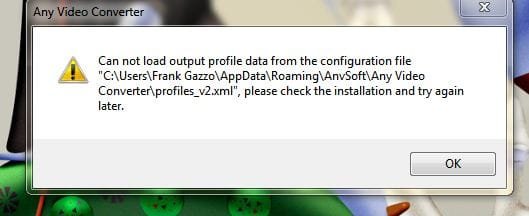
Yeah I can access it via search & put a shortcut on the desktop but when launched I get the attached error?
This is the first time I have had any trouble installing anything on W7?
 

Attachments

  • AnyVideoError.JPG
    AnyVideoError.JPG
    27.3 KB · Views: 7

My Computer

OS
W7 Pro 64bit
CPU
Intel Core 2 Quad Q6600 Kentsfield
Motherboard
GIGABYTE GA-EX38-DQ6
Memory
6gb
Graphics Card(s)
MSI N9600GT 512M OC GeForce 9600 GT
Hard Drives
Intel SSD

My Computer

Computer Manufacturer/Model Number
* BFK Customs *
OS
W 7 64-bit Ultimate
CPU
Intel Q9550 Yorkfield
Motherboard
ASUS P5Q Pro
Memory
8GB Dominator 8500C5D
Graphics Card(s)
ATI : XFX 5870
Sound Card
Realtek HD Audio 7-1
Monitor(s) Displays
1x 47" LCD HDMI & 3x 26" LCD HDMI
Screen Resolution
1920x1080P & 1920x1200
Hard Drives
1x 80GB Intel X25-M G2 SSD : 1x 500GB & 1x 640GB WD Caviar Black(s)
PSU
Corsair 620HX
Case
Cooler Master RC-690
Cooling
Tuniq Tower 120, 2x 140mm and 3x 120mm case fans
Keyboard
Microsoft 500
Mouse
Razer Diamondback 3G
Internet Speed
14 Mb/s
Other Info
1x Koutech 3Gb/s SATA HDD Hot Swap Rack
Try this put name in search. When it appears, right click and run as adminsitrator. Does that help?

Barefoot and I were typing at the same time. His solution cuts out one step. You may want to give that a try.
 

My Computer

Computer type
PC/Desktop
Computer Manufacturer/Model Number
Dell XPS 420
OS
Windows 10, Home Clean Install
CPU
Intel Core2 processsor Q8200(2.33Ghz 1333FSB) Quad Core Tech
Motherboard
Dell
Memory
6 gb
Graphics Card(s)
ATI Radeon 256MB HD3650
Sound Card
Intergrated 7.1 Channel Audio
Monitor(s) Displays
Dell SP2009W 20"
Hard Drives
640 GB Serial ATA Hard drive
Cooling
Fan
Keyboard
Dell USB Keyboard
Mouse
Dell Premium Optical USB
Internet Speed
DSL 2.85
Trying to install a new program on my W7 machine.
When I left click on it I get the "...you need administrator...." message.
When I right click & select "Run as administrator" I get the same message.
So I used Switch Users & brought a copy of the install over to the Admin. desktop.
Installed no problem.
But, how can I now use this program without have to switch over to Administrator?

Also, I thought I just posted almost the same post in General but I guess I was doing too many things at once and lost it - if this turns out to be a double post - SORRY!

fmg


I just read this again, can't you enter your user credentials into the prompt then click ok?
 

My Computer

Computer Manufacturer/Model Number
* BFK Customs *
OS
W 7 64-bit Ultimate
CPU
Intel Q9550 Yorkfield
Motherboard
ASUS P5Q Pro
Memory
8GB Dominator 8500C5D
Graphics Card(s)
ATI : XFX 5870
Sound Card
Realtek HD Audio 7-1
Monitor(s) Displays
1x 47" LCD HDMI & 3x 26" LCD HDMI
Screen Resolution
1920x1080P & 1920x1200
Hard Drives
1x 80GB Intel X25-M G2 SSD : 1x 500GB & 1x 640GB WD Caviar Black(s)
PSU
Corsair 620HX
Case
Cooler Master RC-690
Cooling
Tuniq Tower 120, 2x 140mm and 3x 120mm case fans
Keyboard
Microsoft 500
Mouse
Razer Diamondback 3G
Internet Speed
14 Mb/s
Other Info
1x Koutech 3Gb/s SATA HDD Hot Swap Rack
Hey guys,

thanks for the info but all that did was have me cerate another shortcut on my Admin. desktop. But as I'm typing this I'm feling dumb & I will start the process over now from my regular desktop & urn 'Task Scheduler" as Admin.
back in a few...

fmg
 

My Computer

OS
W7 Pro 64bit
CPU
Intel Core 2 Quad Q6600 Kentsfield
Motherboard
GIGABYTE GA-EX38-DQ6
Memory
6gb
Graphics Card(s)
MSI N9600GT 512M OC GeForce 9600 GT
Hard Drives
Intel SSD
Plot thickens!
I tried again from my regular account running Task... as Admin. but it then does ask for my credentials but will not accept them?
It asks for them during the Task creation process, NOT when I launch Task...
Batting zero grgrgrgrgrg

fmg
 

My Computer

OS
W7 Pro 64bit
CPU
Intel Core 2 Quad Q6600 Kentsfield
Motherboard
GIGABYTE GA-EX38-DQ6
Memory
6gb
Graphics Card(s)
MSI N9600GT 512M OC GeForce 9600 GT
Hard Drives
Intel SSD
I just read this again, can't you enter your user credentials into the prompt then click ok?[/QUOTE]

nope FYI

fmg
 

My Computer

OS
W7 Pro 64bit
CPU
Intel Core 2 Quad Q6600 Kentsfield
Motherboard
GIGABYTE GA-EX38-DQ6
Memory
6gb
Graphics Card(s)
MSI N9600GT 512M OC GeForce 9600 GT
Hard Drives
Intel SSD
If you installed in the adminstrator account and gave proper permission to the standard user, it should work.

Did you ever have this problem, before with programs? If not it could be a problem with the program, itself.
 

My Computer

Computer type
PC/Desktop
Computer Manufacturer/Model Number
Dell XPS 420
OS
Windows 10, Home Clean Install
CPU
Intel Core2 processsor Q8200(2.33Ghz 1333FSB) Quad Core Tech
Motherboard
Dell
Memory
6 gb
Graphics Card(s)
ATI Radeon 256MB HD3650
Sound Card
Intergrated 7.1 Channel Audio
Monitor(s) Displays
Dell SP2009W 20"
Hard Drives
640 GB Serial ATA Hard drive
Cooling
Fan
Keyboard
Dell USB Keyboard
Mouse
Dell Premium Optical USB
Internet Speed
DSL 2.85
Richc46,

Many thanks for the help!
No, this is the first time I have had this problem.

I'm looking for a Freeware or low-cost program to convert various video formats to .flv
I have for years used a great little program on my Macbook VisualHub but it is no longer supported, still works with errors, but not sure for how long in Snow Leopard (another story, "The Ugly Mac Upgrade") my luck will last?
Anyway, I have been trying a few different Windows based programs as a replacement but nothing has managed the quality output of VisualHub.
Because of the permission issues on my W7 machine I decided to install on an XP machine.....with no problems.

However, the video conversion quality to .flv is decent (given its free) but not acceptable for my application.
Long story made longer, I'm actually going to uninstall this program & keep looking!

Many thanks to you & Barefoot Kid (as usual) !

Cheers,

fmg
 

My Computer

OS
W7 Pro 64bit
CPU
Intel Core 2 Quad Q6600 Kentsfield
Motherboard
GIGABYTE GA-EX38-DQ6
Memory
6gb
Graphics Card(s)
MSI N9600GT 512M OC GeForce 9600 GT
Hard Drives
Intel SSD
Ty for the kind words and rep. Sorry that we could not get better results, but in any event you have it on XP. Take care.
 

My Computer

Computer type
PC/Desktop
Computer Manufacturer/Model Number
Dell XPS 420
OS
Windows 10, Home Clean Install
CPU
Intel Core2 processsor Q8200(2.33Ghz 1333FSB) Quad Core Tech
Motherboard
Dell
Memory
6 gb
Graphics Card(s)
ATI Radeon 256MB HD3650
Sound Card
Intergrated 7.1 Channel Audio
Monitor(s) Displays
Dell SP2009W 20"
Hard Drives
640 GB Serial ATA Hard drive
Cooling
Fan
Keyboard
Dell USB Keyboard
Mouse
Dell Premium Optical USB
Internet Speed
DSL 2.85
Hello again pdxireland.


As it looks like you're using Windows 7 Pro, why not see if the program will run in XP Mode in the admin acct; have a look at the tutorial at the link below, it's worth a try.


How to Install and Setup Windows XP Mode
 

My Computer

Computer Manufacturer/Model Number
* BFK Customs *
OS
W 7 64-bit Ultimate
CPU
Intel Q9550 Yorkfield
Motherboard
ASUS P5Q Pro
Memory
8GB Dominator 8500C5D
Graphics Card(s)
ATI : XFX 5870
Sound Card
Realtek HD Audio 7-1
Monitor(s) Displays
1x 47" LCD HDMI & 3x 26" LCD HDMI
Screen Resolution
1920x1080P & 1920x1200
Hard Drives
1x 80GB Intel X25-M G2 SSD : 1x 500GB & 1x 640GB WD Caviar Black(s)
PSU
Corsair 620HX
Case
Cooler Master RC-690
Cooling
Tuniq Tower 120, 2x 140mm and 3x 120mm case fans
Keyboard
Microsoft 500
Mouse
Razer Diamondback 3G
Internet Speed
14 Mb/s
Other Info
1x Koutech 3Gb/s SATA HDD Hot Swap Rack
Thanks BFK but I think I'm just going to leave well enough alone.
Thanks again for all the help!

cheers,

fmg
 

My Computer

OS
W7 Pro 64bit
CPU
Intel Core 2 Quad Q6600 Kentsfield
Motherboard
GIGABYTE GA-EX38-DQ6
Memory
6gb
Graphics Card(s)
MSI N9600GT 512M OC GeForce 9600 GT
Hard Drives
Intel SSD
Thanks for the reply!
 

My Computer

Computer Manufacturer/Model Number
* BFK Customs *
OS
W 7 64-bit Ultimate
CPU
Intel Q9550 Yorkfield
Motherboard
ASUS P5Q Pro
Memory
8GB Dominator 8500C5D
Graphics Card(s)
ATI : XFX 5870
Sound Card
Realtek HD Audio 7-1
Monitor(s) Displays
1x 47" LCD HDMI & 3x 26" LCD HDMI
Screen Resolution
1920x1080P & 1920x1200
Hard Drives
1x 80GB Intel X25-M G2 SSD : 1x 500GB & 1x 640GB WD Caviar Black(s)
PSU
Corsair 620HX
Case
Cooler Master RC-690
Cooling
Tuniq Tower 120, 2x 140mm and 3x 120mm case fans
Keyboard
Microsoft 500
Mouse
Razer Diamondback 3G
Internet Speed
14 Mb/s
Other Info
1x Koutech 3Gb/s SATA HDD Hot Swap Rack
Back
Top