Administrator rights

DigDeep

New member
Member
VIP
Local time
5:48 AM
Messages
101
Location
Kočevje
I think I have problem with my admin. account , a few times I couldnt delete folder or a file and firefox 16.0.1 sometimes wont save the application. It says that application cant be saved, because its not allowed to change content of the folder, change the properties of the folder or change path for downloads, but on c: its the same. I dont know if thats firefox fault, because before update it worked perfectly. Im 99% sure that my admin account was changed somehow.


I used system restore, but it did not help. User account says Im administrator.


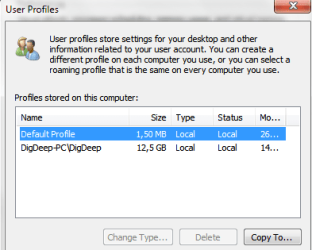
Under user profiles I have this(attachment)

Can I put DigDeep account on the top, or can I delete default profile? Whats wrong?

Edit: I try to delete folder, and it says You require permission from Administrators to make changes to the folders. But than after few seconds, I can delete folder. ????

dsfsd.png
 

Attachments

  • ewr.PNG
    ewr.PNG
    9.5 KB · Views: 8

My Computer

Computer type
PC/Desktop
Computer Manufacturer/Model Number
Custom build
OS
Windows 7 SP1 x64 Ultimate
CPU
FX 8320 4ghz
Motherboard
Gigabyte 970A UD3P
Memory
Crucial Ballistix Tactical 8GB 240-Pin DDR3 1600 Mhz
Graphics Card(s)
Sapphire R9 270 Dual X
Sound Card
VIA HD Audio
Monitor(s) Displays
Samsung SyncMaster 2032BW
Screen Resolution
1680 * 1050
Hard Drives
WD Blue WD10EZEX
PSU
Energon 650w
Case
Aerocool Strike X One
Cooling
Xigmatek Dark Knight SD1283 Night Hawk Edition
Keyboard
Typhoon CarbonKey
Mouse
Trust GXT 25 Gaming Mouse
Internet Speed
120mb/4mb
Antivirus
Comodo Internet Security 8.1
Browser
Firefox
Other Info
CfosSpeed 10
Whether you have a problem with your User Account I'm not sure. But you don't need to move the DigDeep account to the top. It doesn't matter where it is in that list. It is only a List with no hierarchy. As long as it is in the list that is all the counts.

There are some folders on the system partition that can not be written to. Post the names of folders you are having problems with.
 

My Computer

OS
7 x64
Yes I know that, but its ordinary folders I have problem with. I dont know, downloads, or I made new folder, and then I couldnt delete it, but then like I said after few secons its deleteable(is this even a word). The first picture was folder in Program files, at first that message poped out, but then I delete it.

Is creator owner normal under security(C. program files)
wqeqw.png


And is it Ok if I add all administrators permissions to Users DigDeep. Im the only user.

sdfsdsd.png
 

My Computer

Computer type
PC/Desktop
Computer Manufacturer/Model Number
Custom build
OS
Windows 7 SP1 x64 Ultimate
CPU
FX 8320 4ghz
Motherboard
Gigabyte 970A UD3P
Memory
Crucial Ballistix Tactical 8GB 240-Pin DDR3 1600 Mhz
Graphics Card(s)
Sapphire R9 270 Dual X
Sound Card
VIA HD Audio
Monitor(s) Displays
Samsung SyncMaster 2032BW
Screen Resolution
1680 * 1050
Hard Drives
WD Blue WD10EZEX
PSU
Energon 650w
Case
Aerocool Strike X One
Cooling
Xigmatek Dark Knight SD1283 Night Hawk Edition
Keyboard
Typhoon CarbonKey
Mouse
Trust GXT 25 Gaming Mouse
Internet Speed
120mb/4mb
Antivirus
Comodo Internet Security 8.1
Browser
Firefox
Other Info
CfosSpeed 10
There is really something wrong. I never had a problem with pasting and copying files. And now sometimes I cant do that without a message from explorer.


Is it normal if I click Take Ownership on c: d: or e: that it says:

ERROR: File or directory not found
 
Last edited:

My Computer

Computer type
PC/Desktop
Computer Manufacturer/Model Number
Custom build
OS
Windows 7 SP1 x64 Ultimate
CPU
FX 8320 4ghz
Motherboard
Gigabyte 970A UD3P
Memory
Crucial Ballistix Tactical 8GB 240-Pin DDR3 1600 Mhz
Graphics Card(s)
Sapphire R9 270 Dual X
Sound Card
VIA HD Audio
Monitor(s) Displays
Samsung SyncMaster 2032BW
Screen Resolution
1680 * 1050
Hard Drives
WD Blue WD10EZEX
PSU
Energon 650w
Case
Aerocool Strike X One
Cooling
Xigmatek Dark Knight SD1283 Night Hawk Edition
Keyboard
Typhoon CarbonKey
Mouse
Trust GXT 25 Gaming Mouse
Internet Speed
120mb/4mb
Antivirus
Comodo Internet Security 8.1
Browser
Firefox
Other Info
CfosSpeed 10
This can be deleted, because now everything is back to normal.
 

My Computer

Computer type
PC/Desktop
Computer Manufacturer/Model Number
Custom build
OS
Windows 7 SP1 x64 Ultimate
CPU
FX 8320 4ghz
Motherboard
Gigabyte 970A UD3P
Memory
Crucial Ballistix Tactical 8GB 240-Pin DDR3 1600 Mhz
Graphics Card(s)
Sapphire R9 270 Dual X
Sound Card
VIA HD Audio
Monitor(s) Displays
Samsung SyncMaster 2032BW
Screen Resolution
1680 * 1050
Hard Drives
WD Blue WD10EZEX
PSU
Energon 650w
Case
Aerocool Strike X One
Cooling
Xigmatek Dark Knight SD1283 Night Hawk Edition
Keyboard
Typhoon CarbonKey
Mouse
Trust GXT 25 Gaming Mouse
Internet Speed
120mb/4mb
Antivirus
Comodo Internet Security 8.1
Browser
Firefox
Other Info
CfosSpeed 10
Back
Top