Administrator?

Merlin2000

New member
Member
Local time
5:12 PM
Messages
91
With XP, I never had to worry about not being the administrator. With Win 7, it looks like this is a separate account now.. right?

Why is it that me, the administrator, who INSTALLED the OS, is not using the administrator account?

I don't get it.. is there a reason why I would ever need to use the "Run as Administrator" command? What's the point of having the admin as a separate account completely?
 

My Computer

OS
Windows 7
Seeing as you've jumped straight to 7, you won't have experienced this in Vista - U.A.C.
 

My Computer

Computer Manufacturer/Model Number
Sony Vaio FZ21Z
OS
Windows 7 Ultimate x64 ®™
CPU
Intel Core 2 Duo (2.2 GHz)
Motherboard
Sony (Intel Chipset)
Memory
2x 2GB Corsair (667 MHz)
Graphics Card(s)
NVIDIA 8600M GS (256MB)
Sound Card
Sigmatel
Monitor(s) Displays
15.4" TFT X-Black
Screen Resolution
1280x800
Hard Drives
Western Digital 300GB Scorpio Black (7200rpm)
Mouse
Logitech Anywhere MX
Internet Speed
Sky 5MB
Security reasons to prevent rogue applications and other malicious code from running.

Linux uses a model where normal users account can not have admin privlidges and certain tasks will always have to be elevated to admin status to use. unless you log onto root which is bad practice.

I can see the merit of this when in a networked situation or when multi users is involved but for myself personally... I like to be logged in at the highest elevated state possible so I never have to elevate a window or log in as a different user. every extra click pisses me off... I spend a lot of time on computers and hate wasting time.
 

My Computer

Computer Manufacturer/Model Number
Custom
OS
Windows 7 Ultimate x64
CPU
QX6700 @ 3.2Ghz (temporarily till I get the drive to tweak)
Motherboard
Asus Maximus Formula
Memory
8gb (4x2gb) OCZ PC2-8500
Graphics Card(s)
GTX280
Sound Card
Auzentech Prelude
Monitor(s) Displays
Samsung 244T & 940BF
Screen Resolution
1920x1200 & 1280x1024
Hard Drives
2 x Hitatchi 7K500 500GB in raid 0
PSU
Seasonic M-12 700w
Case
Lian Li PC-6077B
Cooling
Liquid (D-tek Fuzion 2/DDC+/240GTX)
Keyboard
Saitech Eclipse II
Mouse
Logitech G9
Internet Speed
22Mbit burst - 15 Mbit typical down / 500Kbit up
Other Info
http://pics.livejournal.com/bun_bun/pic/001c64ww
UAC was actually the first thing I disabled after I installed Win 7 :eek:

I don't see where it mentions anything about the administrator account though in that link...

I can see the merit of this when in a networked situation or when multi users is involved but for myself personally... I like to be logged in at the highest elevated state possible so I never have to elevate a window or log in as a different user. every extra click pisses me off... I spend a lot of time on computers and hate wasting time.
- Well yeah, I'm sure it is better to have this enabled by default, as the average user really doesn't care. But people that know what they're doing on their computer, that have only ONE user account on the machine, should be able to be the administrator and not have to "run as administrator" ever.

Is this not possible?
 

My Computer

OS
Windows 7
After disabling UAC and all the other stuff in Win 7 (windwos defender, action center, security center...) I have no issues running stuff without right click running as admin.

There is a seperate administrator account but it is disabled by default. If you are having troubles with your user account make sure it is in the Administrator user group. You can check these in the computer management MMC snap-in.
 

My Computer

Computer Manufacturer/Model Number
Custom
OS
Windows 7 Ultimate x64
CPU
QX6700 @ 3.2Ghz (temporarily till I get the drive to tweak)
Motherboard
Asus Maximus Formula
Memory
8gb (4x2gb) OCZ PC2-8500
Graphics Card(s)
GTX280
Sound Card
Auzentech Prelude
Monitor(s) Displays
Samsung 244T & 940BF
Screen Resolution
1920x1200 & 1280x1024
Hard Drives
2 x Hitatchi 7K500 500GB in raid 0
PSU
Seasonic M-12 700w
Case
Lian Li PC-6077B
Cooling
Liquid (D-tek Fuzion 2/DDC+/240GTX)
Keyboard
Saitech Eclipse II
Mouse
Logitech G9
Internet Speed
22Mbit burst - 15 Mbit typical down / 500Kbit up
Other Info
http://pics.livejournal.com/bun_bun/pic/001c64ww
UAC was actually the first thing I disabled after I installed Win 7 :eek:

I don't see where it mentions anything about the administrator account though in that link...

I can see the merit of this when in a networked situation or when multi users is involved but for myself personally... I like to be logged in at the highest elevated state possible so I never have to elevate a window or log in as a different user. every extra click pisses me off... I spend a lot of time on computers and hate wasting time.
- Well yeah, I'm sure it is better to have this enabled by default, as the average user really doesn't care. But people that know what they're doing on their computer, that have only ONE user account on the machine, should be able to be the administrator and not have to "run as administrator" ever.

Is this not possible?

Sure is.

The account set up when win 7 is installed by default admin. the problem is in win 7 apps are installed by a special group called "trusted Installer".

First make sure your user account is admin in user cpanel (realize there are security risks in running as admin)

As admin you can add yourself to the trusted installer group.

let us know if that doesnt help

Ken
 

My Computer

Computer Manufacturer/Model Number
HP Pavillion dv-7 1005 Tx
OS
Win 8 Release candidate 8400
CPU
[email protected]
Memory
4 gigs
Graphics Card(s)
Nvidia 9600M
Sound Card
HD built-in
Monitor(s) Displays
17" Wxga
Screen Resolution
1440x900
Cooling
none
Internet Speed
45Mb down 5Mb up
As admin you can add yourself to the trusted installer group.
- How do I do that? I'm already on an "Administrator" account, this is different than the "Administrator" user, right?

After disabling UAC and all the other stuff in Win 7 (windwos defender, action center, security center...) I have no issues running stuff without right click running as admin.
- All that stuff is already disabled on mine.. I've seen a lot of tutorials say you need to run something as an admin, so I want to be able to skip that step by already being the "admin"
 

My Computer

OS
Windows 7
If your account is in the admin and trusted intaller groups then you should be able to bypass the run as admin step.

  1. Right-click My Computer in your start menu and click Manage.
  2. When the Computer Management window opens, expand Local Users And Groups in the left pane. (You may need to expand System Tools if you don’t see Local Users And Groups.)
  3. Select Groups and double-click Administrators in the right pane.
  4. Click the Add button
  5. In the Select Users dialog box, enter a user account name.
  6. Click OK.
Repeat for trusted installer group.
 

My Computer

Computer Manufacturer/Model Number
Custom
OS
Windows 7 Ultimate x64
CPU
QX6700 @ 3.2Ghz (temporarily till I get the drive to tweak)
Motherboard
Asus Maximus Formula
Memory
8gb (4x2gb) OCZ PC2-8500
Graphics Card(s)
GTX280
Sound Card
Auzentech Prelude
Monitor(s) Displays
Samsung 244T & 940BF
Screen Resolution
1920x1200 & 1280x1024
Hard Drives
2 x Hitatchi 7K500 500GB in raid 0
PSU
Seasonic M-12 700w
Case
Lian Li PC-6077B
Cooling
Liquid (D-tek Fuzion 2/DDC+/240GTX)
Keyboard
Saitech Eclipse II
Mouse
Logitech G9
Internet Speed
22Mbit burst - 15 Mbit typical down / 500Kbit up
Other Info
http://pics.livejournal.com/bun_bun/pic/001c64ww
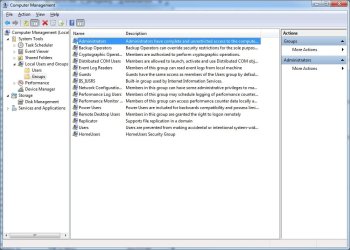
I don't have a trusted installer group listed.. According to the info displayed within the Administrators group, I'm already listed under the Administrator group.
 

Attachments

  • groups.jpg
    groups.jpg
    87.4 KB · Views: 99

My Computer

OS
Windows 7
trusted installer is new to me to sorry about that.

I haven't had any situations that required me to manually run as admin so not sure what to say at this point.
 

My Computer

Computer Manufacturer/Model Number
Custom
OS
Windows 7 Ultimate x64
CPU
QX6700 @ 3.2Ghz (temporarily till I get the drive to tweak)
Motherboard
Asus Maximus Formula
Memory
8gb (4x2gb) OCZ PC2-8500
Graphics Card(s)
GTX280
Sound Card
Auzentech Prelude
Monitor(s) Displays
Samsung 244T & 940BF
Screen Resolution
1920x1200 & 1280x1024
Hard Drives
2 x Hitatchi 7K500 500GB in raid 0
PSU
Seasonic M-12 700w
Case
Lian Li PC-6077B
Cooling
Liquid (D-tek Fuzion 2/DDC+/240GTX)
Keyboard
Saitech Eclipse II
Mouse
Logitech G9
Internet Speed
22Mbit burst - 15 Mbit typical down / 500Kbit up
Other Info
http://pics.livejournal.com/bun_bun/pic/001c64ww
Hmm.. well is there a way I can test it if it's working? I know on Vista you had to run a cmd window as an admin, but it opens fine for me. Not sure if all commands will run though, even then, I don't know which ones to test with.

Guess I'll have to wait until I run into it, in order to fix it, eh?
 

My Computer

OS
Windows 7
The first thing I do in a new install is enable the 'real' 'Administrator' account and use that ..

In the search box type secpol.msc .. press return
In the left-hand window click 'Local Policies' .. then 'Security Options' ..
In the right-hand window double-click 'Accounts: Administrator account status'
In the properties window , select 'Enabled' .. then 'OK'

Now if you log out and back in .. you will see the 'real' Administrator account is available.
 

My Computer

OS
Windows 7 64bit RTM
CPU
AMD Athlon 64 X2 3800+
Motherboard
ASUS M2N-E SLI
Memory
4G Dual channel
Graphics Card(s)
POV GeForce 7600 GT
Sound Card
USB 2.1
Monitor(s) Displays
Samsung 17 in LCD
Hard Drives
80G Western Digital
250G Western Digital
500G Buffalo Drivestation
Now if you log out and back in .. you will see the 'real' Administrator account is available.
- I've already been using the fake admin account. So I doubt it would be a good idea to switch. I just want to give myself the same permissions as the real admin account.

Do you know of any programs/procedures that you need the run as an admin, so I can test this out?
 

My Computer

OS
Windows 7
Back
Top