ADOBE 32bit Flash Player (Beware)

synoptic12

Banned
Local time
5:40 PM
Messages
30
Location
Cranston
I am enclosing some information which may be very useful to some (Adobe). Adobe flash player 32 bit pre-installs a header under "System and Security" in Windows 7, Internet Explorer 9. This window entails 'privacy controls' which you can set. Adobe makes no mention of this prior to installation. You can either "allow sites" to store information on your computer, you can "block sites" from storing information on your computer, or the final option of three is that "You can be notified, prior to allowing sites" to store information on your computer.
Adobe specifies that by not allowing access for the privacy option, you may encounter problems on some websites. This, is untrue. We have found no such significance in this area. Adobe merely wishes to gather information, rather allow other websites to access your information, while planting cookies, and possibly programs on your computer. This, Adobe says is for the benefit of the user, to enhance his search.
I addressed this facet to Adobe and never heard from Corporate Headquarters. This may be interweaved with Google’s Privacy Policy to be enacted March 1, 2012. However you perceive this, do use “The Block All Sites” button. There are no negative aspects in doing so and it will certainly make your files much more secure.
 

My Computer

Computer Manufacturer/Model Number
Hp P6370t
OS
windows 7, 64 bit, home premium
CPU
Intel Core i-5-650
Motherboard
IONA-GL8E
Memory
4 gb.
Graphics Card(s)
Ge Force GT220
Sound Card
PC Board (Audio)
Monitor(s) Displays
HP w2338h 23-inch LCD flat panel
Screen Resolution
1920x1080
Hard Drives
640GB SATA 3Gb/s hard drive-7200 RPM
PSU
300 watt (Merlot C) regulated
Cooling
N.A.
Keyboard
HP multimedia keyboard
Mouse
HP optical mouse
Internet Speed
100 mg. per sec.
Could you help me figure out where to go to make the proper selection.
You can either "allow sites" to store information on your computer, you can "block sites" from storing information on your computer, or the final option of three is that "You can be notified, prior to allowing sites" to store information on your computer.
 

My Computer

Computer type
PC/Desktop
Computer Manufacturer/Model Number
Home made Desktop
OS
Windows 10 Pro. 64/ version 1709 Windows 7 Pro/64
CPU
Intel i7-6800K @ 4.3
Motherboard
ASUS X-99 Deluxe II
Memory
Corsair Platinum 16 gig @2400
Graphics Card(s)
EVGA GTX 1070 OC
Monitor(s) Displays
Asus 27" LED LCD/VE278Q
Screen Resolution
1920-1080 or 1280-720 HDMI
Hard Drives
INTEL SSD 730-240 Gb Sata 3.0/
PSU
EVGA Platium 1200W
Case
Phanteks Luxe Tempered Glass 8 fans/ one radiator
Cooling
XSPC/ Water Cooled CPU
Keyboard
Das 4 Professional
Mouse
Logitech M705/MX Anywhere 2-S
Internet Speed
100 mbits
Antivirus
Microsoft Security Essentials/ Malwarebytes Premium 3.0/ SAS
Browser
I.E. 11 default/Firefox/ ISP Time Warner Cable/Spectrum
Other Info
LG BluRay Burner/
Sound system-KLipsch-THX/
Icy Dock ssd Hot Swap bays.
I can see that your operating Windows 7 Home PREMIUM. I notice your no slouch when it comes to hardware either.
Anyways, 1. Open your control panel.
2. Click on System and Security
3. You will notice the ADOBE 32 bit flash player Logo.
4. Click on the ADOBE logo, and the rest is self-explanatory.
If you have further questions, please feel free to ask.
 

My Computer

Computer Manufacturer/Model Number
Hp P6370t
OS
windows 7, 64 bit, home premium
CPU
Intel Core i-5-650
Motherboard
IONA-GL8E
Memory
4 gb.
Graphics Card(s)
Ge Force GT220
Sound Card
PC Board (Audio)
Monitor(s) Displays
HP w2338h 23-inch LCD flat panel
Screen Resolution
1920x1080
Hard Drives
640GB SATA 3Gb/s hard drive-7200 RPM
PSU
300 watt (Merlot C) regulated
Cooling
N.A.
Keyboard
HP multimedia keyboard
Mouse
HP optical mouse
Internet Speed
100 mg. per sec.
Could you help me figure out where to go to make the proper selection.
You can either "allow sites" to store information on your computer, you can "block sites" from storing information on your computer, or the final option of three is that "You can be notified, prior to allowing sites" to store information on your computer.
Nice "BOAT". Hey, are you in submarine service. One of our relatives was in " " on one of those "Boats". You've got to be kidding me on your question, arn't you?
 

My Computer

Computer Manufacturer/Model Number
Hp P6370t
OS
windows 7, 64 bit, home premium
CPU
Intel Core i-5-650
Motherboard
IONA-GL8E
Memory
4 gb.
Graphics Card(s)
Ge Force GT220
Sound Card
PC Board (Audio)
Monitor(s) Displays
HP w2338h 23-inch LCD flat panel
Screen Resolution
1920x1080
Hard Drives
640GB SATA 3Gb/s hard drive-7200 RPM
PSU
300 watt (Merlot C) regulated
Cooling
N.A.
Keyboard
HP multimedia keyboard
Mouse
HP optical mouse
Internet Speed
100 mg. per sec.
By the way, if you don't know; and for your information, all the 'sites' you visited, while having ADOBE privacy controls "enabled", will be entered into your files. In addition to this, all those site have entered their files in your computer, "For your convenience". Adobe claims this is not their doing but rather the websites you visit. Birds of a feather flock together, that will not change. We feel somewhat uneasy to allow others to 'plant' files on our operating system, "For our convenience".
 

My Computer

Computer Manufacturer/Model Number
Hp P6370t
OS
windows 7, 64 bit, home premium
CPU
Intel Core i-5-650
Motherboard
IONA-GL8E
Memory
4 gb.
Graphics Card(s)
Ge Force GT220
Sound Card
PC Board (Audio)
Monitor(s) Displays
HP w2338h 23-inch LCD flat panel
Screen Resolution
1920x1080
Hard Drives
640GB SATA 3Gb/s hard drive-7200 RPM
PSU
300 watt (Merlot C) regulated
Cooling
N.A.
Keyboard
HP multimedia keyboard
Mouse
HP optical mouse
Internet Speed
100 mg. per sec.
Could you help me figure out where to go to make the proper selection.
You can either "allow sites" to store information on your computer, you can "block sites" from storing information on your computer, or the final option of three is that "You can be notified, prior to allowing sites" to store information on your computer.

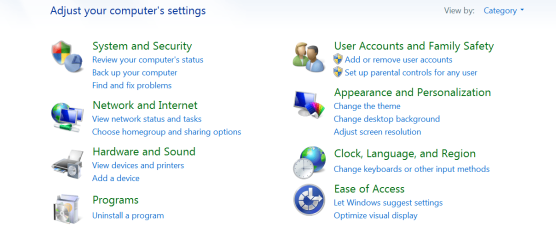
Its under Control Panel but it depends on your View setting. The default is Categories and looks like this and it groups the programs together. Click on "System and Security" and you will see a list of programs in that category and look for the Flash Player icon.

CP 1.PNG

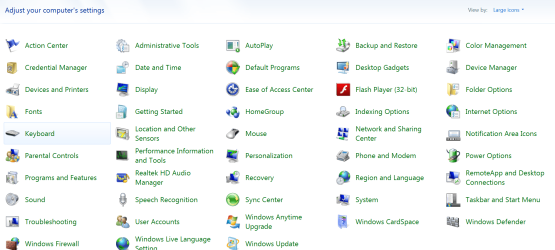
I use the Large Icon View and it looks like this and it shows all the programs.

CP 2.PNG

Open the Flash Player Control it has a link "Learn more about privacy controls" and if you click on that link it gives you information about all the settings.

I use Firefox and use an add-on called Better Privacy https://addons.mozilla.org/en-US/firefox/addon/betterprivacy/?src=userprofile to control these Flash-Cookies or LSO's as they are called.

Jim :geek:
 

My Computer

Computer type
PC/Desktop
Computer Manufacturer/Model Number
Home Built
OS
Windows 8.1 Pro w/Media Center 64bit, Windows 7 HP 64bit
CPU
Phenom II X6 1100T
Motherboard
ASUS M5A99X EVO
Memory
Crucial Balistic 8gb DDR3-1866 CL9
Graphics Card(s)
MSI R6850 Cyclone IGD5 PE
Sound Card
On Board
Monitor(s) Displays
ASUS VE258Q 25" LED with DVI-HDMI-DisplayPort
Screen Resolution
1920 x 1080
Hard Drives
Two WD Cavier Black 2TB Sata III, WD My Book Essential 2TB USB 3.0
PSU
Seasonic X650 80 Plus GOLD Modular
Case
Corsair 400R
Cooling
Antec Kuhler H2O 620, Two 120mm and four 140mm
Keyboard
Logitech K120
Mouse
Logitech Marble Mouse USB, Logitech Precision Game Pad
Internet Speed
15MB
Antivirus
Norton IS 2013, Malwarebytes Pro Beta 2
Browser
IE-11, FF-27
Other Info
APC UPS ES 750, Netgear WNR3500L Gigabit & Wireless N Router with SamKnows Test Program, Motorola SB6120 Gigabit Cable Modem. Brother HL-2170W Laser Printer, Epson V300 Scanner
Back
Top