Adobe CS3 (Print to pDF)

Davib

New member
Local time
2:36 PM
Messages
11
Hi,

I am using Windows 7 64 bit with almost no troubles so far. I have installed a fully licenced version of Adobe CS3 Master Collection and everything works fine EXCEPT that the Adobe PDF does not show up in the printers. I tried a reinstall but no change.

Anybody have any ideas why this might be the case?
 

My Computer

OS
Windows 7
I had the same problem with Acrobat 8 from CS3 so looking around the net I found that it seems Acrobat 8 does not work well with 64bit it's mentioned here in this adobe knowledge base article Adobe knowledgeBase kb401731 look in the additional info section. The fix listed seems to be for Vista 64bit, I haven't tried it for Win7 x64.

I just used Acrobat 9 instead which has support for 64bit system, but the pdf printer did not show up upon installation, I had to manually add it using instructions from this thread: http://www.sevenforums.com/software/2092-adobe-cs4-under-7-x64-pdf-printer.html

So far i haven't find a good solution for acrobat 8, but acrobat 9 works. Hope this helps a bit...
 

My Computer

OS
Windows 7
Follow the instructions from the thread dawgz posted for Acrobat 9. Then, open Devices and Printers in Control Panel. Right click on Adobe PDF Converter and select "Printer properties." Click the Advanced Tab. Make sure "Print directly to the printer" is selected. You should now be good to go.
 

My Computer

OS
Windows 7 x64
CPU
Intel Core i7 2600K
Motherboard
Asus P8P67 Deluxe
Memory
8 GB ADATA DDR3 1600
Graphics Card(s)
HIS Hightech Radeon 4670 (fanless)
Sound Card
Creative X-Fi XtremeGamer
Monitor(s) Displays
Samsung 213T
Screen Resolution
1600 x 1200
Hard Drives
Western Digital Black 640GB (boot), Western Digital Black 2TB x 2 (data and scratch), Western Digital Green 2TB (backup)
PSU
Corsair TX650W
Case
Antec P182
Cooling
Prolimatech Megahalems Rev.B
Keyboard
HP Elite wireless
Mouse
Logitech Performance MX
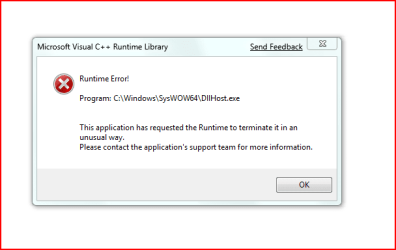
Hi Thanks for your reply, Ive installed Adobe Acrobat 9 but now have some kind of weird Control Panel Error (Im guessing that its related but I'm not sure). I have attached a capture of the error message. If you can shed some light I would appreciate it.

Thanks for taking the time to respond to my original issue

Cheers
 

Attachments

  • 7error.PNG
    7error.PNG
    8.3 KB · Views: 305

My Computer

OS
Windows 7
Well after a lot of trouble including system restore I used the instructions you gave me and now have Acrobat 9 working fully. I also have my control panel back. Thanks HEAPS for your help

Acrobat 8 causes many problems in windows 7
 

My Computer

OS
Windows 7
CS3 - Everything looks correct... but...

When I get to the step:

"Check Use an existing port and select Documents\*.pdf (Adobe PDF) from the drop down. Click Next"

I don't seem to have the option for Documents\*.pdf as a choice. I'm not sure if this is because I'm running CS3 or not.. Is there any way I can manually create this port!?

I've tried going to LPT1 for sh*ts and grins, but that didn't seem to work at all..

Thoughts? Ideas? Suggestions?? Any would be appreciated...

Thanks!

UPDATE: Also probably should mention I'm running 32bit...
 

My Computer

OS
Windows 7 build 7000
Back
Top