
Adobe Digital Editions Importing Deleted Ebooks again

jo69

New member
Local time
12:11 PM
Messages
37
I use Adobe Digital to import EBooks to my computer.
When I have done with them I right click and Delete them.
I had to re install Adobe as it kept freezing. Now it is importing lots of books I deleted months ago again.
I right click and delete.
But each time I open the program they are back... looking different too not showing the covers
How can I get rid of them?

Even though they say imported today, they were deleted again yesterday, but it downloaded them again today!
 

Attachments
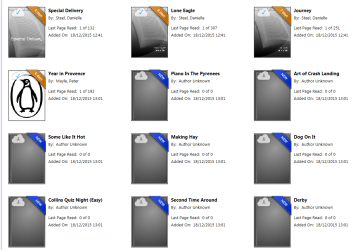
  • adobe.PNG
    adobe.PNG
    70.7 KB · Views: 1

My Computer My Computer

At a glance

Windows 7 Home Premium 64bit
Computer type
PC/Desktop
Computer Manufacturer/Model Number
HP
OS
Windows 7 Home Premium 64bit
I was having the same problem with ADE reloading all of my old ebooks.

What I did to solve it was to delete the ebooks from ADE, then go into the "\My Documents\My Digital Editions" folder and physically delete the ebook files from there. That way, the ebooks aren't in the folder to reload the next time that ADE starts.

It's the only way that I found to get around it, other than not use ADE (which is pretty much impossible if you want to buy an ebook.)

It's sad when DRM forces us to use a genuinely sub-par program to download and read legitimately purchased ebooks. You're paying money for the ebooks and are essentially forced to use ADE. You would think that Adobe would at least put some effort into making it work well. But I guess when you're the only game in town... why would they care?
 

My Computer My Computer

At a glance

Win 7 Pro x64/Win 10 Pro x64 dual bootAMD FX 8350 Vishera @ 420016 GB Mushkin Blackline DDR3-2400 @ 1866 (9-1...XFX Radeon R9 280 Double D Black Edition
Computer type
PC/Desktop
Computer Manufacturer/Model Number
Mellon Labs (custom build)
OS
Win 7 Pro x64/Win 10 Pro x64 dual boot
CPU
AMD FX 8350 Vishera @ 4200
Motherboard
ASUS M5A97 R2.0
Memory
16 GB Mushkin Blackline DDR3-2400 @ 1866 (9-10-10-10-31)
Graphics Card(s)
XFX Radeon R9 280 Double D Black Edition
Sound Card
Realtek HD Audio on MB. Sounds great.
Monitor(s) Displays
Acer 24", Acer 22"
Screen Resolution
3840 x 1080
Hard Drives
1 x Mushkin Chronos 120 GB SSD (Win 10)
1 x Samsung 850 EVO 250 GB SSD (Win 7)
1 x WD 1TB SATA Blue
1 x WD 1TB SATA Green
PSU
Corsair TX-750
Case
CoolerMaster HAF 912+
Cooling
Coolermaster Seidon 240M Liquid AIO. 6 case fans
Keyboard
Logitech G710+
Mouse
Logitech G500s
Internet Speed
Much better since I got fiber, but still way overpriced.
Antivirus
MSE, Malware Bytes for scanning
Browser
Firefox
Other Info
Corsair VOID USB headphones.

A Mellon Labs X-1 - LCD Smartie driven system status display.

Brought to you by the letter E
I was having the same problem with ADE reloading all of my old ebooks.

What I did to solve it was to delete the ebooks from ADE, then go into the "\My Documents\My Digital Editions" folder and physically delete the ebook files from there. That way, the ebooks aren't in the folder to reload the next time that ADE starts.

It's the only way that I found to get around it, other than not use ADE (which is pretty much impossible if you want to buy an ebook.)

It's sad when DRM forces us to use a genuinely sub-par program to download and read legitimately purchased ebooks. You're paying money for the ebooks and are essentially forced to use ADE. You would think that Adobe would at least put some effort into making it work well. But I guess when you're the only game in town... why would they care?

Thank you
Hi will try that but not as my computer today as Xmas shopping.
It seems a lot worse since I did a factory reset of my pc, which left me no books at all in My Digital editions.
So where is it finding them from? They are all backed up on a separate external drive
Will get back to you if it works.
Didn't know why all of a sudden they had a cloud over them too?

I have had a lot of trouble for years with ADE freezing most times I open it Have you had the same problem?
 

My Computer My Computer

At a glance

Windows 7 Home Premium 64bit
Computer type
PC/Desktop
Computer Manufacturer/Model Number
HP
OS
Windows 7 Home Premium 64bit
I haven't had a problem with ADE freezing on me when opening it up.

As for the clouds on the books, maybe that indicates offline storage? Have you had the external drive plugged in when you start ADE?
 

My Computer My Computer

At a glance

Win 7 Pro x64/Win 10 Pro x64 dual bootAMD FX 8350 Vishera @ 420016 GB Mushkin Blackline DDR3-2400 @ 1866 (9-1...XFX Radeon R9 280 Double D Black Edition
Computer type
PC/Desktop
Computer Manufacturer/Model Number
Mellon Labs (custom build)
OS
Win 7 Pro x64/Win 10 Pro x64 dual boot
CPU
AMD FX 8350 Vishera @ 4200
Motherboard
ASUS M5A97 R2.0
Memory
16 GB Mushkin Blackline DDR3-2400 @ 1866 (9-10-10-10-31)
Graphics Card(s)
XFX Radeon R9 280 Double D Black Edition
Sound Card
Realtek HD Audio on MB. Sounds great.
Monitor(s) Displays
Acer 24", Acer 22"
Screen Resolution
3840 x 1080
Hard Drives
1 x Mushkin Chronos 120 GB SSD (Win 10)
1 x Samsung 850 EVO 250 GB SSD (Win 7)
1 x WD 1TB SATA Blue
1 x WD 1TB SATA Green
PSU
Corsair TX-750
Case
CoolerMaster HAF 912+
Cooling
Coolermaster Seidon 240M Liquid AIO. 6 case fans
Keyboard
Logitech G710+
Mouse
Logitech G500s
Internet Speed
Much better since I got fiber, but still way overpriced.
Antivirus
MSE, Malware Bytes for scanning
Browser
Firefox
Other Info
Corsair VOID USB headphones.

A Mellon Labs X-1 - LCD Smartie driven system status display.

Brought to you by the letter E
Hi When I delete the books in My Digital Editions do I delete all the folders in there also?

Yes I have an external drive plugged in all the while But never had this problem beore.
No offline storage.
 

My Computer My Computer

At a glance

Windows 7 Home Premium 64bit
Computer type
PC/Desktop
Computer Manufacturer/Model Number
HP
OS
Windows 7 Home Premium 64bit
I have just deleted all the books in My Digital Editions.
Nothing in there only the folders.... do I delete them?

Then went into ADE and deleted all the books in insists on importing. Closed ADE and re opened it....

All the Books are back!!!!!
 

My Computer My Computer

At a glance

Windows 7 Home Premium 64bit
Computer type
PC/Desktop
Computer Manufacturer/Model Number
HP
OS
Windows 7 Home Premium 64bit
Jo,

What version of ADE are you using? Mine might be different. I haven't upgraded for a while. If you tell me your version I'll download it and see if I can recreate your issue. :)
 

My Computer My Computer

At a glance

Win 7 Pro x64/Win 10 Pro x64 dual bootAMD FX 8350 Vishera @ 420016 GB Mushkin Blackline DDR3-2400 @ 1866 (9-1...XFX Radeon R9 280 Double D Black Edition
Computer type
PC/Desktop
Computer Manufacturer/Model Number
Mellon Labs (custom build)
OS
Win 7 Pro x64/Win 10 Pro x64 dual boot
CPU
AMD FX 8350 Vishera @ 4200
Motherboard
ASUS M5A97 R2.0
Memory
16 GB Mushkin Blackline DDR3-2400 @ 1866 (9-10-10-10-31)
Graphics Card(s)
XFX Radeon R9 280 Double D Black Edition
Sound Card
Realtek HD Audio on MB. Sounds great.
Monitor(s) Displays
Acer 24", Acer 22"
Screen Resolution
3840 x 1080
Hard Drives
1 x Mushkin Chronos 120 GB SSD (Win 10)
1 x Samsung 850 EVO 250 GB SSD (Win 7)
1 x WD 1TB SATA Blue
1 x WD 1TB SATA Green
PSU
Corsair TX-750
Case
CoolerMaster HAF 912+
Cooling
Coolermaster Seidon 240M Liquid AIO. 6 case fans
Keyboard
Logitech G710+
Mouse
Logitech G500s
Internet Speed
Much better since I got fiber, but still way overpriced.
Antivirus
MSE, Malware Bytes for scanning
Browser
Firefox
Other Info
Corsair VOID USB headphones.

A Mellon Labs X-1 - LCD Smartie driven system status display.

Brought to you by the letter E
Thanks Its 4.5
It's adding more and more books now! And I have taken all the books out of My Digital Editions.
Re installed ADE and its still the same also!
 

My Computer My Computer

At a glance

Windows 7 Home Premium 64bit
Computer type
PC/Desktop
Computer Manufacturer/Model Number
HP
OS
Windows 7 Home Premium 64bit
You know, I'm really stumped here. My copy of ADE keeps showing all of my deleted books as "Deleted", but they are still in the main ADE screen, just marked deleted. Those books should not be there as I have deleted them from ADE and the My Digital Editions folder in My Documents.

I'm also not getting the little clouds like you are. Maybe this is a config file issue?

In any case, I'm sorry, but I don't have an answer for you. :(
 

My Computer My Computer

At a glance

Win 7 Pro x64/Win 10 Pro x64 dual bootAMD FX 8350 Vishera @ 420016 GB Mushkin Blackline DDR3-2400 @ 1866 (9-1...XFX Radeon R9 280 Double D Black Edition
Computer type
PC/Desktop
Computer Manufacturer/Model Number
Mellon Labs (custom build)
OS
Win 7 Pro x64/Win 10 Pro x64 dual boot
CPU
AMD FX 8350 Vishera @ 4200
Motherboard
ASUS M5A97 R2.0
Memory
16 GB Mushkin Blackline DDR3-2400 @ 1866 (9-10-10-10-31)
Graphics Card(s)
XFX Radeon R9 280 Double D Black Edition
Sound Card
Realtek HD Audio on MB. Sounds great.
Monitor(s) Displays
Acer 24", Acer 22"
Screen Resolution
3840 x 1080
Hard Drives
1 x Mushkin Chronos 120 GB SSD (Win 10)
1 x Samsung 850 EVO 250 GB SSD (Win 7)
1 x WD 1TB SATA Blue
1 x WD 1TB SATA Green
PSU
Corsair TX-750
Case
CoolerMaster HAF 912+
Cooling
Coolermaster Seidon 240M Liquid AIO. 6 case fans
Keyboard
Logitech G710+
Mouse
Logitech G500s
Internet Speed
Much better since I got fiber, but still way overpriced.
Antivirus
MSE, Malware Bytes for scanning
Browser
Firefox
Other Info
Corsair VOID USB headphones.

A Mellon Labs X-1 - LCD Smartie driven system status display.

Brought to you by the letter E
Thanks for trying Mellon.
Maybe someone somewhere has had the same issue and sees this post lol
Its driving me nuts lol
 

My Computer My Computer

At a glance

Windows 7 Home Premium 64bit
Computer type
PC/Desktop
Computer Manufacturer/Model Number
HP
OS
Windows 7 Home Premium 64bit
Back
Top