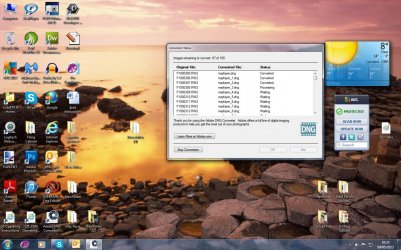
I seem to have accumulated numerous RAW files which I have converted over a period of time but cannot find any way of deleting them. Please see attached screen shot. I now have over 100!!
Can anyone please tell me in simple terms how to get rid of them?
1*Samsung 840 EVO 120GB SSD;
1*OCZ Vertex 2 60GB SSD;
2*Samsung F3 SpinPoint 1TB in RAID0;
1*Samsung F1 SpinPoint 1TB;
2*Western Digital 1TB External USB 3.0
1*Western Digital 500GB External USB 3.0
1*Seagate 500GB External USB 2.0
PSU
Thermaltake ToughPower QFan 750W
Case
Thermaltake Element S VK60001W2Z
Cooling
Corsair H60 Water Cooling, 2*230mm and 2*80mm case fans
If they are already converted, why convert them a second time. I really can't understand what the problem is. Why not just hightlight the files you no longer wish to keep and delete them in the normal way, ie click "Delete".
I have never seen any use for these converters. If you just rename the manufacturers RAW file extension in my case .ORF (Olympus) to RAW. Job done. Most half decent photo editors will read all the usual manufacturers RAW extensions anyway, so there is never in my view the need to "convert" You always take a chance on corrupting the file anyway if you convert it.
My Computer
Computer type
PC/Desktop
OS
Microsoft Windows 7 Home Premium 64-bit 7601 Multiprocessor Free Service Pack 1
CPU
Intel(R) Core(TM) i7-3770 CPU @ 3.40GHz
Motherboard
ASUSTeK COMPUTER INC. P8H77-M
Memory
8.00 GB
Graphics Card(s)
Intel(R) HD Graphics 4000
Sound Card
On Board
Monitor(s) Displays
Dell 24"
Screen Resolution
1920 x 1080
Hard Drives
(1) INTEL SSDSC2CT180A3 ATA Device (2) ST500DM002-1BD142 ATA Device (3) WDC WD3200AAKS-75L9A0 ATA Device (4) Generic- Compact Flash USB Device (5) Generic- MS/MS-Pro USB Device (6) Generic- SD/MMC USB Device (7) Generic- SM/xD-Picture USB
Thanks for your reply, sorry about the delay in getting back to you. I have a Lumix G5 which produces files but unlike the Oly, Adobe will not read the RAW files straight from the camera, I have to use a converter to convert the files into readable RAW mode, (please dont ask me why) before I can see which files I want to keep and which I want to delete.
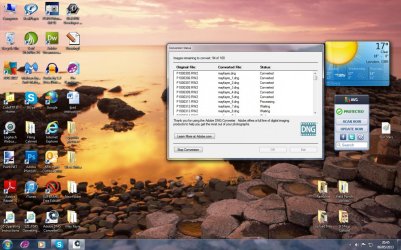
I put my SD card in the reader, the DNG converter does it's job and they come out as readable RAW files and I can open the pictures via the Bridge and CS5. The problem I am having is with the converter. Every time I convert a batch of files I can find no way of clearing them out of the converter so much so that now I have a large number of converted files which I cant find a way of deleting.
What I want to find out is how do I delete these old files from the converter? I think the screen shot will show you what the problem is.
Bear with me for awhile Ron. I think I am getting this one sorted but away from my PC for a couple of hours now (Domestic duties call). back Later!
My Computer
Computer type
PC/Desktop
OS
Microsoft Windows 7 Home Premium 64-bit 7601 Multiprocessor Free Service Pack 1
CPU
Intel(R) Core(TM) i7-3770 CPU @ 3.40GHz
Motherboard
ASUSTeK COMPUTER INC. P8H77-M
Memory
8.00 GB
Graphics Card(s)
Intel(R) HD Graphics 4000
Sound Card
On Board
Monitor(s) Displays
Dell 24"
Screen Resolution
1920 x 1080
Hard Drives
(1) INTEL SSDSC2CT180A3 ATA Device (2) ST500DM002-1BD142 ATA Device (3) WDC WD3200AAKS-75L9A0 ATA Device (4) Generic- Compact Flash USB Device (5) Generic- MS/MS-Pro USB Device (6) Generic- SD/MMC USB Device (7) Generic- SM/xD-Picture USB
Ron
A quick question. What is the file extension of the RAW file that is on the card when you remove it from the camera?
My Computer
Computer type
PC/Desktop
OS
Microsoft Windows 7 Home Premium 64-bit 7601 Multiprocessor Free Service Pack 1
CPU
Intel(R) Core(TM) i7-3770 CPU @ 3.40GHz
Motherboard
ASUSTeK COMPUTER INC. P8H77-M
Memory
8.00 GB
Graphics Card(s)
Intel(R) HD Graphics 4000
Sound Card
On Board
Monitor(s) Displays
Dell 24"
Screen Resolution
1920 x 1080
Hard Drives
(1) INTEL SSDSC2CT180A3 ATA Device (2) ST500DM002-1BD142 ATA Device (3) WDC WD3200AAKS-75L9A0 ATA Device (4) Generic- Compact Flash USB Device (5) Generic- MS/MS-Pro USB Device (6) Generic- SD/MMC USB Device (7) Generic- SM/xD-Picture USB
I think I have answered my own question. .RW2 seems to be the file extension. The good news is you have no need to convert your files to view them and sort out which you want to delete and which to save.
The very good free software, that is much recommended on this Forum is Irfanview and that will enable you to view all your RAW files.
You can download it from here: Download IrfanView
You don't ssay where you store your photos. When you put the card from the camera into your card reader do you transfer the files to a folder on your hard drive? If so what happens to the files left on the card. Do you delete thm from the card? If you do I hope you don't delete them whilst the card is still in the card reader, you should only ever delete from the card using the camera's firmware, in other words while the card is in the camera!
When you use your Adobe program to convert the files do you save the converted files to another folder on your hard drive?
When you say
Every time I convert a batch of files I can find no way of clearing them out of the converter so much so that now I have a large number of converted files which I cant find a way of deleting.
You can't store image files within the "Converter" You can only store them in a folder on either your hard drive or an external storage medium, ie External USB Hard Drive, a USB stick or a card but the latter is seldom used for storage purposes. To check where your converted files get stored if you right click on one then in the window that opens you click on Open File Location and you should see something like this at the top address bar.
My Computer
Computer type
PC/Desktop
OS
Microsoft Windows 7 Home Premium 64-bit 7601 Multiprocessor Free Service Pack 1
CPU
Intel(R) Core(TM) i7-3770 CPU @ 3.40GHz
Motherboard
ASUSTeK COMPUTER INC. P8H77-M
Memory
8.00 GB
Graphics Card(s)
Intel(R) HD Graphics 4000
Sound Card
On Board
Monitor(s) Displays
Dell 24"
Screen Resolution
1920 x 1080
Hard Drives
(1) INTEL SSDSC2CT180A3 ATA Device (2) ST500DM002-1BD142 ATA Device (3) WDC WD3200AAKS-75L9A0 ATA Device (4) Generic- Compact Flash USB Device (5) Generic- MS/MS-Pro USB Device (6) Generic- SD/MMC USB Device (7) Generic- SM/xD-Picture USB




 I think the screen shot will show you what the problem is.