Solved Adobe Flash Player 10.3

acdouglas

New member
Local time
8:06 PM
Messages
7
IE9 and Adobe Flash Player 10.3

Just downloaded FP 10.3 (on an automatic update from FP 9.xxx), and it fails using IE9 (32 bit) on my Windows 7 (64 bit) machine. Uninstalled and reinstalled FP 10.3 twice with a restart after each operation. No go. Flash Player stuff either simply doesn't show or shows way out of position on the page. This is the very first time I've run across this problem (or any problem whatsoever) in all the years of using Flash Player with IE.

Anyone else experiencing this problem, and, if so, any suggestions as to what the problem is and how to fix it?

ACD
 

My Computer

OS
Windows 7 (64 bit)

My Computer

Computer type
PC/Desktop
Computer Manufacturer/Model Number
Airbot 2.0
OS
Windows 7 Ultimate x64 SP1
CPU
Core i7 920 (D0) @ 4Ghz, *26c idle *65c full load on air
Motherboard
Asus P6X58D Premium - Sata 6Gb/s - USB 3.0
Memory
12GB DDR3 Corsair Dominator -CMD12GX3M6A1600C8 at 1600MHz
Graphics Card(s)
Zotac Geforce GTX 770
Sound Card
ASUS Xonar D2X
Monitor(s) Displays
1 LG 24" Flatron W2453V-PF 1 Samsung 24" P2450H both 2ms RT
Screen Resolution
1920x1080@60hz
Hard Drives
1 Samsung 250GB 840 Evo SSD
1 OCZ Vertex2 180GB SSD
1 TB Samsung Spinpoint F1 7200RPM 32MB cache
2 500GB WD Caviar Blacks 7200RPM 32MB cache (WD5001AALS)

Pioneer DVD Burner DVR-S18M
PSU
Corsair HX1000W
Case
Cooler Master HAF 932
Cooling
Case Fans *3 230mm, *1 140mm/CPU - *Tuniq Tower 120 Extreme
Keyboard
Logitech Wireless MK700
Mouse
Logitech Wireless MK700
Internet Speed
DL 15 Mbps UL 0.98 Mbps
Antivirus
None
Browser
Firefox Nightly
Other Info
Processor-7.7 *RAM- 7.9 *Graphics-7.9 *Gaming Graphics- 7.9 *SSD- 7.8 W.E.I final score= 7.7
*Phone- LG Nexus 5

My Computer

Computer type
PC/Desktop
Computer Manufacturer/Model Number
Custom Build
OS
Windows 7 Home Premium 64 bit
CPU
Intel Core i7-4790
Motherboard
GA-Z87X-D3H
Memory
G.SKILL 8GB (2 x 4GB) DDR3 F3-10666CL9D-8GBNT
Graphics Card(s)
AMD Radeon R7 250
Sound Card
Realtek ALC892
Monitor(s) Displays
Samsung UN32EH5000, Dell 1703FPT
Screen Resolution
1920 x 1080, 1280 x 1024
Hard Drives
WD5003AZEX
WD10EZEX
Samsung HD103SJ
Samsung 128 GB 840 PRO
PSU
SeaSonic M12II SS-500GM
Case
Fractal Design Define R4
Cooling
Zalman CNPS9900ALED
Keyboard
Logitech K800
Mouse
Logitech M705
Internet Speed
16 Mbps
Antivirus
Avast
Browser
Firefox
Other Info
Bose Companion 2 Multimedia Speakers
Hmm, not sure. Using 10.3 with 1E9 on a x64 system, no problems here.

Might check after uninstalling flash that nothing's in these folders here -

Windows/SyswWOW64/Macromed
Users/Appdata/Roaming/Macromedia

Not sure if it's an option for you, but might also reset IE, and try installing it after that.
 

My Computer

Computer type
PC/Desktop
Computer Manufacturer/Model Number
Airbot 2.0
OS
Windows 7 Ultimate x64 SP1
CPU
Core i7 920 (D0) @ 4Ghz, *26c idle *65c full load on air
Motherboard
Asus P6X58D Premium - Sata 6Gb/s - USB 3.0
Memory
12GB DDR3 Corsair Dominator -CMD12GX3M6A1600C8 at 1600MHz
Graphics Card(s)
Zotac Geforce GTX 770
Sound Card
ASUS Xonar D2X
Monitor(s) Displays
1 LG 24" Flatron W2453V-PF 1 Samsung 24" P2450H both 2ms RT
Screen Resolution
1920x1080@60hz
Hard Drives
1 Samsung 250GB 840 Evo SSD
1 OCZ Vertex2 180GB SSD
1 TB Samsung Spinpoint F1 7200RPM 32MB cache
2 500GB WD Caviar Blacks 7200RPM 32MB cache (WD5001AALS)

Pioneer DVD Burner DVR-S18M
PSU
Corsair HX1000W
Case
Cooler Master HAF 932
Cooling
Case Fans *3 230mm, *1 140mm/CPU - *Tuniq Tower 120 Extreme
Keyboard
Logitech Wireless MK700
Mouse
Logitech Wireless MK700
Internet Speed
DL 15 Mbps UL 0.98 Mbps
Antivirus
None
Browser
Firefox Nightly
Other Info
Processor-7.7 *RAM- 7.9 *Graphics-7.9 *Gaming Graphics- 7.9 *SSD- 7.8 W.E.I final score= 7.7
*Phone- LG Nexus 5
Are you saying those folders should be empty?

And, no, a reset of IE is out of the question.

ACD
 

My Computer

OS
Windows 7 (64 bit)
Are you saying those folders should be empty?

Yes. Inside the Flash folder of Windows/SysWOW64/Macromed should be empty after an uninstall. Same for inside of "Macromedia" folder in Appdata/Roaming/Macromedia.

If all else fails, a reset of IE may be the only way to rectify the problem. Not saying it would definitely fix it, but it's a step that might just help.

Up to you.

Wasn't mentioned, but I'm sure you've already followed all the steps here? - Common Flash Player download and installation issues (Windows)
 

My Computer

Computer type
PC/Desktop
Computer Manufacturer/Model Number
Airbot 2.0
OS
Windows 7 Ultimate x64 SP1
CPU
Core i7 920 (D0) @ 4Ghz, *26c idle *65c full load on air
Motherboard
Asus P6X58D Premium - Sata 6Gb/s - USB 3.0
Memory
12GB DDR3 Corsair Dominator -CMD12GX3M6A1600C8 at 1600MHz
Graphics Card(s)
Zotac Geforce GTX 770
Sound Card
ASUS Xonar D2X
Monitor(s) Displays
1 LG 24" Flatron W2453V-PF 1 Samsung 24" P2450H both 2ms RT
Screen Resolution
1920x1080@60hz
Hard Drives
1 Samsung 250GB 840 Evo SSD
1 OCZ Vertex2 180GB SSD
1 TB Samsung Spinpoint F1 7200RPM 32MB cache
2 500GB WD Caviar Blacks 7200RPM 32MB cache (WD5001AALS)

Pioneer DVD Burner DVR-S18M
PSU
Corsair HX1000W
Case
Cooler Master HAF 932
Cooling
Case Fans *3 230mm, *1 140mm/CPU - *Tuniq Tower 120 Extreme
Keyboard
Logitech Wireless MK700
Mouse
Logitech Wireless MK700
Internet Speed
DL 15 Mbps UL 0.98 Mbps
Antivirus
None
Browser
Firefox Nightly
Other Info
Processor-7.7 *RAM- 7.9 *Graphics-7.9 *Gaming Graphics- 7.9 *SSD- 7.8 W.E.I final score= 7.7
*Phone- LG Nexus 5
I am having the exact same issues as acdouglas. I am trying to go back to the older version of flash 10.2 - there were never any problems.
Any other suggestions?
 

My Computer

OS
Windows 7 Home Preumium 64 bit
Again, no go.

I'm afraid I've had it with this. I'm simply going to switch to Firefox 4 (where FP 10.3 works perfectly) and retire IE9 until some future date when Adobe or Microsoft (or both) deals with whatever this problem may be with IE9 and FP 10.x. Since 1981 (no, that's not a typo), every machine I've ever owned has been "Microsoft pure". This will be the very first time I've had to opt for the product of another maker where the product is one that Microsoft also makes.

Damn shame.

Thanks for your help.

ACD
 

My Computer

OS
Windows 7 (64 bit)
I am having the exact same issues as acdouglas. I am trying to go back to the older version of flash 10.2 - there were never any problems.
Any other suggestions?


There are older version here, archived/unzip the folder, pick one you want -

Archived Flash Player versions
Uninstall Flash Player | Windows

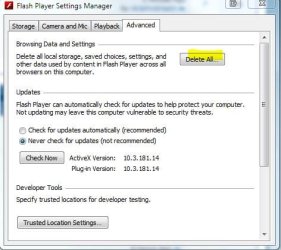
10.3 does add a settings manager in the Control Panel (used to only be assessable in the Adobe web page manager) where you can delete the content.

Capture2.JPG

Sorry couldn't be of more help. 10.3 works just fine on my system with both FF and IE9, so probably a local problem on your end.
 

My Computer

Computer type
PC/Desktop
Computer Manufacturer/Model Number
Airbot 2.0
OS
Windows 7 Ultimate x64 SP1
CPU
Core i7 920 (D0) @ 4Ghz, *26c idle *65c full load on air
Motherboard
Asus P6X58D Premium - Sata 6Gb/s - USB 3.0
Memory
12GB DDR3 Corsair Dominator -CMD12GX3M6A1600C8 at 1600MHz
Graphics Card(s)
Zotac Geforce GTX 770
Sound Card
ASUS Xonar D2X
Monitor(s) Displays
1 LG 24" Flatron W2453V-PF 1 Samsung 24" P2450H both 2ms RT
Screen Resolution
1920x1080@60hz
Hard Drives
1 Samsung 250GB 840 Evo SSD
1 OCZ Vertex2 180GB SSD
1 TB Samsung Spinpoint F1 7200RPM 32MB cache
2 500GB WD Caviar Blacks 7200RPM 32MB cache (WD5001AALS)

Pioneer DVD Burner DVR-S18M
PSU
Corsair HX1000W
Case
Cooler Master HAF 932
Cooling
Case Fans *3 230mm, *1 140mm/CPU - *Tuniq Tower 120 Extreme
Keyboard
Logitech Wireless MK700
Mouse
Logitech Wireless MK700
Internet Speed
DL 15 Mbps UL 0.98 Mbps
Antivirus
None
Browser
Firefox Nightly
Other Info
Processor-7.7 *RAM- 7.9 *Graphics-7.9 *Gaming Graphics- 7.9 *SSD- 7.8 W.E.I final score= 7.7
*Phone- LG Nexus 5
IE9 and Adobe Flash Player 10.3

Just downloaded FP 10.3 (on an automatic update from FP 9.xxx), and it fails using IE9 (32 bit) on my Windows 7 (64 bit) machine. Uninstalled and reinstalled FP 10.3 twice with a restart after each operation. No go. Flash Player stuff either simply doesn't show or shows way out of position on the page. This is the very first time I've run across this problem (or any problem whatsoever) in all the years of using Flash Player with IE.

Anyone else experiencing this problem, and, if so, any suggestions as to what the problem is and how to fix it?

ACD

Got the same problem after upgrading as well :(

Doesn't bother me much though as I use Chrome as my default browser anyway, but it's a shame it wasn't found & reported during the beta phase.

For reference mine is IE9 on a 32-bit Windows 7 install.

I get flickering, and flash content being out of place.
 

My Computer

Computer Manufacturer/Model Number
Acer Aspire 5742
OS
Windows 7 Ultimate x64 SP1
CPU
Intel Core i3-370M @ 2.4GHz
Motherboard
Mobile Intel HM55 Express Chipset
Memory
6GB 1333MHz DDR3
Graphics Card(s)
Intel GMA HD
Monitor(s) Displays
15.6" HD Acer CineCrystal LED LCD
Screen Resolution
1366×768
Hard Drives
320GB (5400 RPM) SATA
PSU
65W
Mouse
Microsoft Wireless Optical Mouse 3000
Internet Speed
6Mbps
Other Info
WEI Score: 4.6
Same erratic video, and out of place video here.
 

My Computer

OS
windows 7 home premium x64
Try https://browsercheck.qualys.com/

on scanning your PC (takes a couple of seconds ) it flags any issues you have and if you allow it updates Flash for you.
 

My Computer

Computer type
PC/Desktop
Computer Manufacturer/Model Number
self build
OS
Windows 7 Ultimate 64 bit
CPU
Intel Core i7 4770K overclocked to 4.7GHz Quad Core Haswell
Motherboard
Asus Z87 Pro (Socket 1150) ATX Motherboard
Memory
16GB Team Group Vulcan Gold 2133MHz
Graphics Card(s)
ATI Radeon HD 7880 Series Display adapter
Monitor(s) Displays
NEC LCD2690WUXi2
Screen Resolution
26" 1920 x 1200
Hard Drives
Samsung 500GB SSD 840 EVO SATA 6Gb/s
Samsung 250GB SSD 840 EVO SATA 6Gb/s
PSU
Corsair AX760 Platinum
Case
Cooler Master HAF X Gaming Tower
Cooling
XSPC RayStorm 750 RS360 Water cooling
Mouse
Razer Death Adder left handed
Internet Speed
126Mb download 11.5Mb up
Antivirus
Avast free
Browser
Opera
Other Info
Main Browser is Opera
Favorite software Adobe Lightroom & Photoshop
best plugins Nik software
Firewall : Private firewall 7
Didn't fix the issue for me stve. It def involves latest flash update, because everything was fine up to that point. I'll just use chrome or firefox till a cure comes along. Thanks for your effort, and the link to the browsercheck. I can see where it could be helpful in a diff scenario.
 

My Computer

OS
windows 7 home premium x64
Give Chrome a solid week, and you'll forget that IE9 even exists!
 

My Computer

OS
Windows 7 Home Premium x64 SP1
Again, no go.

I'm afraid I've had it with this. I'm simply going to switch to Firefox 4 (where FP 10.3 works perfectly) and retire IE9 until some future date when Adobe or Microsoft (or both) deals with whatever this problem may be with IE9 and FP 10.x. Since 1981 (no, that's not a typo), every machine I've ever owned has been "Microsoft pure". This will be the very first time I've had to opt for the product of another maker where the product is one that Microsoft also makes.

Damn shame.

Thanks for your help.

ACD

Hi AC,

It isn't a Microsoft problem, I assure you. Your faith in MS is well-founded. My x64 machine runs it perfectly. There's something else wrong... have you tried running the pages you're trying to view in Compatibility View?

Sent from my Evo 4G. Please to excuse my engrish typing
 

My Computer

Computer Manufacturer/Model Number
Myself
OS
Win7 Ultimate x64, Server 2008 R2
CPU
AMD Phenom II X6 1055T Thuban 2.8GHz
Motherboard
GIGABYTE GA-890FXA-UD5
Memory
8GB G.SKILL Ripjaws Series DDR3 1600 (PC3 12800)
Graphics Card(s)
2x HIS/Sapphire ATI Radeon HD 5830 in CrossfireX
Sound Card
Sound Blaster X-Fi Xtreme
Monitor(s) Displays
Dell 2407WFP 24", Dell 22"
Screen Resolution
1920x1200
Hard Drives
Patriot Torqx 128GB SSD
3TB other HD
PSU
CORSAIR HX Series CMPSU-750HX 750W
Case
Antec Nine Hundred
Cooling
Cooler Master Hyper 212 Plus CPU cooler
Keyboard
SteelSeries MercStealth
Mouse
Razer Lachesis
Internet Speed
HAHA NO MOAR COMCAST. Now, FiOS :D
Other Info
I am a virtualization enthusiast. I like Hyper-V. It's free.
I'm a Windows 7 fangirl. I will teach a class for you or write a custom course for you RIGHT NOW.
I love EVE Online. I'm Sayra Sainer. I play Starcraft II. My gamertag is Tal0nn. I'm trying not to play Minecraft.
I also like coffee. I'll take a basic triple grande extra-hot breve stirred ristretto caramel machiatto.
Same problem here after Adobe update. Tried all suggestions but problem still exists.
 

My Computer

OS
windows 7 64 bit
Again, no go.

I'm afraid I've had it with this. I'm simply going to switch to Firefox 4 (where FP 10.3 works perfectly) and retire IE9 until some future date when Adobe or Microsoft (or both) deals with whatever this problem may be with IE9 and FP 10.x. Since 1981 (no, that's not a typo), every machine I've ever owned has been "Microsoft pure". This will be the very first time I've had to opt for the product of another maker where the product is one that Microsoft also makes.

Damn shame.

Thanks for your help.

ACD

Hi AC,

It isn't a Microsoft problem, I assure you. Your faith in MS is well-founded. My x64 machine runs it perfectly. There's something else wrong... have you tried running the pages you're trying to view in Compatibility View?

Sent from my Evo 4G. Please to excuse my engrish typing

I have indeed tried Compatibility View (it was the very first thing I tried). No go.

I suspect you're right that it's not Microsoft's fault here but Adobe's. But as things stand, makes no difference whose fault it is. IE9 is simply unusable without a functioning Flash Player; ergo, my switch to Firefox 4 for as long as the IE9-FP10.3 problem persists.

ACD
 

My Computer

OS
Windows 7 (64 bit)
oh man it's shame adobe took down 10.3 RC for IE 64bit, because that's working really well for me.

anyway, here is what i have; for IE-32bit, I have

Name: Shockwave Flash Object
Publisher: Adobe Systems Incorporated
Type: ActiveX Control
Version: 10.2.153.1


& for IE 64bit,

Name: Shockwave Flash Object
Publisher: (Not verified) Adobe Systems, Inc.
Type: ActiveX Control
Version: 10.3.162.28
 

My Computer

Computer Manufacturer/Model Number
Toshiba/A500-01V
OS
Windows 7 Home Premium 64bit
CPU
i3-330m
Motherboard
NSKAA 1.00 Intel HM55 Havendale/Clarkdale
Memory
Dual Channel 4GB Samsung DDR3 1066 mhz
Graphics Card(s)
nVidia GeForce 310M 512MB DDR3
Hard Drives
Corsair F120 Refurbished SF-1200
Mouse
Microsoft Explorer Mini
I fixed this problem on my computer by opening IE9-tools-advanced-then ticking use software rendering instead of gpu rendering. Apply and close.
 

My Computer

OS
windows 7 64 bit
Back
Top