
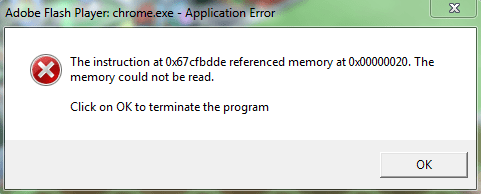
adobe flash player crash

androidal

New member
Local time
2:39 AM
Messages
29
with this problem is often not even know how to modulate?have everybody one idea
 

Attachments

  • Capture.PNG
    Capture.PNG
    10.8 KB · Views: 18

My Computer My Computer

At a glance

windows 7 ulimate 32-bitIntel(r) Pentium(r) Dual Core2GbNvidia Geforce 8400 GS
Computer Manufacturer/Model Number
Gigabyte Technology Co.,LDT
OS
windows 7 ulimate 32-bit
CPU
Intel(r) Pentium(r) Dual Core
Memory
2Gb
Graphics Card(s)
Nvidia Geforce 8400 GS
Screen Resolution
1440X900
Welcome to 7 Forums androidal!

I don't use Adobe Flash Player as it was giving me problems. So I deleted it.
Make sure you get the Flash Player from Adobe.com and not a 3rd party vendor.
 

My Computer My Computer

At a glance

Windows 7 Home Premium 64bitIntel(R)Core(TM)2 quad [email protected] 2.39GHz6GB DDR2 6400GeForce 8500/512MB
Computer Manufacturer/Model Number
HP M9077c
OS
Windows 7 Home Premium 64bit
CPU
Intel(R)Core(TM)2 quad [email protected] 2.39GHz
Motherboard
ASUSeK
Memory
6GB DDR2 6400
Graphics Card(s)
GeForce 8500/512MB
Sound Card
Realtek High Def Audio
Monitor(s) Displays
HP w2408 LCD 24" widescreen
Screen Resolution
1920x1200
Cooling
6 pack of Bud
Keyboard
MS wireless Inteli
Mouse
MS wireless Inteli
i did that u tell me man and the flash crash.....and i dont know what do to?do u have another idea to tell me?????
 

My Computer My Computer

At a glance

windows 7 ulimate 32-bitIntel(r) Pentium(r) Dual Core2GbNvidia Geforce 8400 GS
Computer Manufacturer/Model Number
Gigabyte Technology Co.,LDT
OS
windows 7 ulimate 32-bit
CPU
Intel(r) Pentium(r) Dual Core
Memory
2Gb
Graphics Card(s)
Nvidia Geforce 8400 GS
Screen Resolution
1440X900
i did that u tell me man and the flash crash.....and i dont know what do to?do u have another idea to tell me?????

See if this helps.

When updating Flash Player -

1.An older version must be uninstalled using the appropriate uninstall tool first.


****** Make sure you have no windows open as you uninstall Flash.
Exit all applications: Check the task bar and the system tray to make sure no user applications are running. For example, if you see icons for browsers or instant messaging (IM) clients such as AOL Instant Messenger or Yahoo! Messenger, right-click the icon and select either Close or Exit.******


Uninstall Flash Player | Windows

2.Carefully read how to install before doing so.

Troubleshoot Flash Player installation | Windows

3.Download new version.
Untick the free Google toolbar if you don't want it.
Note the different downloads for IE, Firefox, Chrome etc...


Adobe - Install a different version of Adobe Flash Player

4.Test that you have indeed installed it properly.


Find Flash Player version

5.Troubleshooting.


https://www.adobe.com/products/flashplayer/support/index.html


Last edited:

My Computer My Computer

At a glance

Win 7 Ultimate 64-bit. SP1.Intel i7 -720QM.[1.6GHz Turbo Boost 2.8GHz. 6...8 DDR 3 RAM. 1066MHZATI 1024 MB. DDR3. Radeon HD5650
Computer Manufacturer/Model Number
LAPTOP. HP Pavilion dv7-4010TX .
OS
Win 7 Ultimate 64-bit. SP1.
CPU
Intel i7 -720QM.[1.6GHz Turbo Boost 2.8GHz. 6MB Cache.]
Memory
8 DDR 3 RAM. 1066MHZ
Graphics Card(s)
ATI 1024 MB. DDR3. Radeon HD5650
Monitor(s) Displays
17.3" High Definition Brightview LCD. LED Backlit.
Screen Resolution
1600 x 900.
Hard Drives
640GB
Case
Laptop / notebook.
Mouse
Logitech Anywhere mouse. MX.
Internet Speed
ADSL [ but too slow ]
Back
Top