Solved Adobe Flash Player Plugin Will Not Work In Chrome.

FairyLunar

New member
Local time
11:47 AM
Messages
23
I am growing really frustrated with Chrome. The adobe flash player plugin on sites will not work. It keeps saying "Couldn't load plugin." No matter WHAT I've tried to do.

I have done (chrome://flags/#prefer-html-over-flash set as disable ) Did not work.

I have tried going to the Chrome Advanced settings to either add exception sites, or click allow. NEITHER work.

My chrome is updated, and my flash player is also updated. And it's frustrating that you can't use the

chrome://plugins anymore to fix this option.

Is anyone else experiencing the same problem? And have any suggestions? Help is appreciated.
 

My Computer

Computer type
PC/Desktop
Computer Manufacturer/Model Number
HP
OS
7 Home Premium x64
I got a bit confused the other day when I went to a game site that I have never had a problem with in Chrome 57 and it said that I have to download the flash player ( which I already have the latest ver. ). I finally just clicked on the download Flash button and a pop-up from Chrome asked me if I wanted to "Allow' flash, so I allowed it to run and all was well.
The Google help forums just say that you have to install Flash if you want to use it, no help whatsoever!!
Hope this helps
 

My Computer

Computer type
PC/Desktop
Computer Manufacturer/Model Number
Custom Build
OS
Windows 7 Pro 64 bit
CPU
Intel Core i7 Processor i7-3770 3.4GHz
Motherboard
Asus P8Z77-V PRO
Memory
32 GB
Graphics Card(s)
nVidia GeForce GTX660 TI 2GB
Hard Drives
Toshiba HIGH PERFORMANCE 500GB 7200 RPM 32MB CACHE SATA 6.0Gb/s
Antivirus
MSE
Browser
Chrome

That's exactly what happened to me! I went to my gaming site, and realized it wasn't working. And I agree google help forums were useless.

I'm going to try your suggestion. I went to the download page.

So did you click the plugin option http://prntscr.com/ew7qx0 <-- and then click install and theeen did the pop-pop (allow flash) show up?
 

My Computer

Computer type
PC/Desktop
Computer Manufacturer/Model Number
HP
OS
7 Home Premium x64
So did you click the plugin option http://prntscr.com/ew7qx0 <-- and then click install and theeen did the pop-pop (allow flash) show up?
No, I didn't get that. All I got was a simple pop-up from the Omnibar asking to Allow or Block. I have a feeling that Chrome is changing things around in their browser as we speak.
 

My Computer

Computer type
PC/Desktop
Computer Manufacturer/Model Number
Custom Build
OS
Windows 7 Pro 64 bit
CPU
Intel Core i7 Processor i7-3770 3.4GHz
Motherboard
Asus P8Z77-V PRO
Memory
32 GB
Graphics Card(s)
nVidia GeForce GTX660 TI 2GB
Hard Drives
Toshiba HIGH PERFORMANCE 500GB 7200 RPM 32MB CACHE SATA 6.0Gb/s
Antivirus
MSE
Browser
Chrome
No, I didn't get that. All I got was a simple pop-up from the Omnibar asking to Allow or Block. I have a feeling that Chrome is changing things around in their browser as we speak.

That's so weird. Yeah I didn't get a pop-pop at all. And I'm yeaaah you might be right. It's just obnoxious they are making all these changes that are causing more difficulties rather than help. D:

I wish I knew what to do. I don't want to have to rely on firefox for games since it's slow.
 

My Computer

Computer type
PC/Desktop
Computer Manufacturer/Model Number
HP
OS
7 Home Premium x64
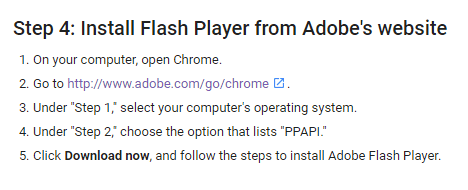
UPDATE: SOOOO! I went to this website http://prntscr.com/ew7yi4 And downloaded the PPAPI even though I already have it in chrome. THEN I went to Chrome://flags and clicked "Allow all flash to run" AND IT WORKED!
 

My Computer

Computer type
PC/Desktop
Computer Manufacturer/Model Number
HP
OS
7 Home Premium x64
chrome.PNG

Googles tryin to trump the world...;)
 

My Computer

Computer type
PC/Desktop
OS
Win7 32 ultimate
Back
Top