
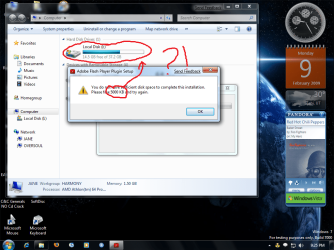
Adobe Flash Player Problems

OVERSOUL

New member
Local time
4:02 PM
Messages
38
every time i try to install flash player it says it doesnt have enough space, when it clearly does, anybody have any idea what is going on?!?!?!?

(heres the screen, click on it for a bigger pic)
 

Attachments

  • help.png
    help.png
    155.5 KB · Views: 1,589

My Computer

Computer Manufacturer/Model Number
Home Built
OS
Windows XP in 1, and Windows 7 in 2
CPU
AMD Athlon64 for both, 1.8GHz 2800 in 1, 2.2GHz 3200 in 2
Motherboard
MSI MS-6702 for 1, WinFast NF4UK8AA in 2
Memory
768MB in 1, 1.5GB in 2
Graphics Card(s)
ATI D33053 in 1, Power Color HD2600 in 2
Sound Card
both onboard sound
Monitor(s) Displays
both ViewSonic, A70 in 1, E70f in2
Screen Resolution
1280X960 on 2, and highest possiblke in Win 7 on 2
Hard Drives
Both 40GB, for now
Cooling
Both aircollerd systems
Keyboard
DELL QuietKey 1, Microsoft Wireless Laser Keyboard 5000 2
Mouse
Microsoft Wheel mouse optical USB 1, (same as above) 2
Internet Speed
6Mbps
Never seen that one before....
 

My Computer

Computer type
PC/Desktop
Computer Manufacturer/Model Number
Airbot 2.0
OS
Windows 7 Ultimate x64 SP1
CPU
Core i7 920 (D0) @ 4Ghz, *26c idle *65c full load on air
Motherboard
Asus P6X58D Premium - Sata 6Gb/s - USB 3.0
Memory
12GB DDR3 Corsair Dominator -CMD12GX3M6A1600C8 at 1600MHz
Graphics Card(s)
Zotac Geforce GTX 770
Sound Card
ASUS Xonar D2X
Monitor(s) Displays
1 LG 24" Flatron W2453V-PF 1 Samsung 24" P2450H both 2ms RT
Screen Resolution
1920x1080@60hz
Hard Drives
1 Samsung 250GB 840 Evo SSD
1 OCZ Vertex2 180GB SSD
1 TB Samsung Spinpoint F1 7200RPM 32MB cache
2 500GB WD Caviar Blacks 7200RPM 32MB cache (WD5001AALS)

Pioneer DVD Burner DVR-S18M
PSU
Corsair HX1000W
Case
Cooler Master HAF 932
Cooling
Case Fans *3 230mm, *1 140mm/CPU - *Tuniq Tower 120 Extreme
Keyboard
Logitech Wireless MK700
Mouse
Logitech Wireless MK700
Internet Speed
DL 15 Mbps UL 0.98 Mbps
Antivirus
None
Browser
Firefox Nightly
Other Info
Processor-7.7 *RAM- 7.9 *Graphics-7.9 *Gaming Graphics- 7.9 *SSD- 7.8 W.E.I final score= 7.7
*Phone- LG Nexus 5
I've seen these types of prompts for different programs in Vista which was usually caused by privilege issues, right-clicking the application and running it as administrator usually solves this.

Please refer to Latest Version of Adobe Flash Player Released for more information on installing Adobe Flash Player.

Cheers;)
 

My Computer

Computer Manufacturer/Model Number
Custom Build
OS
Windows 7 Build 7048 x64
CPU
Athlon 64 X2 Dual Core 4600+
Motherboard
EMX-AMD750G-PRO
Memory
4 x 1GB Kingston 400MHz 6-6-6-18 (800MHz)
Graphics Card(s)
ATI Radeon 3650
Sound Card
Realtek HD Audio
Monitor(s) Displays
22" AOC 2216Vw
Screen Resolution
1680x1050
Cooling
Arctic Cooling Freezer 64 Pro PWM
Keyboard
Generic Enhanced Natural Keyboard
Mouse
Logitech VX Nano
Other Info
Edifier M1550
I've seen these types of prompts for different programs in Vista which was usually caused by privilege issues, right-clicking the application and running it as administrator usually solves this.

Please refer to Latest Version of Adobe Flash Player Released for more information on installing Adobe Flash Player.

Cheers;)


i ran it as administrator, but same problem, it still wont recognize that i have the disk space:mad:
 

My Computer

Computer Manufacturer/Model Number
Home Built
OS
Windows XP in 1, and Windows 7 in 2
CPU
AMD Athlon64 for both, 1.8GHz 2800 in 1, 2.2GHz 3200 in 2
Motherboard
MSI MS-6702 for 1, WinFast NF4UK8AA in 2
Memory
768MB in 1, 1.5GB in 2
Graphics Card(s)
ATI D33053 in 1, Power Color HD2600 in 2
Sound Card
both onboard sound
Monitor(s) Displays
both ViewSonic, A70 in 1, E70f in2
Screen Resolution
1280X960 on 2, and highest possiblke in Win 7 on 2
Hard Drives
Both 40GB, for now
Cooling
Both aircollerd systems
Keyboard
DELL QuietKey 1, Microsoft Wireless Laser Keyboard 5000 2
Mouse
Microsoft Wheel mouse optical USB 1, (same as above) 2
Internet Speed
6Mbps
A bit of digging around shows that Adobe is aware of this bug and is still working on a fix.

This issue with the latest Adobe Flash Installer giving this type of error is linked to a system with no Drive C.

Workaround
Plug in a USB storage device
Windows will then assign it as Drive C (if it is not automatically assigned this drive letter, go to computer management and assign it manually)
Run the installer

Note: You can use any type of media as long as windows can recognize it as a storage device (ex. SD cards, External HD, etc.)

Cheers ;)
 
Last edited:

My Computer

Computer Manufacturer/Model Number
Custom Build
OS
Windows 7 Build 7048 x64
CPU
Athlon 64 X2 Dual Core 4600+
Motherboard
EMX-AMD750G-PRO
Memory
4 x 1GB Kingston 400MHz 6-6-6-18 (800MHz)
Graphics Card(s)
ATI Radeon 3650
Sound Card
Realtek HD Audio
Monitor(s) Displays
22" AOC 2216Vw
Screen Resolution
1680x1050
Cooling
Arctic Cooling Freezer 64 Pro PWM
Keyboard
Generic Enhanced Natural Keyboard
Mouse
Logitech VX Nano
Other Info
Edifier M1550
Back
Top