adobe flash problems

phillipcc

New member
Local time
1:14 AM
Messages
10
hi forum i am using windows 7 4 gig of ram 360 gig hard drive on a laptop plus 2 external 1 terabyte hard drives for backup and data storage hope someone can help me or tell me that i have stuffed up lol
get the following when using internet explorer trying to watch a video on cbs website and it keeps telling me to get the latest flash which i believe i have can anyone tell me what the problem might be at all tried using firefox but it loads the page but doesnt play just says upgrade flash to 9 or above or says nothing quite useful have i stuffed up somewhere hope someone can help me or point me in the right direction thanks forum
bye
phillipcc


User Agent: Mozilla/4.0 (compatible; MSIE 8.0; Windows NT 6.1; Trident/4.0;
Mozilla/4.0 (compatible; MSIE 6.0; Windows NT 5.1; SV1) ; SLCC2; .NET CLR
2.0.50727; .NET CLR 3.5.30729; .NET CLR 3.0.30729; Media Center PC 6.0;
InfoPath.2; Media Center PC 5.0; OfficeLiveConnector.1.4;
OfficeLivePatch.1.3; SLCC1; Tablet PC 2.0)
Timestamp: Fri, 4 Sep 2009 00:50:22 UTC


Message: Unterminated string constant
Line: 635
Char: 23
Code: 0
URI:
Kid Nation on CBS
 

My Computer

Computer Manufacturer/Model Number
dell laptop
OS
windows 7
Memory
4 gig
Monitor(s) Displays
laptop display
Hard Drives
internal 160 3 external
Internet Speed
broadband

My Computer

Computer Manufacturer/Model Number
homegrown
OS
Windows 7 Pro X64 SP1
CPU
Intel Core I7-3930k
Motherboard
Asus P9X79 Pro
Memory
16 GB Gskill DDR3-2133
Graphics Card(s)
eVGA GTX680
Sound Card
Creative X-Fi Titanium
Monitor(s) Displays
As PA246Q
Screen Resolution
1920 X 1200
Hard Drives
Corsair Force GT, 120 GB
WDC 1.5TB Caviar Black
PSU
PCP&C Silencer 750 Crossfire
Case
Silverstone FT02
Cooling
Noctua NH-D14
Keyboard
cheap Logitech USB
Mouse
Microsoft Intellimouse Explorer (old optical) USB
Internet Speed
6Mb cable
Other Info
Pioneer BDR-205
Samsung SH-203B
Monsoon 5.1 speakers

My Computer

Computer Manufacturer/Model Number
dell laptop
OS
windows 7
Memory
4 gig
Monitor(s) Displays
laptop display
Hard Drives
internal 160 3 external
Internet Speed
broadband
If you are using windows 7 X64 along with IE in x64 you are out of luck!
Adobe is working on a x64 version. The existing X86 version will not work.

Regards,

Adrian
 

My Computer

Computer Manufacturer/Model Number
Custom Build
OS
Windows 7 7600 1 X64
CPU
AMD PHENOM II X 550 PROCESSOR 3.1 ghz
Motherboard
ASUS M4A78-TE
Memory
Corsair 4 gig ddr 3
Graphics Card(s)
ati radeon 3300
Sound Card
ati hd
Monitor(s) Displays
syncmaster 2033sw
Screen Resolution
1600X900 60 hz refresh
Hard Drives
twin_seagates SATA's 1 TB & 500 Gig, hitachi_slimline 160 gig
PSU
antec_550 watt
Case
cooler master GLite
Cooling
stock_heat sink
Internet Speed
20mbs up/ 1.5mbs down
Other Info
favorite child "stewie"
favorite dog "brian"
Go to C:\Windows\SysWOW64\Macromed\Flash and run the FlashUtil file with all IE windows closed. Reboot, and then try those websites again.
 

My Computer

OS
Windows 7 Ultimate x64 SP1
CPU
Intel Core i7-2600
Motherboard
Gigabyte GA-P67A-UD3P-B3
Memory
12 GB Patriot Extreme DDR3-1333
Graphics Card(s)
Nvidia GTX 470
Monitor(s) Displays
Dell UltraSharp 2209WA
Hard Drives
OCZ Agility3 240 GB, WD5001AALS, WD7501AALS
PSU
OCZ ModStream 700W
Case
CoolerMaster HAF 912 Advanced
Cooling
CoolerMaster Hyper 212 Plus
Go to C:\Windows\SysWOW64\Macromed\Flash and run the FlashUtil file with all IE windows closed. Reboot, and then try those websites again.
Deacon, thanks for the suggestion. How ever NO JOY!
Using 64 bit IE adobe flash does not display any image.

Regards,

Adrian
 

My Computer

Computer Manufacturer/Model Number
Custom Build
OS
Windows 7 7600 1 X64
CPU
AMD PHENOM II X 550 PROCESSOR 3.1 ghz
Motherboard
ASUS M4A78-TE
Memory
Corsair 4 gig ddr 3
Graphics Card(s)
ati radeon 3300
Sound Card
ati hd
Monitor(s) Displays
syncmaster 2033sw
Screen Resolution
1600X900 60 hz refresh
Hard Drives
twin_seagates SATA's 1 TB & 500 Gig, hitachi_slimline 160 gig
PSU
antec_550 watt
Case
cooler master GLite
Cooling
stock_heat sink
Internet Speed
20mbs up/ 1.5mbs down
Other Info
favorite child "stewie"
favorite dog "brian"
You shouldn't be using the 64 bit version of IE. My instructions above are for reloading Flash for the default, 32 bit version of IE. You can delete your shortucts to the 64 bit version, because it's useless.
 

My Computer

OS
Windows 7 Ultimate x64 SP1
CPU
Intel Core i7-2600
Motherboard
Gigabyte GA-P67A-UD3P-B3
Memory
12 GB Patriot Extreme DDR3-1333
Graphics Card(s)
Nvidia GTX 470
Monitor(s) Displays
Dell UltraSharp 2209WA
Hard Drives
OCZ Agility3 240 GB, WD5001AALS, WD7501AALS
PSU
OCZ ModStream 700W
Case
CoolerMaster HAF 912 Advanced
Cooling
CoolerMaster Hyper 212 Plus
You shouldn't be using the 64 bit version of IE. My instructions above are for reloading Flash for the default, 32 bit version of IE. You can delete your shortucts to the 64 bit version, because it's useless.
Deacon, thanks for the insight. But if you had read this message thread I addressed the 64 bit IE issue.
I suspect Phillipc is using a 64 bit browser.
The OP needs to use a 32 bit browser to get flash to work.
 

Attachments

  • 633502856672540378-stupidity.jpg
    633502856672540378-stupidity.jpg
    51.1 KB · Views: 19

My Computer

Computer Manufacturer/Model Number
Custom Build
OS
Windows 7 7600 1 X64
CPU
AMD PHENOM II X 550 PROCESSOR 3.1 ghz
Motherboard
ASUS M4A78-TE
Memory
Corsair 4 gig ddr 3
Graphics Card(s)
ati radeon 3300
Sound Card
ati hd
Monitor(s) Displays
syncmaster 2033sw
Screen Resolution
1600X900 60 hz refresh
Hard Drives
twin_seagates SATA's 1 TB & 500 Gig, hitachi_slimline 160 gig
PSU
antec_550 watt
Case
cooler master GLite
Cooling
stock_heat sink
Internet Speed
20mbs up/ 1.5mbs down
Other Info
favorite child "stewie"
favorite dog "brian"
re adobe flash problem

hi nope i am using 32 bit not 64 bit i should have posted that in my original message sorry still got the problem looks like i will be waiting for adobe to pull their finger out and fix this issue not that is going to be any time soon knowing adobe
phillipcc


Deacon, thanks for the insight. But if you had read this message thread I addressed the 64 bit IE issue.
I suspect Phillipc is using a 64 bit browser.
The OP needs to use a 32 bit browser to get flash to work.
 

My Computer

Computer Manufacturer/Model Number
dell laptop
OS
windows 7
Memory
4 gig
Monitor(s) Displays
laptop display
Hard Drives
internal 160 3 external
Internet Speed
broadband
hi nope i am using 32 bit not 64 bit i should have posted that in my original message sorry still got the problem looks like i will be waiting for adobe to pull their finger out and fix this issue not that is going to be any time soon knowing adobe
phillipcc

The OP needs to use a 32 bit browser to get flash to work.
Phill, if I could suggest that you open up your browser and click your mouse over the tools drop down menu on the top right side of yor browser and move down to the "Manage Add Ons" option and take a screen shot for us.
Attached is what mine looks like.

Adrian
 

Attachments

  • Add_Ons.png
    Add_Ons.png
    110.9 KB · Views: 33

My Computer

Computer Manufacturer/Model Number
Custom Build
OS
Windows 7 7600 1 X64
CPU
AMD PHENOM II X 550 PROCESSOR 3.1 ghz
Motherboard
ASUS M4A78-TE
Memory
Corsair 4 gig ddr 3
Graphics Card(s)
ati radeon 3300
Sound Card
ati hd
Monitor(s) Displays
syncmaster 2033sw
Screen Resolution
1600X900 60 hz refresh
Hard Drives
twin_seagates SATA's 1 TB & 500 Gig, hitachi_slimline 160 gig
PSU
antec_550 watt
Case
cooler master GLite
Cooling
stock_heat sink
Internet Speed
20mbs up/ 1.5mbs down
Other Info
favorite child "stewie"
favorite dog "brian"
Deacon, thanks for the insight. But if you had read this message thread I addressed the 64 bit IE issue.
My comments were in response to one of your previous comments. I hardly see where I gave you reason to act like a smart ass and post the stupid picture.
 

My Computer

OS
Windows 7 Ultimate x64 SP1
CPU
Intel Core i7-2600
Motherboard
Gigabyte GA-P67A-UD3P-B3
Memory
12 GB Patriot Extreme DDR3-1333
Graphics Card(s)
Nvidia GTX 470
Monitor(s) Displays
Dell UltraSharp 2209WA
Hard Drives
OCZ Agility3 240 GB, WD5001AALS, WD7501AALS
PSU
OCZ ModStream 700W
Case
CoolerMaster HAF 912 Advanced
Cooling
CoolerMaster Hyper 212 Plus
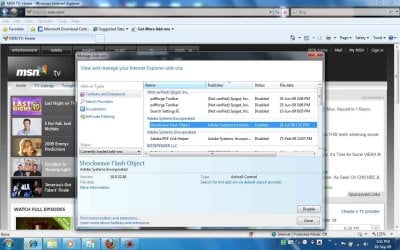
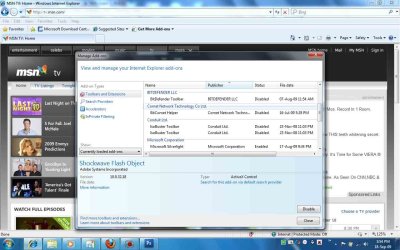
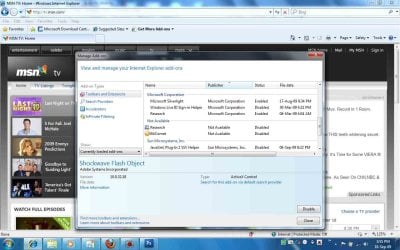
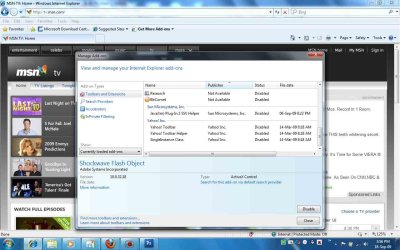
hi adrian here is the snapshot because their is so many in the screen i took a few snapshots ok hope this is ok


hi nope i am using 32 bit not 64 bit i should have posted that in my original message sorry still got the problem looks like i will be waiting for adobe to pull their finger out and fix this issue not that is going to be any time soon knowing adobe
phillipcc

The OP needs to use a 32 bit browser to get flash to work.
Phill, if I could suggest that you open up your browser and click your mouse over the tools drop down menu on the top right side of yor browser and move down to the "Manage Add Ons" option and take a screen shot for us.
Attached is what mine looks like.

Adrian
 

Attachments

  • addons1.jpg
    addons1.jpg
    116.9 KB · Views: 16
  • addons2.jpg
    addons2.jpg
    115 KB · Views: 7
  • addons3.jpg
    addons3.jpg
    114 KB · Views: 6
  • addons4.jpg
    addons4.jpg
    111.9 KB · Views: 10

My Computer

Computer Manufacturer/Model Number
dell laptop
OS
windows 7
Memory
4 gig
Monitor(s) Displays
laptop display
Hard Drives
internal 160 3 external
Internet Speed
broadband
Deacon, thanks for the insight. But if you had read this message thread I addressed the 64 bit IE issue.
My comments were in response to one of your previous comments. I hardly see where I gave you reason to act like a smart ass and post the stupid picture.
How in the world am I acting like a smart ass!
You simply gave incomplete/unclear directions.
The picture is cool, don't you think?
 

Attachments

  • busted.jpg
    busted.jpg
    31.3 KB · Views: 55

My Computer

Computer Manufacturer/Model Number
Custom Build
OS
Windows 7 7600 1 X64
CPU
AMD PHENOM II X 550 PROCESSOR 3.1 ghz
Motherboard
ASUS M4A78-TE
Memory
Corsair 4 gig ddr 3
Graphics Card(s)
ati radeon 3300
Sound Card
ati hd
Monitor(s) Displays
syncmaster 2033sw
Screen Resolution
1600X900 60 hz refresh
Hard Drives
twin_seagates SATA's 1 TB & 500 Gig, hitachi_slimline 160 gig
PSU
antec_550 watt
Case
cooler master GLite
Cooling
stock_heat sink
Internet Speed
20mbs up/ 1.5mbs down
Other Info
favorite child "stewie"
favorite dog "brian"

My Computer

Computer Manufacturer/Model Number
Custom Build
OS
Windows 7 7600 1 X64
CPU
AMD PHENOM II X 550 PROCESSOR 3.1 ghz
Motherboard
ASUS M4A78-TE
Memory
Corsair 4 gig ddr 3
Graphics Card(s)
ati radeon 3300
Sound Card
ati hd
Monitor(s) Displays
syncmaster 2033sw
Screen Resolution
1600X900 60 hz refresh
Hard Drives
twin_seagates SATA's 1 TB & 500 Gig, hitachi_slimline 160 gig
PSU
antec_550 watt
Case
cooler master GLite
Cooling
stock_heat sink
Internet Speed
20mbs up/ 1.5mbs down
Other Info
favorite child "stewie"
favorite dog "brian"
Back
Top