Solved Adobe Folder Constantly Generated When Opening IE 10 on Windows 7

flashbgone

New member
Local time
12:46 AM
Messages
13
I've just installed IE 10 on my Windows 7 64 machine last night. I had completely uninstalled flash prior to doing so but now am seeing that every time I open up IE 10 that it generates a Adobe folder in Users/My name/App Data/Roaming.

Since I don't have flash does anyone know why it's doing that/ And if there is some off the wall way that I have flash sandboxed or something with this new IE 10 browser, is there a way to access settings like I could when I had flash? The only reason I even upgraded was because I thought I could get rid of flash but now with the browser constantly generating the folder...an Adobe folder...it doesn't appear so.

I've also got CCleaner with the winapp2ini file and it's showing two entries. One for "Adobe flash Player More" and the other "Adobe Flash Player Settings" As I said, I had uninstalled flash. Is this browser reinstalling some form of it? If so, are there settings to control it and where would they be?

If I can't find out what's happening I may just reformat the pc and stick with IE 9. I didn't know this was going to happen. Plus I still cannot watch video on some sites that require flash even though IE 10 claims it can and even though it's adding this adobe folder for whatever reason.


Aside from that, I don't see a place to log out here any place. Is it hidden some place? Usually it's in plain site on other forums I've been to. Thanks.
 
Last edited:

My Computer My Computer

At a glance

Window 7 Home Pemium 64 bit
Computer type
PC/Desktop
OS
Window 7 Home Pemium 64 bit
Browser
IE 101
Aside from that, I don't see a place to log out here any place. Is it hidden some place? Usually it's in plain site on other forums I've been to. Thanks.

It is here too....scroll to bottom of page:

Capture.PNG
 

My Computer My Computer

At a glance

Windows 10 Pro x64 ; Xubuntu x64Intel i7 860 @ 2.80 GHz O/C'ed to 4.0GHz16GB Corsair Vengance DDR3 @ 661 MHz Dual Cha...EVGA NVidia GTX 560 1024MB
Computer type
PC/Desktop
Computer Manufacturer/Model Number
Golden Mk. I.4
OS
Windows 10 Pro x64 ; Xubuntu x64
CPU
Intel i7 860 @ 2.80 GHz O/C'ed to 4.0GHz
Motherboard
Gigabyte P55A-UD3R Rev.1. Award BIOS F13
Memory
16GB Corsair Vengance DDR3 @ 661 MHz Dual Channel (9-9-9-24)
Graphics Card(s)
EVGA NVidia GTX 560 1024MB
Sound Card
Realtek Integrated
Monitor(s) Displays
Dual Samsung SyncMaster 2494HS
Screen Resolution
1920*1080 and 1920*1080
Hard Drives
1*Samsung 840 EVO 120GB SSD;
1*OCZ Vertex 2 60GB SSD;
2*Samsung F3 SpinPoint 1TB in RAID0;
1*Samsung F1 SpinPoint 1TB;
2*Western Digital 1TB External USB 3.0
1*Western Digital 500GB External USB 3.0
1*Seagate 500GB External USB 2.0
PSU
Thermaltake ToughPower QFan 750W
Case
Thermaltake Element S VK60001W2Z
Cooling
Corsair H60 Water Cooling, 2*230mm and 2*80mm case fans
Keyboard
Logitech G110
Mouse
Logitech MX518
I think Flash is incorporated into IE10 now. At least it is for Windows 8 and updates are handled through MS. It's not clear if it is for Windows 7 but I suspect it may be. Does it appear in Tools > Manage Add-ons?

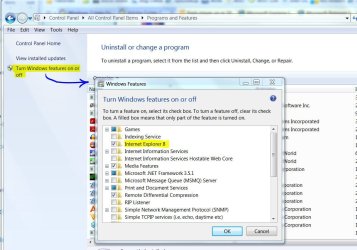
It's not necessary to "reload" Windows to remove IE10. Go to Programs & Features > Turn Windows features on or off (in the left pane). Un-check the box for IE. Windows should revert back to your previous version of IE.

I don't have Windows 8 or IE10 so this speculation.
 

Attachments

  • Features - IE.JPG
    Features - IE.JPG
    102.5 KB · Views: 4

My Computer My Computer

At a glance

Windows 7 Pro-x64i7-2600 3.4GHz - 3.8GHz Turbo8Gb - 2x4GB, Muskin 991770 PC3-1333Integrated Intel HD 2000
Computer type
PC/Desktop
Computer Manufacturer/Model Number
Built 2/11/2011
OS
Windows 7 Pro-x64
CPU
i7-2600 3.4GHz - 3.8GHz Turbo
Motherboard
Intel DH67BL-B3
Memory
8Gb - 2x4GB, Muskin 991770 PC3-1333
Graphics Card(s)
Integrated Intel HD 2000
Sound Card
Integrated Intel 10.1 HD, RealTek ALC892
Monitor(s) Displays
Asus LCD VH222H, Haier HL24XSL2a
Screen Resolution
1920x1080, 1920x1080
Hard Drives
Crucial SSD C300-128Gb,
Western Digital WD5002AALX - 500Gb,
Western Digital WD7501AALS - 750Gb
PSU
Seasonic 650W 80+ Gold Modular
Case
Rosewill Defender
Cooling
Stock CPU, Four 120mm case fans, PCH fan added
Keyboard
Logitech EX100 Y-RBH94 Wireless
Mouse
Logitech EX100 M-RCE95 Wireless
Internet Speed
3.0/1.5 Mbs
Antivirus
Microsoft Security Essentials
Browser
Microsoft Internet Explorer 11
Other Info
Antec Veris Premier-Multimedia IR Station,
Cyber Accoustics-3602 Speakers,
AFT XM-5U Card Reader,
Hauppauge TV-HVR-2250,
Sony LX300 USB Turntable

My Computer My Computer

At a glance

Windows 7 Pro-x64i7-2600 3.4GHz - 3.8GHz Turbo8Gb - 2x4GB, Muskin 991770 PC3-1333Integrated Intel HD 2000
Computer type
PC/Desktop
Computer Manufacturer/Model Number
Built 2/11/2011
OS
Windows 7 Pro-x64
CPU
i7-2600 3.4GHz - 3.8GHz Turbo
Motherboard
Intel DH67BL-B3
Memory
8Gb - 2x4GB, Muskin 991770 PC3-1333
Graphics Card(s)
Integrated Intel HD 2000
Sound Card
Integrated Intel 10.1 HD, RealTek ALC892
Monitor(s) Displays
Asus LCD VH222H, Haier HL24XSL2a
Screen Resolution
1920x1080, 1920x1080
Hard Drives
Crucial SSD C300-128Gb,
Western Digital WD5002AALX - 500Gb,
Western Digital WD7501AALS - 750Gb
PSU
Seasonic 650W 80+ Gold Modular
Case
Rosewill Defender
Cooling
Stock CPU, Four 120mm case fans, PCH fan added
Keyboard
Logitech EX100 Y-RBH94 Wireless
Mouse
Logitech EX100 M-RCE95 Wireless
Internet Speed
3.0/1.5 Mbs
Antivirus
Microsoft Security Essentials
Browser
Microsoft Internet Explorer 11
Other Info
Antec Veris Premier-Multimedia IR Station,
Cyber Accoustics-3602 Speakers,
AFT XM-5U Card Reader,
Hauppauge TV-HVR-2250,
Sony LX300 USB Turntable
I think Flash is incorporated into IE10 now. At least it is for Windows 8 and updates are handled through MS. It's not clear if it is for Windows 7 but I suspect it may be. Does it appear in Tools > Manage Add-ons?

It's not necessary to "reload" Windows to remove IE10. Go to Programs & Features > Turn Windows features on or off (in the left pane). Un-check the box for IE. Windows should revert back to your previous version of IE.

I don't have Windows 8 or IE10 so this speculation.

Thanks. I've been doing some searching on it and found that it was actually a flash plugin that was incorporated into the browser. Although it is not in the manage add-ons section of the browser. I guess I don't so much mind it but would like to see if maybe you can adjust settings like you could with standard Adobe Flash Player. That and the fact that you still can't really access content on flash based sites. Like my son's College recruiting videos for instance. Once I uninstalled flash I can't any longer view them with the IE 10 browser even with the so called built in ability. I get the generic "Download Adobe Flash Player to view this video!" message where the video should be and on simple flash based sites it wants to download Adobe flash plugin from Adobe. So in effect, even though the browser has added "flash support", you still need Adobe flash Player.
 

My Computer My Computer

At a glance

Window 7 Home Pemium 64 bit
Computer type
PC/Desktop
OS
Window 7 Home Pemium 64 bit
Browser
IE 101
You need to "allow" the site to use the flash player. This is a security feature. When you get the yellow band, click on it and you'll see the options. I would suggest you NOT allow all sites to use it. Be selective and ignore the yellow band or click on the X to close it without making a choice. I only allow a few sites to use it.

Have you tried going to the Flash Manager page and see it still works? You will need to allow Flash for that page.
 

My Computer My Computer

At a glance

Windows 7 Pro-x64i7-2600 3.4GHz - 3.8GHz Turbo8Gb - 2x4GB, Muskin 991770 PC3-1333Integrated Intel HD 2000
Computer type
PC/Desktop
Computer Manufacturer/Model Number
Built 2/11/2011
OS
Windows 7 Pro-x64
CPU
i7-2600 3.4GHz - 3.8GHz Turbo
Motherboard
Intel DH67BL-B3
Memory
8Gb - 2x4GB, Muskin 991770 PC3-1333
Graphics Card(s)
Integrated Intel HD 2000
Sound Card
Integrated Intel 10.1 HD, RealTek ALC892
Monitor(s) Displays
Asus LCD VH222H, Haier HL24XSL2a
Screen Resolution
1920x1080, 1920x1080
Hard Drives
Crucial SSD C300-128Gb,
Western Digital WD5002AALX - 500Gb,
Western Digital WD7501AALS - 750Gb
PSU
Seasonic 650W 80+ Gold Modular
Case
Rosewill Defender
Cooling
Stock CPU, Four 120mm case fans, PCH fan added
Keyboard
Logitech EX100 Y-RBH94 Wireless
Mouse
Logitech EX100 M-RCE95 Wireless
Internet Speed
3.0/1.5 Mbs
Antivirus
Microsoft Security Essentials
Browser
Microsoft Internet Explorer 11
Other Info
Antec Veris Premier-Multimedia IR Station,
Cyber Accoustics-3602 Speakers,
AFT XM-5U Card Reader,
Hauppauge TV-HVR-2250,
Sony LX300 USB Turntable
You need to "allow" the site to use the flash player. This is a security feature. When you get the yellow band, click on it and you'll see the options. I would suggest you NOT allow all sites to use it. Be selective and ignore the yellow band or click on the X to close it without making a choice. I only allow a few sites to use it.

Have you tried going to the Flash Manager page and see it still works? You will need to allow Flash for that page.

No, that's not what happens for me. The only yellow band I get is the one that wants to install the flash activex control (even though IE 10 supposedly has flash support already built into it). Which I first closed because of that before then trying again after refreshing the page . It proceeded to install flash and succeeded in a full install. I was reading elsewhere that if you have IE 10 then you already have flash built in so then if you tried to install the flash activex control it would halt the installation because it would see that you already have it natively. This is false, obviously (at least for windows 7) because I have IE 10 which has native flash yet it still proceeded and successfully performed the flash installation from Adobe. Also, if you remove IE 10 in the programs and features section in control panel it doesn't remove it, per se. It just disables your browser. There's no going back to IE 9 that way. So once you do that and restart and go to click on a link it won't open because there is no recognized application to perform it.

I don't see the point in having a theoretical support for flash in IE 10 and then having to still install Flash activex from adobe. That's silly.

So, I'm probably not going to continue guinea pigging myself with this problem. I'm just going to reformat the thing and go back to IE 9. Clearly there are some issues with flash and IE 10 on a Windows 7 machine. I already loath flash as it is so the last thing I want is a double shot of headache from both my browser and flash.

Thanks none the less.
 

My Computer My Computer

At a glance

Window 7 Home Pemium 64 bit
Computer type
PC/Desktop
OS
Window 7 Home Pemium 64 bit
Browser
IE 101
Also, if you remove IE 10 in the programs and features section in control panel it doesn't remove it, per se. It just disables your browser. There's no going back to IE 9 that way. So once you do that and restart and go to click on a link it won't open because there is no recognized application to perform it.
That's odd. That's how I got back to IE8 after trying IE9. Did you go back to the Features and see if IE9 was listed. You do have to select it to get it back but IE9 should be shown as an option. If nothing else, download it and install just that.

Download Internet Explorer 9 - Microsoft Windows
 

My Computer My Computer

At a glance

Windows 7 Pro-x64i7-2600 3.4GHz - 3.8GHz Turbo8Gb - 2x4GB, Muskin 991770 PC3-1333Integrated Intel HD 2000
Computer type
PC/Desktop
Computer Manufacturer/Model Number
Built 2/11/2011
OS
Windows 7 Pro-x64
CPU
i7-2600 3.4GHz - 3.8GHz Turbo
Motherboard
Intel DH67BL-B3
Memory
8Gb - 2x4GB, Muskin 991770 PC3-1333
Graphics Card(s)
Integrated Intel HD 2000
Sound Card
Integrated Intel 10.1 HD, RealTek ALC892
Monitor(s) Displays
Asus LCD VH222H, Haier HL24XSL2a
Screen Resolution
1920x1080, 1920x1080
Hard Drives
Crucial SSD C300-128Gb,
Western Digital WD5002AALX - 500Gb,
Western Digital WD7501AALS - 750Gb
PSU
Seasonic 650W 80+ Gold Modular
Case
Rosewill Defender
Cooling
Stock CPU, Four 120mm case fans, PCH fan added
Keyboard
Logitech EX100 Y-RBH94 Wireless
Mouse
Logitech EX100 M-RCE95 Wireless
Internet Speed
3.0/1.5 Mbs
Antivirus
Microsoft Security Essentials
Browser
Microsoft Internet Explorer 11
Other Info
Antec Veris Premier-Multimedia IR Station,
Cyber Accoustics-3602 Speakers,
AFT XM-5U Card Reader,
Hauppauge TV-HVR-2250,
Sony LX300 USB Turntable
........Also, if you remove IE 10 in the programs and features section in control panel it doesn't remove it, per se. It just disables your browser. There's no going back to IE 9 that way....
~~~
I'm just going to reformat the thing and go back to IE 9....

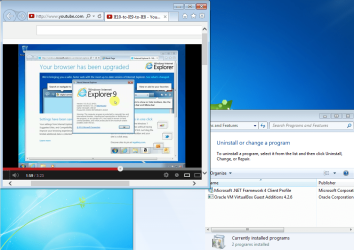
The way to go from IE10 back to IE9 is the same as presented in this tutorial...
http://www.sevenforums.com/tutorials/112121-internet-explorer-9-uninstall.html
...except you might not find anything for step 4:
"...click on the Uninstall a program link in the left pane."

You might want to watch at 720p and in the full screen mode.

Three browsers in about 3 minutes.
 
Last edited:

My Computer My Computer

At a glance

W7 Pro SP1 64biti78GBIntel HD Graphics
Computer type
Laptop
Computer Manufacturer/Model Number
Employer provided Dell Latitude
OS
W7 Pro SP1 64bit
CPU
i7
Memory
8GB
Graphics Card(s)
Intel HD Graphics
Hard Drives
crappy SSD
Antivirus
Employer mandated Symantec Endpoint Protection
Browser
Pale Moon 64bit, IE11 64bit & Chrome 64bit
I've just installed IE 10 on my Windows 7 64 machine last night. I had completely uninstalled flash prior to doing so but now am seeing that every time I open up IE 10 that it generates a Adobe folder in Users/My name/App Data/Roaming....

C:\Users\username\AppData\Roaming\Adobe\Flash Player\NativeCache

The folder pretty much has to be there since that is where Flash stores its Digital Rights Management (DRM) stuff. The folder is created on a W7 computer as soon as you install IE10 - even on computers that have never had Flash installed (as a separate install).

I cannot find any website that actually puts files into that area, but I did not visit places that had DRM content. It does not seem to be like a regular cache. Maybe once Flash is installed, stuff will start showing up in there.
 
Last edited:

My Computer My Computer

At a glance

W7 Pro SP1 64biti78GBIntel HD Graphics
Computer type
Laptop
Computer Manufacturer/Model Number
Employer provided Dell Latitude
OS
W7 Pro SP1 64bit
CPU
i7
Memory
8GB
Graphics Card(s)
Intel HD Graphics
Hard Drives
crappy SSD
Antivirus
Employer mandated Symantec Endpoint Protection
Browser
Pale Moon 64bit, IE11 64bit & Chrome 64bit
I've just installed IE 10 on my Windows 7 64 machine last night. I had completely uninstalled flash prior to doing so but now am seeing that every time I open up IE 10 that it generates a Adobe folder in Users/My name/App Data/Roaming....

C:\Users\username\AppData\Roaming\Adobe\Flash Player\NativeCache

The folder pretty much has to be there since that is where Flash stores its Digital Rights Management (DRM) stuff. The folder is created on a W7 computer as soon as you install IE10 - even on computers that have never had Flash installed (as a separate install).

I cannot find any website that actually puts files into that area, but I did not visit places hat had DRM content. It does not seem to be like a regular cache. Maybe once Flash is installed, stuff will start showing up in there.

Right. I figured that out. Actually was the main reason for this thread but I only found out after that there were other things. Like that video you posted above. I can't watch it. It's blank. It says I have to have flash or a html 5 supported browser. Yet here I am with a html 5 supported IE 10 browser that theoretically has flash built in and still can't watch. Unless I go to adobe and install flash.

As I recall though, I had downgraded from 9 once and back to 8 before again moving to 9. I just removed the windows update for IE9 and I was set.
 

My Computer My Computer

At a glance

Window 7 Home Pemium 64 bit
Computer type
PC/Desktop
OS
Window 7 Home Pemium 64 bit
Browser
IE 101
Right. I figured that out. Actually was the main reason for this thread but I only found out after that there were other things. Like that video you posted above. I can't watch it. It's blank. It says I have to have flash or a html 5 supported browser. Yet here I am with a html 5 supported IE 10 browser that theoretically has flash built in and still can't watch. Unless I go to adobe and install flash.

As I recall though, I had downgraded from 9 once and back to 8 before again moving to 9. I just removed the windows update for IE9 and I was set.
Then something else is wrong with you setup because that video plays fine via IE10 without a separate install of Flash:

IE10-flash.PNG
 

My Computer My Computer

At a glance

W7 Pro SP1 64biti78GBIntel HD Graphics
Computer type
Laptop
Computer Manufacturer/Model Number
Employer provided Dell Latitude
OS
W7 Pro SP1 64bit
CPU
i7
Memory
8GB
Graphics Card(s)
Intel HD Graphics
Hard Drives
crappy SSD
Antivirus
Employer mandated Symantec Endpoint Protection
Browser
Pale Moon 64bit, IE11 64bit & Chrome 64bit

My Computer My Computer

At a glance

W7 Pro SP1 64biti78GBIntel HD Graphics
Computer type
Laptop
Computer Manufacturer/Model Number
Employer provided Dell Latitude
OS
W7 Pro SP1 64bit
CPU
i7
Memory
8GB
Graphics Card(s)
Intel HD Graphics
Hard Drives
crappy SSD
Antivirus
Employer mandated Symantec Endpoint Protection
Browser
Pale Moon 64bit, IE11 64bit & Chrome 64bit
It is your call.

Do you want to revert to IE9 or try and figure out why your IE10 setup is abnormal?
 

My Computer My Computer

At a glance

W7 Pro SP1 64biti78GBIntel HD Graphics
Computer type
Laptop
Computer Manufacturer/Model Number
Employer provided Dell Latitude
OS
W7 Pro SP1 64bit
CPU
i7
Memory
8GB
Graphics Card(s)
Intel HD Graphics
Hard Drives
crappy SSD
Antivirus
Employer mandated Symantec Endpoint Protection
Browser
Pale Moon 64bit, IE11 64bit & Chrome 64bit
It is your call.

Do you want to revert to IE9 or try and figure out why your IE10 setup is abnormal?

Well. I like IE 10 so I'm going to keep it and work with it. Cripes, I've figured out things much harder than this before. I can watch youtube video generally though. Just not the one you embedded.

Usually around this time, I'm up working and listen to this radio station which runs on flash. News Radio 590 KLBJ AM Austin Texas :: Live Stream

I can't listen to that now without actually installing flash from adobe.

The only other issue I've had is that I cannot space paragraphs with the enter button like I could before on a furum. I can on this one though which is kind of weird. I think i'm going to keep it though. I'll read over that 64 bit link you gave too.

Actually, I just turned on enhanced 64. Going to restart now and see how it works. Thanks for that.
 

My Computer My Computer

At a glance

Window 7 Home Pemium 64 bit
Computer type
PC/Desktop
OS
Window 7 Home Pemium 64 bit
Browser
IE 101
I stand corrected (actually, I'm not standing at the moment :-).

The video plays if you watch it on YouTube. It does ask for Flash if it is embedded in this forum. So what you are seeing is the norm for IE10. I'm not sure why that is. I use Firefox for these forums and IE9 and IE10 (via a VM) for general surfing.

And I too would need Flash to listen to KLBJ... maybe it has to do with the embedded thing. I'm not much of a Flash guru.

Edit: Try this link:
http://www.youtube-nocookie.com/embed/r2MNHbcteZY
(Interesting domain name. I got the URL via the properties of the embedded video.)
 

My Computer My Computer

At a glance

W7 Pro SP1 64biti78GBIntel HD Graphics
Computer type
Laptop
Computer Manufacturer/Model Number
Employer provided Dell Latitude
OS
W7 Pro SP1 64bit
CPU
i7
Memory
8GB
Graphics Card(s)
Intel HD Graphics
Hard Drives
crappy SSD
Antivirus
Employer mandated Symantec Endpoint Protection
Browser
Pale Moon 64bit, IE11 64bit & Chrome 64bit
I stand corrected (actually, I'm not standing at the moment :-).

The video plays if you watch it on YouTube. It does ask for Flash if it is embedded in this forum. So what you are seeing is the norm for IE10. I'm not sure why that is. I use Firefox for these forums and IE9 and IE10 (via a VM) for general surfing.

And I too would need Flash to listen to KLBJ... maybe it has to do with the embedded thing. I'm not much of a Flash guru.

Edit: Try this link:
http://www.youtube-nocookie.com/embed/r2MNHbcteZY
(Interesting domain name. I got the URL via the properties of the embedded video.)


I reverted back to IE9, rebooted and reinstalled IE 10. That's about all I can do. Still the same issue with some flash sites wanting you to install Adobe Flash. I'm just going to chalk it up as the web is due for an overall upgrade. Time for sites to get with the times. So...essentially I guess the issue is technically a non issue as far as IE 10 goes. It's some of the web sites that need to catch up, I suppose.

It is silly though, to me at least, that even though you have a flash supported IE 10 browser (that creates an Adobe Flash Folder, btw) that you would still have to install Adobe Flash on your system. Seems like they just have too much of a stronghold on the function of the web itself.

Thanks for your help.
 
Last edited:

My Computer My Computer

At a glance

Window 7 Home Pemium 64 bit
Computer type
PC/Desktop
OS
Window 7 Home Pemium 64 bit
Browser
IE 101
Aside from that, I don't see a place to log out here any place. Is it hidden some place? Usually it's in plain site on other forums I've been to. Thanks.

It is here too....scroll to bottom of page:

View attachment 258786

Thanks, btw. I'm used to logouts at the top of the page on web sites. This is a new one for me having to look at fine print on the bottom of the page. I wouldn't have found it if you didn't point to it. Seriously.
 

My Computer My Computer

At a glance

Window 7 Home Pemium 64 bit
Computer type
PC/Desktop
OS
Window 7 Home Pemium 64 bit
Browser
IE 101
Back
Top