
You are using an out of date browser. It may not display this or other websites correctly.
You should upgrade or use an alternative browser.
You should upgrade or use an alternative browser.
Solved Adobe Reader Taskbar Icon
- Thread starter Injust
- Start date
Hello,
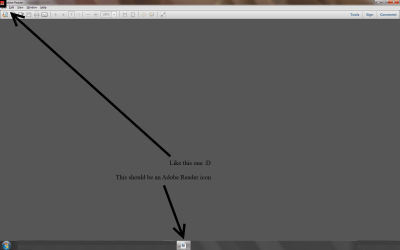
I seem to be having a problem with Adobe Reader. The taskbar icon is incorrect. Is there anything that I can do to fix it?
Thanks!
Reinstalling/repairing the program should fix this issue.
My Computer
- OS
- Windows 7 Professional 64bit

Is the icon on the start menu also generic? If so, see this thread:
http://www.sevenforums.com/software/144375-wrong-adobe-reader-icon-start-menu.html
A Guy
http://www.sevenforums.com/software/144375-wrong-adobe-reader-icon-start-menu.html
A Guy
My Computer
- Computer type
- PC/Desktop
- OS
- Windows 10 Home x64
- CPU
- INTEL Core i5-750 Quad-Core 3.37GHz
- Motherboard
- ASUS P7P55D
- Memory
- HyperX Fury Black Series 8GB (2 x 4GB) 1866Mhz
- Graphics Card(s)
- EVGA GeForce GTX 750 Superclocked 1GB 128-Bit GDDR5
- Monitor(s) Displays
- LG 32MA68HY 32" IPS
- Screen Resolution
- 1920 x 1080
- Hard Drives
- Samsung 840 Evo 120GB, SEAGATE 500GB Barracuda® 7200.12, SATA 3 Gb/s, 7200 RPM, 16MB cache
- PSU
- ANTEC TruePower New TP-550, 80 PLUS, 550W
- Case
- ANTEC Three Hundred Illusion
- Cooling
- COOLER MASTER Hyper 212 Plus, 4 x 120mm 1 x 140mm Noctua's
- Internet Speed
- 85 + Mbps
- Antivirus
- Avast
- Browser
- Vivaldi

Great, you're welcome 
A Guy
A Guy
My Computer
- Computer type
- PC/Desktop
- OS
- Windows 10 Home x64
- CPU
- INTEL Core i5-750 Quad-Core 3.37GHz
- Motherboard
- ASUS P7P55D
- Memory
- HyperX Fury Black Series 8GB (2 x 4GB) 1866Mhz
- Graphics Card(s)
- EVGA GeForce GTX 750 Superclocked 1GB 128-Bit GDDR5
- Monitor(s) Displays
- LG 32MA68HY 32" IPS
- Screen Resolution
- 1920 x 1080
- Hard Drives
- Samsung 840 Evo 120GB, SEAGATE 500GB Barracuda® 7200.12, SATA 3 Gb/s, 7200 RPM, 16MB cache
- PSU
- ANTEC TruePower New TP-550, 80 PLUS, 550W
- Case
- ANTEC Three Hundred Illusion
- Cooling
- COOLER MASTER Hyper 212 Plus, 4 x 120mm 1 x 140mm Noctua's
- Internet Speed
- 85 + Mbps
- Antivirus
- Avast
- Browser
- Vivaldi