Adobe Reader update continues to fail

Milennin

New member
Member
Local time
4:11 AM
Messages
40
This is something that has been happening for a long time, but Adobe Reader update asks to update every time I start up Windows. However, at the end of the update it gives this error message every time: "Error 2727.The directory entry 'NETSCAPE_4' does not exist in the Directory table."
How to fix this?
 

My Computer

Computer Manufacturer/Model Number
No idea...
OS
Windows 7
CPU
3.6GhZ
Motherboard
Uhmm...
Memory
4GB RAM?
Graphics Card(s)
NVIDIA GeForce GTX 550ti
Sound Card
Dunno.
Monitor(s) Displays
Ehh...?
Screen Resolution
1920x1080
Hard Drives
C:
D:
PSU
What?
Case
Case?
Cooling
Cool... yeah.
Hi Milennin

What version of Adobe Reader are you currently running. I think the best step forward is to un install the version you currently have and install the latest version from here - Adobe - Adobe Reader download - All versions This should in turn fix the automatic update issues you are experiencing at present

Danny

Be sure to uncheck the added extras for McAfee
 

My Computer

Computer Manufacturer/Model Number
acer aspire 5935g
OS
Windows 7 Home Premium x64 SP1
CPU
intel(R)core(TM)2 duo CPU T6600 @ 2.20GHz
Motherboard
intel gm45/gm47 revision 07
Memory
3 gb ddr3
Graphics Card(s)
ati radeon hd4570/512mb
Monitor(s) Displays
lop156wh2-tle1 15.3 flat
Screen Resolution
1366x768
Hard Drives
OCZ-Agility3 60gig ssd
320gig external hdd
500gig external hdd
Mouse
Optical
Internet Speed
30Mbps Down/30Mbps Up
Thanks, I'll try that and see if it works.
 

My Computer

Computer Manufacturer/Model Number
No idea...
OS
Windows 7
CPU
3.6GhZ
Motherboard
Uhmm...
Memory
4GB RAM?
Graphics Card(s)
NVIDIA GeForce GTX 550ti
Sound Card
Dunno.
Monitor(s) Displays
Ehh...?
Screen Resolution
1920x1080
Hard Drives
C:
D:
PSU
What?
Case
Case?
Cooling
Cool... yeah.
No problems let us know how it goes

Danny
 

My Computer

Computer Manufacturer/Model Number
acer aspire 5935g
OS
Windows 7 Home Premium x64 SP1
CPU
intel(R)core(TM)2 duo CPU T6600 @ 2.20GHz
Motherboard
intel gm45/gm47 revision 07
Memory
3 gb ddr3
Graphics Card(s)
ati radeon hd4570/512mb
Monitor(s) Displays
lop156wh2-tle1 15.3 flat
Screen Resolution
1366x768
Hard Drives
OCZ-Agility3 60gig ssd
320gig external hdd
500gig external hdd
Mouse
Optical
Internet Speed
30Mbps Down/30Mbps Up
Yup, seems to be working now.=p I re-installed and re-booted PC, and it doesn't seem to be asking for an update anymore.
 

My Computer

Computer Manufacturer/Model Number
No idea...
OS
Windows 7
CPU
3.6GhZ
Motherboard
Uhmm...
Memory
4GB RAM?
Graphics Card(s)
NVIDIA GeForce GTX 550ti
Sound Card
Dunno.
Monitor(s) Displays
Ehh...?
Screen Resolution
1920x1080
Hard Drives
C:
D:
PSU
What?
Case
Case?
Cooling
Cool... yeah.
Glad to here it."The truth will be in the pudding" as it where the next time it tries for an automatic update but you should be ok now.

Danny
 

My Computer

Computer Manufacturer/Model Number
acer aspire 5935g
OS
Windows 7 Home Premium x64 SP1
CPU
intel(R)core(TM)2 duo CPU T6600 @ 2.20GHz
Motherboard
intel gm45/gm47 revision 07
Memory
3 gb ddr3
Graphics Card(s)
ati radeon hd4570/512mb
Monitor(s) Displays
lop156wh2-tle1 15.3 flat
Screen Resolution
1366x768
Hard Drives
OCZ-Agility3 60gig ssd
320gig external hdd
500gig external hdd
Mouse
Optical
Internet Speed
30Mbps Down/30Mbps Up
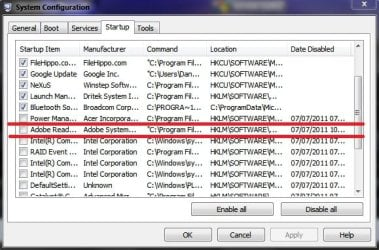
If the problem comes back just stop the automatic updater. Type msconfig into the start menu and untick the updater as below.

Capture.jpg

Regards Danny
 

My Computer

Computer Manufacturer/Model Number
acer aspire 5935g
OS
Windows 7 Home Premium x64 SP1
CPU
intel(R)core(TM)2 duo CPU T6600 @ 2.20GHz
Motherboard
intel gm45/gm47 revision 07
Memory
3 gb ddr3
Graphics Card(s)
ati radeon hd4570/512mb
Monitor(s) Displays
lop156wh2-tle1 15.3 flat
Screen Resolution
1366x768
Hard Drives
OCZ-Agility3 60gig ssd
320gig external hdd
500gig external hdd
Mouse
Optical
Internet Speed
30Mbps Down/30Mbps Up
Back
Top