Adobe update

Jacee

Consumer Security
Guru
Gold Member
VIP
Local time
4:29 PM
Messages
8,608

My Computer

Computer type
PC/Desktop
Computer Manufacturer/Model Number
Bruce ... somewhere in his 40's
OS
Windows 7 Ultimate 32bit SP1
CPU
Intel(R) Core(TM)2 Quad CPU @ 2.40GHz, 2400 MHz
Motherboard
INTEL/D975XBX2
Memory
4 GB
Graphics Card(s)
ATI Radeon HD 2600 Pro
Monitor(s) Displays
Samsung SyncMaster 914v
Screen Resolution
1280 x 1024
Hard Drives
2/500GB each ... ST3500630AS ATA Device.
One is not connected
PSU
Rocketfish 700 W
Case
G.Skill Gigabyte Chassis
Keyboard
Standard PS/2 Keyboard
Mouse
Microsoft PS/2 Mouse
Internet Speed
DSL
Antivirus
Avira Internet Security
Browser
IE 11
Other Info
ATI HDMI Audio
Thankfully, neither of those are on my system!
 

My Computer

Computer Manufacturer/Model Number
Home built
OS
Windows 7 Ultimate 32 bit
CPU
Intel(R) Pentium(R) 4 CPU 3.00GHz
Motherboard
ASUS P4P800-VM Motherboard Chipset: Intel 865G + ICH5
Memory
2.50 GB RAM
Graphics Card(s)
NVIDIA GeForce 7600 GS
Sound Card
SoundMax Integrated Digital Audio (Chip)
Monitor(s) Displays
ViewSonic VX 1962 wm
Screen Resolution
1680 X 1050
Hard Drives
Seagate Barracuda 7200.10 80 GB
ST380215A ATA Device 18.6 GB
Western Digital "My Book" external hard drive 750 GB
Cooling
Fan based
Keyboard
Microsoft Comfort Curve Keyboard 2000 v10 USB
Mouse
Logitec optic USB
Internet Speed
3.01 Mb/s download 0.64 Mb/s upload
Thankfully, neither of those are on my system!

Same here. I replaced Adobe Reader with Sumatra PDF a long time ago.

Note to anyone who uses Adobe Reader or Acrobat: There are reports that the issue in CVE-2010-1297, addressed in this update, is being actively exploited in the wild.

I know a lot of people elect to uninstall Adobe Reader and download a the updated version. If that is your course of action, be sure to uncheck the McAfee Security Scan Plus option. It is not needed for the installation.
 

My Computer

OS
Windows 7 & Windows Vista Ultimate
i tried to update from 9.3 but when i try a manual update it says: "checking for update...", then nothing happens.

anyone else seen this ?

i also use Sumatra, updating Adobe reader just in case i should need it...
 

My Computer

Computer Manufacturer/Model Number
Dell
OS
W7-Enterprise + WS-2008 (Converted to Workstation)
CPU
P4 2,4GHz (at 1,8GHz, "slow" RDRAM, only 400MHz FSB...)
Motherboard
Intel 850E
Memory
2GB
Graphics Card(s)
NVIDIA QUADRO2 PRO 64MB
Sound Card
Yes
Monitor(s) Displays
Dell 1702FP
Screen Resolution
1280x1024
Hard Drives
Yes
PSU
Yes
Case
Yes
Cooling
Yes
Keyboard
Yes
Mouse
Yes, and i also have Cats...
Internet Speed
University: 100 MBit/s, Home: UMTS 7,2 MBit/s
Other Info
W7 on a DINOSAUR: P2 with 266MHz CPU & 160MB RAM
Adobe Reader

I Tried the update via Adobe's check for update It found an udate and installed it. Gave a message that the update was successful. The only thing I an concerned about is prior to the upate is was ver 9.3.2 and after the update it was still ver 9.3.2, Duh?
 

My Computer

Computer Manufacturer/Model Number
BGC (Bob's Garage Crew)
OS
win 7 X64 Ultimate SP1
CPU
I3770K
Motherboard
Asus P8Z77-V Deluxe
Memory
G Skill F3-14900CL9-4GBXL x 4
Graphics Card(s)
NVIDIA GeForce GTX670 + Intel 4000
Sound Card
Realtek HD 5.1 (MOB)
Monitor(s) Displays
Asus VW224T (1)
Screen Resolution
1920 x 1080
Hard Drives
SATA Corsair Force GT 2.5" 180GB (System) Sata 3
OCZ Vertex3 120GB
OCZ Vertex 2 120GB 2.5" SATA II
ST31000524AS 1000.2GB
WD15EARS (External)
PSU
CoolerMaster 1000 Watt
Case
CoolerMaster HAF X
Cooling
CPU -- CoolerMaster 520N
Keyboard
MS Wireless 3000 V2
Mouse
MS Wireless 3000 V2
Internet Speed
Cable
Antivirus
Norton Internet Security
Browser
IE9
Other Info
AMI Bios 1805
OC'd 3%
Hi, HammerHead.

Rather than Adobe's check for update mechanism, I suggest you download the update directly from the Adobe download link at Adobe - Adobe Reader : For Windows (part way down the page, dated 6/29/2010).
 

My Computer

OS
Windows 7 & Windows Vista Ultimate
Adobe Update

OK Corrine, I downloaded the update and it failed. I have deleted the program from my OS (Revo). I don't want a yahoo toolbar anyhoo. I downloaded Sumatra. Will it work in conjunction with IE as Adobe did. I am ready to install it. Let me know.

Aside from this security breach. I got a virus on the previous security breach that they had. Or at least I am blaming it on Adobe.

I could just install a fresh version of Adobe but am not really keen on doing that.
 

My Computer

Computer Manufacturer/Model Number
BGC (Bob's Garage Crew)
OS
win 7 X64 Ultimate SP1
CPU
I3770K
Motherboard
Asus P8Z77-V Deluxe
Memory
G Skill F3-14900CL9-4GBXL x 4
Graphics Card(s)
NVIDIA GeForce GTX670 + Intel 4000
Sound Card
Realtek HD 5.1 (MOB)
Monitor(s) Displays
Asus VW224T (1)
Screen Resolution
1920 x 1080
Hard Drives
SATA Corsair Force GT 2.5" 180GB (System) Sata 3
OCZ Vertex3 120GB
OCZ Vertex 2 120GB 2.5" SATA II
ST31000524AS 1000.2GB
WD15EARS (External)
PSU
CoolerMaster 1000 Watt
Case
CoolerMaster HAF X
Cooling
CPU -- CoolerMaster 520N
Keyboard
MS Wireless 3000 V2
Mouse
MS Wireless 3000 V2
Internet Speed
Cable
Antivirus
Norton Internet Security
Browser
IE9
Other Info
AMI Bios 1805
OC'd 3%
Firefox is my primary browser due to the add-ons I use so heavily. Although, I must admit that I seldom need to access PDF files and when I do, I generally save the file to my computer. The download is scanned and then opened with Sumatra PDF.

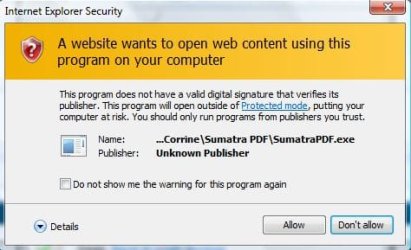
That said, when I launched IE8 and located a PDF to open, IE did launch the warning that the PDF would be opened outside the Protected Mode because the program does not have a valid security certificate. (See attached image) If that is a problem for you, I suggest you try one of the other PDF readers Hackerman1 referenced in http://www.sevenforums.com/system-security/94565-warning-about-foxit-reader-4-a.html
 

Attachments

  • CertWarning.JPG
    CertWarning.JPG
    32.6 KB · Views: 5

My Computer

OS
Windows 7 & Windows Vista Ultimate
Thankfully, neither of those are on my system!

Same here. I replaced Adobe Reader with Sumatra PDF a long time ago.

Note to anyone who uses Adobe Reader or Acrobat: There are reports that the issue in CVE-2010-1297, addressed in this update, is being actively exploited in the wild.

I know a lot of people elect to uninstall Adobe Reader and download a the updated version. If that is your course of action, be sure to uncheck the McAfee Security Scan Plus option. It is not needed for the installation.
Sumatra PDF reader lightweight,simple and does the job.
 

My Computer

Computer Manufacturer/Model Number
Put together
OS
Win7 Pro-64 Bit
CPU
i7-2600-3.4GHz
Motherboard
ASRock Z68M
Memory
8 GIG DDR3
Graphics Card(s)
onboard
Sound Card
onboard
Hard Drives
Seagate 1TB 7200RPM
PSU
680 W
Case
black
Cooling
stock fans
Keyboard
Microsoft
Mouse
Microsoft optical
Make sure to check you MSConfig settings after the update. I noticed this morning that Adobe had set the Reader, Acrobat and the Acrobat manager to launch at startup without letting me in on this fact. Thank you Abobe.....!@#$%^&*
 

My Computer

Computer type
PC/Desktop
Computer Manufacturer/Model Number
Dell Hell oh Well
OS
Win 7 32 Home Premium, Win 7 64 Pro, Win 8.1, Win 10
CPU
Intel Core 2 Duo 2.93GHz
Memory
Not much with my ADHD
Graphics Card(s)
ATI Radeon HD 4350
Monitor(s) Displays
24" HDTV/Monitor
Screen Resolution
Blurry after a Scotch or 2
Hard Drives
1 HDD 250 GB, 1 HDD 1 TB, 3 - 1 TB Externals
Case
Don't get on my case...man :D
Cooling
I have an Air Conditioner & Diet Pepsi
Keyboard
Saitek Cyborg
Mouse
10 yr old MS optical mouse that still works
Internet Speed
Never fast enough
Antivirus
Various
Browser
Various
Borg386: this is one VERY good reason to use WinPatrol.
it warns you when programs tries to make changes to your system fx. installing unwanted software to autostart when you start your computer.

Winpatrol is highly recommended by security-experts & it´s FREE: BillP Studios - WinPatrol 18

WinPatrol has saved my A-S-S more then once...:D
 

My Computer

Computer Manufacturer/Model Number
Dell
OS
W7-Enterprise + WS-2008 (Converted to Workstation)
CPU
P4 2,4GHz (at 1,8GHz, "slow" RDRAM, only 400MHz FSB...)
Motherboard
Intel 850E
Memory
2GB
Graphics Card(s)
NVIDIA QUADRO2 PRO 64MB
Sound Card
Yes
Monitor(s) Displays
Dell 1702FP
Screen Resolution
1280x1024
Hard Drives
Yes
PSU
Yes
Case
Yes
Cooling
Yes
Keyboard
Yes
Mouse
Yes, and i also have Cats...
Internet Speed
University: 100 MBit/s, Home: UMTS 7,2 MBit/s
Other Info
W7 on a DINOSAUR: P2 with 266MHz CPU & 160MB RAM
Thanx hackerman1, I'll check it out.

Doesn't it seem like EVERYTHING is trying to assimilate your PC nowadays?
 

My Computer

Computer type
PC/Desktop
Computer Manufacturer/Model Number
Dell Hell oh Well
OS
Win 7 32 Home Premium, Win 7 64 Pro, Win 8.1, Win 10
CPU
Intel Core 2 Duo 2.93GHz
Memory
Not much with my ADHD
Graphics Card(s)
ATI Radeon HD 4350
Monitor(s) Displays
24" HDTV/Monitor
Screen Resolution
Blurry after a Scotch or 2
Hard Drives
1 HDD 250 GB, 1 HDD 1 TB, 3 - 1 TB Externals
Case
Don't get on my case...man :D
Cooling
I have an Air Conditioner & Diet Pepsi
Keyboard
Saitek Cyborg
Mouse
10 yr old MS optical mouse that still works
Internet Speed
Never fast enough
Antivirus
Various
Browser
Various
yes, it seems the Borg is taking over...:D:D

"The Borg are a fictional pseudo-race of cybernetic organisms depicted in the Star Trek universe."

"Borg manifest as cybernetically enhanced humanoid drones of multiple species, organized as an interconnected collective, the decisions of which are made by a hive mind, linked to subspace domain. The Borg inhabit a vast region of space in the Delta Quadrant of the galaxy, possessing millions of vessels and having conquered thousands of systems. They operate solely toward the fulfilling of one purpose: to "add the biological and technological distinctiveness of other species to their own" in pursuit of perfection."

the next sentence is interesting:
This is achieved through forced assimilation, a process which transforms individuals and technology into Borg, enhancing, and simultaneously controlling, individuals by implanting or appending synthetic components."

http://en.wikipedia.org/wiki/Borg_(Star_Trek)
 

My Computer

Computer Manufacturer/Model Number
Dell
OS
W7-Enterprise + WS-2008 (Converted to Workstation)
CPU
P4 2,4GHz (at 1,8GHz, "slow" RDRAM, only 400MHz FSB...)
Motherboard
Intel 850E
Memory
2GB
Graphics Card(s)
NVIDIA QUADRO2 PRO 64MB
Sound Card
Yes
Monitor(s) Displays
Dell 1702FP
Screen Resolution
1280x1024
Hard Drives
Yes
PSU
Yes
Case
Yes
Cooling
Yes
Keyboard
Yes
Mouse
Yes, and i also have Cats...
Internet Speed
University: 100 MBit/s, Home: UMTS 7,2 MBit/s
Other Info
W7 on a DINOSAUR: P2 with 266MHz CPU & 160MB RAM
Borg386: this is one VERY good reason to use WinPatrol.
it warns you when programs tries to make changes to your system fx. installing unwanted software to autostart when you start your computer.

Winpatrol is highly recommended by security-experts & it´s FREE: BillP Studios - WinPatrol 18

WinPatrol has saved my A-S-S more then once...:D

The same recommendation I gave in Borg386's MSE thread. :)
 

My Computer

OS
Windows 7 & Windows Vista Ultimate
Hey, the Borg would have been easy to defeat if they would have just uploaded Windows ME into the cubes:D
 

My Computer

Computer type
PC/Desktop
Computer Manufacturer/Model Number
Dell Hell oh Well
OS
Win 7 32 Home Premium, Win 7 64 Pro, Win 8.1, Win 10
CPU
Intel Core 2 Duo 2.93GHz
Memory
Not much with my ADHD
Graphics Card(s)
ATI Radeon HD 4350
Monitor(s) Displays
24" HDTV/Monitor
Screen Resolution
Blurry after a Scotch or 2
Hard Drives
1 HDD 250 GB, 1 HDD 1 TB, 3 - 1 TB Externals
Case
Don't get on my case...man :D
Cooling
I have an Air Conditioner & Diet Pepsi
Keyboard
Saitek Cyborg
Mouse
10 yr old MS optical mouse that still works
Internet Speed
Never fast enough
Antivirus
Various
Browser
Various
W95...:D
 

My Computer

Computer Manufacturer/Model Number
Dell
OS
W7-Enterprise + WS-2008 (Converted to Workstation)
CPU
P4 2,4GHz (at 1,8GHz, "slow" RDRAM, only 400MHz FSB...)
Motherboard
Intel 850E
Memory
2GB
Graphics Card(s)
NVIDIA QUADRO2 PRO 64MB
Sound Card
Yes
Monitor(s) Displays
Dell 1702FP
Screen Resolution
1280x1024
Hard Drives
Yes
PSU
Yes
Case
Yes
Cooling
Yes
Keyboard
Yes
Mouse
Yes, and i also have Cats...
Internet Speed
University: 100 MBit/s, Home: UMTS 7,2 MBit/s
Other Info
W7 on a DINOSAUR: P2 with 266MHz CPU & 160MB RAM
Make sure to check you MSConfig settings after the update. I noticed this morning that Adobe had set the Reader, Acrobat and the Acrobat manager to launch at startup without letting me in on this fact. Thank you Abobe.....!@#$%^&*

One of the several reasons that I avoid Adobe like the plague.
 

My Computer

Computer Manufacturer/Model Number
Home built
OS
Windows 7 Ultimate 32 bit
CPU
Intel(R) Pentium(R) 4 CPU 3.00GHz
Motherboard
ASUS P4P800-VM Motherboard Chipset: Intel 865G + ICH5
Memory
2.50 GB RAM
Graphics Card(s)
NVIDIA GeForce 7600 GS
Sound Card
SoundMax Integrated Digital Audio (Chip)
Monitor(s) Displays
ViewSonic VX 1962 wm
Screen Resolution
1680 X 1050
Hard Drives
Seagate Barracuda 7200.10 80 GB
ST380215A ATA Device 18.6 GB
Western Digital "My Book" external hard drive 750 GB
Cooling
Fan based
Keyboard
Microsoft Comfort Curve Keyboard 2000 v10 USB
Mouse
Logitec optic USB
Internet Speed
3.01 Mb/s download 0.64 Mb/s upload
Borg386: this is one VERY good reason to use WinPatrol.
it warns you when programs tries to make changes to your system fx. installing unwanted software to autostart when you start your computer.

Winpatrol is highly recommended by security-experts & it´s FREE: BillP Studios - WinPatrol 18

WinPatrol has saved my A-S-S more then once...:D

The same recommendation I gave in Borg386's MSE thread. :)

well, maybe he´s just a tough case, perhaps he just needed to hear it from more then one guru...:D
 

My Computer

Computer Manufacturer/Model Number
Dell
OS
W7-Enterprise + WS-2008 (Converted to Workstation)
CPU
P4 2,4GHz (at 1,8GHz, "slow" RDRAM, only 400MHz FSB...)
Motherboard
Intel 850E
Memory
2GB
Graphics Card(s)
NVIDIA QUADRO2 PRO 64MB
Sound Card
Yes
Monitor(s) Displays
Dell 1702FP
Screen Resolution
1280x1024
Hard Drives
Yes
PSU
Yes
Case
Yes
Cooling
Yes
Keyboard
Yes
Mouse
Yes, and i also have Cats...
Internet Speed
University: 100 MBit/s, Home: UMTS 7,2 MBit/s
Other Info
W7 on a DINOSAUR: P2 with 266MHz CPU & 160MB RAM
Yeah, I've been meaning to switch over from Adobe, between the online classes, my cancer treatments & the ADHD, and those Yak Shaving competitions I'll get to it...someday

That reminds me, I need to do spring cleaning....one of these springs:roflmao:

BTW...point me to a good substitute for Adobe. I've read about a few alternatives but give me your experiences with the alternatives...I'd appreciate it
 
Last edited:

My Computer

Computer type
PC/Desktop
Computer Manufacturer/Model Number
Dell Hell oh Well
OS
Win 7 32 Home Premium, Win 7 64 Pro, Win 8.1, Win 10
CPU
Intel Core 2 Duo 2.93GHz
Memory
Not much with my ADHD
Graphics Card(s)
ATI Radeon HD 4350
Monitor(s) Displays
24" HDTV/Monitor
Screen Resolution
Blurry after a Scotch or 2
Hard Drives
1 HDD 250 GB, 1 HDD 1 TB, 3 - 1 TB Externals
Case
Don't get on my case...man :D
Cooling
I have an Air Conditioner & Diet Pepsi
Keyboard
Saitek Cyborg
Mouse
10 yr old MS optical mouse that still works
Internet Speed
Never fast enough
Antivirus
Various
Browser
Various
Sumatra PDF and Foxit. If you choose Foxit, be careful when installing it that you uncheck the toolbars and other added junk.
 

My Computer

Computer Manufacturer/Model Number
Home built
OS
Windows 7 Ultimate 32 bit
CPU
Intel(R) Pentium(R) 4 CPU 3.00GHz
Motherboard
ASUS P4P800-VM Motherboard Chipset: Intel 865G + ICH5
Memory
2.50 GB RAM
Graphics Card(s)
NVIDIA GeForce 7600 GS
Sound Card
SoundMax Integrated Digital Audio (Chip)
Monitor(s) Displays
ViewSonic VX 1962 wm
Screen Resolution
1680 X 1050
Hard Drives
Seagate Barracuda 7200.10 80 GB
ST380215A ATA Device 18.6 GB
Western Digital "My Book" external hard drive 750 GB
Cooling
Fan based
Keyboard
Microsoft Comfort Curve Keyboard 2000 v10 USB
Mouse
Logitec optic USB
Internet Speed
3.01 Mb/s download 0.64 Mb/s upload
Back
Top