advance systemcare wont remove

OK cheers 4 all your help. I'll delete the backup i did lastnight then do it that way lol[/QUOTE said:
Run the new backups BEFORE!!! you delete the old ones.

Regards....Mike Connor
 

My Computer My Computer

OS
Several, including Windows 7 x64 Ultimate
ok nice 1 Mike. Cheers for ALL ur help and if i've done your head in then sorry. atleast you got through to me in the end lol.
THANKS! i repped u lastnight
 

My Computer My Computer

Computer type
PC/Desktop
Computer Manufacturer/Model Number
Custom build
OS
Win7 Home Premium x64 SP1
CPU
i7 4770k
Motherboard
Asus maximus VI Hero
Memory
8Gb Kingston HyperX Beast 2400MHz @2133MHz 11-12-11-30
Graphics Card(s)
MSI GTX 780ti Gaming Oc x2
Sound Card
Onboard ROG SupremeFX
Monitor(s) Displays
Asus VG248QE
Screen Resolution
3840X1080 144Hz
Hard Drives
Samung Evo 256Gb, OCZ Agility4 128Gb
1x1TB hitachi storage
PSU
EVGA Supernova 1000w Platinum
Case
Corsair Air 540
Cooling
Corsair H100i
Keyboard
Coolermaster Quickfire Pro
Mouse
Corsair M65 RGB
Internet Speed
74mb dwn/16up
Antivirus
MSE,Malwarebytes
Browser
Chrome
ok nice 1 Mike. Cheers for ALL ur help and if i've done your head in then sorry. atleast you got through to me in the end lol.
THANKS! i repped u lastnight

No problem, my head's fine. (Possibly not least because I don't indulge in herbal recreational refreshments! :) )

You can schedule your backups to run automatically if that suits you better;


Regards....Mike Connor
 

My Computer My Computer

OS
Several, including Windows 7 x64 Ultimate
lol that is the plan. what was pickling me is the fact that everything is stored on my C drive. so when i select it for the backup. it backs up 500+Gb. it wouldnt of all fit on my HDD lol if i did the new 1 b4 deleting the old. but i have deleted the extra files i had on there so the new 1 will fit
 

My Computer My Computer

Computer type
PC/Desktop
Computer Manufacturer/Model Number
Custom build
OS
Win7 Home Premium x64 SP1
CPU
i7 4770k
Motherboard
Asus maximus VI Hero
Memory
8Gb Kingston HyperX Beast 2400MHz @2133MHz 11-12-11-30
Graphics Card(s)
MSI GTX 780ti Gaming Oc x2
Sound Card
Onboard ROG SupremeFX
Monitor(s) Displays
Asus VG248QE
Screen Resolution
3840X1080 144Hz
Hard Drives
Samung Evo 256Gb, OCZ Agility4 128Gb
1x1TB hitachi storage
PSU
EVGA Supernova 1000w Platinum
Case
Corsair Air 540
Cooling
Corsair H100i
Keyboard
Coolermaster Quickfire Pro
Mouse
Corsair M65 RGB
Internet Speed
74mb dwn/16up
Antivirus
MSE,Malwarebytes
Browser
Chrome
lol that is the plan. what was pickling me is the fact that everything is stored on my C drive. so when i select it for the backup. it backs up 500+Gb. it wouldnt of all fit on my HDD lol if i did the new 1 b4 deleting the old. but i have deleted the extra files i had on there so the new 1 will fit

Ah, OK. Once you have a good backup, you could partition your drive to keep your system and data separate.

It's not a big deal, and it prevents you having to do large "restores" if the system crashes. You just need to restore the system. The data is usually OK.

If the disc crashes you need to restore everything of course.

Regards....Mike Connor
 

My Computer My Computer

OS
Several, including Windows 7 x64 Ultimate
thats what i thought you meant back at the start lol. i just could'nt think how to word that my data and op system were all on the same drive. how would i go about creating another partitian for my data? or would i just be better off doing a clean install and create a partitian then?


edit: i haad a smoke 4 a while now lol so i can understand everythin better again now;)
 

My Computer My Computer

Computer type
PC/Desktop
Computer Manufacturer/Model Number
Custom build
OS
Win7 Home Premium x64 SP1
CPU
i7 4770k
Motherboard
Asus maximus VI Hero
Memory
8Gb Kingston HyperX Beast 2400MHz @2133MHz 11-12-11-30
Graphics Card(s)
MSI GTX 780ti Gaming Oc x2
Sound Card
Onboard ROG SupremeFX
Monitor(s) Displays
Asus VG248QE
Screen Resolution
3840X1080 144Hz
Hard Drives
Samung Evo 256Gb, OCZ Agility4 128Gb
1x1TB hitachi storage
PSU
EVGA Supernova 1000w Platinum
Case
Corsair Air 540
Cooling
Corsair H100i
Keyboard
Coolermaster Quickfire Pro
Mouse
Corsair M65 RGB
Internet Speed
74mb dwn/16up
Antivirus
MSE,Malwarebytes
Browser
Chrome
thats what i thought you meant back at the start lol. i just could'nt think how to word that my data and op system were all on the same drive. how would i go about creating another partitian for my data? or would i just be better off doing a clean install and create a partitian then?

Not a problem, run your backups, and then get this free partition manager;

Best FREE Partition Manager Freeware for Windows 2000/XP/Vista/7 32 bit & 64 bit. EASEUS free Partition Manager Software Home Edition.

Delete all your data files which have nothing to do with the system, and then you can resize the system partition as desired. Make a second partition in the space you freed up, and then copy your file backups to the new partition you made.

It's not hard to do, but it takes a little time and you have to be careful.

Regards....Mike Connor
 

My Computer My Computer

OS
Several, including Windows 7 x64 Ultimate
cheers! sounds pretty straight forward. you like EASEUS do'nt you. so in my words lol. download the software delete my stuff,resize and create new partition then restore the backup to the new partition.... smashin lol. i'll crack on with it first thing when i got a fresh head on lol. AGAIN thanks vary much for your help, much apreciated

thats why i said i wanted 2 do a clean install. then create a system image once my progs had been installed. i did'nt know there was a much easier way
 

My Computer My Computer

Computer type
PC/Desktop
Computer Manufacturer/Model Number
Custom build
OS
Win7 Home Premium x64 SP1
CPU
i7 4770k
Motherboard
Asus maximus VI Hero
Memory
8Gb Kingston HyperX Beast 2400MHz @2133MHz 11-12-11-30
Graphics Card(s)
MSI GTX 780ti Gaming Oc x2
Sound Card
Onboard ROG SupremeFX
Monitor(s) Displays
Asus VG248QE
Screen Resolution
3840X1080 144Hz
Hard Drives
Samung Evo 256Gb, OCZ Agility4 128Gb
1x1TB hitachi storage
PSU
EVGA Supernova 1000w Platinum
Case
Corsair Air 540
Cooling
Corsair H100i
Keyboard
Coolermaster Quickfire Pro
Mouse
Corsair M65 RGB
Internet Speed
74mb dwn/16up
Antivirus
MSE,Malwarebytes
Browser
Chrome
cheers! sounds pretty straight forward. you like EASEUS do'nt you. so in my words lol. download the software delete my stuff,resize and create new partition then restore the backup to the new partition.... smashin lol. i'll crack on with it first thing when i got a fresh head on lol. AGAIN thanks vary much for your help, much apreciated

thats why i said i wanted 2 do a clean install. then create a system image once my progs had been installed. i did'nt know there was a much easier way

My pleasure. Any problems or questions just ask. Yes I do like Easeus stuff, I have found it to be excellent. Never had a problem with any of it, which is a great deal more than I can say for a lot of other stuff!

Regards....Mike Connor
 

My Computer My Computer

OS
Several, including Windows 7 x64 Ultimate
Cheers! i may end up pestering u tomorrow lol. hopefully il sort it tho. ive managed well b4. its just this backup malarky that pickled me a bit lol
 

My Computer My Computer

Computer type
PC/Desktop
Computer Manufacturer/Model Number
Custom build
OS
Win7 Home Premium x64 SP1
CPU
i7 4770k
Motherboard
Asus maximus VI Hero
Memory
8Gb Kingston HyperX Beast 2400MHz @2133MHz 11-12-11-30
Graphics Card(s)
MSI GTX 780ti Gaming Oc x2
Sound Card
Onboard ROG SupremeFX
Monitor(s) Displays
Asus VG248QE
Screen Resolution
3840X1080 144Hz
Hard Drives
Samung Evo 256Gb, OCZ Agility4 128Gb
1x1TB hitachi storage
PSU
EVGA Supernova 1000w Platinum
Case
Corsair Air 540
Cooling
Corsair H100i
Keyboard
Coolermaster Quickfire Pro
Mouse
Corsair M65 RGB
Internet Speed
74mb dwn/16up
Antivirus
MSE,Malwarebytes
Browser
Chrome
Hiya Mike!
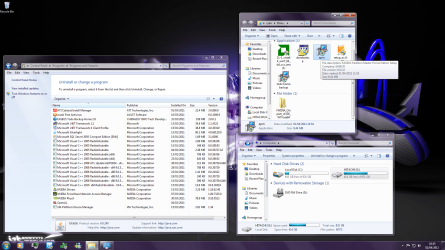
tis i again lol. i have backed up, unistalled all my progs and deleted all media. this is what is left.

i know i still have to unistall my av. but is everything else ok as it is?
im just about to start wit that partitian manager program. do i just install it 2 its default location?

im totally knackered. i have'nt been 2 bed yet:sleep:im ok tho. all bright n perky lol
 

Attachments

  • Untitled.png
    Untitled.png
    329.5 KB · Views: 4

My Computer My Computer

Computer type
PC/Desktop
Computer Manufacturer/Model Number
Custom build
OS
Win7 Home Premium x64 SP1
CPU
i7 4770k
Motherboard
Asus maximus VI Hero
Memory
8Gb Kingston HyperX Beast 2400MHz @2133MHz 11-12-11-30
Graphics Card(s)
MSI GTX 780ti Gaming Oc x2
Sound Card
Onboard ROG SupremeFX
Monitor(s) Displays
Asus VG248QE
Screen Resolution
3840X1080 144Hz
Hard Drives
Samung Evo 256Gb, OCZ Agility4 128Gb
1x1TB hitachi storage
PSU
EVGA Supernova 1000w Platinum
Case
Corsair Air 540
Cooling
Corsair H100i
Keyboard
Coolermaster Quickfire Pro
Mouse
Corsair M65 RGB
Internet Speed
74mb dwn/16up
Antivirus
MSE,Malwarebytes
Browser
Chrome
Hiya Mike!
tis i again lol. i have backed up, unistalled all my progs and deleted all media. this is what is left.

i know i still have to unistall my av. but is everything else ok as it is?
im just about to start wit that partitian manager program. do i just install it 2 its default location?

im totally knackered. i have'nt been 2 bed yet:sleep:im ok tho. all bright n perky lol


Hi, just having a good look at what you posted, back in a sec......

Yes, that looks OK. Now you can use the partition manager to first of all reduce the system partition in size, I recommend you use 50 Gbyte for that. ( You CAN use 40 Gbyte, but that tends to cramp the system).

You didn't need to uninstall the programs, but as you have done so it doesn't matter now. If ANYTHING AT ALL is unclear to you, then keep asking until it is.

Once you have reduced the partition, create a new partition in the now unallocated space. Use all the space left.

When you have done that we'll have another word.

It's much easier to make mistakes when you are tired, so if you would rather have a sleep first, that might be a good idea, but it's up to you of course.

Regards....Mike Connor
 

My Computer My Computer

OS
Several, including Windows 7 x64 Ultimate
afternoon chap. yeah ill crack on with it. im used to not sleeping. i havent slept properly in 20yrs. i havent smoked any weed through the night so i can crack on with this lol. so im more capable than i was yesterday lol. ill go do the partitions and get back
 

My Computer My Computer

Computer type
PC/Desktop
Computer Manufacturer/Model Number
Custom build
OS
Win7 Home Premium x64 SP1
CPU
i7 4770k
Motherboard
Asus maximus VI Hero
Memory
8Gb Kingston HyperX Beast 2400MHz @2133MHz 11-12-11-30
Graphics Card(s)
MSI GTX 780ti Gaming Oc x2
Sound Card
Onboard ROG SupremeFX
Monitor(s) Displays
Asus VG248QE
Screen Resolution
3840X1080 144Hz
Hard Drives
Samung Evo 256Gb, OCZ Agility4 128Gb
1x1TB hitachi storage
PSU
EVGA Supernova 1000w Platinum
Case
Corsair Air 540
Cooling
Corsair H100i
Keyboard
Coolermaster Quickfire Pro
Mouse
Corsair M65 RGB
Internet Speed
74mb dwn/16up
Antivirus
MSE,Malwarebytes
Browser
Chrome
One more thing before you start. Run a disk cleanup and check.


After you have run the cleanup, click on "Tools", run "Check now" and then "Defragment now".

This ensures you have a nice clean and defragmented disc to work with.

Regards...Mike Connor
 

My Computer My Computer

OS
Several, including Windows 7 x64 Ultimate
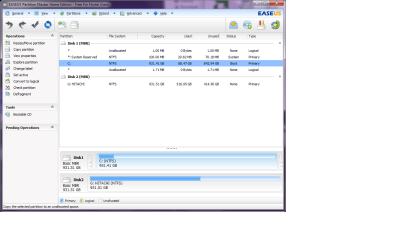
i hav a ok hdd but will run a diskchck. i looked at that prog and not quite sure. do i reduce the one that is highlghted to 50GB
 

Attachments

  • Untitled1.png
    Untitled1.png
    41.5 KB · Views: 1

My Computer My Computer

Computer type
PC/Desktop
Computer Manufacturer/Model Number
Custom build
OS
Win7 Home Premium x64 SP1
CPU
i7 4770k
Motherboard
Asus maximus VI Hero
Memory
8Gb Kingston HyperX Beast 2400MHz @2133MHz 11-12-11-30
Graphics Card(s)
MSI GTX 780ti Gaming Oc x2
Sound Card
Onboard ROG SupremeFX
Monitor(s) Displays
Asus VG248QE
Screen Resolution
3840X1080 144Hz
Hard Drives
Samung Evo 256Gb, OCZ Agility4 128Gb
1x1TB hitachi storage
PSU
EVGA Supernova 1000w Platinum
Case
Corsair Air 540
Cooling
Corsair H100i
Keyboard
Coolermaster Quickfire Pro
Mouse
Corsair M65 RGB
Internet Speed
74mb dwn/16up
Antivirus
MSE,Malwarebytes
Browser
Chrome
i hav a ok hdd but will run a diskchck. i looked at that prog and not quite sure. do i reduce the one that is highlghted to 50GB

Yes, that would normally be correct, but you can't do that here because you have 88.47 GBytes in use!

You must have quite a bit of stuff still on there.

Not a problem. Reduce it to 100 Gbytes for now, we will take care of the rest later.

Regards....Mike Connor
 

My Computer My Computer

OS
Several, including Windows 7 x64 Ultimate
im looking everywhere and cant find what could be using it. how can i find out?

edit: could it b restore points? as i hav a couple of restore points as i have'nt turned system restore off yet
 

My Computer My Computer

Computer type
PC/Desktop
Computer Manufacturer/Model Number
Custom build
OS
Win7 Home Premium x64 SP1
CPU
i7 4770k
Motherboard
Asus maximus VI Hero
Memory
8Gb Kingston HyperX Beast 2400MHz @2133MHz 11-12-11-30
Graphics Card(s)
MSI GTX 780ti Gaming Oc x2
Sound Card
Onboard ROG SupremeFX
Monitor(s) Displays
Asus VG248QE
Screen Resolution
3840X1080 144Hz
Hard Drives
Samung Evo 256Gb, OCZ Agility4 128Gb
1x1TB hitachi storage
PSU
EVGA Supernova 1000w Platinum
Case
Corsair Air 540
Cooling
Corsair H100i
Keyboard
Coolermaster Quickfire Pro
Mouse
Corsair M65 RGB
Internet Speed
74mb dwn/16up
Antivirus
MSE,Malwarebytes
Browser
Chrome
im looking everywhere and cant find what could be using it. how can i find out?

edit: could it b restore points? as i hav a couple of restore points as i have'nt turned system restore off yet

Use CCleaner to remove all your old restore points. Go to "tools", "System Restore"


You can not delete the last one in this program, that is for system safety. As you can see, I don't have any, because I don't use system restore.

Regards....Mike Connor
 

My Computer My Computer

OS
Several, including Windows 7 x64 Ultimate
You can find out what is using what with WinDirStat.

Regards....Mike Connor
 

My Computer My Computer

OS
Several, including Windows 7 x64 Ultimate
ive uninstalled it. but ccleaner only deletes all but 1 of restore points. should i delete them from system properties where u configure syst restore? then run ccleaner?
 

My Computer My Computer

Computer type
PC/Desktop
Computer Manufacturer/Model Number
Custom build
OS
Win7 Home Premium x64 SP1
CPU
i7 4770k
Motherboard
Asus maximus VI Hero
Memory
8Gb Kingston HyperX Beast 2400MHz @2133MHz 11-12-11-30
Graphics Card(s)
MSI GTX 780ti Gaming Oc x2
Sound Card
Onboard ROG SupremeFX
Monitor(s) Displays
Asus VG248QE
Screen Resolution
3840X1080 144Hz
Hard Drives
Samung Evo 256Gb, OCZ Agility4 128Gb
1x1TB hitachi storage
PSU
EVGA Supernova 1000w Platinum
Case
Corsair Air 540
Cooling
Corsair H100i
Keyboard
Coolermaster Quickfire Pro
Mouse
Corsair M65 RGB
Internet Speed
74mb dwn/16up
Antivirus
MSE,Malwarebytes
Browser
Chrome
Back
Top