Advanced System Optimzier - Startup

swifty2010

New member
Hi all,

I have been trying to resolve this by myself for ages now with no luck. I currently have Systweak's Advanced System Optimizer insalled which really helps my PC, however it seems to always load up at startup and the main screen popus up each time, which becomes incredibly annoying. I have tried everything from msconfig, to startup services to try and stop the program being loaded at startup and just using it manually.

I hope someone else has had this problem and been able to rectify it.

Thanks a lot
 

My Computer

Computer Manufacturer/Model Number
Phillips MT2700 Freevents
OS
MS Windows 7 Home Premium 32-bit SP1
CPU
Intel Pentium D 945 Presler 65nm Technology
Motherboard
ELITEGROUP COMPUTER SYSTEM CO.,LTD. 945P-M3 (Socket 775)
Memory
3.00 GB Dual-Channel DDR2 @ 199MHz (4-3-3-9)
Graphics Card(s)
S221HQL (1920x1080@30Hz) 1024MB GeForce 9500 GT (Undefined)
Sound Card
Conexant 2388x Audio Capture
Hard Drives
293GB Maxtor Maxtor 6V300F0 ATA Device (SATA)
Other Info
FREECOM_ DVD+/-RW18H9 USB Device
PHILIPS DVDR1628P1 ATA Device
Have you tired using the built-in Start Manager to stop it or check in its options to see if you can prevent it from doing what you dislike?

Check options for anything like start-up or splash screen.
 

My Computer

Computer type
PC/Desktop
Computer Manufacturer/Model Number
Gateway DX4831-01e (Mid-Tower Desktop)
OS
Originally Win 7 Hm Prem x64 Ver 6.1.7600 Build 7601-SP1 | Upgraded to Windows 10 December 14, 2019
CPU
Intel i3 530 2.93GHz, 2933MHz 2 Cores 4 Logical Processors
Motherboard
Gateway H57M01 133 megahertz
Memory
6GB of 1,333MHz DDR3 SDRAM
Graphics Card(s)
32MB Intel Graphics Media Accelerator HD IGChip
Sound Card
Realtek High Definition Audio
Monitor(s) Displays
Gateway HX2000 20inch TFT active matrix TN
Screen Resolution
1600 x 900 x 59 hertz
Hard Drives
WDC WD10EADS-00M2B0 [HDD] (1000.20 GB) -- drive 0,
HL-DT-ST DVDRAM GH41N [CD-ROM dr]
Four card readers, and Four USB 2.0
PSU
300watts.
Case
Mid-Tower Desktop
Cooling
Stock from Gateway
Keyboard
Natural Ergonomic Keyboard 4000, see Other Info
Mouse
Orig. Gateway wore out now using Insignia USB wired optical
Internet Speed
Vz FIOS 10ms png 57.64Mbps down 65.53Mbps up Speedtest.org
Antivirus
Zamana Anti-logger with Anti-malware, MSE, Windows Firewall,
Browser
IE11.0.9600.19399-Upd ver11.0.135, Firefox 68.0.1 x64
Other Info
System Specs by Belarc.

BIOS: American Megatrends Inc. P01-A0 11/17/2009

Replaced the MS 'Natural' Standard PS/2 Enhanced 101-102 Keyboard with a new Natural Ergonomic Keyboard 4000 on August 1st 2014.

Canon Pixma MG3222 Printer.

Updated to IE11 on 12102015 | Fios Quantum Router g1100

Additional AV: SpywareBlaster, manual Mbam, SAS
Hi all,

I have been trying to resolve this by myself for ages now with no luck. I currently have Systweak's Advanced System Optimizer insalled which really helps my PC, however it seems to always load up at startup and the main screen popus up each time, which becomes incredibly annoying. I have tried everything from msconfig, to startup services to try and stop the program being loaded at startup and just using it manually.

I hope someone else has had this problem and been able to rectify it.

Thanks a lot


I'm not really sure why you feel this helps your PC.

I just installed this in a Virtual machine to see if I could answer your question.

The lack of program settings and the fact that optimizers rarely optimize are red flags for me.

These free alternatives are better and all that is needed in my opinion,

CCleaner - Optimization and Cleaning - Free Download

BillP Studios - WinPatrol

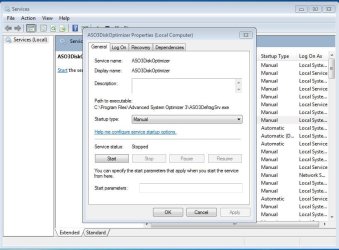
That being said, I was able to set the ASO Disk Optimizer Service to Manual in the service properties, apply, close it down and restart and the program did not start with windows.

I was still able to open it manually.
 

Attachments

  • aso3.JPG
    aso3.JPG
    95.1 KB · Views: 83

My Computer

Computer type
PC/Desktop
Computer Manufacturer/Model Number
Self Built
OS
Win 10 Pro x64
CPU
Intel I5-2500K @3.3GHz
Motherboard
Asrock P67 Extreme4
Memory
16GB G.Skill Ripjaws X (4x4GB)
Graphics Card(s)
EVGA GeForce 750 Ti SC 2GB
Sound Card
ASUS Xonar DG 5.1 Channels 24-bit 96KHz PCI Interface Sound
Monitor(s) Displays
auria eq2367
Screen Resolution
1920 x 1080
Hard Drives
250GB Samsung 850 EVO SSD
1TB WD Blue
1TB Hitachi
PSU
SeaSonic X 650W 80 Plus Gold
Case
Corsair Obsidian 750D
Cooling
Corsair H60, Three 140mm case fans
Keyboard
Logitech Wireless Keyboard K520
Mouse
Logitech Wireless Mouse M310
Internet Speed
Wave Broadband ~ 100 dn 5 up
Antivirus
Windows Defender, Malwarebytes Premium
Browser
Edge, IE11, Chrome
Other Info
Laptop specs: HP g7-1365dx /
CPU: AMD A6-3420M APU with Radeon(tm) HD Graphics /
RAM: Crucial 8Gb (2x4Gb) /
SSD: Crucial M4-CT128M4SSD2 ATA Device/ FW 000F /
GFX: AMD Radeon HD 6520G /
OS: Windows 10 Pro x64
Back
Top