Advanced Word Processor

Moop

New member
Local time
12:14 AM
Messages
4
A progam that allows individual tagging of single words in a document?

I use google docs for my creative writing. Much of that includes compiling large word lists, to keep these lists in good order and have the right word at hand when I need it, I'm looking for a word processing program/suite/online app/browser add on, an anything! that will allow me to quickly filter through these lists.

For example: I create a list of 500 fruits in a document, with this program I should be able to tag the words in that list with terms such as "white" "small" "round" "yellow" "sweet" "bitter" "berry" "tree" "bush" "bird" etc. Now, when I need to find a small, white, berry birds eat, I can filter the list with tags and highlight for instance mistletoe from the other 499.

I've googled everything I could think of, without joy, so I'd really appreciate any help.

Thanks guys
 

My Computer

OS
Windows 7 64
hi moop, and welcome to sevenforums,

it seems like you need to use a database, rather than a word processor.

word processors are really designed to produce printable documents, not fancy searching/filtering stuff.

i'm afraid i'm not sure exactly how you would do it, having very little database experience. i suppose you could bodge something up with a spreadsheet, but a database really is the tool here.

openoffice.org provide a well respected database as part of their free office suite. probably a good place to start, without having to spend any money.

i'm sure other forum members will be along shortly with other ideas or more help.
 

My Computer

Computer Manufacturer/Model Number
mickey megabyte 1234
OS
ultimate 64 sp1
CPU
i5 2500K [email protected]
Motherboard
MSI P67A-GD53
Memory
8 gigs GSkill Ripjaws 1600
Graphics Card(s)
amd hd6950
Sound Card
creative x-fi gamer
Monitor(s) Displays
samsung 24"
Screen Resolution
1920x1080
Hard Drives
ocz vertex 2e 60 gig, samsung f3 1tb, buffalo 2tb ext
PSU
antec 550
Case
antec three hundred
Cooling
i'm a cooling fan
Keyboard
saitek eclipse ii
Mouse
logitech g3
Internet Speed
about 4 Mbps
Other Info
i love win7
Hey Mickey,

Thanks for the quick reply, I think your right a database looks like the way to go. I'm downloading OOO as I type, and having a look at some of the tutorials of youtube.
 

My Computer

OS
Windows 7 64
have fun!
 

My Computer

Computer Manufacturer/Model Number
mickey megabyte 1234
OS
ultimate 64 sp1
CPU
i5 2500K [email protected]
Motherboard
MSI P67A-GD53
Memory
8 gigs GSkill Ripjaws 1600
Graphics Card(s)
amd hd6950
Sound Card
creative x-fi gamer
Monitor(s) Displays
samsung 24"
Screen Resolution
1920x1080
Hard Drives
ocz vertex 2e 60 gig, samsung f3 1tb, buffalo 2tb ext
PSU
antec 550
Case
antec three hundred
Cooling
i'm a cooling fan
Keyboard
saitek eclipse ii
Mouse
logitech g3
Internet Speed
about 4 Mbps
Other Info
i love win7
Hi Moop,

Another option might be a spreadsheet . Most spreadsheets have basic DB functionality. I'm not sure how good the Google Docs spreadsheet is but you might be able to do something with it.
 

My Computer

Computer type
Laptop
Computer Manufacturer/Model Number
Hewlett-Packard/G62-107SA Notebook
OS
Microsoft Windows 7 Home Premium 64-bit Service Pack 1
CPU
Intel(R) Core(TM) i3 CPU M 330 @ 2.13GHz
Motherboard
Hewlett-Packard 1425
Memory
8 GB DDR3
Graphics Card(s)
Intel(R) HD Graphics
Sound Card
Realtek High Definition Audio
Monitor(s) Displays
Builtin
Screen Resolution
1366 x 768 x 32 bits (4294967296 colors) @ 60 Hz
Hard Drives
250 GB SATA Hard Disk Drive 7200 rpm
2TB Seagate GoFlex USB 2 Drive
1TB Iomega Prestige USB 2 Drive
1.5TB Iomega Prestige USB 2 Drive (Samsung)
2TB WD MyBook Live NAS.
Mouse
Logitech Anywhere MX
Internet Speed
152 Mbs download 10 Mbs upload
Antivirus
Norton 360
Browser
Chrome
Thanks Kado, does anyone have any thoughts about which would be best DB VS SS? I'm looking for the simplest solution, even if I have to give up a little functionality.
 

My Computer

OS
Windows 7 64
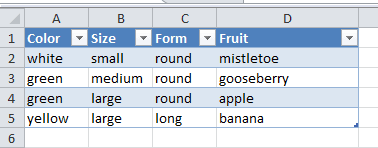
I've had a look at the Google spreadsheet and it doesn't have the functionality you need. What you need to be able to do is create a table with headings

The attached was knocked up in Excel but most spreadsheets should be able to do it. You just click the headers and select the tag values you want


OO Update: Just had a look at the Open Office documentation and you can do this in calc using automatic filters.
 

Attachments

  • Capture2.PNG
    Capture2.PNG
    3.4 KB · Views: 1
Last edited:

My Computer

Computer type
Laptop
Computer Manufacturer/Model Number
Hewlett-Packard/G62-107SA Notebook
OS
Microsoft Windows 7 Home Premium 64-bit Service Pack 1
CPU
Intel(R) Core(TM) i3 CPU M 330 @ 2.13GHz
Motherboard
Hewlett-Packard 1425
Memory
8 GB DDR3
Graphics Card(s)
Intel(R) HD Graphics
Sound Card
Realtek High Definition Audio
Monitor(s) Displays
Builtin
Screen Resolution
1366 x 768 x 32 bits (4294967296 colors) @ 60 Hz
Hard Drives
250 GB SATA Hard Disk Drive 7200 rpm
2TB Seagate GoFlex USB 2 Drive
1TB Iomega Prestige USB 2 Drive
1.5TB Iomega Prestige USB 2 Drive (Samsung)
2TB WD MyBook Live NAS.
Mouse
Logitech Anywhere MX
Internet Speed
152 Mbs download 10 Mbs upload
Antivirus
Norton 360
Browser
Chrome
Thanks for checking that out for me Kado, yes it looks as if a DB is the way to go, I'm in the middle of reading http://bit.ly/hGiqet, funny enough is starts with how to make a DB for Authors, and books, bit of a learning trying to get my head around cardinality and opitonality, but it long run I should get a much better result. Any OOO base experts more than welcome to chip in :D

Thanks guys
 

My Computer

OS
Windows 7 64
You are welcome.

A filtered table in a spreadsheet as described earlier is a simpler and more easily understood option than a fully fledged database solution.
 

My Computer

Computer type
Laptop
Computer Manufacturer/Model Number
Hewlett-Packard/G62-107SA Notebook
OS
Microsoft Windows 7 Home Premium 64-bit Service Pack 1
CPU
Intel(R) Core(TM) i3 CPU M 330 @ 2.13GHz
Motherboard
Hewlett-Packard 1425
Memory
8 GB DDR3
Graphics Card(s)
Intel(R) HD Graphics
Sound Card
Realtek High Definition Audio
Monitor(s) Displays
Builtin
Screen Resolution
1366 x 768 x 32 bits (4294967296 colors) @ 60 Hz
Hard Drives
250 GB SATA Hard Disk Drive 7200 rpm
2TB Seagate GoFlex USB 2 Drive
1TB Iomega Prestige USB 2 Drive
1.5TB Iomega Prestige USB 2 Drive (Samsung)
2TB WD MyBook Live NAS.
Mouse
Logitech Anywhere MX
Internet Speed
152 Mbs download 10 Mbs upload
Antivirus
Norton 360
Browser
Chrome
Back
Top