Advice before installing new CPU

OneSerious

New member
Power User
VIP
Local time
1:03 AM
Messages
324
Right then,

I've just ordered a new Phenom II x4 3.4 965 Black Edition CPU. Before I get it fitted I would just like a bit of advice. The current mother board is GA-M61PME-S2P from what I've read this mobo will support the new processor, but I've read on other sites that the CPU may suffer performance wise due to the mobo. Basically I want to know would it be better for me to hold off and get a new mobo before going ahead with this? or should the current board support it fine? Any advice is appreciated.

Thanks.
 

My Computer

OS
MS Windows 7 Home Premium 64-bit
What kind of advice would you like?

I mean, handle the cpu gently on its sides, use good thermal grease like Arctic Silver or similar and apply it evenly/thinly, don't force anything etc...

Anything specific you'd like to know?
 

My Computer

Computer Manufacturer/Model Number
self built
OS
7600.20510 x86
CPU
P4 550 3.4 GHz HT running at 3.5 GHz
Motherboard
MSI PM8M3-V (MS-7211 v1.x) Micro-ATX mainboard
Memory
OCZ 2 GB(2x1GB) DDR400mHz running @ 414 mHz
Graphics Card(s)
HIS Radeon HD 3850 IceQ 3 Turbo HDMI Dual DL-DVI AGP
Sound Card
MOTU Traveler firewire studio interface 192 kHz 24 bit
Monitor(s) Displays
22" widescreen Acer X223W LCD, 17" Compaq P75 CRT
Screen Resolution
1680x1050 and 1280x1024
Hard Drives
SATA I x2 WD, 400 GB and 120 GB, SATA 2 WD Caviar Black 1 TB
PSU
350W generic
Case
Cybertronpc, it glows blue
Cooling
stock cpu fan, Ice-Q 3 gpu and system, many case fans
Keyboard
Logitch Classical Keyboard 200
Mouse
Logitech Mediaplay cordless
Internet Speed
1792/448 kbits/sec
Other Info
SATA II PCI fake RAID adapter, 1 GB Readyboost, original ATI Remote Wonder (even works with WMC perfectly), Logitech Rumblepad 2 game controller x2
What kind of advice would you like?

I mean, handle the cpu gently on its sides, use good thermal grease like Arctic Silver or similar and apply it evenly/thinly, don't force anything etc...

Anything specific you'd like to know?

Sorry if I wasn't so clear, not regarding the actual installation. Before I bother to install it I'm wanting to know if it's good to go with the current mobo. I've read that albeit these things say they are forward compatible that the newer CPU's may not perform so good.

Don't want to install it only to find it doesn't perform well and have to switch the mobo after.

Really just want to see if anybody else has had experiance with this and confirm if the work together ok.
 

My Computer

OS
MS Windows 7 Home Premium 64-bit
clean the fans... you wont be able to clean it till you buy an new CPU I think XD
 

My Computer

OS
Windows 7 32bit RTM
Your motherboards performance is for the most part determined by it's chipset:
NVIDIA® GeForce 6100 / nForce 430 chipset
Newer chipset will perform much better, but you'll most likely also need to outlay for new DDR3 RAM.
Look for something with either a 785 or a 790 chipset, to suit your budget
 

My Computer

OS
XP Pro/Vista Ultimate (64)/Windows 7 Ultimate Signature Edition(64)
CPU
Core 2 Duo E8500 @ stock
Motherboard
Gigabyte EP45-UD3R
Memory
8Gb (4 X 2Gb) Corsair Dominator 1066Mhz DDR2
Graphics Card(s)
XFX ATI Radeon 4870 1Gb
Sound Card
Onboard 7.1
Monitor(s) Displays
BenQ E2200Hd, Asus VW161D, HP L1506
Screen Resolution
1920 X 1080
Hard Drives
Seagate 7200.12 500Gb
2 X Hitachi 1Tb
PSU
CoolerMaster 650 EPD
Case
Thermaltake
Cooling
2 X Noctua 120mm's, Stock Intel
Keyboard
Logitech
Mouse
Logitech
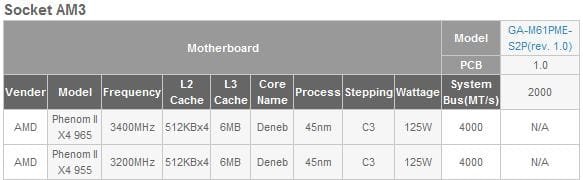
from what I've read this mobo will support the new processor
Not according to Gigabyte it isn't,

GIGABYTE - Support&Download - Motherboard - CPU Support List - GA-M61PME-S2P (rev. 1.0)

amd965.JPG

That isn't to say that it won't work. If it does about the only thing that will happen is that it won't be identified correctly in the bios or by Windows, it should still run at the correct speed though.

As Orpheous said, with that CPU you would be much better off getting a new AM3/DDR3 motherboard to use it on. Something like this,

Newegg.com - GIGABYTE GA-MA785GT-UD3H AM3 AMD 785G HDMI ATX AMD Motherboard - AMD Motherboards

would do nicely, and not to expensive.
 

My Computer

Computer type
PC/Desktop
Computer Manufacturer/Model Number
Me
OS
Win 7 Ultimate x64
CPU
FX-8350 @ 4.6 GHz so far
Motherboard
Asus M5A97 EVO
Memory
ADATA XPG V1 Series Black 8GB DDR3 1600
Graphics Card(s)
Sapphire R9 270x Dual-X
Sound Card
Xonar DGX w/ Corsair Vengence 1300
Monitor(s) Displays
Acer S232HL Abid
Screen Resolution
1920x1080
Hard Drives
120 GB OCZ Vertex 3
500 GB Seagate 7200.12
PSU
Antec Earthwatts 650W Green
Case
Antec Three Hundred
Cooling
Cooler Master 212 EVO
Keyboard
Logitech G510
Mouse
Logitech G500s
Internet Speed
35000/3000
I just noticed this today actually. A new mobo it is, that one linked would probably do the job. Cheers guys.
 

My Computer

OS
MS Windows 7 Home Premium 64-bit
Don't forget if you get a board that uses DDR3 you'll need new ram as well. If you do go for that board make sure to go here,

GIGABYTE - Product - Motherboard - Overview - GA-MA785GT-UD3H (rev. 1.0)

and check the memory compatibility list. Nothing saying that ram not on the list won't work, but better if you can get stuff that is for compatibilities sake.
 

My Computer

Computer type
PC/Desktop
Computer Manufacturer/Model Number
Me
OS
Win 7 Ultimate x64
CPU
FX-8350 @ 4.6 GHz so far
Motherboard
Asus M5A97 EVO
Memory
ADATA XPG V1 Series Black 8GB DDR3 1600
Graphics Card(s)
Sapphire R9 270x Dual-X
Sound Card
Xonar DGX w/ Corsair Vengence 1300
Monitor(s) Displays
Acer S232HL Abid
Screen Resolution
1920x1080
Hard Drives
120 GB OCZ Vertex 3
500 GB Seagate 7200.12
PSU
Antec Earthwatts 650W Green
Case
Antec Three Hundred
Cooling
Cooler Master 212 EVO
Keyboard
Logitech G510
Mouse
Logitech G500s
Internet Speed
35000/3000
Don't forget if you get a board that uses DDR3 you'll need new ram as well. If you do go for that board make sure to go here,

GIGABYTE - Product - Motherboard - Overview - GA-MA785GT-UD3H (rev. 1.0)

and check the memory compatibility list. Nothing saying that ram not on the list won't work, but better if you can get stuff that is for compatibilities sake.

Dammit, this CPU will near enough end up being a new build. Awk well. Next thing I know I'll need a new PSU to run it all.

What about this board? Asus M4A785TD-V EVO AMD 785G (Socket AM3) PCI-Express DDR3 Motherboard

As for RAM, would this do the job? Corsair XMS3 TwinX 4GB (2x2GB) DDR3 PC3-10666C9 1333MHz Dual Channel Kit seems a bit pricey.

Sorry for all the questions but I don't know a great deal about all this stuff.
 

My Computer

OS
MS Windows 7 Home Premium 64-bit
Dammit, this CPU will near enough end up being a new build. Awk well. Next thing I know I'll need a new PSU to run it all.

What about this board? Asus M4A785TD-V EVO AMD 785G (Socket AM3) PCI-Express DDR3 Motherboard

As for RAM, would this do the job? Corsair XMS3 TwinX 4GB (2x2GB) DDR3 PC3-10666C9 1333MHz Dual Channel Kit seems a bit pricey.

Sorry for all the questions but I don't know a great deal about all this stuff.

I'm using this board at the moment and have had no problems whatsoever, it's quite a nice little board in my opinion.
 

My Computer

Computer Manufacturer/Model Number
Home Built
OS
Windows 7 Ultimate RTM
CPU
AMD Phenom II x4 945
Motherboard
Asus M4A785 TD V Evo
Memory
6GB PC1600 DDR3
Graphics Card(s)
1GB XFX Radeon HD 5770
Sound Card
Onboard
Monitor(s) Displays
2x Daewoo 19" TFT
Screen Resolution
1440 x 900
Hard Drives
WD 120GB SATA
Hitachi 250GB SATA
PSU
Enermax 450w thing
Case
None...well half a case
Cooling
Thermalright Ultra-120 eXtreme 120mm Heat Sink
Other Info
GPU Cooler: Thermaltake V2
I'm using this board at the moment and have had no problems whatsoever, it's quite a nice little board in my opinion.

That's good enough for me. Think I'll go for this to be honest.

The only thing now is RAM. Can you tell me which RAM the mobo supports, because I see here there is,

DDR3 Tri Channel PC3 16000+
DDR3 Tri Channel PC3 14400+
DDR3 Tri Channel PC3 112800
DDR3 Tri Channel PC3 10666
DDR3 Dual Channel PC3 14400+
DDR3 Dual Channel PC3 12800
DDR3 Dual Channel PC3 10666

Again. sorry for so many questions but it's late, I'm not up to scratch on this stuff I don't want to end up buying parts that's not going to work.

Thanks again.
 

My Computer

OS
MS Windows 7 Home Premium 64-bit
That's good enough for me. Think I'll go for this to be honest.

The only thing now is RAM. Can you tell me which RAM the mobo supports

I've attached the official Asus memory support list for that board for you ;)
 

Attachments

My Computer

OS
XP Pro/Vista Ultimate (64)/Windows 7 Ultimate Signature Edition(64)
CPU
Core 2 Duo E8500 @ stock
Motherboard
Gigabyte EP45-UD3R
Memory
8Gb (4 X 2Gb) Corsair Dominator 1066Mhz DDR2
Graphics Card(s)
XFX ATI Radeon 4870 1Gb
Sound Card
Onboard 7.1
Monitor(s) Displays
BenQ E2200Hd, Asus VW161D, HP L1506
Screen Resolution
1920 X 1080
Hard Drives
Seagate 7200.12 500Gb
2 X Hitachi 1Tb
PSU
CoolerMaster 650 EPD
Case
Thermaltake
Cooling
2 X Noctua 120mm's, Stock Intel
Keyboard
Logitech
Mouse
Logitech
Thanks everybody for your help so far. Just one more question before I proceed.

Since I plan to replace my current mobo, CPU and RAM with these...

Asus M4A785TD-V EVO AMD 785G (Socket AM3) PCI-Express DDR3 Motherboard
AMD Quad Core Phenom II X4 965 Black Edition 3.4GHz Socket AM3
Corsair XMS3 TwinX 4GB (2x2GB) DDR3 PC3-10666C9 1333MHz Dual Channel Kit

I know the new CPU is a higher wattage. For the life of me I can't find a number for the mobo.

I just wanted to make sure my PSU was big enough to take the new stuff. It's a 450W, which I know isn't particularly good.

I have my systems specs added so if somebody could compare the two and give me an idea of what power is needed I'd appreciate that. Thanks again!:D

I really need to get clued into these things.
 

My Computer

OS
MS Windows 7 Home Premium 64-bit

My Computer

Computer type
PC/Desktop
Computer Manufacturer/Model Number
Me
OS
Win 7 Ultimate x64
CPU
FX-8350 @ 4.6 GHz so far
Motherboard
Asus M5A97 EVO
Memory
ADATA XPG V1 Series Black 8GB DDR3 1600
Graphics Card(s)
Sapphire R9 270x Dual-X
Sound Card
Xonar DGX w/ Corsair Vengence 1300
Monitor(s) Displays
Acer S232HL Abid
Screen Resolution
1920x1080
Hard Drives
120 GB OCZ Vertex 3
500 GB Seagate 7200.12
PSU
Antec Earthwatts 650W Green
Case
Antec Three Hundred
Cooling
Cooler Master 212 EVO
Keyboard
Logitech G510
Mouse
Logitech G500s
Internet Speed
35000/3000
Don't forget if you get a board that uses DDR3 you'll need new ram as well. If you do go for that board make sure to go here,

GIGABYTE - Product - Motherboard - Overview - GA-MA785GT-UD3H (rev. 1.0)

and check the memory compatibility list. Nothing saying that ram not on the list won't work, but better if you can get stuff that is for compatibilities sake.

Dammit, this CPU will near enough end up being a new build. Awk well. Next thing I know I'll need a new PSU to run it all.

What about this board? Asus M4A785TD-V EVO AMD 785G (Socket AM3) PCI-Express DDR3 Motherboard

As for RAM, would this do the job? Corsair XMS3 TwinX 4GB (2x2GB) DDR3 PC3-10666C9 1333MHz Dual Channel Kit seems a bit pricey.

Sorry for all the questions but I don't know a great deal about all this stuff.
Kyle, before you attempt this project it may be wise to study up or have an experienced builder with you. From your shopping list you look to be spending $50 to $80 bucks in a 500-600 watt psu, the processor will cost you $125 to $150 and the Motherboard will run you $90 to $165 and ddr 3 memory is about $45 a gig, so you are looking to invest $400 to $500 bucks. Your existing rig looks pretty good now.
Decide what you need all this additional horsepower for, I perceive you are wanting to build a gaming machine?
 

My Computer

Computer Manufacturer/Model Number
Custom Build
OS
Windows 7 7600 1 X64
CPU
AMD PHENOM II X 550 PROCESSOR 3.1 ghz
Motherboard
ASUS M4A78-TE
Memory
Corsair 4 gig ddr 3
Graphics Card(s)
ati radeon 3300
Sound Card
ati hd
Monitor(s) Displays
syncmaster 2033sw
Screen Resolution
1600X900 60 hz refresh
Hard Drives
twin_seagates SATA's 1 TB & 500 Gig, hitachi_slimline 160 gig
PSU
antec_550 watt
Case
cooler master GLite
Cooling
stock_heat sink
Internet Speed
20mbs up/ 1.5mbs down
Other Info
favorite child "stewie"
favorite dog "brian"

My Computer

OS
MS Windows 7 Home Premium 64-bit

My Computer

OS
XP Pro/Vista Ultimate (64)/Windows 7 Ultimate Signature Edition(64)
CPU
Core 2 Duo E8500 @ stock
Motherboard
Gigabyte EP45-UD3R
Memory
8Gb (4 X 2Gb) Corsair Dominator 1066Mhz DDR2
Graphics Card(s)
XFX ATI Radeon 4870 1Gb
Sound Card
Onboard 7.1
Monitor(s) Displays
BenQ E2200Hd, Asus VW161D, HP L1506
Screen Resolution
1920 X 1080
Hard Drives
Seagate 7200.12 500Gb
2 X Hitachi 1Tb
PSU
CoolerMaster 650 EPD
Case
Thermaltake
Cooling
2 X Noctua 120mm's, Stock Intel
Keyboard
Logitech
Mouse
Logitech
Nothing at all wrong with that RAM, but you may be able to save a bit and still stay with reliable brands like Corsair, Kingston, or Crucial.

For peace of mind, stay with the specific choices on the supported RAM list supplied earlier in this thread. Check around with your suppliers. It isn't likely you will ever notice the differences in timings. Find out your suppliers policy if your RAM is defective. You should test it thoroughly as soon as you finish the build with Memtest or a similar application.

That's a good high quality PSU and shouldn't give you any problems.
 

My Computer

Computer type
PC/Desktop
Computer Manufacturer/Model Number
Ignatz Special; 4 speed manual gearbox; factory air conditioning; one of one
OS
Windows 7 Home Premium SP1, 64-bit
CPU
Intel Skylake i5-6600K, not overclocked
Motherboard
AsRock Z170M Extreme 4, micro ATX
Memory
8 GB HyperX DDR4-2666 (2 x 4 GB)
Graphics Card(s)
none; graphics are integrated on CPU
Sound Card
onboard: Realtek ALC1150; external: USB Behringer UF0-202
Monitor(s) Displays
Dell S2340M 23 inch IPS
Screen Resolution
1600 x 900
Hard Drives
System: Crucial MX100 series SSD, 128 GB;
Data: Samsung Spinpoint 103SJ, 1 TB;
Backup: WD Caviar Green WD30EZRX-00D8PB0, 3 TB
PSU
Rosewill SilentNight 500 watt fanless, semi-modular
Case
Antec Solo II
Cooling
Noctua NH-U12S; Noctua F12 intake, Noctua S12A exhaust
Keyboard
Microsoft 200 6JH-00001 USB
Mouse
Dell or Microsoft optical wired; USB
Antivirus
Microsoft Security Essentials and Malwarebytes Premium
Browser
Pale Moon
Other Info
All fans PWM; speeds at idle: CPU circa 500 rpm; intake circa 600 rpm; exhaust circa 600 rpm; CPU temps 27 idle and 47 C load in a warm room (27 C/81 F) when running Intel Extreme Tuning Utility stress test.
Thanks everybody for your replies, everyone has been very helpful. Picking up mobo and RAM soon and the build will get done after Christmas, will post how it goes when I'm done.

Thanks again!:D
 

My Computer

OS
MS Windows 7 Home Premium 64-bit
Back
Top