Advice on uninstalling ALL of Adobe CS5.5

desktop

New member
Member
Local time
12:45 PM
Messages
90
Location
Michigan
Hi Guys,

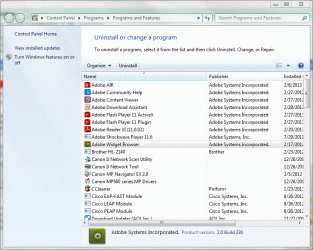
I want to completely uninstall Creative Suite 5.5 before I install CS6, but there seems to be several different methods for achieving this. I used the CS5 uninstall program and it uninstalled all the main programs (Illustrator, Photoshop, etc.), then I ran the Adobe Cleaner Utility, but after restarting I still see a lot of Adobe programs left behind (see attached screenshot).

I'm wanting to know if I can just go ahead and uninstall of these programs, too?
 

Attachments
  • win7uninstall.GIF
    win7uninstall.GIF
    143.7 KB · Views: 12

My Computer My Computer

At a glance

Windows 7 Home PremiumIntel Q6600 SLACR (2.7GHz)8GB G.SKILL PC6400ASUS EN9600GSO GeForce 9600 GSO 512MB
OS
Windows 7 Home Premium
CPU
Intel Q6600 SLACR (2.7GHz)
Motherboard
Gigabyte P35-DS4 (Rev 2.1)
Memory
8GB G.SKILL PC6400
Graphics Card(s)
ASUS EN9600GSO GeForce 9600 GSO 512MB
Monitor(s) Displays
LG W2252TQ 22" Widescreen
Screen Resolution
1680 x 1050
Hard Drives
2 x SeaGate Barracuda SATA (250GB, 320GB)
PSU
PCP&C Silencer 610
Case
Ultra m998
Cooling
ThermalRight Ultra 120E
Keyboard
Logitech K360
Mouse
Logitech Performance MX
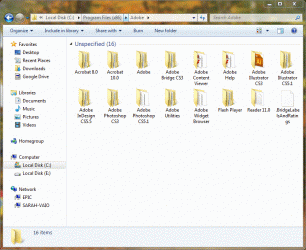
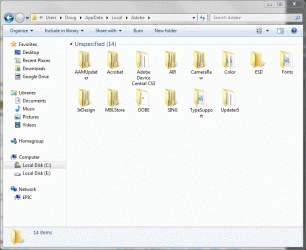
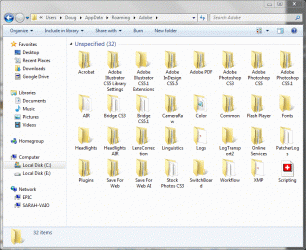
I also still have a lot of Adobe folders still on the system (see attachments).
 

Attachments

  • win7adobefolders.GIF
    win7adobefolders.GIF
    140.9 KB · Views: 3
  • win7adobefolders2.GIF
    win7adobefolders2.GIF
    128 KB · Views: 2
  • win7adobefolders3.GIF
    win7adobefolders3.GIF
    141.5 KB · Views: 4

My Computer My Computer

At a glance

Windows 7 Home PremiumIntel Q6600 SLACR (2.7GHz)8GB G.SKILL PC6400ASUS EN9600GSO GeForce 9600 GSO 512MB
OS
Windows 7 Home Premium
CPU
Intel Q6600 SLACR (2.7GHz)
Motherboard
Gigabyte P35-DS4 (Rev 2.1)
Memory
8GB G.SKILL PC6400
Graphics Card(s)
ASUS EN9600GSO GeForce 9600 GSO 512MB
Monitor(s) Displays
LG W2252TQ 22" Widescreen
Screen Resolution
1680 x 1050
Hard Drives
2 x SeaGate Barracuda SATA (250GB, 320GB)
PSU
PCP&C Silencer 610
Case
Ultra m998
Cooling
ThermalRight Ultra 120E
Keyboard
Logitech K360
Mouse
Logitech Performance MX
I went through this myself when I made the update for Adobe software. Do you have CCleaner installed on your computer? I think it could be a quick solution to uninstall what's left behind.
 

My Computer My Computer

At a glance

Windows 7 Home Premiumintel i38 GBRadeon
Computer type
Laptop
Computer Manufacturer/Model Number
HP
OS
Windows 7 Home Premium
CPU
intel i3
Memory
8 GB
Graphics Card(s)
Radeon
Screen Resolution
1366x768
Mouse
A4 Tech
Antivirus
Avira
Browser
Chrome
Adobe is well known for installing lots of unwanted/un-needed/undesirable software on end user systems. Not only does it install files and programs, it also puts lots of entries into your registry.

The best way to deal with this is to use a program like Advanced Uninstaller Pro to remove Adobe products. This software first runs the standard application uninstaller, and then searches your system for leftover stuff related to the software you just uninstalled. It will find files, folders, and registry entries that have been left behind and give you the option to select some, all, or none to de-install.
 

My Computer My Computer

At a glance

Win7-64Intel i7-3770S16GBnVidia GT630
Computer type
PC/Desktop
Computer Manufacturer/Model Number
Custom built
OS
Win7-64
CPU
Intel i7-3770S
Motherboard
ASUS P8Z77-M
Memory
16GB
Graphics Card(s)
nVidia GT630
Sound Card
onboard
Monitor(s) Displays
dual
Screen Resolution
1920x1200 (primary) 1050x1680 (secondary)
Hard Drives
128GB SSD (boot)
64GB SSD (Temp/My Documents)
500GB (photos/videos)
1TB (rendered video, backups)
PSU
650W
Case
Thermaltake A30
Cooling
Thermaltake
Keyboard
Logitech Lighted
Mouse
Kensington Expert Mouse (trackball)
Internet Speed
FIOS 35/35
Antivirus
MS Security Essentials
Browser
Chrome (beta)

My Computer My Computer

At a glance

Microsoft Windows 10 Pro Insider Preview 64-bitIntel(R) Core(TM) i3-4130 CPU @ 3.40GHzCorsair Vengence 4GB x2 (8.00GB Dual-Channel ...2047MB GeForce GTS 450 (ZOTAC International)
Computer type
PC/Desktop
Computer Manufacturer/Model Number
Self Assembled
OS
Microsoft Windows 10 Pro Insider Preview 64-bit
CPU
Intel(R) Core(TM) i3-4130 CPU @ 3.40GHz
Motherboard
Gigabyte Technology Co., Ltd. B85M-D3H
Memory
Corsair Vengence 4GB x2 (8.00GB Dual-Channel DDR3 @ 798MHz)
Graphics Card(s)
2047MB GeForce GTS 450 (ZOTAC International)
Sound Card
Onboard (Realtek High Definition Audio)
Monitor(s) Displays
LG Flatron E2040T
Screen Resolution
1600x900
Hard Drives
Western Digital 1 TB
Seagate 500 GB
PSU
Corsair VS550
Case
Cooler Master K380
Cooling
Cooler Master Seidon 120V Plus
Keyboard
Logitech MK260r
Mouse
Logitech MK260r
Internet Speed
PMPL Broadband
Antivirus
Windows Defender + MBAM
Browser
Firefox
Other Info
Dell Studio 15" Laptop
Back
Top