Aero blue highlight

Rose1

New member
Member
VIP
Local time
7:07 AM
Messages
416
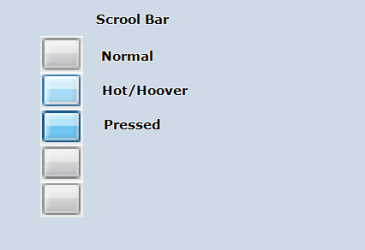
Is there a way to remove the blue highlight from Aero themes without switching themes? Whenever I go advanced on personalize and set my color on selected items. It doesn't change. Scrolbar slide is highlight blue. Minimize, restore is blue highight.
 

My Computer

Computer type
Laptop
Computer Manufacturer/Model Number
compaq
OS
windows Ultimate
Is there a way to remove the blue highlight from Aero themes without switching themes? Whenever I go advanced on personalize and set my color on selected items. It doesn't change. Scrolbar slide is highlight blue. Minimize, restore is blue highight.

Are you trying to use a custom theme or a change from the Windows 7 default? If you are trying to use a custom one, it may sound like a pain in the tookis, but try "duplicating" that theme if the changes don't seem to stick... To do this, you'll need to create a seperate theme and name it something different, keeping all the settings you want... then you can switch in between and hopefully this will help the changes "stick" Hope this helps!
 

My Computer

Computer type
PC/Desktop
Computer Manufacturer/Model Number
I built my pc
OS
Win7 Home Pro x64
CPU
core i7 3960x
Motherboard
Asus Rampage Gene IV
Memory
32GB DDR3 1333
Graphics Card(s)
GTX 780
Sound Card
onboard Creative x-Fi
Monitor(s) Displays
25" Asus
Screen Resolution
1080p (1920x1080)
Hard Drives
Corsair Sata III SSD
1TB WD SATA II 7200 HDD for storage
PSU
Silverstone 1200 Watt Modular
Case
CoolerMaster HAF X blue edition
Cooling
Corsair H80 liquid CPU cooler
Keyboard
CM Storm
Mouse
CM Storm
Internet Speed
50 down, 5 up
Is there a way to remove the blue highlight from Aero themes without switching themes? Whenever I go advanced on personalize and set my color on selected items. It doesn't change. Scrolbar slide is highlight blue. Minimize, restore is blue highight.

Are you trying to use a custom theme or a change from the Windows 7 default? If you are trying to use a custom one, it may sound like a pain in the tookis, but try "duplicating" that theme if the changes don't seem to stick... To do this, you'll need to create a seperate theme and name it something different, keeping all the settings you want... then you can switch in between and hopefully this will help the changes "stick" Hope this helps!
I'm using the windows 7 aero theme.
 

My Computer

Computer type
Laptop
Computer Manufacturer/Model Number
compaq
OS
windows Ultimate

Attachments

  • scroll.png
    scroll.png
    3.8 KB · Views: 24

My Computer

Computer type
Laptop
Computer Manufacturer/Model Number
Sager NP9170
OS
Win 7 Pro x64 / Win 10 Pro
CPU
Intel(R) Core(TM) i7-3630QM CPU @ 2.40GHz
Motherboard
CLEVO P170EM
Memory
12 GB
Graphics Card(s)
(1) Intel(R) HD Graphics 4000 (2) NVIDIA GeForce GTX 675M
Sound Card
(1) Realtek High Definition Audio (2) Intel(R) Display Aud
Monitor(s) Displays
17.3
Screen Resolution
1920x1080
Hard Drives
(1) Samsung 860 EVO 500GB(OS) (1) Samsung 860 EVO 500GB(Data)
Keyboard
Backlite
Antivirus
MSE, Malwarebytes Pro
Browser
Firefox
Other Info
DESKTOP: Custom-built.
OS: Win 10 Pro x64.
CASE: Rosewill R5.
CPU: Intel I5 4670K CPU @ 3.40GHz.
CPU COOLER: Cool Master Hyper 212 EVO.
MOTHERBOARD: Asus Z87-A.
MEMORY: Kingston HyperX 2x4 GB.
GPU: Nvidia Geforce 650 TI.
PSU: Corsair TX750.
DRIVES: (1) Samsung 840 120 GB SSD (2) Western Digital blue 500 GB 7200 RPM.
Thanks anyway. I'll keep searching.
 

My Computer

Computer type
Laptop
Computer Manufacturer/Model Number
compaq
OS
windows Ultimate
Back
Top