
You are using an out of date browser. It may not display this or other websites correctly.
You should upgrade or use an alternative browser.
You should upgrade or use an alternative browser.
aero effect and transparency
- Thread starter ej18
- Start date
ej18...
You should probably start a NEW thread about this problem.
Also, please fill in your system specs. It will greatly accellerate the memberships ability to provide you with good information.
You should probably start a NEW thread about this problem.
Also, please fill in your system specs. It will greatly accellerate the memberships ability to provide you with good information.
My Computer
- Computer type
- PC/Desktop
- Computer Manufacturer/Model Number
- Homebuilt
- OS
- windows 7 32
- CPU
- Intel i7 4770K
- Motherboard
- Asus Z97-A
- Memory
- Corsair Vengeance 8gb DDR3 2133(PC3 17000)
- Graphics Card(s)
- nVidia GTX 660 2gb
- Sound Card
- Asus Xonar D1
- Monitor(s) Displays
- Dell Ultrasharp UM2913WM
- Screen Resolution
- 2560x1080 32
- Hard Drives
- PNY 240gb SSD
Seagate 500gb SSD
- PSU
- Corsair CXM 600
- Case
- Fractal Design Define R4
- Cooling
- Arctic Freezer Xtreme rev 2
- Keyboard
- Logitech K800 Wireless Illuminated
- Mouse
- MicroSoft 5000
- Internet Speed
- Cable
- Antivirus
- MSE
- Browser
- IE 11 and Chrome
- Other Info
- Samsung DVD-RW
Cambridge 4.1 speakers
Hauppauge HVR-950 USB Tuner
Asus Optimized Overclock to 4.4ghz

- Local time
- 5:48 PM
- Messages
- 18,396
Posts moved to it's own thread. 
My Computer
- Computer type
- PC/Desktop
- Computer Manufacturer/Model Number
- Airbot 2.0
- OS
- Windows 7 Ultimate x64 SP1
- CPU
- Core i7 920 (D0) @ 4Ghz, *26c idle *65c full load on air
- Motherboard
- Asus P6X58D Premium - Sata 6Gb/s - USB 3.0
- Memory
- 12GB DDR3 Corsair Dominator -CMD12GX3M6A1600C8 at 1600MHz
- Graphics Card(s)
- Zotac Geforce GTX 770
- Sound Card
- ASUS Xonar D2X
- Monitor(s) Displays
- 1 LG 24" Flatron W2453V-PF 1 Samsung 24" P2450H both 2ms RT
- Screen Resolution
- 1920x1080@60hz
- Hard Drives
- 1 Samsung 250GB 840 Evo SSD
1 OCZ Vertex2 180GB SSD
1 TB Samsung Spinpoint F1 7200RPM 32MB cache
2 500GB WD Caviar Blacks 7200RPM 32MB cache (WD5001AALS)
Pioneer DVD Burner DVR-S18M
- PSU
- Corsair HX1000W
- Case
- Cooler Master HAF 932
- Cooling
- Case Fans *3 230mm, *1 140mm/CPU - *Tuniq Tower 120 Extreme
- Keyboard
- Logitech Wireless MK700
- Mouse
- Logitech Wireless MK700
- Internet Speed
- DL 15 Mbps UL 0.98 Mbps
- Antivirus
- None
- Browser
- Firefox Nightly
- Other Info
- Processor-7.7 *RAM- 7.9 *Graphics-7.9 *Gaming Graphics- 7.9 *SSD- 7.8 W.E.I final score= 7.7
*Phone- LG Nexus 5

- Local time
- 5:48 PM
- Messages
- 233
Hi ej18,
First of all, Aero is not available with Windows 7 Starter or Home Basic. If you have either of these, you will not be able to use Aero. You also need to use a Windows theme to display Aero graphics.
To make sure your computer meets hardware requirements to use Aero, visit http://windows.microsoft.com/en-us/windows7/What-is-the-Aero-desktop-experience
Cheers,
Cassandra
Microsoft Windows Outreach
First of all, Aero is not available with Windows 7 Starter or Home Basic. If you have either of these, you will not be able to use Aero. You also need to use a Windows theme to display Aero graphics.
To make sure your computer meets hardware requirements to use Aero, visit http://windows.microsoft.com/en-us/windows7/What-is-the-Aero-desktop-experience
Cheers,
Cassandra
Microsoft Windows Outreach
My Computer
- Computer Manufacturer/Model Number
- HP/p6207c
- OS
- Windows 7 Professional 64-bit
- CPU
- Pentium(R) Dual-Core CPU E5300 @260GHz
- Sound Card
- RealTek High Def Audio
- Monitor(s) Displays
- HP 2159m
- Screen Resolution
- 1920 x 1080 x 60
- Mouse
- HP M/N: M-U0009-HP1
- Internet Speed
- Broadband

Hello EJ, and welcome to Seven Forums.
Here are some items to check to be able to have Aero and Transparency.
Shawn
Here are some items to check to be able to have Aero and Transparency.
- Aero is not available in Windows 7 Starter edition.
- 1 GHz 32-bit or 64-bit processor
- 1 GB of system memory
- A graphics card with support for DirectX 9 graphics with at least 128 MB of memory.
- The graphics card must support Pixel Shader 2.0 and the Windows Display Driver Model (WDDM).
- Aero theme used.
- The Desktop Window Manager Session Manager and Themes Services need to be set as Started and Automatic.
- You must be have True Color (32 bit) set instead of High Color (16 bit).
- Desktop composition needs to be enabled (checked) in Visual Effects.
- Refresh or update your WEI score.
Shawn
My Computer
- Computer type
- PC/Desktop
- Computer Manufacturer/Model Number
- Self built custom
- OS
- 64-bit Windows 11 Pro for Workstations
- CPU
- Intel i7-8700K OC'd to 5 GHz
- Motherboard
- ASUS ROG Maximus XI Formula Z390
- Memory
- 64 GB (4x16GB) G.SKILL TridentZ RGB DDR4 3600 MHz
- Graphics Card(s)
- ASUS ROG-STRIX-GTX1080TI-O11G-GAMING
- Sound Card
- Integrated
- Monitor(s) Displays
- 2 x Samsung Odyssey G7 27"
- Screen Resolution
- 2560x1440
- Hard Drives
- 1TB Samsung 990 PRO M.2,
4TB Samsung 990 PRO PRO M.2,
TerraMaster F8 SSD Plus NAS
- PSU
- Seasonic Prime Titanium 850W
- Case
- Thermaltake Core P3
- Cooling
- Corsair Hydro H115i
- Keyboard
- Logitech wireless K800
- Mouse
- Logitech MX Master 4
- Internet Speed
- 2 Gb/s Download and 100 Mb/s Upload
- Antivirus
- Malwarebyte Anti-Malware Premium
- Browser
- Google Chrome
- Other Info
- Logitech Z625 speaker system,
Logitech BRIO 4K Pro webcam,
HP Color LaserJet Pro MFP M477fdn,
APC SMART-UPS RT 1000 XL - SURT1000XLI,
Galaxy S23 Plus phone
Hello EJ,
Did you go into Services (click on link) and right click on Desktop Window Manager Session Manager, click on Properties, select Automatic from the drop down box next to "Startup type", click on Apply, click on Start, then click on OK?
Did you go into Services (click on link) and right click on Desktop Window Manager Session Manager, click on Properties, select Automatic from the drop down box next to "Startup type", click on Apply, click on Start, then click on OK?
Last edited:
My Computer
- Computer type
- PC/Desktop
- Computer Manufacturer/Model Number
- Self built custom
- OS
- 64-bit Windows 11 Pro for Workstations
- CPU
- Intel i7-8700K OC'd to 5 GHz
- Motherboard
- ASUS ROG Maximus XI Formula Z390
- Memory
- 64 GB (4x16GB) G.SKILL TridentZ RGB DDR4 3600 MHz
- Graphics Card(s)
- ASUS ROG-STRIX-GTX1080TI-O11G-GAMING
- Sound Card
- Integrated
- Monitor(s) Displays
- 2 x Samsung Odyssey G7 27"
- Screen Resolution
- 2560x1440
- Hard Drives
- 1TB Samsung 990 PRO M.2,
4TB Samsung 990 PRO PRO M.2,
TerraMaster F8 SSD Plus NAS
- PSU
- Seasonic Prime Titanium 850W
- Case
- Thermaltake Core P3
- Cooling
- Corsair Hydro H115i
- Keyboard
- Logitech wireless K800
- Mouse
- Logitech MX Master 4
- Internet Speed
- 2 Gb/s Download and 100 Mb/s Upload
- Antivirus
- Malwarebyte Anti-Malware Premium
- Browser
- Google Chrome
- Other Info
- Logitech Z625 speaker system,
Logitech BRIO 4K Pro webcam,
HP Color LaserJet Pro MFP M477fdn,
APC SMART-UPS RT 1000 XL - SURT1000XLI,
Galaxy S23 Plus phone

I am sorry that you are having aero effect and transparency issues. Most of the potential solutions have already been covered, but this may add some new light on the potential solution:
How To Fix No Aero Transparency in Windows 7 - How-To Geek
How To Fix No Aero Transparency in Windows 7 - How-To Geek
My Computer
- Computer type
- PC/Desktop
- Computer Manufacturer/Model Number
- Dell XPS 420
- OS
- Windows 10, Home Clean Install
- CPU
- Intel Core2 processsor Q8200(2.33Ghz 1333FSB) Quad Core Tech
- Motherboard
- Dell
- Memory
- 6 gb
- Graphics Card(s)
- ATI Radeon 256MB HD3650
- Sound Card
- Intergrated 7.1 Channel Audio
- Monitor(s) Displays
- Dell SP2009W 20"
- Hard Drives
- 640 GB Serial ATA Hard drive
- Cooling
- Fan
- Keyboard
- Dell USB Keyboard
- Mouse
- Dell Premium Optical USB
- Internet Speed
- DSL 2.85
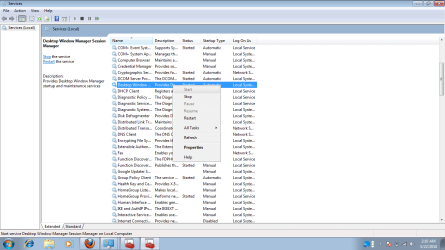
Click on Properties, then you should be able to see it. 
My Computer
- Computer type
- PC/Desktop
- Computer Manufacturer/Model Number
- Self built custom
- OS
- 64-bit Windows 11 Pro for Workstations
- CPU
- Intel i7-8700K OC'd to 5 GHz
- Motherboard
- ASUS ROG Maximus XI Formula Z390
- Memory
- 64 GB (4x16GB) G.SKILL TridentZ RGB DDR4 3600 MHz
- Graphics Card(s)
- ASUS ROG-STRIX-GTX1080TI-O11G-GAMING
- Sound Card
- Integrated
- Monitor(s) Displays
- 2 x Samsung Odyssey G7 27"
- Screen Resolution
- 2560x1440
- Hard Drives
- 1TB Samsung 990 PRO M.2,
4TB Samsung 990 PRO PRO M.2,
TerraMaster F8 SSD Plus NAS
- PSU
- Seasonic Prime Titanium 850W
- Case
- Thermaltake Core P3
- Cooling
- Corsair Hydro H115i
- Keyboard
- Logitech wireless K800
- Mouse
- Logitech MX Master 4
- Internet Speed
- 2 Gb/s Download and 100 Mb/s Upload
- Antivirus
- Malwarebyte Anti-Malware Premium
- Browser
- Google Chrome
- Other Info
- Logitech Z625 speaker system,
Logitech BRIO 4K Pro webcam,
HP Color LaserJet Pro MFP M477fdn,
APC SMART-UPS RT 1000 XL - SURT1000XLI,
Galaxy S23 Plus phone
You just didn't do the rest of the instructions.
Right click on Desktop Window Manager Session Manager, click on Properties, select Automatic from the drop down box next to "Startup type", click on Apply, click on Start, then click on OK.
Right click on Desktop Window Manager Session Manager, click on Properties, select Automatic from the drop down box next to "Startup type", click on Apply, click on Start, then click on OK.
My Computer
- Computer type
- PC/Desktop
- Computer Manufacturer/Model Number
- Self built custom
- OS
- 64-bit Windows 11 Pro for Workstations
- CPU
- Intel i7-8700K OC'd to 5 GHz
- Motherboard
- ASUS ROG Maximus XI Formula Z390
- Memory
- 64 GB (4x16GB) G.SKILL TridentZ RGB DDR4 3600 MHz
- Graphics Card(s)
- ASUS ROG-STRIX-GTX1080TI-O11G-GAMING
- Sound Card
- Integrated
- Monitor(s) Displays
- 2 x Samsung Odyssey G7 27"
- Screen Resolution
- 2560x1440
- Hard Drives
- 1TB Samsung 990 PRO M.2,
4TB Samsung 990 PRO PRO M.2,
TerraMaster F8 SSD Plus NAS
- PSU
- Seasonic Prime Titanium 850W
- Case
- Thermaltake Core P3
- Cooling
- Corsair Hydro H115i
- Keyboard
- Logitech wireless K800
- Mouse
- Logitech MX Master 4
- Internet Speed
- 2 Gb/s Download and 100 Mb/s Upload
- Antivirus
- Malwarebyte Anti-Malware Premium
- Browser
- Google Chrome
- Other Info
- Logitech Z625 speaker system,
Logitech BRIO 4K Pro webcam,
HP Color LaserJet Pro MFP M477fdn,
APC SMART-UPS RT 1000 XL - SURT1000XLI,
Galaxy S23 Plus phone

Oh, ok. Sorry.
Leave it set to Automatic, and restart the computer to see if it may start automatically afterwards.
Leave it set to Automatic, and restart the computer to see if it may start automatically afterwards.
My Computer
- Computer type
- PC/Desktop
- Computer Manufacturer/Model Number
- Self built custom
- OS
- 64-bit Windows 11 Pro for Workstations
- CPU
- Intel i7-8700K OC'd to 5 GHz
- Motherboard
- ASUS ROG Maximus XI Formula Z390
- Memory
- 64 GB (4x16GB) G.SKILL TridentZ RGB DDR4 3600 MHz
- Graphics Card(s)
- ASUS ROG-STRIX-GTX1080TI-O11G-GAMING
- Sound Card
- Integrated
- Monitor(s) Displays
- 2 x Samsung Odyssey G7 27"
- Screen Resolution
- 2560x1440
- Hard Drives
- 1TB Samsung 990 PRO M.2,
4TB Samsung 990 PRO PRO M.2,
TerraMaster F8 SSD Plus NAS
- PSU
- Seasonic Prime Titanium 850W
- Case
- Thermaltake Core P3
- Cooling
- Corsair Hydro H115i
- Keyboard
- Logitech wireless K800
- Mouse
- Logitech MX Master 4
- Internet Speed
- 2 Gb/s Download and 100 Mb/s Upload
- Antivirus
- Malwarebyte Anti-Malware Premium
- Browser
- Google Chrome
- Other Info
- Logitech Z625 speaker system,
Logitech BRIO 4K Pro webcam,
HP Color LaserJet Pro MFP M477fdn,
APC SMART-UPS RT 1000 XL - SURT1000XLI,
Galaxy S23 Plus phone
i already done sir.still no aero effect..my os before is vista home premium but don't have either aero effect.what should i do?
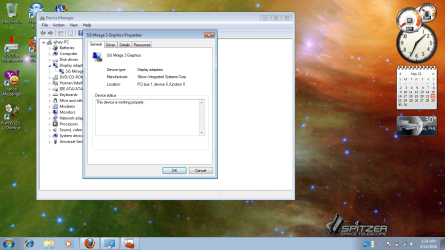
is there any requirements in vga driver for aero effects?because im using sis mirage 3 graphics.
is there any requirements in vga driver for aero effects?because im using sis mirage 3 graphics.
My Computer
- OS
- windows 7

zigzag3143
New member
- Local time
- 6:48 PM
- Messages
- 27,140
is there any requirements in vga driver for aero effects?because im using sis mirage 3 graphics.
ANy chance we could get the model and specs of your card? Minimum requirements are 256Mb for aero to work.
All you have to do is google aero requirements
Ken
My Computer
- Computer Manufacturer/Model Number
- HP Pavillion dv-7 1005 Tx
- OS
- Win 8 Release candidate 8400
- Memory
- 4 gigs
- Graphics Card(s)
- Nvidia 9600M
- Sound Card
- HD built-in
- Monitor(s) Displays
- 17" Wxga
- Screen Resolution
- 1440x900
- Cooling
- none
- Internet Speed
- 45Mb down 5Mb up
EJ,
From looking at your Neo Basic B3140 N specs, you have a SiS Mirage 3+ integrated graphics.
Double check in your BIOS settings to make sure that you have enough memory allocated for the graphics chip. 256MB recommended and default.
From looking at your Neo Basic B3140 N specs, you have a SiS Mirage 3+ integrated graphics.
Double check in your BIOS settings to make sure that you have enough memory allocated for the graphics chip. 256MB recommended and default.
My Computer
- Computer type
- PC/Desktop
- Computer Manufacturer/Model Number
- Self built custom
- OS
- 64-bit Windows 11 Pro for Workstations
- CPU
- Intel i7-8700K OC'd to 5 GHz
- Motherboard
- ASUS ROG Maximus XI Formula Z390
- Memory
- 64 GB (4x16GB) G.SKILL TridentZ RGB DDR4 3600 MHz
- Graphics Card(s)
- ASUS ROG-STRIX-GTX1080TI-O11G-GAMING
- Sound Card
- Integrated
- Monitor(s) Displays
- 2 x Samsung Odyssey G7 27"
- Screen Resolution
- 2560x1440
- Hard Drives
- 1TB Samsung 990 PRO M.2,
4TB Samsung 990 PRO PRO M.2,
TerraMaster F8 SSD Plus NAS
- PSU
- Seasonic Prime Titanium 850W
- Case
- Thermaltake Core P3
- Cooling
- Corsair Hydro H115i
- Keyboard
- Logitech wireless K800
- Mouse
- Logitech MX Master 4
- Internet Speed
- 2 Gb/s Download and 100 Mb/s Upload
- Antivirus
- Malwarebyte Anti-Malware Premium
- Browser
- Google Chrome
- Other Info
- Logitech Z625 speaker system,
Logitech BRIO 4K Pro webcam,
HP Color LaserJet Pro MFP M477fdn,
APC SMART-UPS RT 1000 XL - SURT1000XLI,
Galaxy S23 Plus phone