Aero Effects/Transparency Help

Muffinz413

New member
Local time
4:47 PM
Messages
3
Location
South Dakota
Hello I need help with my aero on my computer! My Aero Snap and Shake work perfectly but my transparecy and peek do not work at all. So I have no transparecy what so ever. Is there some sort of hack that can force windows to display these features? PLEASE HELP!!!! My OP is
Windows 7 RC 7100.
~~~~~~~~~~~~ERROR MESSAGE!~~~~~~~~~~~~
The current video card may support Aero with a driver that is compliant with the Windows Display Driver Model (WDDM). Contact the manufacturer of your computer or video card for a WDDM-compatible driver.

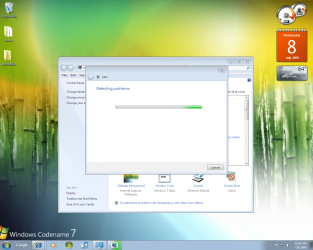
PIC OF DESKTOP IN ATTACHED FILES
 

Attachments
  • NEW.PNG
    NEW.PNG
    282.6 KB · Views: 296

My Computer

Computer Manufacturer/Model Number
Dell Dimension 4700
OS
Windows 7 RC 7100
Memory
2 MB
Graphics Card(s)
Intel Graphics Media Accelerator Driver
Sound Card
SoundMax Integrated Digital Audio
Monitor(s) Displays
Generic PnP Monitor
Screen Resolution
1280/1024
Keyboard
Dell
Mouse
Dell
Internet Speed
Local Area Connection
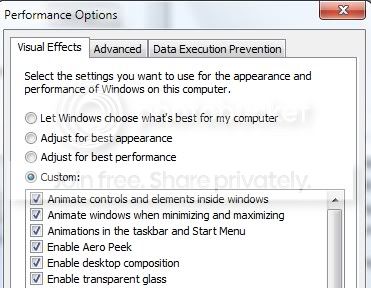
Make sure that they are checked in "Performance Options"
performanceoptions.jpg
 

My Computer

Computer type
PC/Desktop
Computer Manufacturer/Model Number
Bruce ... somewhere in his 40's
OS
Windows 7 Ultimate 32bit SP1
CPU
Intel(R) Core(TM)2 Quad CPU @ 2.40GHz, 2400 MHz
Motherboard
INTEL/D975XBX2
Memory
4 GB
Graphics Card(s)
ATI Radeon HD 2600 Pro
Monitor(s) Displays
Samsung SyncMaster 914v
Screen Resolution
1280 x 1024
Hard Drives
2/500GB each ... ST3500630AS ATA Device.
One is not connected
PSU
Rocketfish 700 W
Case
G.Skill Gigabyte Chassis
Keyboard
Standard PS/2 Keyboard
Mouse
Microsoft PS/2 Mouse
Internet Speed
DSL
Antivirus
Avira Internet Security
Browser
IE 11
Other Info
ATI HDMI Audio
Where can u access Performance Options?
 

My Computer

Computer Manufacturer/Model Number
Dell E520
OS
7600x64 RTM
CPU
Intel® Q6700, 2.66 GHz stock clock (upgraded)
Motherboard
Dell
Memory
4g (upgraded)
Graphics Card(s)
Sapphire Radeon Toxic HD 3870 512MB GDDR4 (upgraded)
Sound Card
HT Omega Claro Plus (upgraded)
Monitor(s) Displays
22' , 40"
Screen Resolution
1050, 1080p
Hard Drives
1.5tb (upgraded)
PSU
Zalman 600w (upgraded)
Case
Dell
Cooling
stock Dell
Keyboard
dell
Mouse
dell
Internet Speed
100m Fiber optical
Other Info
Bought the Dell secondhand for cheap and upgraded cpu, vga, ram, soundcard, psu and HDD's.
Where can u access Performance Options?
type it in the start menu.


Because there is no WDDM driver for your graphics processor.

From http://www.intel.com/support/graphics/sb/cs-023606.htm#3

Intel will provide support for WDDM drivers beginning with the Intel® 945 Express chipset family and beyond. See question 5 below for a detailed explanation of WDDM support on Intel® 915 Express chipset-based platforms. However, Windows Vista is supported on the Intel® 865G, 915G Express desktop chipsets and 852/855GM mobile chipsets running XPDM (XP Display Driver Model) driver included on the Windows Vista install media. Windows Vista will install on these platforms, but advanced features such as Windows Aero will not be enabled as XPDM drivers do not support Windows AERO.
 
Last edited:

My Computer

OS
Win 7
OOOPSIE!

I clicked on Spliff's system instead of Muffinz413's! I thought he had a Radeon card, but he just has a generic adapter, so Yup Yup may be right! Never mind!
:o:o

An easy way to access the performance options is to go to the WEI screen from System Properties and click on Adjust Visual Effects on the top left corner.
 
Last edited:

My Computer

Computer Manufacturer/Model Number
Custom workstation /// Lenovo X61t tablet notebook
OS
Windows 7 RTM x64
CPU
Core i7 980X @ 4.04GHz OC /// Core Duo L7500 @ 1.6GHz
Motherboard
Asus P6T6 WS Revolution ///
Memory
12GB G. Skill @ DDR-1600 OC /// 4GB
Graphics Card(s)
Saphire HD4870 Toxic 1GB /// Intel Mobile GMA X3100
Monitor(s) Displays
Dual Eizo 24" SX2461W /// 12"
Screen Resolution
1920x1200 /// 1400x1050
Hard Drives
Workstation:
5x 750GB Barracuda-11 on Areca ARC-1220;
4x 1.5TB Barracuda-11 on Intel ICH10R;
Volumes:
300GB RAID 0, 2.7TB RAID 10 on Intel;
100GB RAID 0, 1.4TB RAID 10 on Areca ///
Notebook: G.Skill Titan 256GB SSD
PSU
Tagan ITZ 1100
Case
GHS-1500 ///
Cooling
Thermalright IFX-14 + a slew of stealth fans ///
Keyboard
Logitech Edge ///
Mouse
Logitech Wireless Optical Trackball
Internet Speed
5Mbps down / 820Kbps up
Other Info
Main use: photography;
DVD Drive: L.G GGW-H20L Blu-Ray / DVD;
OC: QPI/DRAM @ 1.33v, CPU @ 1.293v, DRAM Bus @ 1.65v, CPU PLL @ 1.88v, CPU mult = 25x, BCLK = 160, DDR3-1604 @ 7-8-7-24
Catalyst 9.6 definitely is WDDM 1.1! I'm running it.

An easy way to access the performance options is to go to the WEI screen from System Properties and click on Adjust Visual Effects on the top left corner.
Yes it is, my comment about not having WDDM drivers was towards Muffinz413 i corrected my post to make that clear.
 

My Computer

OS
Win 7

My Computer

Computer Manufacturer/Model Number
Custom workstation /// Lenovo X61t tablet notebook
OS
Windows 7 RTM x64
CPU
Core i7 980X @ 4.04GHz OC /// Core Duo L7500 @ 1.6GHz
Motherboard
Asus P6T6 WS Revolution ///
Memory
12GB G. Skill @ DDR-1600 OC /// 4GB
Graphics Card(s)
Saphire HD4870 Toxic 1GB /// Intel Mobile GMA X3100
Monitor(s) Displays
Dual Eizo 24" SX2461W /// 12"
Screen Resolution
1920x1200 /// 1400x1050
Hard Drives
Workstation:
5x 750GB Barracuda-11 on Areca ARC-1220;
4x 1.5TB Barracuda-11 on Intel ICH10R;
Volumes:
300GB RAID 0, 2.7TB RAID 10 on Intel;
100GB RAID 0, 1.4TB RAID 10 on Areca ///
Notebook: G.Skill Titan 256GB SSD
PSU
Tagan ITZ 1100
Case
GHS-1500 ///
Cooling
Thermalright IFX-14 + a slew of stealth fans ///
Keyboard
Logitech Edge ///
Mouse
Logitech Wireless Optical Trackball
Internet Speed
5Mbps down / 820Kbps up
Other Info
Main use: photography;
DVD Drive: L.G GGW-H20L Blu-Ray / DVD;
OC: QPI/DRAM @ 1.33v, CPU @ 1.293v, DRAM Bus @ 1.65v, CPU PLL @ 1.88v, CPU mult = 25x, BCLK = 160, DDR3-1604 @ 7-8-7-24
Yes it is, my comment about not having WDDM drivers was towards Muffinz413 i corrected my post to make that clear.
OOOPSIE!

I clicked on Spliff's system instead of Muffinz413's! I thought he had a Radeon card, but he just has a generic adapter, so Yup Yup may be right!
:o:o
 

My Computer

Computer Manufacturer/Model Number
Custom workstation /// Lenovo X61t tablet notebook
OS
Windows 7 RTM x64
CPU
Core i7 980X @ 4.04GHz OC /// Core Duo L7500 @ 1.6GHz
Motherboard
Asus P6T6 WS Revolution ///
Memory
12GB G. Skill @ DDR-1600 OC /// 4GB
Graphics Card(s)
Saphire HD4870 Toxic 1GB /// Intel Mobile GMA X3100
Monitor(s) Displays
Dual Eizo 24" SX2461W /// 12"
Screen Resolution
1920x1200 /// 1400x1050
Hard Drives
Workstation:
5x 750GB Barracuda-11 on Areca ARC-1220;
4x 1.5TB Barracuda-11 on Intel ICH10R;
Volumes:
300GB RAID 0, 2.7TB RAID 10 on Intel;
100GB RAID 0, 1.4TB RAID 10 on Areca ///
Notebook: G.Skill Titan 256GB SSD
PSU
Tagan ITZ 1100
Case
GHS-1500 ///
Cooling
Thermalright IFX-14 + a slew of stealth fans ///
Keyboard
Logitech Edge ///
Mouse
Logitech Wireless Optical Trackball
Internet Speed
5Mbps down / 820Kbps up
Other Info
Main use: photography;
DVD Drive: L.G GGW-H20L Blu-Ray / DVD;
OC: QPI/DRAM @ 1.33v, CPU @ 1.293v, DRAM Bus @ 1.65v, CPU PLL @ 1.88v, CPU mult = 25x, BCLK = 160, DDR3-1604 @ 7-8-7-24
Back
Top