Hi,
I'm looking for a solution to this annoying little problem which has been avoiding me for months.
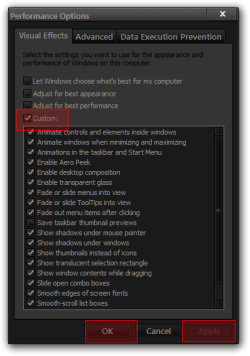
I'm running Windows 7 Home Premium 64bit addition. All of my performance settings are permanently set to have the full Aero effects and my accessibility settings are set to ensure they are all running.
My laptop has a windows experience index of 3.3 and normally has no problem running the graphical effects.
But...this is the problem. Every time I start up the laptop the Aero window fade effect and the minimising effect doesn't happen. The screen remains in Aero style and as far as I can tell these are the only effects that are stopped. In order to reactivate the Aero style I have to go to the System Properties window>Peformance settings and switch the radio button from the 'adjust for best appearance' option to either one of the other two available and switch it back again. I don't even need to click apply - but once I click okay the effects are all back to normal.
There are two other things that I've noticed:
This isn't a critical problem, but its just an annoyance. I love the way Windows 7 looks and it seems a shame that to get the full effect I have to keep adjusting the settings. I would appreciate any advice as to how I can sort it.
Many thanks.
I'm looking for a solution to this annoying little problem which has been avoiding me for months.
I'm running Windows 7 Home Premium 64bit addition. All of my performance settings are permanently set to have the full Aero effects and my accessibility settings are set to ensure they are all running.
My laptop has a windows experience index of 3.3 and normally has no problem running the graphical effects.
But...this is the problem. Every time I start up the laptop the Aero window fade effect and the minimising effect doesn't happen. The screen remains in Aero style and as far as I can tell these are the only effects that are stopped. In order to reactivate the Aero style I have to go to the System Properties window>Peformance settings and switch the radio button from the 'adjust for best appearance' option to either one of the other two available and switch it back again. I don't even need to click apply - but once I click okay the effects are all back to normal.
There are two other things that I've noticed:
- When I start Windows, just before all of the background programmes have finished loading, the fade effect is working. It appears as if one of the start up progams is disabling it. However I've uninstalled and reinstalled each one in turn to see which one is causing the problem and so far there's no change. I currently have Dropbox, Onenote 2010, and Avast anti-virus running in the background
- I have run a netbook and another laptop on Windows 7 Ultimate 32 bit and Windows 7 Home Premium 32 bit and Windows Vista Home Premium 32 bit and they all have the same problem - with the same symtoms.
This isn't a critical problem, but its just an annoyance. I love the way Windows 7 looks and it seems a shame that to get the full effect I have to keep adjusting the settings. I would appreciate any advice as to how I can sort it.
Many thanks.
My Computer
- Computer Manufacturer/Model Number
- Toshiba C660
- OS
- Windows 7 Home Premium 64bit
- CPU
- Celeron Dual Core T3500 @ 2.10 and 2.09 Ghz
- Memory
- 4.00 GB
- Graphics Card(s)
- Mobile Intel 4 Series Express Chipset
- Sound Card
- Realtek High Definition Audio
- Hard Drives
- 500GB
- Other Info
- Laptop - Windows Experience Index 3.3