Hi all;
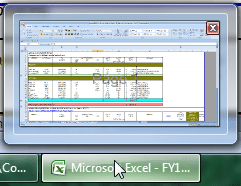
My Aero function seems not to be working for MS Excel 2007. AERO is working on all other apps. When launching MS Excel 2007 as a single app, the Aero function is working as shown below.
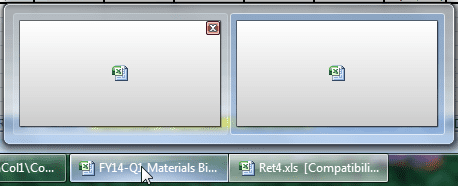
However, when launching more than ONE MS EXcel 2007 file, the AERO function ceased to work for MS Excel 2007.
the best reply on this page and well explained was this.
Excel is what you call an MDI interface. You can read about it on Wikipedia. Basically, each Excel window is basically the same incarnation that a tab would be in a browser. I can't think of any other MDI programs that come with Windows anymore, but old examples of similar programs include the File Manager or several examples on Wikipedia.
To get it's child windows (documents) to appear as separate application instances on the taskbar, Excel does some tricky stuff that isn't really optimal. It's basically tricking the taskbar into showing them. Because of this, no preview of child documents, unless you launch an entire new instance of Excel (so that the two documents are cousins (or step children?), rather than siblings of the same 'parent' window).
In Office 2010, they fix this issue by using some documented Windows 7 enhancements to how the taskbar works (more info about that on MSDN).
My Computer
Computer type
PC/Desktop
Computer Manufacturer/Model Number
Custom Bulid/Self made
OS
Windows 11 x64
CPU
i5 2500K @ 3.3 GHz
Motherboard
ASUS P8 Z77 V pro
Memory
16 GB DDR 3 @ 1600Mhz
Graphics Card(s)
MSI 1050TI 4GB OC version
Sound Card
On Board (Realtek HD audio)
Monitor(s) Displays
Samsung 22" LCD
Screen Resolution
1920*1080
Hard Drives
Seagate 1 TB, WD 1TB, Seagate 2 TB ( I use a lot of space)