Solved Aero is Missing

Bored

New member
Local time
12:13 PM
Messages
13
So I just reinstalled Windows (Premium 64) and now Aero appears to be missing, I tried forcing it through a hack but that didn't work.

So what should I do get Aero again?

Thanks For Reading.
 

My Computer

OS
Windows 7 Premium 64
CPU
I7 920 @ 2.67 GHZ
Memory
6GB
Graphics Card(s)
ATI 7950
Hard Drives
1 TB Sata II
Install your video/graphic drivers.
 

My Computer

Computer type
PC/Desktop
Computer Manufacturer/Model Number
Self assembled
OS
Windows 10 Home 64Bit
CPU
Intel Core i5 10400 @ 2.90GHz
Motherboard
Intel Corporation DG41WV (PROCESSOR)
Memory
8.00GB Single-Channel Unknown @ 1329MHz (16-20-20-38)
Sound Card
Realtek High Definition Audio
Monitor(s) Displays
DELL E170S
Screen Resolution
1280x1024 pixels
Hard Drives
931GB TOSHIBA DT01ACA100 (SATA)
238GB TEAM TM8PS7256G (SATA SSD)
Case
Nothing Fancy
Cooling
Fans
Keyboard
A4 Tech Co LTD
Mouse
A4 Tech Co Ltd/Logitech
Internet Speed
25 Mbps

My Computer

OS
Windows 7 Premium 64
CPU
I7 920 @ 2.67 GHZ
Memory
6GB
Graphics Card(s)
ATI 7950
Hard Drives
1 TB Sata II
So is your aero working?
 

My Computer

Computer type
PC/Desktop
Computer Manufacturer/Model Number
Self assembled
OS
Windows 10 Home 64Bit
CPU
Intel Core i5 10400 @ 2.90GHz
Motherboard
Intel Corporation DG41WV (PROCESSOR)
Memory
8.00GB Single-Channel Unknown @ 1329MHz (16-20-20-38)
Sound Card
Realtek High Definition Audio
Monitor(s) Displays
DELL E170S
Screen Resolution
1280x1024 pixels
Hard Drives
931GB TOSHIBA DT01ACA100 (SATA)
238GB TEAM TM8PS7256G (SATA SSD)
Case
Nothing Fancy
Cooling
Fans
Keyboard
A4 Tech Co LTD
Mouse
A4 Tech Co Ltd/Logitech
Internet Speed
25 Mbps
So is your aero working?

No, I installed them before I even made this topic and they still weren't working so I asked around here.

Wait never mind I got it fixed now.
 
Last edited:

My Computer

OS
Windows 7 Premium 64
CPU
I7 920 @ 2.67 GHZ
Memory
6GB
Graphics Card(s)
ATI 7950
Hard Drives
1 TB Sata II
Click on Start Orb, type Aero...choose option "Fix and fix problems with transparency and other visual effects".

That's worked numerous times for me in the past.
 

My Computer

Computer Manufacturer/Model Number
Self-Built in July 2009
OS
Windows 7 Ultimate x64
CPU
Intel Q9550 2.83Ghz OC'd to 3.40Ghz
Motherboard
Gigabyte GA-EP45-UD3R rev. 1.1, F12 BIOS
Memory
8GB G.Skill PI DDR2-800, 4-4-4-12 timings
Graphics Card(s)
EVGA 1280MB Nvidia GeForce GTX570
Sound Card
Realtek ALC899A 8 channel onboard audio
Monitor(s) Displays
23" Acer x233H
Screen Resolution
1920x1080
Hard Drives
Intel X25-M 80GB Gen 2 SSD
Western Digital 1TB Caviar Black, 32MB cache. WD1001FALS
PSU
Corsair 620HX modular
Case
Antec P182
Cooling
stock
Keyboard
ABS M1 Mechanical
Mouse
Logitech G9 Laser Mouse
Internet Speed
15/2 cable modem
Other Info
Windows and Linux enthusiast. Logitech G35 Headset.
Click on Start Orb, type Aero...choose option "Fix and fix problems with transparency and other visual effects".

That's worked numerous times for me in the past.

That actually was the first thing I tried said Windows cannot repair the promlem.

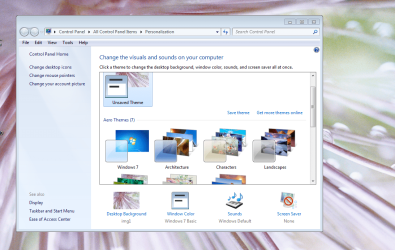
Mind you I fixed myself by going to Desktop > Personalize >Aero Themes > Windows 7

Thanks for responding.
 

My Computer

OS
Windows 7 Premium 64
CPU
I7 920 @ 2.67 GHZ
Memory
6GB
Graphics Card(s)
ATI 7950
Hard Drives
1 TB Sata II

Attachments

  • Capture.PNG
    Capture.PNG
    218 KB · Views: 20

My Computer

Computer type
PC/Desktop
Computer Manufacturer/Model Number
Self assembled
OS
Windows 10 Home 64Bit
CPU
Intel Core i5 10400 @ 2.90GHz
Motherboard
Intel Corporation DG41WV (PROCESSOR)
Memory
8.00GB Single-Channel Unknown @ 1329MHz (16-20-20-38)
Sound Card
Realtek High Definition Audio
Monitor(s) Displays
DELL E170S
Screen Resolution
1280x1024 pixels
Hard Drives
931GB TOSHIBA DT01ACA100 (SATA)
238GB TEAM TM8PS7256G (SATA SSD)
Case
Nothing Fancy
Cooling
Fans
Keyboard
A4 Tech Co LTD
Mouse
A4 Tech Co Ltd/Logitech
Internet Speed
25 Mbps
That actually was the first thing I tried said Windows cannot repair the promlem.

Mind you I fixed myself by going to Desktop > Personalize >Aero Themes > Windows 7

Thanks for responding.

That means the theme you had on all this while was the basic windows 7 theme.
Well, glad its sorted.
 

My Computer

Computer type
PC/Desktop
Computer Manufacturer/Model Number
Self assembled
OS
Windows 10 Home 64Bit
CPU
Intel Core i5 10400 @ 2.90GHz
Motherboard
Intel Corporation DG41WV (PROCESSOR)
Memory
8.00GB Single-Channel Unknown @ 1329MHz (16-20-20-38)
Sound Card
Realtek High Definition Audio
Monitor(s) Displays
DELL E170S
Screen Resolution
1280x1024 pixels
Hard Drives
931GB TOSHIBA DT01ACA100 (SATA)
238GB TEAM TM8PS7256G (SATA SSD)
Case
Nothing Fancy
Cooling
Fans
Keyboard
A4 Tech Co LTD
Mouse
A4 Tech Co Ltd/Logitech
Internet Speed
25 Mbps
Had the same problem Run sfc /scannow and your computer will fix it. If it can't then get a patched uxtheme and run it. After I restarted It came back! And I did this in my Home basic. Now it looks like a windows ultimate cuz of personalization panel!
 

My Computer

OS
Windows 7 Home Basic 32bit
Back
Top