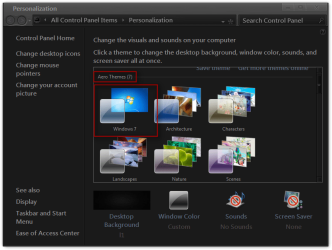
AERO Is not working

selkov

New member
Local time
8:35 PM
Messages
10
I have a version of Seven Ultimate x86 installed and running. All is good.
I just installed a version of Seven x-64. Aero does not work.

Both installs are fully updated and have the proper video [ATI Radeon 4850] drivers installed. Both are clean installation with no other software.
The X-64 Aero will not work [all settings are correct] where the x-86 does.
So i am quite certain it is not the hardware.

What can i do to fix this?
 

My Computer

Computer Manufacturer/Model Number
CLONE
OS
Windows Seven Ultimate X-64
CPU
AMD Phenom(tm) II X4 955 Processor
Motherboard
Gigabyte Technology Co., Ltd. GA-MA790FXT-UD5P
Memory
8.00 GB
Graphics Card(s)
ATI Mobility Radeon HD 4850
Sound Card
(1) High Definition Audio Device (2) High Definition Audio
Monitor(s) Displays
LG Digital
Screen Resolution
1280 x 960 x 32 bits (4294967296 colors) @ 59 Hz
Hard Drives
(1) WDC WD1001FALS-00J7B1 ATA Device (2) WDC WD6401AALS-00E3A0 ATA Device
PSU
Rosewill 730ss
Welcome to the Seven Forums
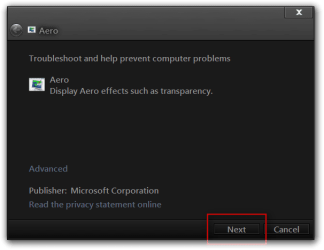
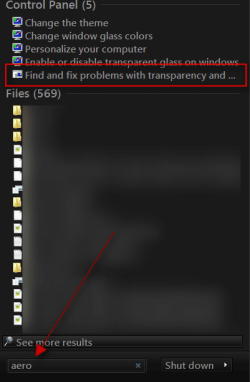
Click on :orb:start button in the search box type Aero and look for Find and fix problems with transparency and check for problems
s.pngAero.png

You may need to refresh your WEI http://www.sevenforums.com/tutorials/263-windows-experience-index-update-refresh-score.html

Just for your information here is the minimum requirements for Aero.

You will not have the Transparency option if you have a Basic and High Contrast Theme instead of a Aero Theme.

Aero Requirements to be Enabled in Windows 7:
NOTE: If Aero is not enabled, then Transparency will not work even when enabled.
  • 1 GHz 32-bit or 64-bit processor
  • 1 GB of system memory
  • Support for DirectX 9 graphics with 128 MB memory (in order to enable Aero theme)
  • You must be have True Color (32 bit) set instead of High Color (16 bit).
  • The desktop composition and Animate controls and elements inside windows options need to be enabled in Visual Effects.
  • The Desktop Window Manager Session Manager and Themes Services need to be set as Started and Automatic.
  • Refresh or update your WEI score. You will need an WEI score minimum of 2.0 in both Graphics & Gaming graphics in order for Aero to be activated.
It would help if you would fill in your system specs
http://www.sevenforums.com/tutorials/180324-system-info-see-your-system-specs.html
Jerry
 

My Computer

Computer type
Laptop
Computer Manufacturer/Model Number
Sager NP9170
OS
Win 7 Pro x64 / Win 10 Pro
CPU
Intel(R) Core(TM) i7-3630QM CPU @ 2.40GHz
Motherboard
CLEVO P170EM
Memory
12 GB
Graphics Card(s)
(1) Intel(R) HD Graphics 4000 (2) NVIDIA GeForce GTX 675M
Sound Card
(1) Realtek High Definition Audio (2) Intel(R) Display Aud
Monitor(s) Displays
17.3
Screen Resolution
1920x1080
Hard Drives
(1) Samsung 860 EVO 500GB(OS) (1) Samsung 860 EVO 500GB(Data)
Keyboard
Backlite
Antivirus
MSE, Malwarebytes Pro
Browser
Firefox
Other Info
DESKTOP: Custom-built.
OS: Win 10 Pro x64.
CASE: Rosewill R5.
CPU: Intel I5 4670K CPU @ 3.40GHz.
CPU COOLER: Cool Master Hyper 212 EVO.
MOTHERBOARD: Asus Z87-A.
MEMORY: Kingston HyperX 2x4 GB.
GPU: Nvidia Geforce 650 TI.
PSU: Corsair TX750.
DRIVES: (1) Samsung 840 120 GB SSD (2) Western Digital blue 500 GB 7200 RPM.
All requirements are met.
AS I said it runs fine in the x86 install.

I ran the Aero fix as suggested and it reported :"No Errors Found"

What now?
 

My Computer

Computer Manufacturer/Model Number
CLONE
OS
Windows Seven Ultimate X-64
CPU
AMD Phenom(tm) II X4 955 Processor
Motherboard
Gigabyte Technology Co., Ltd. GA-MA790FXT-UD5P
Memory
8.00 GB
Graphics Card(s)
ATI Mobility Radeon HD 4850
Sound Card
(1) High Definition Audio Device (2) High Definition Audio
Monitor(s) Displays
LG Digital
Screen Resolution
1280 x 960 x 32 bits (4294967296 colors) @ 59 Hz
Hard Drives
(1) WDC WD1001FALS-00J7B1 ATA Device (2) WDC WD6401AALS-00E3A0 ATA Device
PSU
Rosewill 730ss
All requirements are met.
AS I said it runs fine in the x86 install.

I ran the Aero fix as suggested and it reported :"No Errors Found"

What now?
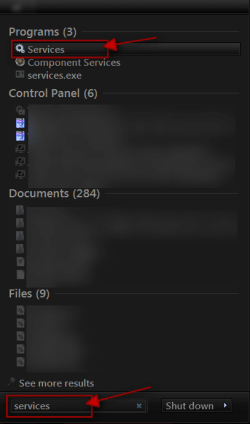
Click on the :orb: Start Button type in Services In the search box and then click on Services
1.png

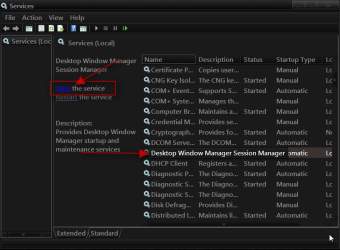
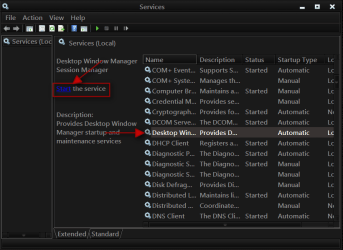
Scroll down until you see Desktop Windows Manager Sessions Manager select it in click on the Stop text and let it stop after that click on Start text and see if that works. Your screen may blink when you do this.
2.png3.png

Jerry
 

My Computer

Computer type
Laptop
Computer Manufacturer/Model Number
Sager NP9170
OS
Win 7 Pro x64 / Win 10 Pro
CPU
Intel(R) Core(TM) i7-3630QM CPU @ 2.40GHz
Motherboard
CLEVO P170EM
Memory
12 GB
Graphics Card(s)
(1) Intel(R) HD Graphics 4000 (2) NVIDIA GeForce GTX 675M
Sound Card
(1) Realtek High Definition Audio (2) Intel(R) Display Aud
Monitor(s) Displays
17.3
Screen Resolution
1920x1080
Hard Drives
(1) Samsung 860 EVO 500GB(OS) (1) Samsung 860 EVO 500GB(Data)
Keyboard
Backlite
Antivirus
MSE, Malwarebytes Pro
Browser
Firefox
Other Info
DESKTOP: Custom-built.
OS: Win 10 Pro x64.
CASE: Rosewill R5.
CPU: Intel I5 4670K CPU @ 3.40GHz.
CPU COOLER: Cool Master Hyper 212 EVO.
MOTHERBOARD: Asus Z87-A.
MEMORY: Kingston HyperX 2x4 GB.
GPU: Nvidia Geforce 650 TI.
PSU: Corsair TX750.
DRIVES: (1) Samsung 840 120 GB SSD (2) Western Digital blue 500 GB 7200 RPM.
OK. Followed instruction. no changes.

However paying close attention - when hovering over the "X" it seems to flash, like it was opening a link but nothing else happens.
 

My Computer

Computer Manufacturer/Model Number
CLONE
OS
Windows Seven Ultimate X-64
CPU
AMD Phenom(tm) II X4 955 Processor
Motherboard
Gigabyte Technology Co., Ltd. GA-MA790FXT-UD5P
Memory
8.00 GB
Graphics Card(s)
ATI Mobility Radeon HD 4850
Sound Card
(1) High Definition Audio Device (2) High Definition Audio
Monitor(s) Displays
LG Digital
Screen Resolution
1280 x 960 x 32 bits (4294967296 colors) @ 59 Hz
Hard Drives
(1) WDC WD1001FALS-00J7B1 ATA Device (2) WDC WD6401AALS-00E3A0 ATA Device
PSU
Rosewill 730ss

My Computer

Computer type
Laptop
Computer Manufacturer/Model Number
Sager NP9170
OS
Win 7 Pro x64 / Win 10 Pro
CPU
Intel(R) Core(TM) i7-3630QM CPU @ 2.40GHz
Motherboard
CLEVO P170EM
Memory
12 GB
Graphics Card(s)
(1) Intel(R) HD Graphics 4000 (2) NVIDIA GeForce GTX 675M
Sound Card
(1) Realtek High Definition Audio (2) Intel(R) Display Aud
Monitor(s) Displays
17.3
Screen Resolution
1920x1080
Hard Drives
(1) Samsung 860 EVO 500GB(OS) (1) Samsung 860 EVO 500GB(Data)
Keyboard
Backlite
Antivirus
MSE, Malwarebytes Pro
Browser
Firefox
Other Info
DESKTOP: Custom-built.
OS: Win 10 Pro x64.
CASE: Rosewill R5.
CPU: Intel I5 4670K CPU @ 3.40GHz.
CPU COOLER: Cool Master Hyper 212 EVO.
MOTHERBOARD: Asus Z87-A.
MEMORY: Kingston HyperX 2x4 GB.
GPU: Nvidia Geforce 650 TI.
PSU: Corsair TX750.
DRIVES: (1) Samsung 840 120 GB SSD (2) Western Digital blue 500 GB 7200 RPM.
I have re installed the drivers, no help.
I do get task bar thumbnails.
It is the default them from install.

open pages will not fade away still
 

My Computer

Computer Manufacturer/Model Number
CLONE
OS
Windows Seven Ultimate X-64
CPU
AMD Phenom(tm) II X4 955 Processor
Motherboard
Gigabyte Technology Co., Ltd. GA-MA790FXT-UD5P
Memory
8.00 GB
Graphics Card(s)
ATI Mobility Radeon HD 4850
Sound Card
(1) High Definition Audio Device (2) High Definition Audio
Monitor(s) Displays
LG Digital
Screen Resolution
1280 x 960 x 32 bits (4294967296 colors) @ 59 Hz
Hard Drives
(1) WDC WD1001FALS-00J7B1 ATA Device (2) WDC WD6401AALS-00E3A0 ATA Device
PSU
Rosewill 730ss

My Computer

Computer type
Laptop
Computer Manufacturer/Model Number
Sager NP9170
OS
Win 7 Pro x64 / Win 10 Pro
CPU
Intel(R) Core(TM) i7-3630QM CPU @ 2.40GHz
Motherboard
CLEVO P170EM
Memory
12 GB
Graphics Card(s)
(1) Intel(R) HD Graphics 4000 (2) NVIDIA GeForce GTX 675M
Sound Card
(1) Realtek High Definition Audio (2) Intel(R) Display Aud
Monitor(s) Displays
17.3
Screen Resolution
1920x1080
Hard Drives
(1) Samsung 860 EVO 500GB(OS) (1) Samsung 860 EVO 500GB(Data)
Keyboard
Backlite
Antivirus
MSE, Malwarebytes Pro
Browser
Firefox
Other Info
DESKTOP: Custom-built.
OS: Win 10 Pro x64.
CASE: Rosewill R5.
CPU: Intel I5 4670K CPU @ 3.40GHz.
CPU COOLER: Cool Master Hyper 212 EVO.
MOTHERBOARD: Asus Z87-A.
MEMORY: Kingston HyperX 2x4 GB.
GPU: Nvidia Geforce 650 TI.
PSU: Corsair TX750.
DRIVES: (1) Samsung 840 120 GB SSD (2) Western Digital blue 500 GB 7200 RPM.
Back
Top