Solved Aero not doing minimise / open window effects anymore

Sheza

New member
Local time
7:42 AM
Messages
20
Hello,

I did a fresh install of Windows yesterday and for the first first few reboots, all Aero features were working fine (once I had installed my Nvidia drivers, of course). But for some reason now, a few of the features are broken.

If I for example click the File Explorer shortcut on the superbar, it doesn't open with a cool effect, it just "appears" simply - as if I'm using Aero Basic. Aero Snap works, but the sort of "pulse" or "circle" effect you get around the mouse pointer, doesn't appear. Also when I minimize a window, it simply disappears, instead of the cool effect it usually is.

And yet, Aero Peek works, as does the "Win Key + Tab" window selection AND the full Aero Glass / Transparency effects.

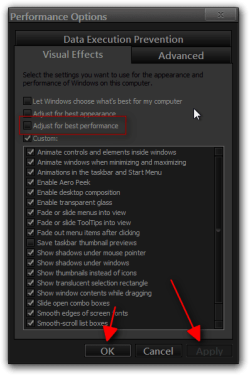
I've already looked under "Adjust performance" settings, Windows had already select all of the Aero effects for me, the only unticked thing was "Save taskbar thumbnail previews".

I've also already ran the Aero troubleshooter with no success.

My WEI is 7.4 and my specs are as follows:
Intel Core i7 3770K
128GB SSD (1.5TB HDD)
8GB RAM (1600Mhz)
Nvidia GTX 560Ti

At first I thought this could be due to my manual setting of the page file (a low 512MB minimum 1024MB maximum) however I can confirm that letting Windows manage my page file again (and rebooting afterwards) has not solved the problem.

It's very annoying having a half-baked Aero experience and I hope you can help me with it.

Thanks!
 

My Computer My Computer

At a glance

Windows 7 Home Premium 64bit
OS
Windows 7 Home Premium 64bit
Have you tryed this yet

  1. Click on Start menu[FONT=inherit !important]
    [/FONT]
  2. Type the following text into the Start Search box: Aero
  3. Click on a search result listing under Control Panel group that named as the following: Find and fix problems with transparency and other visual effects
 
Last edited:

My Computer My Computer

At a glance

Win7 64bit UltIntel Q8200 Skt 7758gb Corsair DDR3 @ 1333mhzNvidia 9500gt 1gb
Computer Manufacturer/Model Number
Custom Build
OS
Win7 64bit Ult
CPU
Intel Q8200 Skt 775
Motherboard
Asus
Memory
8gb Corsair DDR3 @ 1333mhz
Graphics Card(s)
Nvidia 9500gt 1gb
Sound Card
Onboard
Monitor(s) Displays
Acer Daul 22"
Screen Resolution
1600 * 900
Hard Drives
O/S 500gb 3x 1tb bkups
PSU
1000w
Case
Icute jet terbine
Cooling
Air Cooled mainly Zalmans
Keyboard
Microsoft Media
Mouse
Rat 9
Internet Speed
Talk Talk upto 10mb
Also you could try these options

Go to run, type in "services.msc"
Look for where it says Desktop Window Manager Session Manager, Right click this go to propertes,
Make sure Automatic start is enabled if not start the service, then apply
Do the same thing for the service called Theme, and that should do the trick.
lastly right click “my computer”
click “properties”
click on “advanced system settings” in the left pane
click on “settings” under “performance” in the “advanced” tab
under “visual effects” click “adjust for best performance”
then you need to have the boxes checked to enable Aero peek, enable desktop composition, enable transparent glass, enable use visual styles on windows and buttons. Just un-check / check what you wish to use.:geek:
 

My Computer My Computer

At a glance

Win7 64bit UltIntel Q8200 Skt 7758gb Corsair DDR3 @ 1333mhzNvidia 9500gt 1gb
Computer Manufacturer/Model Number
Custom Build
OS
Win7 64bit Ult
CPU
Intel Q8200 Skt 775
Motherboard
Asus
Memory
8gb Corsair DDR3 @ 1333mhz
Graphics Card(s)
Nvidia 9500gt 1gb
Sound Card
Onboard
Monitor(s) Displays
Acer Daul 22"
Screen Resolution
1600 * 900
Hard Drives
O/S 500gb 3x 1tb bkups
PSU
1000w
Case
Icute jet terbine
Cooling
Air Cooled mainly Zalmans
Keyboard
Microsoft Media
Mouse
Rat 9
Internet Speed
Talk Talk upto 10mb
I've already looked under "Adjust performance" settings, Windows had already select all of the Aero effects for me, the only unticked thing was "Save taskbar thumbnail previews".

I've also already ran the Aero troubleshooter with no success.
As above, I've already tried those two things with no success :/

Thanks for your response though!
 

My Computer My Computer

At a glance

Windows 7 Home Premium 64bit
OS
Windows 7 Home Premium 64bit
Sorry i Couldn't help You could try this

Could it be something to do with the drivers you installed? Do they have pacific Aero setting within the drivers. With Nvidia you can choose performance over visual display this may have some affect.
Where they the latest driver you installed? or from a installation CD?
It may be worth uninstalling display drivers and replacing them with the latest version you can find for your hardware, I personally use tweak-force drivers found here in the download section TWeaKFoRCe.CoM your source for the latest Video Drivers
 

My Computer My Computer

At a glance

Win7 64bit UltIntel Q8200 Skt 7758gb Corsair DDR3 @ 1333mhzNvidia 9500gt 1gb
Computer Manufacturer/Model Number
Custom Build
OS
Win7 64bit Ult
CPU
Intel Q8200 Skt 775
Motherboard
Asus
Memory
8gb Corsair DDR3 @ 1333mhz
Graphics Card(s)
Nvidia 9500gt 1gb
Sound Card
Onboard
Monitor(s) Displays
Acer Daul 22"
Screen Resolution
1600 * 900
Hard Drives
O/S 500gb 3x 1tb bkups
PSU
1000w
Case
Icute jet terbine
Cooling
Air Cooled mainly Zalmans
Keyboard
Microsoft Media
Mouse
Rat 9
Internet Speed
Talk Talk upto 10mb
I downloaded the latest Nvidia drivers direct from the Nvidia site when I re-installed Windows yesterday.

NVIDIA DRIVERS 301.42WHQL
 

My Computer My Computer

At a glance

Windows 7 Home Premium 64bit
OS
Windows 7 Home Premium 64bit
I've already looked under "Adjust performance" settings, Windows had already select all of the Aero effects for me, the only unticked thing was "Save taskbar thumbnail previews".

I've also already ran the Aero troubleshooter with no success.
As above, I've already tried those two things with no success :/

Thanks for your response though!

Did you Try the Run option i suggested "services.msc" without the quotation marks.
 

Attachments

  • services.jpg
    services.jpg
    163.4 KB · Views: 8

My Computer My Computer

At a glance

Win7 64bit UltIntel Q8200 Skt 7758gb Corsair DDR3 @ 1333mhzNvidia 9500gt 1gb
Computer Manufacturer/Model Number
Custom Build
OS
Win7 64bit Ult
CPU
Intel Q8200 Skt 775
Motherboard
Asus
Memory
8gb Corsair DDR3 @ 1333mhz
Graphics Card(s)
Nvidia 9500gt 1gb
Sound Card
Onboard
Monitor(s) Displays
Acer Daul 22"
Screen Resolution
1600 * 900
Hard Drives
O/S 500gb 3x 1tb bkups
PSU
1000w
Case
Icute jet terbine
Cooling
Air Cooled mainly Zalmans
Keyboard
Microsoft Media
Mouse
Rat 9
Internet Speed
Talk Talk upto 10mb
Go back to Performance Options and check the Adjust for best performance that should uncheck everything then click on apply and ok your way out reboot then go back to Performance Options and check the Adjust for best appearance/or Custom and then click apply and okay your way out and see if that helped.

http://www.sevenforums.com/tutorials/1908-visual-effects-settings-change.html

Jerry
Performance Options.png
 
Last edited by a moderator:

My Computer My Computer

At a glance

Win 7 Pro x64 / Win 10 ProIntel(R) Core(TM) i7-3630QM CPU @ 2.40GHz12 GB(1) Intel(R) HD Graphics 4000 (2) NVIDIA GeFo...
Computer type
Laptop
Computer Manufacturer/Model Number
Sager NP9170
OS
Win 7 Pro x64 / Win 10 Pro
CPU
Intel(R) Core(TM) i7-3630QM CPU @ 2.40GHz
Motherboard
CLEVO P170EM
Memory
12 GB
Graphics Card(s)
(1) Intel(R) HD Graphics 4000 (2) NVIDIA GeForce GTX 675M
Sound Card
(1) Realtek High Definition Audio (2) Intel(R) Display Aud
Monitor(s) Displays
17.3
Screen Resolution
1920x1080
Hard Drives
(1) Samsung 860 EVO 500GB(OS) (1) Samsung 860 EVO 500GB(Data)
Keyboard
Backlite
Antivirus
MSE, Malwarebytes Pro
Browser
Firefox
Other Info
DESKTOP: Custom-built.
OS: Win 10 Pro x64.
CASE: Rosewill R5.
CPU: Intel I5 4670K CPU @ 3.40GHz.
CPU COOLER: Cool Master Hyper 212 EVO.
MOTHERBOARD: Asus Z87-A.
MEMORY: Kingston HyperX 2x4 GB.
GPU: Nvidia Geforce 650 TI.
PSU: Corsair TX750.
DRIVES: (1) Samsung 840 120 GB SSD (2) Western Digital blue 500 GB 7200 RPM.
Hi Bongo, that's done the trick! Thank you very much!

And for the record Trevers, I did do that services.msc check (forgot to mention it) :D
 

My Computer My Computer

At a glance

Windows 7 Home Premium 64bit
OS
Windows 7 Home Premium 64bit
You're welcome
 

My Computer My Computer

At a glance

Win 7 Pro x64 / Win 10 ProIntel(R) Core(TM) i7-3630QM CPU @ 2.40GHz12 GB(1) Intel(R) HD Graphics 4000 (2) NVIDIA GeFo...
Computer type
Laptop
Computer Manufacturer/Model Number
Sager NP9170
OS
Win 7 Pro x64 / Win 10 Pro
CPU
Intel(R) Core(TM) i7-3630QM CPU @ 2.40GHz
Motherboard
CLEVO P170EM
Memory
12 GB
Graphics Card(s)
(1) Intel(R) HD Graphics 4000 (2) NVIDIA GeForce GTX 675M
Sound Card
(1) Realtek High Definition Audio (2) Intel(R) Display Aud
Monitor(s) Displays
17.3
Screen Resolution
1920x1080
Hard Drives
(1) Samsung 860 EVO 500GB(OS) (1) Samsung 860 EVO 500GB(Data)
Keyboard
Backlite
Antivirus
MSE, Malwarebytes Pro
Browser
Firefox
Other Info
DESKTOP: Custom-built.
OS: Win 10 Pro x64.
CASE: Rosewill R5.
CPU: Intel I5 4670K CPU @ 3.40GHz.
CPU COOLER: Cool Master Hyper 212 EVO.
MOTHERBOARD: Asus Z87-A.
MEMORY: Kingston HyperX 2x4 GB.
GPU: Nvidia Geforce 650 TI.
PSU: Corsair TX750.
DRIVES: (1) Samsung 840 120 GB SSD (2) Western Digital blue 500 GB 7200 RPM.
Back with bad news I'm afraid, I come on today and the issue is back. It's really strange, never happened to me before... unless I've never noticed it before.
 

My Computer My Computer

At a glance

Windows 7 Home Premium 64bit
OS
Windows 7 Home Premium 64bit

My Computer My Computer

At a glance

Win 7 Pro x64 / Win 10 ProIntel(R) Core(TM) i7-3630QM CPU @ 2.40GHz12 GB(1) Intel(R) HD Graphics 4000 (2) NVIDIA GeFo...
Computer type
Laptop
Computer Manufacturer/Model Number
Sager NP9170
OS
Win 7 Pro x64 / Win 10 Pro
CPU
Intel(R) Core(TM) i7-3630QM CPU @ 2.40GHz
Motherboard
CLEVO P170EM
Memory
12 GB
Graphics Card(s)
(1) Intel(R) HD Graphics 4000 (2) NVIDIA GeForce GTX 675M
Sound Card
(1) Realtek High Definition Audio (2) Intel(R) Display Aud
Monitor(s) Displays
17.3
Screen Resolution
1920x1080
Hard Drives
(1) Samsung 860 EVO 500GB(OS) (1) Samsung 860 EVO 500GB(Data)
Keyboard
Backlite
Antivirus
MSE, Malwarebytes Pro
Browser
Firefox
Other Info
DESKTOP: Custom-built.
OS: Win 10 Pro x64.
CASE: Rosewill R5.
CPU: Intel I5 4670K CPU @ 3.40GHz.
CPU COOLER: Cool Master Hyper 212 EVO.
MOTHERBOARD: Asus Z87-A.
MEMORY: Kingston HyperX 2x4 GB.
GPU: Nvidia Geforce 650 TI.
PSU: Corsair TX750.
DRIVES: (1) Samsung 840 120 GB SSD (2) Western Digital blue 500 GB 7200 RPM.
It came back clean.

I did patch UXTheme for a minor custom theme, but I restored the files, rebooted, the problem persisted and so I ran the scanner and nothing was found.

Don't worry, I haven't been wasting your time or anything, the issue occurs whether I have patched UXTheme or not :/ It's really annoying how one moment it works, the next it doesn't.
 

My Computer My Computer

At a glance

Windows 7 Home Premium 64bit
OS
Windows 7 Home Premium 64bit

My Computer My Computer

At a glance

Win 7 Pro x64 / Win 10 ProIntel(R) Core(TM) i7-3630QM CPU @ 2.40GHz12 GB(1) Intel(R) HD Graphics 4000 (2) NVIDIA GeFo...
Computer type
Laptop
Computer Manufacturer/Model Number
Sager NP9170
OS
Win 7 Pro x64 / Win 10 Pro
CPU
Intel(R) Core(TM) i7-3630QM CPU @ 2.40GHz
Motherboard
CLEVO P170EM
Memory
12 GB
Graphics Card(s)
(1) Intel(R) HD Graphics 4000 (2) NVIDIA GeForce GTX 675M
Sound Card
(1) Realtek High Definition Audio (2) Intel(R) Display Aud
Monitor(s) Displays
17.3
Screen Resolution
1920x1080
Hard Drives
(1) Samsung 860 EVO 500GB(OS) (1) Samsung 860 EVO 500GB(Data)
Keyboard
Backlite
Antivirus
MSE, Malwarebytes Pro
Browser
Firefox
Other Info
DESKTOP: Custom-built.
OS: Win 10 Pro x64.
CASE: Rosewill R5.
CPU: Intel I5 4670K CPU @ 3.40GHz.
CPU COOLER: Cool Master Hyper 212 EVO.
MOTHERBOARD: Asus Z87-A.
MEMORY: Kingston HyperX 2x4 GB.
GPU: Nvidia Geforce 650 TI.
PSU: Corsair TX750.
DRIVES: (1) Samsung 840 120 GB SSD (2) Western Digital blue 500 GB 7200 RPM.
Back
Top