
aero peek option got grey

windstory

New member
Member
VIP
Local time
5:00 PM
Messages
142
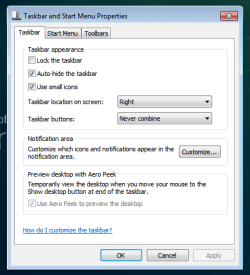
At attached picture, the aero peek option got grey.

I tried to fix this with "Desktop peek tweak" - Desktop Peek Tweak -.
But it didn't work.

How to solve this problem?
 

Attachments
  • 2010-06-25 aeropeak.png
    2010-06-25 aeropeak.png
    12.2 KB · Views: 10
Last edited:

My Computer My Computer

Computer Manufacturer/Model Number
self assembling
OS
windows 7 x64 16385
CPU
core2duo 6600
Motherboard
asus p5b delxe
Memory
samsung 1G x 4
Graphics Card(s)
ati x850
Sound Card
audigy2 zs
Monitor(s) Displays
lg lcd
Screen Resolution
1920 x1200
Hard Drives
samsung 520G
PSU
micronics classic 500W
Case
nctop a380
Cooling
zalman
Internet Speed
lan
Set up an Aero theme then try again. I would guess that you haven't got the Aero theme active!
Right click on your desktop and choose "Personalize" and then choose an Aero theme.
 

My Computer My Computer

Computer type
PC/Desktop
OS
Microsoft Windows 7 Home Premium 64-bit 7601 Multiprocessor Free Service Pack 1
CPU
Intel(R) Core(TM) i7-3770 CPU @ 3.40GHz
Motherboard
ASUSTeK COMPUTER INC. P8H77-M
Memory
8.00 GB
Graphics Card(s)
Intel(R) HD Graphics 4000
Sound Card
On Board
Monitor(s) Displays
Dell 24"
Screen Resolution
1920 x 1080
Hard Drives
(1) INTEL SSDSC2CT180A3 ATA Device (2) ST500DM002-1BD142 ATA Device (3) WDC WD3200AAKS-75L9A0 ATA Device (4) Generic- Compact Flash USB Device (5) Generic- MS/MS-Pro USB Device (6) Generic- SD/MMC USB Device (7) Generic- SM/xD-Picture USB
PSU
500w Corsair
Case
Cooler Master
Cooling
3 Fans
Keyboard
Logitech MK300
Mouse
Logitech WOM
Internet Speed
75Mb
Antivirus
Norton 360
Browser
Firefox, Opera, IE
You can try the Aero troubleshooter.

Open Control Panel/Troubleshooting. Under Appearance and Personalization, select the Display Aero desktop effects.

In the Troubleshooter dialog, click the Advanced link and place a check mark in the Apply Repairs Automatically option.

Click Next to run the troubleshooter.
 

My Computer My Computer

Computer Manufacturer/Model Number
Too many to describe...
OS
Windows 7 x64 pro/ Windows 7 x86 Pro/ XP SP3 x86
Set up an Aero theme then try again. I would guess that you haven't got the Aero theme active!
Right click on your desktop and choose "Personalize" and then choose an Aero theme.

Thanks, I got the Aero theme active, however same result.

You can try the Aero troubleshooter.

Open Control Panel/Troubleshooting. Under Appearance and Personalization, select the Display Aero desktop effects.

In the Troubleshooter dialog, click the Advanced link and place a check mark in the Apply Repairs Automatically option.

Click Next to run the troubleshooter.

I tried "the Aero troubleshooter", and found wddm driver, so I changed driver.
After checking "the Aero troubleshooter", I open Aero peek option box, then same result.
 

My Computer My Computer

Computer Manufacturer/Model Number
self assembling
OS
windows 7 x64 16385
CPU
core2duo 6600
Motherboard
asus p5b delxe
Memory
samsung 1G x 4
Graphics Card(s)
ati x850
Sound Card
audigy2 zs
Monitor(s) Displays
lg lcd
Screen Resolution
1920 x1200
Hard Drives
samsung 520G
PSU
micronics classic 500W
Case
nctop a380
Cooling
zalman
Internet Speed
lan

My Computer My Computer

Computer Manufacturer/Model Number
self assembling
OS
windows 7 x64 16385
CPU
core2duo 6600
Motherboard
asus p5b delxe
Memory
samsung 1G x 4
Graphics Card(s)
ati x850
Sound Card
audigy2 zs
Monitor(s) Displays
lg lcd
Screen Resolution
1920 x1200
Hard Drives
samsung 520G
PSU
micronics classic 500W
Case
nctop a380
Cooling
zalman
Internet Speed
lan
mitchell65
Set up an Aero theme then try again. I would guess that you haven't got the Aero theme active!
Right click on your desktop and choose "Personalize" and then choose an Aero theme.

Mitchell you are my hero. I have been reading forums for about two hours and almost shat myself when I read this post. Such and easy fix. I have been checking/adding registry, service and visual settings to no avail. Thanks for the advice.
 

My Computer My Computer

OS
win7 64 pro
Back
Top