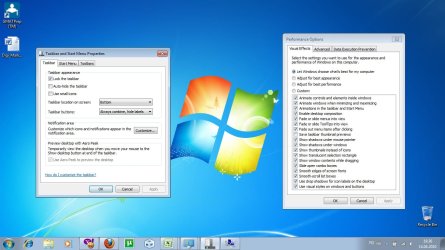
Control Panel > Performance Information and Tools > Adjust Visual Effects
I discovered that after enabling all settings, Aero Peek worked. After toggling them all off and enabling them one by one, I discovered that only three are required for Aero Peek to work:
Animate controls and elements inside windows
Enable desktop composition
Use visual styles on windows and buttons.
The one that I had turned off that was preventing it from working originally was the first one -- Animate controls and elements inside windows -- which was a little surprising. Also interesting was that "Enable transparent glass" does not have to be enabled.
I haven't had Aero peek working since i installed 7, but now after this it seems it works, but it is very finicky. I have to try shaking it many different times for it to work. Is there some special way I should be shaking these windows or something?
You just have to have more than one window open and just click and hold on the window at the top and shake it side to side a couple of times, either slow or fast.
Agreed, I have to shake it 2 or 3 times over a distance or half a dozen+ short shakes to make it work. Not something I'd use much anyway, but still odd.
I am running windows 7 professional and my aeropeek recently quit working. out of the 3 things that need to be checked i do not have Enable desktop composition place even to check dose any one have a reason as to why it is missing.
My Computer
At a glance
windows 7Intel 2.00ghz dual core3gb ddmnvidia 8500GT
Computer Manufacturer/Model Number
Dell
OS
windows 7
CPU
Intel 2.00ghz dual core
Motherboard
foxconn
Memory
3gb ddm
Graphics Card(s)
nvidia 8500GT
Monitor(s) Displays
dell 19" widescreen
Hard Drives
patriot 30gb Solid State
160gb Western digital
500gb western digital
I find Alt+Tab to be far more useful than Aero Peek. The need to physically shake a window doesn't seem that useful to me.
I read an article that said when you highlight one open window, the others are suppose to be transparent. This isn't occurring for me. Is this supposed to be part of Aero?
My Computer
At a glance
Win 7 Professional 32-bitIntel Core 2 Duo CPU T5750 @ 2.00 GHz3GB
I think we are discussing the wrong thing here, or at least two different things .
AeroPeek is the ability to see the desktop by hovering over the button at the far right of the taskbar. This will show Ghosts of the open windows.
AeroShake is the ability to hide all unused windows by shaking the active window This will take a fairly large shake action to activate as it is designed mainly for use with Multi-Touch
Windows 11 Pro x64 [Latest Release and Releas...Ryzen 9 5950X, 3.8 - 5.2 MHz64GB [2 x 32GB] DDR4 3200MHz4GB NVIDIA GEFORCE GTX 1650 Ti
Computer type
PC/Desktop
Computer Manufacturer/Model Number
ChillBlast - Custom to my design
OS
Windows 11 Pro x64 [Latest Release and Release Preview]
CPU
Ryzen 9 5950X, 3.8 - 5.2 MHz
Motherboard
Asus Prime X570-Pro
Memory
64GB [2 x 32GB] DDR4 3200MHz
Graphics Card(s)
4GB NVIDIA GEFORCE GTX 1650 Ti
Sound Card
On-board SPDIF to 5.1 System + HDMI [5.1 system]
Monitor(s) Displays
32" UHD 32 Bit HDR Monitor + 43" UHD 4K 32Bit HDR TV
Screen Resolution
2 x 3840 x 2160 @60Hz
Hard Drives
1TB M2 SSD OS, 500GB Fast Access SSD, 2 x 8TB Data + Various Externals from 1TB to 4TB, 10TB NAS
PSU
NZXT C750 80 PLUS Gold 750W Modular PSU
Case
Workstation Case [Matt Black]
Cooling
NZXT Kraken X63 280mm CPU Cooler +2x Quiet Case fans
Keyboard
Logitech Wireless MX Keys & K400 + others
Mouse
Logitech Wireless MX Master 3S
Internet Speed
920 MB Down 50 MB Up
Antivirus
BitDefender Total Security Pro
Browser
Chrome (always run latest Non-Beta)
Other Info
Also run ...
Laptop - Quad 8GB - Windows 10 Pro x64
Nexus 7 Android tablet x2
Samsung 10.2" tablet
Blackview TAB 8 4G Android Tablet c/w Keyboard
Wacom Intuos Pro Medium Pen Pad
Wacom Intuos Pro Small Pen Pad
Wacom Expresskeys Remote
Loopdeck+ Graphics Controller
Shuttle Pro v2 Control
At a glance
Windows 11 Pro x64 Latest RPIntel I7 10750H 5.0GHz32GB [2x16GB] DDR4 2933 MHznVidia GTX1650Ti 4 GB GDDR6
Computer type
Laptop
System Manufacturer/Model Number
Dell XPS 17 10750H
OS
Windows 11 Pro x64 Latest RP
CPU
Intel I7 10750H 5.0GHz
Motherboard
Dell XPS
Memory
32GB [2x16GB] DDR4 2933 MHz
Graphics Card(s)
nVidia GTX1650Ti 4 GB GDDR6
Sound Card
Stock [Realtek] 4 Speaker
Monitor(s) Displays
17" IPS UHD+ Infinity Edge Touchscreen
Screen Resolution
3840 x 2400
Hard Drives
2TB M2 NVMe, 4TB External + various 500GB & 1TB External NVMe (also have access to spinner HDD from
PSU
Stock
Case
Stock XPS Aluminium & Carbon Fibre
Cooling
Stock - Active Fan Control
Keyboard
Backlit + Various Logitech
Mouse
Stock Track Pad + Logitech MX Trackball
Internet Speed
72 MB Down 18MB Up
Browser
Chrome
Other Info
Also run ...
Laptop - Quad 8GB - Windows 10 Pro x64
Nexus 7 Android tablet x2
10.2" tablet
Sony Z3 Android Smartphone
Wacom Intuos Pro Medium Pen Pad
Wacom Intuos Pro Small Pen Pad
Wacom Expresskeys Remote
Loopdeck+ Graphics Controller
Shuttle Pro v2 Control Pad
10TB NAS
Check that your theme is an aero theme and not a normal theme. Themes are available in normal and aero and can be confusing. Set your theme as an aero theme and you should get the aero window working. Good luck.
Recently I noticed that Aero Peek stop working. I've done everything you all said until now and still doesn't work. I'm not such a fan of Aero Shake but Aero Peek was somehow useful to me.
I attached a photo with the settings that I have done.....pls help me. Do you know what could be wrong outside of what you already said?



 .
.