Aero problems with Alienware themes

wewinjiggy

New member
Local time
4:25 PM
Messages
21
Location
Manila, Philippines
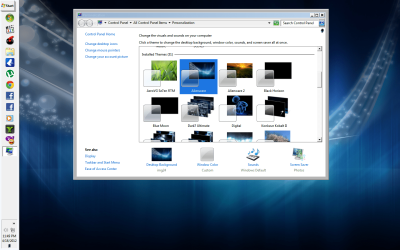
i'm currently running win7 alienware. problem is, when i try to switch to installed alienware themes, aside from the aero themes, the taskbar and window appearance becomes the classic style (like in windows 98) instead of being aero..

what can i do about this?
thanks for future responses.
 

Attachments

  • aero.png
    aero.png
    298.4 KB · Views: 64
  • aero1.png
    aero1.png
    256.7 KB · Views: 39

My Computer

OS
Windows 7 Ultimate, Windows 8 CP
CPU
Athlon X2 7750
Motherboard
MSI 780
Memory
3Gb 800Mhz
Hard Drives
Maxtor 40Gb IDE
Seagate Barracuda 500Gb Sata
PSU
Cougar RS550
Did this computer come with Alienware theme installed already?
Do any of the other Installed Themes work like I see you have Dark7Ultimate?
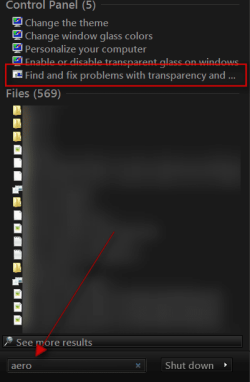
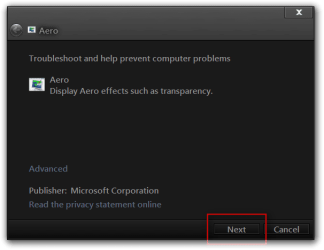
Try this
Click on start button in the search box type Aero and look for Find and fix problems with transparency click on it and check for problems
s.png

Aero.png
Jerry
 

My Computer

Computer type
Laptop
Computer Manufacturer/Model Number
Sager NP9170
OS
Win 7 Pro x64 / Win 10 Pro
CPU
Intel(R) Core(TM) i7-3630QM CPU @ 2.40GHz
Motherboard
CLEVO P170EM
Memory
12 GB
Graphics Card(s)
(1) Intel(R) HD Graphics 4000 (2) NVIDIA GeForce GTX 675M
Sound Card
(1) Realtek High Definition Audio (2) Intel(R) Display Aud
Monitor(s) Displays
17.3
Screen Resolution
1920x1080
Hard Drives
(1) Samsung 860 EVO 500GB(OS) (1) Samsung 860 EVO 500GB(Data)
Keyboard
Backlite
Antivirus
MSE, Malwarebytes Pro
Browser
Firefox
Other Info
DESKTOP: Custom-built.
OS: Win 10 Pro x64.
CASE: Rosewill R5.
CPU: Intel I5 4670K CPU @ 3.40GHz.
CPU COOLER: Cool Master Hyper 212 EVO.
MOTHERBOARD: Asus Z87-A.
MEMORY: Kingston HyperX 2x4 GB.
GPU: Nvidia Geforce 650 TI.
PSU: Corsair TX750.
DRIVES: (1) Samsung 840 120 GB SSD (2) Western Digital blue 500 GB 7200 RPM.
i'm currently running win7 alienware. problem is, when i try to switch to installed alienware themes, aside from the aero themes, the taskbar and window appearance becomes the classic style (like in windows 98) instead of being aero..

what can i do about this?
thanks for future responses.

Hello wewinjiggy to re-iterate Bongos question above "Did this computer come with Alienware theme installed already?" because if it did not and you installed it separately then you will have to follow this tutorial Enabling Custom Themes - Windows 7 to make your theme work.

Also had the same problem with some themes still remaining the classic style after patching when I try to enable them if my DPI is set above 124% (screen resoloution > make text or other items larger or smaller). Changing the DPI to between 100% and 124% solved my problem.
 

My Computer

Computer type
PC/Desktop
Computer Manufacturer/Model Number
My own abomination, I call it the Money Pit
OS
Windows 10 Pro x 2/Windows 11 Home
CPU
Intel i7 2600K @ 3.40 GHz
Motherboard
ASUS Sabertooth P67
Memory
Corsair Vengeance 16GB DDR3 1600MHz CL8 Dual Channel Kit
Graphics Card(s)
EVGA GeForce RTX 3080 XC3 ULTRA GAMING 10GB GDDR6X
Sound Card
Onboard Realtek or Nvidia High Definition Audio (HDMI)
Monitor(s) Displays
Samsung JS7000 50" SUHD TV or Samsung 27" FHD 60Hz 8ms GTG V
Screen Resolution
1920 x 1080
Hard Drives
1 x Samsung 870 EVO 250 GB SSD (Windows 10 Pro), 1 x Samsung 850 EVO 250 GB SSD (Windows 10 Pro)
PSU
Corsair AX860 - 860W Modular Power Supply
Case
Phanteks Enthoo Luxe Full Tower Case - Black
Cooling
CORSAIR Hydro Series H150i PRO RGB 360mm Liquid CPU Cooler
Keyboard
Logitech K830 Illuminated Living-Room Keyboard
Mouse
Logitech MX Anywhere 2S Wireless Mouse
Internet Speed
100 Mbps
Antivirus
ESET Internet Security
Browser
Latest Version Of Firefox & Microsoft Edge Chromium Stable
Other Info
LG Super Multi Blue Internal Blu-ray Disk Rewriter - BH10LS30
6x2 HDMI Switcher (6 inputs, 2 outputs) so I can send the output of my Cable Box, Roku, or any my 4 computers to either my TV or Monitor separately or simultaneously.
Back
Top