
Aero theme changes to Basic

SE7EN47

New member
Local time
10:29 AM
Messages
2
Hello everyone, I have this strange problem I've never seemed to have before.

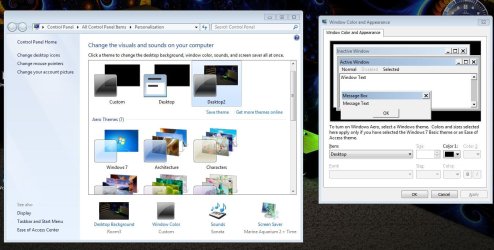
As the title says, my theme (which I have as Windows Aero) randomly and unexpectedly changes to Windows Basic giving me that pop-up message in the corner telling me it's been changed. I have my own personal theme saved (just Aero with a background and personal window color settings, nothing downloaded or installed, only factory options). Now my personalization window doesnt let me change back to Aero or to any theme besides basic or high contrast, it just keeps the window color byt changes the background; simply nothing works in trying to change it back. I've tried every option there is and it looks like some of the settings are disabled and will not show up.

I've attached a screencap of what the windows look like when opened. On the left is the personalization window and on the right is what opens when I click Window Color.

I have quite a bit of computer expertise so I know this isn't me making a foolish error or not knowing where to click. This has only happened once before in my year of using 7 (which was 2 days ago). Fixing it required a restart but I'm definitely not inclined to keep restarting if this is going to keep happening.

Any ideas on what's causing the problem and how to fix this?
 

Attachments
  • Capture.JPG
    Capture.JPG
    120.9 KB · Views: 772

My Computer

Computer Manufacturer/Model Number
msi cr600
OS
Windows 7
Memory
3gb
Graphics Card(s)
nvidea gforce 8200m
Hi,

Sometimes it's because a program cannot run in aero and Windows will change back to basic.
You can rerun the Windows Experience Index to see if something is changed.

MK2
 

My Computer

OS
7
Hey,

I know that it changes when you run certain full screen programs or others and am aware of this behavior, but that's the thing, this problem just seems to happen randomly and when I am doing miscellaneous things like messaging a buddy on Skype, like I was doing when this happened.
 

My Computer

Computer Manufacturer/Model Number
msi cr600
OS
Windows 7
Memory
3gb
Graphics Card(s)
nvidea gforce 8200m
Graphics :
How about your Graphics card ? Just looking at your specs and honestly I have not had good luck with Nvidia cards .

Ram:
On my son's computer which is running Windows 7 on 1.25 gigs of ram , when he runs low on ram aero will convert to basic automatically but once he gets out of some programs he will go directly back to aero.
 

My Computer

Computer type
PC/Desktop
Computer Manufacturer/Model Number
HP
OS
Windows 8 Pro / Windows 7 Home Premium x64 dual boot
Memory
6 gigs
Graphics Card(s)
Nvidia GEForce 9400 GT
Screen Resolution
1600 x 900
Hard Drives
Internal - Western Digital 600 gb HDD
Internal - Western Digital 250 gb HDD
External - Western Digital 1 TB HDD
Antivirus
Avast!
Browser
Pale Moon
Anyone found a solution? i have the same problem.
 

My Computer

Computer Manufacturer/Model Number
HP Envy 14
OS
Windows 7 64bit
CPU
i7 720
Memory
6GB
Graphics Card(s)
ATI Radeon 5650 mobility
Sound Card
Envy beats (IDT)
Monitor(s) Displays
HP Radiance display
Screen Resolution
1600x900
Hello Omair, Windows will change it to basic if your hardware capabilities become marginal

If you want to chance it & possibly overload your Hardware (which may result in damage) you could set your visual effects to a custom setting rather than allowing Windows to choose what is best.

View attachment 100937

The choice is yours (i wouldn't)
 
Last edited:

My Computer

Computer Manufacturer/Model Number
Hewlett Packard Compaq Presario CQ60-305au
OS
Windows Seven Home Premium 32bit SP1
CPU
AMD Athlon QI46 2.1Ghz
Motherboard
Wistron 303c
Memory
2048 Mb DDR2 SD RAM
Graphics Card(s)
NVidea GE GoForce 8200M G/256mb dedicated graphics memory
Sound Card
MCP78S NVidea high definition
Monitor(s) Displays
15.6" High definition Brightview Widescreen
Screen Resolution
1336x768
Hard Drives
Toshiba MK2555GSX ATA
I have a 5.9 experience index....
 

My Computer

Computer Manufacturer/Model Number
HP Envy 14
OS
Windows 7 64bit
CPU
i7 720
Memory
6GB
Graphics Card(s)
ATI Radeon 5650 mobility
Sound Card
Envy beats (IDT)
Monitor(s) Displays
HP Radiance display
Screen Resolution
1600x900
You should not be having any problems with an index score like that, try running the aero diag tool in Control Panel /Action Center / Troubleshooting ;

View attachment 101107

If it doesn't find anything wrong we would need a whole lot more info as you are not the original poster in this thread and really have not given us any info to work with such as what circumstances is Aero reverting back to basic etc. etc.

It would also greatly assist members who are trying to help you if you could fill out your system specs, i have posted a link on how to do this;

http://www.sevenforums.com/256049-post4.html

Also this is helpful reading;

http://www.sevenforums.com/447052-post5.html
 
Last edited:

My Computer

Computer Manufacturer/Model Number
Hewlett Packard Compaq Presario CQ60-305au
OS
Windows Seven Home Premium 32bit SP1
CPU
AMD Athlon QI46 2.1Ghz
Motherboard
Wistron 303c
Memory
2048 Mb DDR2 SD RAM
Graphics Card(s)
NVidea GE GoForce 8200M G/256mb dedicated graphics memory
Sound Card
MCP78S NVidea high definition
Monitor(s) Displays
15.6" High definition Brightview Widescreen
Screen Resolution
1336x768
Hard Drives
Toshiba MK2555GSX ATA
Updated. and i fond a workaround by simply doing the following steps....
--------------------------------------------------------------
1/ Ensure that you have the following registry value set to :

HKCU\Software\Microsoft\Windows\DWM\Composition set to 1 (32-bit DWORD)

HKCU\Software\Microsoft\Windows\DWM\CompositionPolicy set to 2 (32-bit DWORD)

2/ Restart DWM by opening a command prompt with administrative privileges :

- Type 'net stop uxsms'
- Then 'net start uxsms'

You should have Glass now
-----------------------------------------------------------------------------------------
 

My Computer

Computer Manufacturer/Model Number
HP Envy 14
OS
Windows 7 64bit
CPU
i7 720
Memory
6GB
Graphics Card(s)
ATI Radeon 5650 mobility
Sound Card
Envy beats (IDT)
Monitor(s) Displays
HP Radiance display
Screen Resolution
1600x900
Updated. and i fond a workaround by simply doing the following steps....
--------------------------------------------------------------
1/ Ensure that you have the following registry value set to :

HKCU\Software\Microsoft\Windows\DWM\Composition set to 1 (32-bit DWORD)

HKCU\Software\Microsoft\Windows\DWM\CompositionPolicy set to 2 (32-bit DWORD)

2/ Restart DWM by opening a command prompt with administrative
privileges :

- Type 'net stop uxsms'
- Then 'net start uxsms'

You should have Glass now
-----------------------------------------------------------------------------------------
Glad you got it sorted & thank you for posting your work around it is appreciated as others can use it for future reference

Mitch :)
 

My Computer

Computer Manufacturer/Model Number
Hewlett Packard Compaq Presario CQ60-305au
OS
Windows Seven Home Premium 32bit SP1
CPU
AMD Athlon QI46 2.1Ghz
Motherboard
Wistron 303c
Memory
2048 Mb DDR2 SD RAM
Graphics Card(s)
NVidea GE GoForce 8200M G/256mb dedicated graphics memory
Sound Card
MCP78S NVidea high definition
Monitor(s) Displays
15.6" High definition Brightview Widescreen
Screen Resolution
1336x768
Hard Drives
Toshiba MK2555GSX ATA
Back
Top