
Solved AERO themes causes severe lag in the web browsers.

Hey guys, thanks for suggestions, tried them all - nothing seems to help ._.

I have a free partition on HDD, so today I decided to try and install Windows 7 from original disk I bought in 2010. Guess what - browsers lag still occurs... I only installed video drivers and that's all.

What I also noticed is that browser's behaves similar to when no video driver is installed, I mean those stuttery animations and all...
And if I open a video, minimize it to taskbar, browse some thing's in Chrome and it starts lagging - when I bring that video on screen and play, it also starts lagging, but when I minimize Chrome - lag is instantly gone.

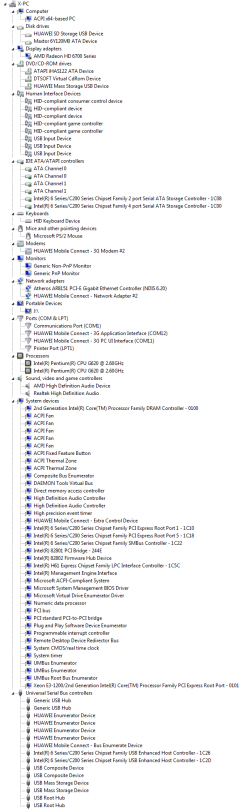
Also I found a guy in the web, he claims to have the same problem. Although I found nothing similar in our computers...

I'll post his hardware screen here, also I added my system specs on forum as Slartybart suggested.

And just updated driver to the latest 344.11 WHQL, that did nothing...
 

Attachments
  • qq.png
    qq.png
    37.7 KB · Views: 3

My Computer My Computer

At a glance

Microsoft Windows 7 Ultimate 64-bit 7601 Mult...Intel(R) Core(TM) i7-3630QM CPU @ 2.40GHz8.00 GB(1) NVIDIA GeForce GT 650M (2) NVIDIA GeForce...
Computer type
Laptop
Computer Manufacturer/Model Number
Lenovo Y500
OS
Microsoft Windows 7 Ultimate 64-bit 7601 Multiprocessor Free Service Pack 1
CPU
Intel(R) Core(TM) i7-3630QM CPU @ 2.40GHz
Motherboard
Mobile Intel HM76 Express
Memory
8.00 GB
Graphics Card(s)
(1) NVIDIA GeForce GT 650M (2) NVIDIA GeForce GT 650M
Sound Card
(1) NVIDIA Virtual Audio Device (Wave Extensible) (WDM) (2
Screen Resolution
1920 x 1080 x 32 bits (4294967296 colors) @ 59 Hz
Hard Drives
(1) Crucial_ CT256M550SSD3 SCSI Disk Device
(2) ST1000LM 024 HN-M101MBB SCSI Disk Device
What do you mean you only installed video drivers? Why are you forcing any drivers into a driver-complete OS? Did you think this is XP?

I'd start over and this time follow the same steps as for http://www.sevenforums.com/tutorials/219487-clean-reinstall-factory-oem-windows-7-a.html#post1839164 taking special care with the steps about drivers printed in red so they can't be missed.

This time, after enabling Automatically deliver drivers via Windows Update (Step 3)
Check for Updates and install all rounds of Important and Optional until no more are offered when you Check after each reboot.

This is how you judge initially if a problem continues, by fully patching the OS with patches that are meant to make your PC's hardware work correctly, and the drivers Win7 wants.

Where did you get the Win7 disk you're using? How is it activated?

If the problem persists using the latest official installer from tutorial and after only doing those steps then it is likely hardware, probably a failing GPU. You said you tried everything we'd given you even though you didn't report back a single specific result. So what happened when you ran with a boot disk like Peppermint as advised?
 
..... Also I found a guy in the web, he claims to have the same problem. Although I found nothing similar in our computers...

I'll post his hardware screen here, also I added my system specs on forum as Slartybart suggested.

And just updated driver to the latest 344.11 WHQL, that did nothing...

There's far too little hard data to effectively troubleshoot the issue.

Posting information about another person's issue only obfuscates things - it confuses anyone looking at the information.

Members only want information about your machine and your computing environment.

If you are asked for the information, please provide it completely - if you're not sure, ask. Please don't waste your time chasing more than one solution - that's a poor trouble shooting method and will certainly not resolve the issue.

Thanks for updating your system specs, but there was more requested.

I'm confused by the specs though - they say you have 2 NVidia cards ?? This is where specific model information would help.

..... What does the COA sticker say on the laptop? (bottom or battery compartment)

Please provide the following report, it might show corruption in Windows activation or other information that would prove useful in resolving the issue on your machine.
http://www.sevenforums.com/windows-...ne-activation-issue-posting-instructions.html

.....
System specs: In the System Manufacturer/Model Number field, manually type Desktop or Laptop adding it to the information already in the field.

The specific model is very important! There are many models that have sub-models that are quite different component wise.

The tool does not fill in this information but it is very important if someone has to research drivers or hardware for your machine.

I'll ask for one more report before I give up. Please complete the requests already made and then provide the additional information.
Please follow this tutorial to provide the current operating environment of your machine.
http://www.sevenforums.com/tutorials/311593-speccy-publish-snapshot-your-system-specs.html

Thanks
 

My Computer My Computer

At a glance

x64 (6.3.9600) Win8.1 Pro & soon dual boot x6...AMD A6-3420M APU with Radeon(tm) HD Graphics6.00 GBAMD Radeon(TM) HD 6520G
Computer type
Laptop
Computer Manufacturer/Model Number
HP Pavilion dv6-6c10us
OS
x64 (6.3.9600) Win8.1 Pro & soon dual boot x64 (6.1.7601) Win7_SP1 HomePrem
CPU
AMD A6-3420M APU with Radeon(tm) HD Graphics
Motherboard
Hewlett-Packard 1805
Memory
6.00 GB
Graphics Card(s)
AMD Radeon(TM) HD 6520G
Sound Card
(1) AMD High Definition Audio Device (2) IDT High Definiti
Monitor(s) Displays
HP W2072a 20" LCD (1600 x 900) @ 60 Hz
Screen Resolution
1366 x 768 x 32 bits (4294967296 colors) @ 60 Hz
Hard Drives
ST640LM0 00 HM641JI SATA Disk Device
Keyboard
Logitech k520 wireless KB
Mouse
Logitech m320 wireless mouse (bundled with KB)
Internet Speed
15/5 | 54 MB Wireless 'n'
Antivirus
Realtime: Defender or Avast | On-demand: Malwarebytes, ESET
Browser
IE 11 on Win8, IE 10 on win 7
Other Info
Media: [Gimp, Audacity, VLC] || Comm: [WEmail 2012, Skype] || Productivity: [OpenOffice,| Textpad] || Utils: [Sysinternals, cCleaner, Speccy, Defraggler]
I'm confused by the specs though - they say you have 2 NVidia cards ?? This is where specific model information would help.
Yes, two in SLI.

What does the COA sticker say on the laptop? (bottom or battery compartment)
Just checked, there is none. Only a Windows 8 stickers without any information.

Please provide the following report, it might show corruption in Windows activation or other information that would prove useful in resolving the issue on your machine.
http://www.sevenforums.com/windows-...ne-activation-issue-posting-instructions.html
Diagnostic Report (1.9.0027.0):
-----------------------------------------
Windows Validation Data-->

Validation Code: 0
Cached Online Validation Code: N/A, hr = 0xc004f012
Windows Product Key: *****-*****-PJW6W-9GK29-TMPWP
Windows Product Key Hash: s96ZjOX/L18svs5JSfzs8eCl/m0=
Windows Product ID: 00426-OEM-8992662-00537
Windows Product ID Type: 5
Windows License Type: Retail
Windows OS version: 6.1.7601.2.00010100.1.0.001
ID: {3B2E8D51-A6E6-4504-8AE0-839C4B5F70E6}(1)
Is Admin: Yes
TestCab: 0x0
LegitcheckControl ActiveX: N/A, hr = 0x80070002
Signed By: N/A, hr = 0x80070002
Product Name: Windows 7 Ultimate
Architecture: 0x00000009
Build lab: 7601.win7sp1_gdr.140303-2144
TTS Error:
Validation Diagnostic:
Resolution Status: N/A

Vista WgaER Data-->
ThreatID(s): N/A, hr = 0x80070002
Version: N/A, hr = 0x80070002

Windows XP Notifications Data-->
Cached Result: N/A, hr = 0x80070002
File Exists: No
Version: N/A, hr = 0x80070002
WgaTray.exe Signed By: N/A, hr = 0x80070002
WgaLogon.dll Signed By: N/A, hr = 0x80070002

OGA Notifications Data-->
Cached Result: N/A, hr = 0x80070002
Version: N/A, hr = 0x80070002
OGAExec.exe Signed By: N/A, hr = 0x80070002
OGAAddin.dll Signed By: N/A, hr = 0x80070002

OGA Data-->
Office Status: 109 N/A
OGA Version: N/A, 0x80070002
Signed By: N/A, hr = 0x80070002
Office Diagnostics: 025D1FF3-364-80041010_025D1FF3-229-80041010_025D1FF3-230-1_025D1FF3-517-80040154_025D1FF3-237-80040154_025D1FF3-238-2_025D1FF3-244-80070002_025D1FF3-258-3

Browser Data-->
Proxy settings: N/A
User Agent: Mozilla/4.0 (compatible; MSIE 8.0; Win32)
Default Browser: C:\Program Files (x86)\Google\Chrome\Application\chrome.exe
Download signed ActiveX controls: Prompt
Download unsigned ActiveX controls: Disabled
Run ActiveX controls and plug-ins: Allowed
Initialize and script ActiveX controls not marked as safe: Disabled
Allow scripting of Internet Explorer Webbrowser control: Disabled
Active scripting: Allowed
Script ActiveX controls marked as safe for scripting: Allowed

File Scan Data-->
File Mismatch: C:\Windows\system32\wat\watadminsvc.exe[Hr = 0x80070003]
File Mismatch: C:\Windows\system32\wat\npwatweb.dll[Hr = 0x80070003]
File Mismatch: C:\Windows\system32\wat\watux.exe[Hr = 0x80070003]
File Mismatch: C:\Windows\system32\wat\watweb.dll[Hr = 0x80070003]

Other data-->
Office Details: <GenuineResults><MachineData><UGUID>{3B2E8D51-A6E6-4504-8AE0-839C4B5F70E6}</UGUID><Version>1.9.0027.0</Version><OS>6.1.7601.2.00010100.1.0.001</OS><Architecture>x64</Architecture><PKey>*****-*****-*****-*****-TMPWP</PKey><PID>00426-OEM-8992662-00537</PID><PIDType>2</PIDType><SID>S-1-5-21-1209833903-212113483-258342777</SID><SYSTEM><Manufacturer>LENOVO</Manufacturer><Model>20193</Model></SYSTEM><BIOS><Manufacturer>LENOVO</Manufacturer><Version>6BCN44WW(V2.04)</Version><SMBIOSVersion major="2" minor="7"/><Date>20130521000000.000000+000</Date></BIOS><HWID>87BD3807018400FE</HWID><UserLCID>0409</UserLCID><SystemLCID>0409</SystemLCID><TimeZone>Russian Standard Time(GMT+04:00)</TimeZone><iJoin>0</iJoin><SBID><stat>3</stat><msppid></msppid><name></name><model></model></SBID><OEM><OEMID>LENOVO</OEMID><OEMTableID>TC-90 </OEMTableID></OEM><GANotification/></MachineData><Software><Office><Result>109</Result><Products/><Applications/></Office></Software></GenuineResults>

Spsys.log Content: 0x80070002

Licensing Data-->
Software licensing service version: 6.1.7601.17514

Name: Windows(R) 7, Ultimate edition
Description: Windows Operating System - Windows(R) 7, OEM_SLP channel
Activation ID: 7cfd4696-69a9-4af7-af36-ff3d12b6b6c8
Application ID: 55c92734-d682-4d71-983e-d6ec3f16059f
Extended PID: 00426-00178-926-600537-02-1033-7601.0000-2162014
Installation ID: 009462664515202956803362031493221835359461458461939981
Processor Certificate URL: http://go.microsoft.com/fwlink/?LinkID=88338
Machine Certificate URL: http://go.microsoft.com/fwlink/?LinkID=88339
Use License URL: http://go.microsoft.com/fwlink/?LinkID=88341
Product Key Certificate URL: http://go.microsoft.com/fwlink/?LinkID=88340
Partial Product Key: TMPWP
License Status: Licensed
Remaining Windows rearm count: 2
Trusted time: 20-Sep-14 21:41:34

Windows Activation Technologies-->
HrOffline: 0x00000000
HrOnline: N/A
HealthStatus: 0x0000000000000000
Event Time Stamp: N/A
ActiveX: Not Registered - 0x80040154
Admin Service: Not Registered - 0x80040154
HealthStatus Bitmask Output:


HWID Data-->
HWID Hash Current: MgAAAAEAAQABAAEAAAACAAAABAABAAEAln1mDHcWLvKYNZSJXMkWjUakAtX2GBoVlmM=

OEM Activation 1.0 Data-->
N/A

OEM Activation 2.0 Data-->
BIOS valid for OA 2.0: yes
Windows marker version: 0x20001
OEMID and OEMTableID Consistent: yes
BIOS Information:
ACPI Table Name OEMID Value OEMTableID Value
APIC LENOVO CB-01
FACP LENOVO CB-01
DBGP LENOVO CB-01
HPET LENOVO CB-01
BOOT LENOVO CB-01
MCFG LENOVO CB-01
SLIC LENOVO TC-90
UEFI LENOVO CB-01
ASF! LENOVO CB-01
SSDT LENOVO CB-01
ASPT LENOVO CB-01
FPDT LENOVO CB-01
MSDM LENOVO CB-01
SSDT LENOVO CB-01
SSDT LENOVO CB-01
SSDT LENOVO CB-01


I'll ask for one more report before I give up. Please complete the requests already made and then provide the additional information.
Please follow this tutorial to provide the current operating environment of your machine.
http://www.sevenforums.com/tutorials/311593-speccy-publish-snapshot-your-system-specs.html

Thanks
http://speccy.piriform.com/results/JrDbpmUwzMiDOwUJd1KNfzP
 

My Computer My Computer

At a glance

Microsoft Windows 7 Ultimate 64-bit 7601 Mult...Intel(R) Core(TM) i7-3630QM CPU @ 2.40GHz8.00 GB(1) NVIDIA GeForce GT 650M (2) NVIDIA GeForce...
Computer type
Laptop
Computer Manufacturer/Model Number
Lenovo Y500
OS
Microsoft Windows 7 Ultimate 64-bit 7601 Multiprocessor Free Service Pack 1
CPU
Intel(R) Core(TM) i7-3630QM CPU @ 2.40GHz
Motherboard
Mobile Intel HM76 Express
Memory
8.00 GB
Graphics Card(s)
(1) NVIDIA GeForce GT 650M (2) NVIDIA GeForce GT 650M
Sound Card
(1) NVIDIA Virtual Audio Device (Wave Extensible) (WDM) (2
Screen Resolution
1920 x 1080 x 32 bits (4294967296 colors) @ 59 Hz
Hard Drives
(1) Crucial_ CT256M550SSD3 SCSI Disk Device
(2) ST1000LM 024 HN-M101MBB SCSI Disk Device
Why do you have two SLI video cards? Is one disabled? I would remove the lesser card to see if it resolves the situation. If not swap it for the other one. Just disabling may not be enough.
 
Why do you have two SLI video cards? Is one disabled? I would remove the lesser card to see if it resolves the situation. If not swap it for the other one. Just disabling may not be enough.
Uhm, its a model with optional SLI card.
I tried disabling/enabling SLI and removing one of them, doesnt help.
 

My Computer My Computer

At a glance

Microsoft Windows 7 Ultimate 64-bit 7601 Mult...Intel(R) Core(TM) i7-3630QM CPU @ 2.40GHz8.00 GB(1) NVIDIA GeForce GT 650M (2) NVIDIA GeForce...
Computer type
Laptop
Computer Manufacturer/Model Number
Lenovo Y500
OS
Microsoft Windows 7 Ultimate 64-bit 7601 Multiprocessor Free Service Pack 1
CPU
Intel(R) Core(TM) i7-3630QM CPU @ 2.40GHz
Motherboard
Mobile Intel HM76 Express
Memory
8.00 GB
Graphics Card(s)
(1) NVIDIA GeForce GT 650M (2) NVIDIA GeForce GT 650M
Sound Card
(1) NVIDIA Virtual Audio Device (Wave Extensible) (WDM) (2
Screen Resolution
1920 x 1080 x 32 bits (4294967296 colors) @ 59 Hz
Hard Drives
(1) Crucial_ CT256M550SSD3 SCSI Disk Device
(2) ST1000LM 024 HN-M101MBB SCSI Disk Device

Attachments

  • SPECCY  OS.PNG
    SPECCY OS.PNG
    27.2 KB · Views: 0

My Computer My Computer

At a glance

Desk1 7 Home Prem / Desk2 10 Pro / Main lap A...Desk1 i5 3750K / Laptop i7 GTX 860M / Desk2 i...Desk1 8GB (1866) / Desk2 16GB (1333) / Laptop...Desk 1& 2NVidia GTX 650 & Laptops on board Intel
Computer type
PC/Desktop
Computer Manufacturer/Model Number
Own build (new) Desk1 / Asus ROG Win 7 / Desk2 1st build
OS
Desk1 7 Home Prem / Desk2 10 Pro / Main lap Asus ROG 10 Pro 2 laptop Toshiba 7 Pro Asus P2520 7 & 10
CPU
Desk1 i5 3750K / Laptop i7 GTX 860M / Desk2 i5 2500
Motherboard
Desk1 Asus P877-V / Desk2 Gigabyte H67 UD3H / Laptop ?
Memory
Desk1 8GB (1866) / Desk2 16GB (1333) / Laptop 8Gb DDR3
Graphics Card(s)
Desk 1& 2NVidia GTX 650 & Laptops on board Intel
Sound Card
Desk 1 & 2 -XONAR DG Realtek High Def audio Laptop
Monitor(s) Displays
Desk 1 Benq HD 2450 / Desk2 Philips 24" / Laptop 17.5"
Screen Resolution
1920x1080 D1 & D2 & Laptop 1
Hard Drives
Desk1 Samsung 120GB 830 SSD
Asus ROG 256GB 850 Pro SSD
Desk2 Samsung 840 256 SSD
Toshiba 120GB EVO
PSU
Desk 1 Corsair HX 1050/ Laptop ? / Desk 2 Corsair HX 650
Case
Desk 1 Cooler HAF XM ? Toshiba laptop / Desk2 Coolermaster
Cooling
Fans on all Desk1 -2 Desk2 - all Coolermasters 5 Laptop ?
Keyboard
Desk 1 MS Sidewinder X6 Desk 2 MS Sidewinder X 4
Mouse
Desk 1&2 - Gigabyte MS 900 gamer - laptop - Logitec wireless
Internet Speed
ADSL2+
Other Info
One other Desktop (tester) and spare Toshba laptop both with SSD's
Running Kaspersky 2016 ISS on all machines config'd identically
Logitec audio stereo systems on each machine (x3)
Canon MG5250MFC
Router/modem TP-Link running WPA2SK
Thank you for posting the information.

There are something I need to follow up on
The MGA report says Retail, but the product ID is 00426-OEM-8992662-00537
and the OS description says: OEM_SLP channel

Other than my the above concerns, the MGA looks good.

You said that you downloaded the install media from the website, but never said what website - I have to assume the following
The website was Lenovo
This machine originally had Win8
You downloaded the Win8 media and then recovered the system
At some point you downgraded to Win7
- correct me if those are a bad assumptions

Speccy has a few things I'm not sure about

In the summary, I see:
Motherboard
LENOVO INVALID (U3E1)​

Under OS/Services:
Start pending:
Peer Name Resolution Protocol​

Under Scheduler:
GoogleUpdateTaskMachineUA
GoogleUpdateTaskMachineCore
HWiNFO
Process Explorer-DARKWORLD-Someday
SidebarExecute​

Under Process List:
DTAgent.exe
Process ID: 4356
Path: C:\MY PROGRAMS\DAEMON Tools Pro\DTAgent.exe
Memory Usage: 13 MB
Peak Memory Usage: 13 MB​
DTShellHlp.exe
Process ID: 3384
Path: C:\MY PROGRAMS\DAEMON Tools Pro\DTShellHlp.exe
Memory Usage: 19 MB
Peak Memory Usage: 19 MB​
HWiNFO64.EXE
Process ID: 5324
Path: C:\MY PROGRAMS\HWiNFO 64\HWiNFO64.EXE
Memory Usage: 8.27 MB
Peak Memory Usage: 36 MB​
HWiNFOMonitor.exe
Process ID: 5052
User: Someday
Domain: DARKWORLD
Path: C:\Users\Someday\AppData\Local\Microsoft\Windows Sidebar\Gadgets\HWiNFOMonitor.gadget\HWiNFOMonitor.exe
Memory Usage: 8.20 MB
Peak Memory Usage: 8.20 MB​
uTorrent.exe
Process ID: 4252
Path: C:\Users\Someday\AppData\Roaming\uTorrent\uTorrent.exe
Memory Usage: 74 MB
Peak Memory Usage: 119 MB​

Under Motherboard:
Motherboard
Manufacturer: LENOVO
Model: INVALID (U3E1)
Version: Lenovo IdeaPad Y500
Chipset Vendor: Intel
Chipset Model: Ivy Bridge
Chipset Revision: 09
Southbridge Vendor: Intel
Southbridge Model: HM76
Southbridge Revision: 04​

BIOS
Brand: LENOVO
Version: 6BCN44WW(V2.04)
Date: 21-May-13​

Under Current TCP Connections
C:\Program Files (x86)\Google\Chrome\Application\chrome.exe (5920)
17 active ESTABLISHED..(Querying )
1 active CLOSE-WAIT..(Querying )​

C:\Program Files (x86)\NVIDIA Corporation\NetService\NvNetworkService.exe (1408)
1 active LISTEN​

C:\Program Files (x86)\NVIDIA Corporation\Update Core\NvBackend.exe (4200)
1 active LISTEN​

C:\Program Files\NVIDIA Corporation\NvStreamSrv\nvstreamsvc.exe (2820)
3 active LISTEN
2 active ESTABLISHED..(Querying )​

C:\Users\Someday\AppData\Roaming\uTorrent\uTorrent.exe (4252)
1 active CLOSE-WAIT..(Querying )
10 active ESTABLISHED..(Querying )
1 active FIN-WAIT-2..(Querying )
1 active LAST-ACK..(Querying )
2 1 active LISTEN
29 active SYN-SENT..(Querying )​

Unknown (2452)
1 active ESTABLISHED..(Querying )​

Some of my confusion might be a Speccy error (motherboard)

I took a look at the Lenovo support page and that only confused me more. There are Win8 *.1) updates for devices that are not listed for Win7. The one that threw me was the NVidia BIOS for the 2nd VGA.

Most of the above are simply notes - I don't see anything that really jumps out, but give me a bit more time to research some things.

If you could clear up whether the machine was originally Win8 that you downgraded (also helpful what type of Win8 Home, Pro, Ult..) and where you got the Win7 disc (you mentioned a retail disc from 2010), that would help a little.

I'm trying to wrap my head around the whole machine - Lenovo, Win8??, Win7 and what drivers should be on it. This is a difficult thread - Lenovo is adding to my difficulty on reaching concrete suggestions. I might come back empty handed, but I'll let you know.

As a start, I suggest uninstalling torrent and Deamon Tools (there's a utility that finishes the DT cleanup - I'll look around). both can cause bottlenecks on some machines. HWInfo can go too. If any are paid programs, make sure you have the license key. Free programs can be easily replaced.

Thanks,

Bill
.
 

My Computer My Computer

At a glance

x64 (6.3.9600) Win8.1 Pro & soon dual boot x6...AMD A6-3420M APU with Radeon(tm) HD Graphics6.00 GBAMD Radeon(TM) HD 6520G
Computer type
Laptop
Computer Manufacturer/Model Number
HP Pavilion dv6-6c10us
OS
x64 (6.3.9600) Win8.1 Pro & soon dual boot x64 (6.1.7601) Win7_SP1 HomePrem
CPU
AMD A6-3420M APU with Radeon(tm) HD Graphics
Motherboard
Hewlett-Packard 1805
Memory
6.00 GB
Graphics Card(s)
AMD Radeon(TM) HD 6520G
Sound Card
(1) AMD High Definition Audio Device (2) IDT High Definiti
Monitor(s) Displays
HP W2072a 20" LCD (1600 x 900) @ 60 Hz
Screen Resolution
1366 x 768 x 32 bits (4294967296 colors) @ 60 Hz
Hard Drives
ST640LM0 00 HM641JI SATA Disk Device
Keyboard
Logitech k520 wireless KB
Mouse
Logitech m320 wireless mouse (bundled with KB)
Internet Speed
15/5 | 54 MB Wireless 'n'
Antivirus
Realtime: Defender or Avast | On-demand: Malwarebytes, ESET
Browser
IE 11 on Win8, IE 10 on win 7
Other Info
Media: [Gimp, Audacity, VLC] || Comm: [WEmail 2012, Skype] || Productivity: [OpenOffice,| Textpad] || Utils: [Sysinternals, cCleaner, Speccy, Defraggler]
OEM SLP is installed at factory, cannot be retail.

Looks like you have a cracked copy of win7 which we cannot support

If I'm wrong then please explain where you purchased the Win7 to install.
 

My Computer My Computer

At a glance

x64 (6.3.9600) Win8.1 Pro & soon dual boot x6...AMD A6-3420M APU with Radeon(tm) HD Graphics6.00 GBAMD Radeon(TM) HD 6520G
Computer type
Laptop
Computer Manufacturer/Model Number
HP Pavilion dv6-6c10us
OS
x64 (6.3.9600) Win8.1 Pro & soon dual boot x64 (6.1.7601) Win7_SP1 HomePrem
CPU
AMD A6-3420M APU with Radeon(tm) HD Graphics
Motherboard
Hewlett-Packard 1805
Memory
6.00 GB
Graphics Card(s)
AMD Radeon(TM) HD 6520G
Sound Card
(1) AMD High Definition Audio Device (2) IDT High Definiti
Monitor(s) Displays
HP W2072a 20" LCD (1600 x 900) @ 60 Hz
Screen Resolution
1366 x 768 x 32 bits (4294967296 colors) @ 60 Hz
Hard Drives
ST640LM0 00 HM641JI SATA Disk Device
Keyboard
Logitech k520 wireless KB
Mouse
Logitech m320 wireless mouse (bundled with KB)
Internet Speed
15/5 | 54 MB Wireless 'n'
Antivirus
Realtime: Defender or Avast | On-demand: Malwarebytes, ESET
Browser
IE 11 on Win8, IE 10 on win 7
Other Info
Media: [Gimp, Audacity, VLC] || Comm: [WEmail 2012, Skype] || Productivity: [OpenOffice,| Textpad] || Utils: [Sysinternals, cCleaner, Speccy, Defraggler]
You said that you downloaded the install media from the website, but never said what website - I have to assume the following
The website was Lenovo
This machine originally had Win8
You downloaded the Win8 media and then recovered the system
At some point you downgraded to Win7
- correct me if those are a bad assumptions
Machine came preloaded with Windows 8 Home/Basic Edition, I messed up with it a little while and decided to install Windows 7. It was about a year ago. This summer I decided to purchase Windows 8 Pro & SSD for this laptop, and so I did. After a while I found out about some nasty bugs which I couldnt resolve so I decided to go back to 7 yet again. I installed it from a microsoft ISO, I just googled it and found a highly upvoted post in ms-forum with links on 32/64 bit ISO's.

I took a look at the Lenovo support page and that only confused me more. There are Win8 *.1) updates for devices that are not listed for Win7. The one that threw me was the NVidia BIOS for the 2nd VGA.
Yes, there was a bug/conflict with windows 8.1 and this particular model, in short - 8.1 couldn't recognize second GPU, so they released a VGA BIOS fix for it.

If you could clear up whether the machine was originally Win8 that you downgraded (also helpful what type of Win8 Home, Pro, Ult..) and where you got the Win7 disc (you mentioned a retail disc from 2010), that would help a little.
OEM SLP is installed at factory, cannot be retail.

Looks like you have a cracked copy of win7 which we cannot support

If I'm wrong then please explain where you purchased the Win7 to install.
I have 2 instances of Windows 7. First is the disk in the black curvy box I got with PC that I bought in 2010, I paid for licensed Win7 (at least it was in the bill), they installed Windows 7 Ultimate on it and I also received this disk. Second is the ISO from microsoft's website which I activated using my key.


As a start, I suggest uninstalling torrent and Deamon Tools (there's a utility that finishes the DT cleanup - I'll look around). both can cause bottlenecks on some machines. HWInfo can go too. If any are paid programs, make sure you have the license key. Free programs can be easily replaced.
I'll try that but I dont think it will work, it looks like some hardware conflict with something in windows...
 

My Computer My Computer

At a glance

Microsoft Windows 7 Ultimate 64-bit 7601 Mult...Intel(R) Core(TM) i7-3630QM CPU @ 2.40GHz8.00 GB(1) NVIDIA GeForce GT 650M (2) NVIDIA GeForce...
Computer type
Laptop
Computer Manufacturer/Model Number
Lenovo Y500
OS
Microsoft Windows 7 Ultimate 64-bit 7601 Multiprocessor Free Service Pack 1
CPU
Intel(R) Core(TM) i7-3630QM CPU @ 2.40GHz
Motherboard
Mobile Intel HM76 Express
Memory
8.00 GB
Graphics Card(s)
(1) NVIDIA GeForce GT 650M (2) NVIDIA GeForce GT 650M
Sound Card
(1) NVIDIA Virtual Audio Device (Wave Extensible) (WDM) (2
Screen Resolution
1920 x 1080 x 32 bits (4294967296 colors) @ 59 Hz
Hard Drives
(1) Crucial_ CT256M550SSD3 SCSI Disk Device
(2) ST1000LM 024 HN-M101MBB SCSI Disk Device
Ok thanks again for the information.

Follow post #30 and we might get a little closer to a solution. A member more versed in reading MGA said "There's something not quite right about that report". If the ISO you downloaded was corrupted in some way, then we'll never solve the problem without a clean reinstall.

So let me make sure I understand.
Your machine had Win8 home edition installed when you bought the machine and you also paid for a Win7 license (Ultimate)
You also purchased a Win8 Pro license when you bought an SSD.
You then used the Win7 license to install Win7 using a downloaded ISO.

I'll wait for you to complete the Daemon tools, torrent and HWinfo uninstall testing and then wait for the new MGA after installing KB971033

Bill
.
 

My Computer My Computer

At a glance

x64 (6.3.9600) Win8.1 Pro & soon dual boot x6...AMD A6-3420M APU with Radeon(tm) HD Graphics6.00 GBAMD Radeon(TM) HD 6520G
Computer type
Laptop
Computer Manufacturer/Model Number
HP Pavilion dv6-6c10us
OS
x64 (6.3.9600) Win8.1 Pro & soon dual boot x64 (6.1.7601) Win7_SP1 HomePrem
CPU
AMD A6-3420M APU with Radeon(tm) HD Graphics
Motherboard
Hewlett-Packard 1805
Memory
6.00 GB
Graphics Card(s)
AMD Radeon(TM) HD 6520G
Sound Card
(1) AMD High Definition Audio Device (2) IDT High Definiti
Monitor(s) Displays
HP W2072a 20" LCD (1600 x 900) @ 60 Hz
Screen Resolution
1366 x 768 x 32 bits (4294967296 colors) @ 60 Hz
Hard Drives
ST640LM0 00 HM641JI SATA Disk Device
Keyboard
Logitech k520 wireless KB
Mouse
Logitech m320 wireless mouse (bundled with KB)
Internet Speed
15/5 | 54 MB Wireless 'n'
Antivirus
Realtime: Defender or Avast | On-demand: Malwarebytes, ESET
Browser
IE 11 on Win8, IE 10 on win 7
Other Info
Media: [Gimp, Audacity, VLC] || Comm: [WEmail 2012, Skype] || Productivity: [OpenOffice,| Textpad] || Utils: [Sysinternals, cCleaner, Speccy, Defraggler]
Ok thanks again for the information.

Follow post #30 and we might get a little closer to a solution. A member more versed in reading MGA said "There's something not quite right about that report". If the ISO you downloaded was corrupted in some way, then we'll never solve the problem without a clean reinstall.

So let me make sure I understand.
Your machine had Win8 home edition installed when you bought the machine and you also paid for a Win7 license (Ultimate)
You also purchased a Win8 Pro license when you bought an SSD.
You then used the Win7 license to install Win7 using a downloaded ISO.

I'll wait for you to complete the Daemon tools, torrent and HWinfo uninstall testing and then wait for the new MGA after installing KB971033

Bill
.
I already installed new Win7 on a different partition, this time from my disk, not this ISO.

Anyway, installed KB971033, here goes new report:
Diagnostic Report (1.9.0027.0)
-----------------------------------------
Windows Validation Data--

Validation Code 0
Cached Online Validation Code NA, hr = 0xc004f012
Windows Product Key --PJW6W-9GK29-TMPWP
Windows Product Key Hash s96ZjOXL18svs5JSfzs8eClm0=
Windows Product ID 00426-OEM-8992662-00537
Windows Product ID Type 2
Windows License Type OEM SLP
Windows OS version 6.1.7601.2.00010100.1.0.001
ID {7FC11FD1-C7C3-4300-90F2-C3D076F419F8}(3)
Is Admin Yes
TestCab 0x0
LegitcheckControl ActiveX NA, hr = 0x80070002
Signed By NA, hr = 0x80070002
Product Name Windows 7 Ultimate
Architecture 0x00000009
Build lab 7601.win7sp1_rtm.101119-1850
TTS Error
Validation Diagnostic
Resolution Status NA

Vista WgaER Data--
ThreatID(s) NA, hr = 0x80070002
Version NA, hr = 0x80070002

Windows XP Notifications Data--
Cached Result NA, hr = 0x80070002
File Exists No
Version NA, hr = 0x80070002
WgaTray.exe Signed By NA, hr = 0x80070002
WgaLogon.dll Signed By NA, hr = 0x80070002

OGA Notifications Data--
Cached Result NA, hr = 0x80070002
Version NA, hr = 0x80070002
OGAExec.exe Signed By NA, hr = 0x80070002
OGAAddin.dll Signed By NA, hr = 0x80070002

OGA Data--
Office Status 109 NA
OGA Version NA, 0x80070002
Signed By NA, hr = 0x80070002
Office Diagnostics 025D1FF3-364-80041010_025D1FF3-229-80041010_025D1FF3-230-1_025D1FF3-517-80040154_025D1FF3-237-80040154_025D1FF3-238-2_025D1FF3-244-80070002_025D1FF3-258-3

Browser Data--
Proxy settings NA
User Agent Mozilla4.0 (compatible; MSIE 8.0; Win32)
Default Browser CProgram Files (x86)GoogleChromeApplicationchrome.exe
Download signed ActiveX controls Prompt
Download unsigned ActiveX controls Disabled
Run ActiveX controls and plug-ins Allowed
Initialize and script ActiveX controls not marked as safe Disabled
Allow scripting of Internet Explorer Webbrowser control Disabled
Active scripting Allowed
Script ActiveX controls marked as safe for scripting Allowed

File Scan Data--

Other data--
Office Details GenuineResultsMachineDataUGUID{7FC11FD1-C7C3-4300-90F2-C3D076F419F8}UGUIDVersion1.9.0027.0VersionOS6.1.7601.2.00010100.1.0.001OSArchitecturex64ArchitecturePKey----TMPWPPKeyPID00426-OEM-8992662-00537PIDPIDType2PIDTypeSIDS-1-5-21-4042030822-3855798700-3045365620SIDSYSTEMManufacturerLENOVOManufacturerModel20193ModelSYSTEMBIOSManufacturerLENOVOManufacturerVersion6BCN44WW(V2.04)VersionSMBIOSVersion major=2 minor=7Date20130521000000.000000+000DateBIOSHWID2BB50200018400FEHWIDUserLCID0409UserLCIDSystemLCID0409SystemLCIDTimeZoneRussian Standard Time(GMT+0300)TimeZoneiJoin0iJoinSBIDstat3statmsppidmsppidnamenamemodelmodelSBIDOEMOEMIDLENOVOOEMIDOEMTableIDTC-90 OEMTableIDOEMGANotificationMachineDataSoftwareOfficeResult109ResultProductsApplicationsOfficeSoftwareGenuineResults

Spsys.log Content 0x80070002

Licensing Data--
Software licensing service version 6.1.7601.17514

Name Windows(R) 7, Ultimate edition
Description Windows Operating System - Windows(R) 7, OEM_SLP channel
Activation ID 7cfd4696-69a9-4af7-af36-ff3d12b6b6c8
Application ID 55c92734-d682-4d71-983e-d6ec3f16059f
Extended PID 00426-00178-926-600537-02-1033-7601.0000-2632014
Installation ID 019752300890357801269600173121198856002874999344088415
Processor Certificate URL httpgo.microsoft.comfwlinkLinkID=88338
Machine Certificate URL httpgo.microsoft.comfwlinkLinkID=88339
Use License URL httpgo.microsoft.comfwlinkLinkID=88341
Product Key Certificate URL httpgo.microsoft.comfwlinkLinkID=88340
Partial Product Key TMPWP
License Status Licensed
Remaining Windows rearm count 3
Trusted time 9212014 20602 PM

Windows Activation Technologies--
HrOffline 0x00000000
HrOnline NA
HealthStatus 0x0000000000000000
Event Time Stamp NA
ActiveX Registered, Version 7.1.7600.16395
Admin Service Registered, Version 7.1.7600.16395
HealthStatus Bitmask Output


HWID Data--
HWID Hash Current MAAAAAAAAgABAAEAAAACAAAAAwABAAEAln1mDC7yHC+sZSJXMkWjUak9hgaFZZj

OEM Activation 1.0 Data--
NA

OEM Activation 2.0 Data--
BIOS valid for OA 2.0 yes
Windows marker version 0x20001
OEMID and OEMTableID Consistent yes
BIOS Information
ACPI Table Name OEMID Value OEMTableID Value
APIC LENOVO CB-01
FACP LENOVO CB-01
DBGP LENOVO CB-01
HPET LENOVO CB-01
BOOT LENOVO CB-01
MCFG LENOVO CB-01
SLIC LENOVO TC-90
UEFI LENOVO CB-01
ASF! LENOVO CB-01
SSDT LENOVO CB-01
ASPT LENOVO CB-01
FPDT LENOVO CB-01
MSDM LENOVO CB-01
SSDT LENOVO CB-01
SSDT LENOVO CB-01
SSDT LENOVO CB-01

So let me make sure I understand.
Your machine had Win8 home edition installed when you bought the machine and you also paid for a Windows 7 license (Ultimate)
You also purchased a Win8 Pro license when you bought an SSD.
You then used the Windows 7 license to install Windows 7 using a downloaded ISO.
Right.
 

My Computer My Computer

At a glance

Microsoft Windows 7 Ultimate 64-bit 7601 Mult...Intel(R) Core(TM) i7-3630QM CPU @ 2.40GHz8.00 GB(1) NVIDIA GeForce GT 650M (2) NVIDIA GeForce...
Computer type
Laptop
Computer Manufacturer/Model Number
Lenovo Y500
OS
Microsoft Windows 7 Ultimate 64-bit 7601 Multiprocessor Free Service Pack 1
CPU
Intel(R) Core(TM) i7-3630QM CPU @ 2.40GHz
Motherboard
Mobile Intel HM76 Express
Memory
8.00 GB
Graphics Card(s)
(1) NVIDIA GeForce GT 650M (2) NVIDIA GeForce GT 650M
Sound Card
(1) NVIDIA Virtual Audio Device (Wave Extensible) (WDM) (2
Screen Resolution
1920 x 1080 x 32 bits (4294967296 colors) @ 59 Hz
Hard Drives
(1) Crucial_ CT256M550SSD3 SCSI Disk Device
(2) ST1000LM 024 HN-M101MBB SCSI Disk Device
I have got a little lost here the ISO where was that from?? If it was the one linked in Greg rocker's tutorial it should have been kosher??:confused:
 

My Computer My Computer

At a glance

Desk1 7 Home Prem / Desk2 10 Pro / Main lap A...Desk1 i5 3750K / Laptop i7 GTX 860M / Desk2 i...Desk1 8GB (1866) / Desk2 16GB (1333) / Laptop...Desk 1& 2NVidia GTX 650 & Laptops on board Intel
Computer type
PC/Desktop
Computer Manufacturer/Model Number
Own build (new) Desk1 / Asus ROG Win 7 / Desk2 1st build
OS
Desk1 7 Home Prem / Desk2 10 Pro / Main lap Asus ROG 10 Pro 2 laptop Toshiba 7 Pro Asus P2520 7 & 10
CPU
Desk1 i5 3750K / Laptop i7 GTX 860M / Desk2 i5 2500
Motherboard
Desk1 Asus P877-V / Desk2 Gigabyte H67 UD3H / Laptop ?
Memory
Desk1 8GB (1866) / Desk2 16GB (1333) / Laptop 8Gb DDR3
Graphics Card(s)
Desk 1& 2NVidia GTX 650 & Laptops on board Intel
Sound Card
Desk 1 & 2 -XONAR DG Realtek High Def audio Laptop
Monitor(s) Displays
Desk 1 Benq HD 2450 / Desk2 Philips 24" / Laptop 17.5"
Screen Resolution
1920x1080 D1 & D2 & Laptop 1
Hard Drives
Desk1 Samsung 120GB 830 SSD
Asus ROG 256GB 850 Pro SSD
Desk2 Samsung 840 256 SSD
Toshiba 120GB EVO
PSU
Desk 1 Corsair HX 1050/ Laptop ? / Desk 2 Corsair HX 650
Case
Desk 1 Cooler HAF XM ? Toshiba laptop / Desk2 Coolermaster
Cooling
Fans on all Desk1 -2 Desk2 - all Coolermasters 5 Laptop ?
Keyboard
Desk 1 MS Sidewinder X6 Desk 2 MS Sidewinder X 4
Mouse
Desk 1&2 - Gigabyte MS 900 gamer - laptop - Logitec wireless
Internet Speed
ADSL2+
Other Info
One other Desktop (tester) and spare Toshba laptop both with SSD's
Running Kaspersky 2016 ISS on all machines config'd identically
Logitec audio stereo systems on each machine (x3)
Canon MG5250MFC
Router/modem TP-Link running WPA2SK
I have got a little lost here the ISO where was that from?? If it was the one linked in Greg rocker's tutorial it should have been kosher??:confused:
From here, to be super specific.
 

My Computer My Computer

At a glance

Microsoft Windows 7 Ultimate 64-bit 7601 Mult...Intel(R) Core(TM) i7-3630QM CPU @ 2.40GHz8.00 GB(1) NVIDIA GeForce GT 650M (2) NVIDIA GeForce...
Computer type
Laptop
Computer Manufacturer/Model Number
Lenovo Y500
OS
Microsoft Windows 7 Ultimate 64-bit 7601 Multiprocessor Free Service Pack 1
CPU
Intel(R) Core(TM) i7-3630QM CPU @ 2.40GHz
Motherboard
Mobile Intel HM76 Express
Memory
8.00 GB
Graphics Card(s)
(1) NVIDIA GeForce GT 650M (2) NVIDIA GeForce GT 650M
Sound Card
(1) NVIDIA Virtual Audio Device (Wave Extensible) (WDM) (2
Screen Resolution
1920 x 1080 x 32 bits (4294967296 colors) @ 59 Hz
Hard Drives
(1) Crucial_ CT256M550SSD3 SCSI Disk Device
(2) ST1000LM 024 HN-M101MBB SCSI Disk Device
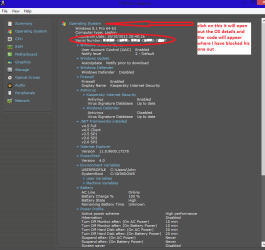
You'd need two Product Keys to activate both installs. Why did you keep the old install?

If the problem persists while running with a boot disk then its most likely hardware, probably your GPU failing.

If not what I would do is look over carefully the steps for doing a perfect http://www.sevenforums.com/tutorials/219487-clean-reinstall-factory-oem-windows-7-a.html#post1839164 and if you find you didn't follow those steps or use those recommended tools and methods only, then I'd do it over with a fresh ISO from the tutorial. This time correctly delete all partitions during the booted install to get it cleanest.

You can make this a diagnostic install by only installing your network adapter driver if necessary to get online, then enable Automatically deliver drivers via Windows Update (Step 3) to install all rounds of Important and Optional Windows Updates, with reboots, until no more are offered when you Check for Updates.

Then test performance and Aero to see if the problem persists, before checking Device Manager for any drivers needing imported.

Test performance awhile again after each program is installed. Try to pinpoint what is causing the Aero issue.
 
You'd need two Product Keys to activate both installs. Why did you keep the old install?

If the problem persists while running with a boot disk then its most likely hardware, probably your GPU failing.

If not what I would do is look over carefully the steps for doing a perfect http://www.sevenforums.com/tutorials/219487-clean-reinstall-factory-oem-windows-7-a.html#post1839164 and if you find you didn't follow those steps or use those recommended tools and methods only, then I'd do it over with a fresh ISO from the tutorial. This time correctly delete all partitions during the booted install to get it cleanest.

You can make this a diagnostic install by only installing your network adapter driver if necessary to get online, then enable Automatically deliver drivers via Windows Update (Step 3) to install all rounds of Important and Optional Windows Updates, with reboots, until no more are offered when you Check for Updates.

Then test performance and Aero to see if the problem persists, before checking Device Manager for any drivers needing imported.

Test performance awhile again after each program is installed. Try to pinpoint what is causing the Aero issue.
Hey, I totally forgot about Peppermint USB you suggested to try. Though I only found Peppermint 5 through that link in the tutorial, guess no big deal, right? So I made bootable USB with Peppermint 5, and couldn't boot it, its just stuck right after I picked "try it live" on a grey screen, tried it three times - it never loaded. So I decided to remove second GPU and voila - it loaded pretty fast. Browsed a little bit there, not found any graphical bugs, not even in browser. So I decided to boot Win7 again with a single GPU (although I did it already) and lag still occurs... I guess we can count both GPU's out, or not? What do you think?

Yeah, I will do a clean reinstall tomorrow, seems like I have no other options left...

Also, would it be wise to try and install windows 8 and test that out? Cause I dont remember this bug in W8.
 

My Computer My Computer

At a glance

Microsoft Windows 7 Ultimate 64-bit 7601 Mult...Intel(R) Core(TM) i7-3630QM CPU @ 2.40GHz8.00 GB(1) NVIDIA GeForce GT 650M (2) NVIDIA GeForce...
Computer type
Laptop
Computer Manufacturer/Model Number
Lenovo Y500
OS
Microsoft Windows 7 Ultimate 64-bit 7601 Multiprocessor Free Service Pack 1
CPU
Intel(R) Core(TM) i7-3630QM CPU @ 2.40GHz
Motherboard
Mobile Intel HM76 Express
Memory
8.00 GB
Graphics Card(s)
(1) NVIDIA GeForce GT 650M (2) NVIDIA GeForce GT 650M
Sound Card
(1) NVIDIA Virtual Audio Device (Wave Extensible) (WDM) (2
Screen Resolution
1920 x 1080 x 32 bits (4294967296 colors) @ 59 Hz
Hard Drives
(1) Crucial_ CT256M550SSD3 SCSI Disk Device
(2) ST1000LM 024 HN-M101MBB SCSI Disk Device
Sure, you have a license. You can even create two partitions to Dual Boot Installation - Windows 8 and Windows 7 or Vista.

The test doesn't eliminate hardware as the cause and in fact points somewhat to the second GPU. Can you try a disk to see if you can truly rule out the hardware?

Why again are you running two GPU's? Seems like a recipe for trouble. I'm not a hardware guy so will ask a good one to look in.
 
I'm going to back out since Greg is advising you. Too many voices often confuse things.

The new MGA report is not promising, although it did resolve the Retail / OEM issue from the first MGA. It's not a fair comparison though since you reinstalled using the disc on a separate partition.

@Greg: I think the best way to untangle the various licensing / MGA reports would be for DarkWorld to focus on one install and only one install.

I suggest using the downgrade option on the Win8 Pro license (downgrade to Win7 Pro). This will require contacting Lenovo as the option applies only to Win8 preinstalled OS
Understanding downgrade rights

I'm not sure what Lenovo would do since the machine came with Win8 Home, not Pro - Win8 Pro was a retail purchase.

At any rate, I'm not sure I trust the Ultimate key - the two MGA reports using different media gave odd results.

I'll keep an eye on the thread, but won't post unless I see something - this will keep the chatter down.

Bill
.
 

My Computer My Computer

At a glance

x64 (6.3.9600) Win8.1 Pro & soon dual boot x6...AMD A6-3420M APU with Radeon(tm) HD Graphics6.00 GBAMD Radeon(TM) HD 6520G
Computer type
Laptop
Computer Manufacturer/Model Number
HP Pavilion dv6-6c10us
OS
x64 (6.3.9600) Win8.1 Pro & soon dual boot x64 (6.1.7601) Win7_SP1 HomePrem
CPU
AMD A6-3420M APU with Radeon(tm) HD Graphics
Motherboard
Hewlett-Packard 1805
Memory
6.00 GB
Graphics Card(s)
AMD Radeon(TM) HD 6520G
Sound Card
(1) AMD High Definition Audio Device (2) IDT High Definiti
Monitor(s) Displays
HP W2072a 20" LCD (1600 x 900) @ 60 Hz
Screen Resolution
1366 x 768 x 32 bits (4294967296 colors) @ 60 Hz
Hard Drives
ST640LM0 00 HM641JI SATA Disk Device
Keyboard
Logitech k520 wireless KB
Mouse
Logitech m320 wireless mouse (bundled with KB)
Internet Speed
15/5 | 54 MB Wireless 'n'
Antivirus
Realtime: Defender or Avast | On-demand: Malwarebytes, ESET
Browser
IE 11 on Win8, IE 10 on win 7
Other Info
Media: [Gimp, Audacity, VLC] || Comm: [WEmail 2012, Skype] || Productivity: [OpenOffice,| Textpad] || Utils: [Sysinternals, cCleaner, Speccy, Defraggler]

My Computers My Computers

  • At a glance

    Windows 11 ProRyzen 9 5900X32GB G Skill DDR4-3600EVGA RTX 3080 FTW 3 Ultra
    Computer type
    PC/Desktop
    Computer Manufacturer/Model Number
    ALWAYS UNDER CONSTRUCTION
    OS
    Windows 11 Pro
    CPU
    Ryzen 9 5900X
    Motherboard
    Asus X570 Crosshair Viii Hero
    Memory
    32GB G Skill DDR4-3600
    Graphics Card(s)
    EVGA RTX 3080 FTW 3 Ultra
    Sound Card
    On Board/Sennheiser PC37X Headset
    Monitor(s) Displays
    3 X Asus 27"
    Screen Resolution
    2560x1440
    Hard Drives
    2 X 1 TB NVME drives
    PSU
    EVGA 850
    Case
    Phanteks Eclipse P400A
    Cooling
    EVGA 280 AIO
    Keyboard
    Logitech G510s/ Logitech G13
    Mouse
    Logitech G502
    Internet Speed
    24/1
    Antivirus
    ESET/MBAM Pro/SAS Pro
    Browser
    Chrome/ Firefox/ Edge
  • At a glance

    Windows 11 ProIntel Ultra 9 288V32 GB LPDDR5X 8533
    Computer type
    Laptop
    System Manufacturer/Model Number
    Dell 16 Plus
    OS
    Windows 11 Pro
    CPU
    Intel Ultra 9 288V
    Memory
    32 GB LPDDR5X 8533
    Monitor(s) Displays
    16" Mini-LED HDR600 Touch 90 Hz
    Screen Resolution
    2560X1600
    Hard Drives
    1 TB NVME
Back
Top