
aero

mista

New member
Local time
5:03 PM
Messages
31
hello again:o:o

i wounder how i can stop aero ,,,,, what is aero
what its effect on windows

and when i rate my pc it stop when it reach writing caching it told that it cant wtite to hard disk ,,,, what i suppose to do
 

My Computer

Computer Manufacturer/Model Number
build 7057 x86
OS
windows 7
CPU
intel pentium d 925 (3.00 GHz /2 MB)
Motherboard
intel (D945GCCR)
Memory
1024 mb (ddr 2)
Graphics Card(s)
intel (R) 82945G Express Chipset Family
Sound Card
realtek high definition audio
Monitor(s) Displays
Generic PnP monitor
Screen Resolution
1024 x 768
Hard Drives
w.d (western digital) 320gb
PSU
i do no know what is it
Case
not important
Cooling
i do no know what is it
Keyboard
microsoft
Mouse
HID compliant mouse
Internet Speed
512 kb/s
Other Info
there is one thing every body should know that ,,,,, i am living in Gaza,,,,, do you know what is that mean ????
Aero is the transparency seen in window edges & in Aero Peek (open an app & hover the mouse over the taskbar icon for that app). You can disable it by right-clicking the desktop and selecting 'Personalize' then click 'Windows Colour' at the bottom. This will show a screen that will allow you to disable Transparency.

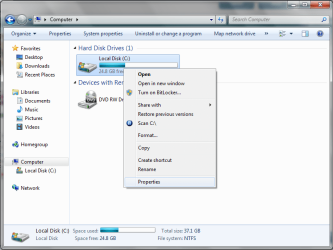
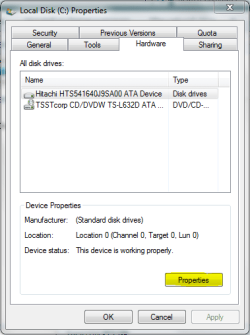
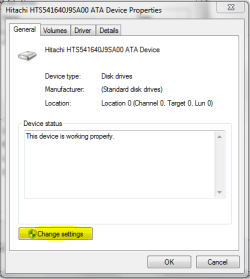
You might want to check the settings for your HD. Open 'Computer' and right-click and select properties. Then select the 'Hardware' tab, then click 'Properties' then 'Change Settings'. This will show whether or not Write-Caching has been enabled. If not the click to enable and 'Apply' all then see if that works.
 

My Computer

Computer Manufacturer/Model Number
Compaq Desktop
OS
Windows 7 Ultimate x64
CPU
AMD Sempron Dual Core
Memory
3GB
Graphics Card(s)
NVIDIA GeForce 6150SE nForce 430
Screen Resolution
1024x768
Hard Drives
150GB Sata
thanxx a lot for aeroo ,,,,, but i did not find which you was talking about can you be more clear
 

My Computer

Computer Manufacturer/Model Number
build 7057 x86
OS
windows 7
CPU
intel pentium d 925 (3.00 GHz /2 MB)
Motherboard
intel (D945GCCR)
Memory
1024 mb (ddr 2)
Graphics Card(s)
intel (R) 82945G Express Chipset Family
Sound Card
realtek high definition audio
Monitor(s) Displays
Generic PnP monitor
Screen Resolution
1024 x 768
Hard Drives
w.d (western digital) 320gb
PSU
i do no know what is it
Case
not important
Cooling
i do no know what is it
Keyboard
microsoft
Mouse
HID compliant mouse
Internet Speed
512 kb/s
Other Info
there is one thing every body should know that ,,,,, i am living in Gaza,,,,, do you know what is that mean ????
I'll post some images for you. 2 mins
 

My Computer

Computer Manufacturer/Model Number
Compaq Desktop
OS
Windows 7 Ultimate x64
CPU
AMD Sempron Dual Core
Memory
3GB
Graphics Card(s)
NVIDIA GeForce 6150SE nForce 430
Screen Resolution
1024x768
Hard Drives
150GB Sata
Hope these screens help. NOTE: i forgot to mention the policies tab :o
 

Attachments

  • Untitled.png
    Untitled.png
    41 KB · Views: 32
  • Capture.PNG
    Capture.PNG
    14.3 KB · Views: 26
  • Capture1.PNG
    Capture1.PNG
    11.4 KB · Views: 21
  • Capture2.PNG
    Capture2.PNG
    13 KB · Views: 23

My Computer

Computer Manufacturer/Model Number
Compaq Desktop
OS
Windows 7 Ultimate x64
CPU
AMD Sempron Dual Core
Memory
3GB
Graphics Card(s)
NVIDIA GeForce 6150SE nForce 430
Screen Resolution
1024x768
Hard Drives
150GB Sata
the tab policies does not appear to me
 

My Computer

Computer Manufacturer/Model Number
build 7057 x86
OS
windows 7
CPU
intel pentium d 925 (3.00 GHz /2 MB)
Motherboard
intel (D945GCCR)
Memory
1024 mb (ddr 2)
Graphics Card(s)
intel (R) 82945G Express Chipset Family
Sound Card
realtek high definition audio
Monitor(s) Displays
Generic PnP monitor
Screen Resolution
1024 x 768
Hard Drives
w.d (western digital) 320gb
PSU
i do no know what is it
Case
not important
Cooling
i do no know what is it
Keyboard
microsoft
Mouse
HID compliant mouse
Internet Speed
512 kb/s
Other Info
there is one thing every body should know that ,,,,, i am living in Gaza,,,,, do you know what is that mean ????
This will sound like a silly question, have you made sure the hard disk is selected (image 2)? If the CD/DVD drive is selected there is no policies tab.
 

My Computer

Computer Manufacturer/Model Number
Compaq Desktop
OS
Windows 7 Ultimate x64
CPU
AMD Sempron Dual Core
Memory
3GB
Graphics Card(s)
NVIDIA GeForce 6150SE nForce 430
Screen Resolution
1024x768
Hard Drives
150GB Sata
yaa i am sure about that
 

My Computer

Computer Manufacturer/Model Number
build 7057 x86
OS
windows 7
CPU
intel pentium d 925 (3.00 GHz /2 MB)
Motherboard
intel (D945GCCR)
Memory
1024 mb (ddr 2)
Graphics Card(s)
intel (R) 82945G Express Chipset Family
Sound Card
realtek high definition audio
Monitor(s) Displays
Generic PnP monitor
Screen Resolution
1024 x 768
Hard Drives
w.d (western digital) 320gb
PSU
i do no know what is it
Case
not important
Cooling
i do no know what is it
Keyboard
microsoft
Mouse
HID compliant mouse
Internet Speed
512 kb/s
Other Info
there is one thing every body should know that ,,,,, i am living in Gaza,,,,, do you know what is that mean ????
That's very strange indeed. I can't then think what would be preventing that. You could try accessing the properties in safe mode, then reboot.
 

My Computer

Computer Manufacturer/Model Number
Compaq Desktop
OS
Windows 7 Ultimate x64
CPU
AMD Sempron Dual Core
Memory
3GB
Graphics Card(s)
NVIDIA GeForce 6150SE nForce 430
Screen Resolution
1024x768
Hard Drives
150GB Sata

My Computer

Computer Manufacturer/Model Number
build 7057 x86
OS
windows 7
CPU
intel pentium d 925 (3.00 GHz /2 MB)
Motherboard
intel (D945GCCR)
Memory
1024 mb (ddr 2)
Graphics Card(s)
intel (R) 82945G Express Chipset Family
Sound Card
realtek high definition audio
Monitor(s) Displays
Generic PnP monitor
Screen Resolution
1024 x 768
Hard Drives
w.d (western digital) 320gb
PSU
i do no know what is it
Case
not important
Cooling
i do no know what is it
Keyboard
microsoft
Mouse
HID compliant mouse
Internet Speed
512 kb/s
Other Info
there is one thing every body should know that ,,,,, i am living in Gaza,,,,, do you know what is that mean ????
can i enable it from anywhere ,,,control panel may be
 

My Computer

Computer Manufacturer/Model Number
build 7057 x86
OS
windows 7
CPU
intel pentium d 925 (3.00 GHz /2 MB)
Motherboard
intel (D945GCCR)
Memory
1024 mb (ddr 2)
Graphics Card(s)
intel (R) 82945G Express Chipset Family
Sound Card
realtek high definition audio
Monitor(s) Displays
Generic PnP monitor
Screen Resolution
1024 x 768
Hard Drives
w.d (western digital) 320gb
PSU
i do no know what is it
Case
not important
Cooling
i do no know what is it
Keyboard
microsoft
Mouse
HID compliant mouse
Internet Speed
512 kb/s
Other Info
there is one thing every body should know that ,,,,, i am living in Gaza,,,,, do you know what is that mean ????
Sorry i misread your post, you should have the policies tab but it may be grayed out. I don't know of any command line functions for windows 7, however you can download this attachment. The tool will allow you to set the cache options, instructions on how to use it are here.
 

Attachments

My Computer

OS
Win 7
Sorry i misread your post, you should have the policies tab but it may be grayed out. I don't know of any command line functions for windows 7, however you can download this attachment. The tool will allow you to set the cache options, instructions on how to use it are here.

Nice 1 YupYup that could prove to be a very handy tool.
 

My Computer

Computer Manufacturer/Model Number
Compaq Desktop
OS
Windows 7 Ultimate x64
CPU
AMD Sempron Dual Core
Memory
3GB
Graphics Card(s)
NVIDIA GeForce 6150SE nForce 430
Screen Resolution
1024x768
Hard Drives
150GB Sata
mista, it would be an idea to extract to your root directory (e.g. c:\) then when you run 'Command Prompt' you won't need to direct yourself to a specific folder.

I would suggest using this option
dskcache +w /i c:
use /i for IDE drive & /s for SCSI drives but this is explained in the link by YupYup
 

My Computer

Computer Manufacturer/Model Number
Compaq Desktop
OS
Windows 7 Ultimate x64
CPU
AMD Sempron Dual Core
Memory
3GB
Graphics Card(s)
NVIDIA GeForce 6150SE nForce 430
Screen Resolution
1024x768
Hard Drives
150GB Sata
i do not understand anything ,,, can you be more clear ,,,, please describe each single step to do it,,,:o
 

My Computer

Computer Manufacturer/Model Number
build 7057 x86
OS
windows 7
CPU
intel pentium d 925 (3.00 GHz /2 MB)
Motherboard
intel (D945GCCR)
Memory
1024 mb (ddr 2)
Graphics Card(s)
intel (R) 82945G Express Chipset Family
Sound Card
realtek high definition audio
Monitor(s) Displays
Generic PnP monitor
Screen Resolution
1024 x 768
Hard Drives
w.d (western digital) 320gb
PSU
i do no know what is it
Case
not important
Cooling
i do no know what is it
Keyboard
microsoft
Mouse
HID compliant mouse
Internet Speed
512 kb/s
Other Info
there is one thing every body should know that ,,,,, i am living in Gaza,,,,, do you know what is that mean ????
Ok,

Step 1: click the diskcache.zip file mentioned in post #13 by YupYup. Once the dialog box opens choose 'Open'. A second message will display, just click 'Allow' and this will open explorer. Click 'Extract all files' and enter C:\ when the box appears then click 'Extract'.

Step 2: In the Start Menu search bar, type 'cmd' then press enter. Type in 'cd\' and press enter, this will take you to the root directory.

Step 3: Type dskcache +w /i c: (use /i for IDE drive & /s for SCSI drives but this is explained in the link by YupYup).

That should do the trick. You may also need to restart your PC.
@YupYup if i've missed anything then please jump in :D
 

My Computer

Computer Manufacturer/Model Number
Compaq Desktop
OS
Windows 7 Ultimate x64
CPU
AMD Sempron Dual Core
Memory
3GB
Graphics Card(s)
NVIDIA GeForce 6150SE nForce 430
Screen Resolution
1024x768
Hard Drives
150GB Sata
Ok,

Step 1: click the diskcache.zip file mentioned in post #13 by YupYup. Once the dialog box opens choose 'Open'. A second message will display, just click 'Allow' and this will open explorer. Click 'Extract all files' and enter C:\ when the box appears then click 'Extract'.

Step 2: In the Start Menu search bar, type 'cmd' then press enter. Type in 'cd\' and press enter, this will take you to the root directory.

Step 3: Type dskcache +w /i c: (use /i for IDE drive & /s for SCSI drives but this is explained in the link by YupYup).

That should do the trick. You may also need to restart your PC.
@YupYup if i've missed anything then please jump in :D


in the first step there is no explorer which you said and no Extract all files
 

My Computer

Computer Manufacturer/Model Number
build 7057 x86
OS
windows 7
CPU
intel pentium d 925 (3.00 GHz /2 MB)
Motherboard
intel (D945GCCR)
Memory
1024 mb (ddr 2)
Graphics Card(s)
intel (R) 82945G Express Chipset Family
Sound Card
realtek high definition audio
Monitor(s) Displays
Generic PnP monitor
Screen Resolution
1024 x 768
Hard Drives
w.d (western digital) 320gb
PSU
i do no know what is it
Case
not important
Cooling
i do no know what is it
Keyboard
microsoft
Mouse
HID compliant mouse
Internet Speed
512 kb/s
Other Info
there is one thing every body should know that ,,,,, i am living in Gaza,,,,, do you know what is that mean ????
in the first step there is no explorer which you said and no Extract all files

You can click "save" if open is not working for you, after it downloads you can choose "open" or "open folder". If you choose open folder you will need to open the file, once it is open you can extract or just drag the file to your C drive.


Ok,

Step 1: click the diskcache.zip file mentioned in post #13 by YupYup. Once the dialog box opens choose 'Open'. A second message will display, just click 'Allow' and this will open explorer. Click 'Extract all files' and enter C:\ when the box appears then click 'Extract'.

Step 2: In the Start Menu search bar, type 'cmd' then press enter. Type in 'cd\' and press enter, this will take you to the root directory.

Step 3: Type dskcache +w /i c: (use /i for IDE drive & /s for SCSI drives but this is explained in the link by YupYup).

That should do the trick. You may also need to restart your PC.
@YupYup if i've missed anything then please jump in :D

Step 2: Command prompt needs to be run as administrator, so use "CTRL+SHIFT+Enter" instead of just "Enter"

Step 3: Use "c:\dskcache +w c:" that way the user does not have to worry about changing directories ( /i and /s are optional as default is both)
 

My Computer

OS
Win 7
i know that ,,,, it's Very disturbing from me to ask all these question but,,,, it is not working
it need an administrator permission ,,, but my account is an administrator

the second ,,that is the save mode it is not working
and my program installed in my pc it is not exist in the Uninstall program menu


pleaase done leave me ,,,,,help
 

My Computer

Computer Manufacturer/Model Number
build 7057 x86
OS
windows 7
CPU
intel pentium d 925 (3.00 GHz /2 MB)
Motherboard
intel (D945GCCR)
Memory
1024 mb (ddr 2)
Graphics Card(s)
intel (R) 82945G Express Chipset Family
Sound Card
realtek high definition audio
Monitor(s) Displays
Generic PnP monitor
Screen Resolution
1024 x 768
Hard Drives
w.d (western digital) 320gb
PSU
i do no know what is it
Case
not important
Cooling
i do no know what is it
Keyboard
microsoft
Mouse
HID compliant mouse
Internet Speed
512 kb/s
Other Info
there is one thing every body should know that ,,,,, i am living in Gaza,,,,, do you know what is that mean ????
Back
Top