After clean Win 7 install now Running out of Memory constantly.

Salgado3d

New member
Local time
2:21 PM
Messages
23
I had a big issue last week with my Dell XPS Laptop (here's the post regarding that: http://www.sevenforums.com/performa...rely-runs-0-free-physical-memory-problem.html)

Things run fine again except that when I open for example Photoshop and have another program running like firefox or chrome then I get ''out of memory, please close the following program: Photoshop CS6"

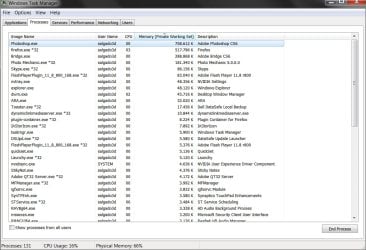
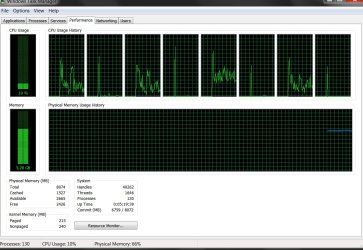
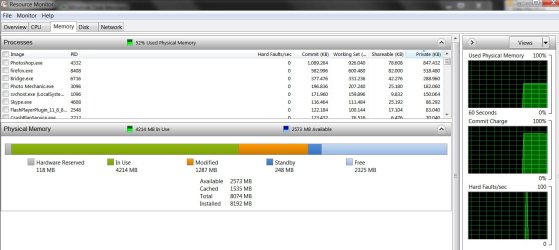
Before I did this new install I could easily run photshop and both chrome and mozilla running. I'm not sure why this has now changed dramatically. I have 8mb of RAM so I'm not sure what to do. I've tried playing around with the memory allocation in Photoshop but that doenst seem to help much either.. Here's screens of the memory situation with both mozilla and photoshop open. Again, this was never a problem before, can someone help please?

I decided to do a clean install and this time have installed all sorts of maintenance programs like CCleaner, Malwarebytes to make sure that things are kept clean.

Thanks ahead of time...
 

Attachments
  • Resource monitor.jpg
    Resource monitor.jpg
    125.6 KB · Views: 6
  • task manager.jpg
    task manager.jpg
    147.2 KB · Views: 7
  • PS Memory shot.jpg
    PS Memory shot.jpg
    94.1 KB · Views: 4
  • task manager 1.jpg
    task manager 1.jpg
    168.9 KB · Views: 4

My Computer My Computer

At a glance

Windows 7 home premium 64 bitIntel core i7 3612qm @ 2.10 ghz8gbNvidia GeForce gt 640M
Computer type
PC/Desktop
Computer Manufacturer/Model Number
Dell xps
OS
Windows 7 home premium 64 bit
CPU
Intel core i7 3612qm @ 2.10 ghz
Memory
8gb
Graphics Card(s)
Nvidia GeForce gt 640M
Were those performance screenshots taken without any programs running?

If not, what programs were running?
 

My Computer My Computer

At a glance

Windows 10 ProAMD Ryzen 5 2400G Processor with Radeon RX Ve...G.SKILL Ripjaws V Series 16GB (2 x 8GB) 288-P...2047MB NVIDIA GeForce GTX 1060 6GB (EVGA)
Computer type
PC/Desktop
Computer Manufacturer/Model Number
Custom Built
OS
Windows 10 Pro
CPU
AMD Ryzen 5 2400G Processor with Radeon RX Vega 11 Graphics
Motherboard
ASRock X470 Master SLI/AC AM4 AMD Promontory X470 SATA 6Gb/s
Memory
G.SKILL Ripjaws V Series 16GB (2 x 8GB) 288-Pin DDR4 SDRAM D
Graphics Card(s)
2047MB NVIDIA GeForce GTX 1060 6GB (EVGA)
Sound Card
Motherboard Built in
Monitor(s) Displays
Acer R240HY bidx 23.8-Inch IPS HDMI DVI VGA (1920 x 1080) Wi
Screen Resolution
1920 x 1080
Hard Drives
1TB Sandisk SSD PLUS (Main drive)
500 GB Seagate 7200 RPM (Games)
500 GB Western Digital 7200 RPM (Virtual Machines)
PSU
CORSAIR TX Series TX650M 650W 80+ Gold Modular Power Supply
Case
CORSAIR CARBIDE SPEC-02 Mid-Tower Gaming Case, Red LED Fan
Cooling
220mm, two 120mm, and four 60mm fans
Keyboard
Wired Dell keyboard
Mouse
Wireless Logitech mouse
Internet Speed
250mb down, 30mb up
Antivirus
Panda Cloud Antivirus
Browser
Chrome-ish x64
Other Info
Your awesome for reading this.
I have the programs open which are shown on the second screen shot. Photoshop, Mozilla, Bridge, and a few smaller ones. This was however never an issue before, i had them open all the time without getting memory messages and performance issues.
:huh:
 

My Computer My Computer

At a glance

Windows 7 home premium 64 bitIntel core i7 3612qm @ 2.10 ghz8gbNvidia GeForce gt 640M
Computer type
PC/Desktop
Computer Manufacturer/Model Number
Dell xps
OS
Windows 7 home premium 64 bit
CPU
Intel core i7 3612qm @ 2.10 ghz
Memory
8gb
Graphics Card(s)
Nvidia GeForce gt 640M

My Computer My Computer

At a glance

Multi-Boot W7_Pro_x64 W8.1_Pro_x64 W10_Pro_x6...AMD Athlon II x4 6206GB GSkill DDR2 800AMD 4670 GPU + AMD 4200 IGP
Computer type
PC/Desktop
Computer Manufacturer/Model Number
home built
OS
Multi-Boot W7_Pro_x64 W8.1_Pro_x64 W10_Pro_x64 +Linux_VMs +Chromium_VM
CPU
AMD Athlon II x4 620
Motherboard
Gigabyte GA-MA785G-UD3H
Memory
6GB GSkill DDR2 800
Graphics Card(s)
AMD 4670 GPU + AMD 4200 IGP
Sound Card
on board Realtek ALC889A
Monitor(s) Displays
RCA 40" LCD TV, Insignia 32" LCD TV, HP 15" LCD monitor
Screen Resolution
1680 x 1050
Hard Drives
OCZ Vertex 3 120GB,
Samsung F3 1TB (3),
Several others - WD, Seagate, Hitachi, ...
PSU
Corsair 500 W
Case
Rosewill mid tower
Cooling
CM 90mm rifle
Keyboard
Gyration wireless, Logitech wireless, Dell USB wired
Mouse
Gyration wireless, Logitech wireless, V7 USB wired
Internet Speed
Spectrum - 100Mbps D / 10Mbps U
Antivirus
Avast, MBAM3, EMET, WinPatrol
Browser
Pale Moon, Firefox, IE
Other Info
2 multi-boot PC's
Mainly HTPC/Office/Gen purpose (no gaming).
Trendnet USB KVM.
LG DVD burner/Blue Ray Player.
Tray system for removable SATA backup drives.

Not currently OCd, under-volted.
I use Hybrid sleep, rarely re-boot or shutdown.

Hauppauge HD-PVR, Avermedia PCIe TV Tuner, Hauppauge PCI TV Tuner.
Agreed with davidw7ncus. That is a lot of processes. I also wish to point out that ram is not the fator in the slowness.
I don't see your system running out of memory from those screenshots.
However you do have a lot of processes running. You have 2GB of memory free while running photoshop and firefox, so you seem fine on memory.

What specifically are you doing when you get the error? Can you take a psr recording of it and upload it so we can see a "video" of what is happening?

Also it was stated in your previews thread that memory is not the issue.
 

My Computer My Computer

At a glance

Windows 10 ProAMD Ryzen 5 2400G Processor with Radeon RX Ve...G.SKILL Ripjaws V Series 16GB (2 x 8GB) 288-P...2047MB NVIDIA GeForce GTX 1060 6GB (EVGA)
Computer type
PC/Desktop
Computer Manufacturer/Model Number
Custom Built
OS
Windows 10 Pro
CPU
AMD Ryzen 5 2400G Processor with Radeon RX Vega 11 Graphics
Motherboard
ASRock X470 Master SLI/AC AM4 AMD Promontory X470 SATA 6Gb/s
Memory
G.SKILL Ripjaws V Series 16GB (2 x 8GB) 288-Pin DDR4 SDRAM D
Graphics Card(s)
2047MB NVIDIA GeForce GTX 1060 6GB (EVGA)
Sound Card
Motherboard Built in
Monitor(s) Displays
Acer R240HY bidx 23.8-Inch IPS HDMI DVI VGA (1920 x 1080) Wi
Screen Resolution
1920 x 1080
Hard Drives
1TB Sandisk SSD PLUS (Main drive)
500 GB Seagate 7200 RPM (Games)
500 GB Western Digital 7200 RPM (Virtual Machines)
PSU
CORSAIR TX Series TX650M 650W 80+ Gold Modular Power Supply
Case
CORSAIR CARBIDE SPEC-02 Mid-Tower Gaming Case, Red LED Fan
Cooling
220mm, two 120mm, and four 60mm fans
Keyboard
Wired Dell keyboard
Mouse
Wireless Logitech mouse
Internet Speed
250mb down, 30mb up
Antivirus
Panda Cloud Antivirus
Browser
Chrome-ish x64
Other Info
Your awesome for reading this.
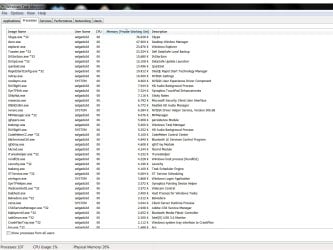
I have just checked, when booting Windows 7 from scratch, windows starts already with almost 110 processes running, I'm guessing that's not normal? I've also done as you requested Andrew, recorded using psr recording, opened up my web browsers, then photoshop (as that usually also gives me the memory error problem after a while, after closed it and opened Premiere and right away the error came forcing me to close the program. As I mentioned earlier, before it was no problem running the web browsers and Premiere or Photoshop.

Thanks...
 

Attachments

My Computer My Computer

At a glance

Windows 7 home premium 64 bitIntel core i7 3612qm @ 2.10 ghz8gbNvidia GeForce gt 640M
Computer type
PC/Desktop
Computer Manufacturer/Model Number
Dell xps
OS
Windows 7 home premium 64 bit
CPU
Intel core i7 3612qm @ 2.10 ghz
Memory
8gb
Graphics Card(s)
Nvidia GeForce gt 640M
When I start Windows I have around 40-45 processes.
About the only time I get over 50 is when I wake up a PC that has been sleeping for a day or more.
Windows and many programs check for updates, etc. when the PC wakes up.

You could consider cleaning up bloatware if you want to get the process count down, or consider a Clean Install of Windows.
Here are a couple of tutorials by gregrocker if you're interested in this:
http://www.sevenforums.com/tutorials/219576-clean-up-factory-bloatware.html
http://www.sevenforums.com/tutorials/219487-clean-reinstall-factory-oem-windows-7-a.html
 

My Computer My Computer

At a glance

Multi-Boot W7_Pro_x64 W8.1_Pro_x64 W10_Pro_x6...AMD Athlon II x4 6206GB GSkill DDR2 800AMD 4670 GPU + AMD 4200 IGP
Computer type
PC/Desktop
Computer Manufacturer/Model Number
home built
OS
Multi-Boot W7_Pro_x64 W8.1_Pro_x64 W10_Pro_x64 +Linux_VMs +Chromium_VM
CPU
AMD Athlon II x4 620
Motherboard
Gigabyte GA-MA785G-UD3H
Memory
6GB GSkill DDR2 800
Graphics Card(s)
AMD 4670 GPU + AMD 4200 IGP
Sound Card
on board Realtek ALC889A
Monitor(s) Displays
RCA 40" LCD TV, Insignia 32" LCD TV, HP 15" LCD monitor
Screen Resolution
1680 x 1050
Hard Drives
OCZ Vertex 3 120GB,
Samsung F3 1TB (3),
Several others - WD, Seagate, Hitachi, ...
PSU
Corsair 500 W
Case
Rosewill mid tower
Cooling
CM 90mm rifle
Keyboard
Gyration wireless, Logitech wireless, Dell USB wired
Mouse
Gyration wireless, Logitech wireless, V7 USB wired
Internet Speed
Spectrum - 100Mbps D / 10Mbps U
Antivirus
Avast, MBAM3, EMET, WinPatrol
Browser
Pale Moon, Firefox, IE
Other Info
2 multi-boot PC's
Mainly HTPC/Office/Gen purpose (no gaming).
Trendnet USB KVM.
LG DVD burner/Blue Ray Player.
Tray system for removable SATA backup drives.

Not currently OCd, under-volted.
I use Hybrid sleep, rarely re-boot or shutdown.

Hauppauge HD-PVR, Avermedia PCIe TV Tuner, Hauppauge PCI TV Tuner.
I just did a new install of Windows last week, however since I hadn't backed up an image of it I had to use Dell's 'Recovery' from the factory so maybe this is the problem, I will try the Clean Up Factory Bloatware that you mention and see if that fixes something.
I'll report back, thanks!
 

My Computer My Computer

At a glance

Windows 7 home premium 64 bitIntel core i7 3612qm @ 2.10 ghz8gbNvidia GeForce gt 640M
Computer type
PC/Desktop
Computer Manufacturer/Model Number
Dell xps
OS
Windows 7 home premium 64 bit
CPU
Intel core i7 3612qm @ 2.10 ghz
Memory
8gb
Graphics Card(s)
Nvidia GeForce gt 640M
Thanks for the psr recording. It is very odd that you get that error considering that when task manager under performance is checked, you do have free memory. I wonder if your video memory is getting low...

But then I looked up your GPU which should be more then enough.

You probably have a program causing a memory leak.

Do the following:

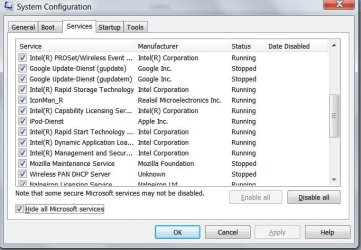
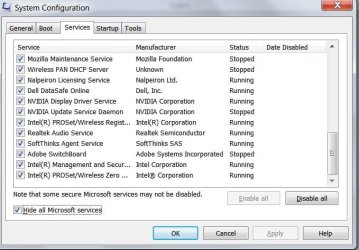
Click :orb: then type "msconfig" without the quotes. Hit enter. Click yes on UAC if it appears. Under the services tab, check hide all Microsoft services.
Then send us a screenshot using the snipping tool of the attached items in there. You might need to make 2 screenshots.

NEXT,
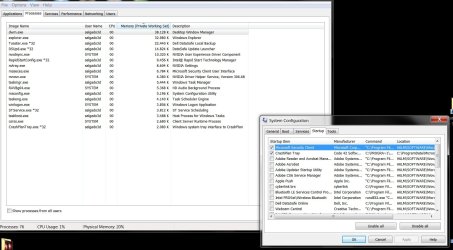
Go to the startup tab. Uncheck everything except your antivirus/antimalware protection. Click ok and then choose restart.

Report how many processes there are now.
 

My Computer My Computer

At a glance

Windows 10 ProAMD Ryzen 5 2400G Processor with Radeon RX Ve...G.SKILL Ripjaws V Series 16GB (2 x 8GB) 288-P...2047MB NVIDIA GeForce GTX 1060 6GB (EVGA)
Computer type
PC/Desktop
Computer Manufacturer/Model Number
Custom Built
OS
Windows 10 Pro
CPU
AMD Ryzen 5 2400G Processor with Radeon RX Vega 11 Graphics
Motherboard
ASRock X470 Master SLI/AC AM4 AMD Promontory X470 SATA 6Gb/s
Memory
G.SKILL Ripjaws V Series 16GB (2 x 8GB) 288-Pin DDR4 SDRAM D
Graphics Card(s)
2047MB NVIDIA GeForce GTX 1060 6GB (EVGA)
Sound Card
Motherboard Built in
Monitor(s) Displays
Acer R240HY bidx 23.8-Inch IPS HDMI DVI VGA (1920 x 1080) Wi
Screen Resolution
1920 x 1080
Hard Drives
1TB Sandisk SSD PLUS (Main drive)
500 GB Seagate 7200 RPM (Games)
500 GB Western Digital 7200 RPM (Virtual Machines)
PSU
CORSAIR TX Series TX650M 650W 80+ Gold Modular Power Supply
Case
CORSAIR CARBIDE SPEC-02 Mid-Tower Gaming Case, Red LED Fan
Cooling
220mm, two 120mm, and four 60mm fans
Keyboard
Wired Dell keyboard
Mouse
Wireless Logitech mouse
Internet Speed
250mb down, 30mb up
Antivirus
Panda Cloud Antivirus
Browser
Chrome-ish x64
Other Info
Your awesome for reading this.
If your going to do what you said in post 8. I would suggest highly that you just simply Wipe and follow the guide http://www.sevenforums.com/tutorials/219487-clean-reinstall-factory-oem-windows-7-a.html that DavidW7ncus already suggested.

Especially since you just reinstalled windows recently. It takes a little longer but it is very well worth it. The speed difference is worth it by itself.

If you do not wish to do this then go ahead with removing the factory bloatware and follow my post above.
 

My Computer My Computer

At a glance

Windows 10 ProAMD Ryzen 5 2400G Processor with Radeon RX Ve...G.SKILL Ripjaws V Series 16GB (2 x 8GB) 288-P...2047MB NVIDIA GeForce GTX 1060 6GB (EVGA)
Computer type
PC/Desktop
Computer Manufacturer/Model Number
Custom Built
OS
Windows 10 Pro
CPU
AMD Ryzen 5 2400G Processor with Radeon RX Vega 11 Graphics
Motherboard
ASRock X470 Master SLI/AC AM4 AMD Promontory X470 SATA 6Gb/s
Memory
G.SKILL Ripjaws V Series 16GB (2 x 8GB) 288-Pin DDR4 SDRAM D
Graphics Card(s)
2047MB NVIDIA GeForce GTX 1060 6GB (EVGA)
Sound Card
Motherboard Built in
Monitor(s) Displays
Acer R240HY bidx 23.8-Inch IPS HDMI DVI VGA (1920 x 1080) Wi
Screen Resolution
1920 x 1080
Hard Drives
1TB Sandisk SSD PLUS (Main drive)
500 GB Seagate 7200 RPM (Games)
500 GB Western Digital 7200 RPM (Virtual Machines)
PSU
CORSAIR TX Series TX650M 650W 80+ Gold Modular Power Supply
Case
CORSAIR CARBIDE SPEC-02 Mid-Tower Gaming Case, Red LED Fan
Cooling
220mm, two 120mm, and four 60mm fans
Keyboard
Wired Dell keyboard
Mouse
Wireless Logitech mouse
Internet Speed
250mb down, 30mb up
Antivirus
Panda Cloud Antivirus
Browser
Chrome-ish x64
Other Info
Your awesome for reading this.
Ok andrew, I've done as you asked, here are the screens. Indeed I now start with 76 processes, I'm not sure if that's still alot but anyhow let me know what you think I should do next.
 

Attachments

  • Sys Config 01.jpg
    Sys Config 01.jpg
    55.5 KB · Views: 14
  • Sys Config 02.jpg
    Sys Config 02.jpg
    60.8 KB · Views: 14
  • Sys Config 03.jpg
    Sys Config 03.jpg
    53.9 KB · Views: 14
  • Sys Config After Changes in MSconfig.jpg
    Sys Config After Changes in MSconfig.jpg
    155.5 KB · Views: 3

My Computer My Computer

At a glance

Windows 7 home premium 64 bitIntel core i7 3612qm @ 2.10 ghz8gbNvidia GeForce gt 640M
Computer type
PC/Desktop
Computer Manufacturer/Model Number
Dell xps
OS
Windows 7 home premium 64 bit
CPU
Intel core i7 3612qm @ 2.10 ghz
Memory
8gb
Graphics Card(s)
Nvidia GeForce gt 640M
Thank you for the information and for doing what was asked. Going forward I am assuming you do not want to follow the guide to do a http://www.sevenforums.com/tutorials/219487-clean-reinstall-factory-oem-windows-7-a.html without any bloatware at all?

If no, lets continue:

Wow! That is a lot of services. Your procceses look a lot better. Mine is 78 with firefox running. Notice too how your memory is at 20% usage as well? That's good.

Have you removed the bloatware yet or not? Just wondering. (It does not look like it)

Looking here, this is what I suggest be removed if you do not use it: (Let me know if you do use the software please)

If you do not use it, uninstall it in http://www.sevenforums.com/tutorials/77761-programs-features-uninstall-change-program.html

-Crashplan backup -Do you use it? If not uninstall it. If you do, might I suggest windows built in backup?
-Ciberlink -Do you use it? If not uninstall it.
-codemeter -Do you use it? If not uninstall it.

-I notice you have firefox and possibly chrome installed (or some sort of google software.) If you have any google software installed, you can uninstall it if you do not use it. (Such as chrome, google earth, or google toolbar.)
Pick one third party browser and use it. Otherwise, internet explorer no longer sucks, so you might want to try internet explorer 10 out and compare. Decide which browser you want to use.

-I noticed you have SoftThinks Agent Service in your services list. This is a dell backup program that is unnecessary. It's name is dell datasafe. I suggest uninstalling it. Source of info.

-Do you actually use itunes? As in have a idevice? If you do not, suggest using windows media player. Itunes is a major resource hog. Your computer will run significantly faster without it. If you do use it because you have a idevice: Note that Itunes is no longer necessary for updates to said Idevices. Therefor it does not need to be installed.
If you do want something like itunes for the functionality of syncing etc, I suggest third party software.

Third party software for itunes replacement:

iTunes replacements for Windows, Mac OS X, and iOS | How To - CNET

8 Best iTunes Alternatives

How to Ditch iTunes Forever and Keep Syncing Your iOS Devices
 

My Computer My Computer

At a glance

Windows 10 ProAMD Ryzen 5 2400G Processor with Radeon RX Ve...G.SKILL Ripjaws V Series 16GB (2 x 8GB) 288-P...2047MB NVIDIA GeForce GTX 1060 6GB (EVGA)
Computer type
PC/Desktop
Computer Manufacturer/Model Number
Custom Built
OS
Windows 10 Pro
CPU
AMD Ryzen 5 2400G Processor with Radeon RX Vega 11 Graphics
Motherboard
ASRock X470 Master SLI/AC AM4 AMD Promontory X470 SATA 6Gb/s
Memory
G.SKILL Ripjaws V Series 16GB (2 x 8GB) 288-Pin DDR4 SDRAM D
Graphics Card(s)
2047MB NVIDIA GeForce GTX 1060 6GB (EVGA)
Sound Card
Motherboard Built in
Monitor(s) Displays
Acer R240HY bidx 23.8-Inch IPS HDMI DVI VGA (1920 x 1080) Wi
Screen Resolution
1920 x 1080
Hard Drives
1TB Sandisk SSD PLUS (Main drive)
500 GB Seagate 7200 RPM (Games)
500 GB Western Digital 7200 RPM (Virtual Machines)
PSU
CORSAIR TX Series TX650M 650W 80+ Gold Modular Power Supply
Case
CORSAIR CARBIDE SPEC-02 Mid-Tower Gaming Case, Red LED Fan
Cooling
220mm, two 120mm, and four 60mm fans
Keyboard
Wired Dell keyboard
Mouse
Wireless Logitech mouse
Internet Speed
250mb down, 30mb up
Antivirus
Panda Cloud Antivirus
Browser
Chrome-ish x64
Other Info
Your awesome for reading this.
The lack of "free" RAM is not a problem. Windows was designed to operate with little or no free memory and this is in fact the ideal condition. What is important is having adequate available memory.

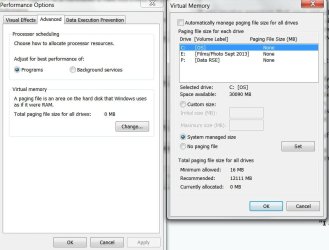
What is a serious problem is that for the current workload and 8 GB RAM you need a pagefile. The fact that the commit limit is virtually the same as RAM size clearly shows that there is either no pagefile at all or one that is not nearly large enough. When the total commit hits the commit limit bad things will happen. Most likely this is the cause of your problems. This can happen even when there is considerable available or even free memory.
 

My Computer My Computer

At a glance

Windows 7 Pro 64 bitXeon W35208 GBNvidia Geforce 210
Computer type
PC/Desktop
Computer Manufacturer/Model Number
HP
OS
Windows 7 Pro 64 bit
CPU
Xeon W3520
Memory
8 GB
Graphics Card(s)
Nvidia Geforce 210
Going off of LMiller7 lets check your page file settings. IGNORE THIS IF YOU HAVE A SOLID STATE DRIVE. SSD's do not need a page file.

If you receive warnings that your virtual memory is low, you'll need to increase the minimum size of your paging file. Windows sets the initial minimum size of the paging file at the amount of random access memory (RAM) installed on your computer plus 300 megabytes (MB), and the maximum size at 3 times the amount of RAM installed on your computer. If you see warnings at these recommended levels, then increase the minimum and maximum sizes.

  1. Open System by clicking the Start button
    4f6cbd09-148c-4dd8-b1f2-48f232a2fd33_47.png
    , clicking Control Panel, clicking System and Maintenance, and then clicking System.
  2. In the left pane, click Advanced system settings.
    18abb370-ac1e-4b6b-b663-e028a75bf05b_41.png
    If you are prompted for an administrator password or confirmation, type the password or provide confirmation.
  3. On the Advanced tab, under Performance, click Settings.
  4. Click the Advanced tab, and then, under Virtual memory, click Change.
  5. Clear the Automatically manage paging file size for all drives check box.
  6. Under Drive [Volume Label], click the drive that contains the paging file you want to change. (Drive C typically.)
  7. Make sure Automatic managing of page file is selected. Or choose to set a manual number.
Increases in size usually don't require a restart, but if you decrease the size, you'll need to restart your computer for the changes to take effect. We recommend that you don't disable or delete the paging file.

See also


My Computer My Computer

At a glance

Windows 10 ProAMD Ryzen 5 2400G Processor with Radeon RX Ve...G.SKILL Ripjaws V Series 16GB (2 x 8GB) 288-P...2047MB NVIDIA GeForce GTX 1060 6GB (EVGA)
Computer type
PC/Desktop
Computer Manufacturer/Model Number
Custom Built
OS
Windows 10 Pro
CPU
AMD Ryzen 5 2400G Processor with Radeon RX Vega 11 Graphics
Motherboard
ASRock X470 Master SLI/AC AM4 AMD Promontory X470 SATA 6Gb/s
Memory
G.SKILL Ripjaws V Series 16GB (2 x 8GB) 288-Pin DDR4 SDRAM D
Graphics Card(s)
2047MB NVIDIA GeForce GTX 1060 6GB (EVGA)
Sound Card
Motherboard Built in
Monitor(s) Displays
Acer R240HY bidx 23.8-Inch IPS HDMI DVI VGA (1920 x 1080) Wi
Screen Resolution
1920 x 1080
Hard Drives
1TB Sandisk SSD PLUS (Main drive)
500 GB Seagate 7200 RPM (Games)
500 GB Western Digital 7200 RPM (Virtual Machines)
PSU
CORSAIR TX Series TX650M 650W 80+ Gold Modular Power Supply
Case
CORSAIR CARBIDE SPEC-02 Mid-Tower Gaming Case, Red LED Fan
Cooling
220mm, two 120mm, and four 60mm fans
Keyboard
Wired Dell keyboard
Mouse
Wireless Logitech mouse
Internet Speed
250mb down, 30mb up
Antivirus
Panda Cloud Antivirus
Browser
Chrome-ish x64
Other Info
Your awesome for reading this.
Ok, when looking at 'system' you're right, there is no page under C. Could this have happened after I created a partition for my hardrive into two, (I wanted to keep windows files and programs in this drive and separate to another partition for my movies/music etc. )


where it then didn't allocate a page file to it? Here's a screen of what it was set to, it says "0''!?
What should I set it to now ? thanks
 

Attachments

  • page file 01.jpg
    page file 01.jpg
    57.2 KB · Views: 1

My Computer My Computer

At a glance

Windows 7 home premium 64 bitIntel core i7 3612qm @ 2.10 ghz8gbNvidia GeForce gt 640M
Computer type
PC/Desktop
Computer Manufacturer/Model Number
Dell xps
OS
Windows 7 home premium 64 bit
CPU
Intel core i7 3612qm @ 2.10 ghz
Memory
8gb
Graphics Card(s)
Nvidia GeForce gt 640M

My Computer My Computer

At a glance

Win 10 Pro x64Intel I5-2500K @3.3GHz16GB G.Skill Ripjaws X (4x4GB)EVGA GeForce 750 Ti SC 2GB
Computer type
PC/Desktop
Computer Manufacturer/Model Number
Self Built
OS
Win 10 Pro x64
CPU
Intel I5-2500K @3.3GHz
Motherboard
Asrock P67 Extreme4
Memory
16GB G.Skill Ripjaws X (4x4GB)
Graphics Card(s)
EVGA GeForce 750 Ti SC 2GB
Sound Card
ASUS Xonar DG 5.1 Channels 24-bit 96KHz PCI Interface Sound
Monitor(s) Displays
auria eq2367
Screen Resolution
1920 x 1080
Hard Drives
250GB Samsung 850 EVO SSD
1TB WD Blue
1TB Hitachi
PSU
SeaSonic X 650W 80 Plus Gold
Case
Corsair Obsidian 750D
Cooling
Corsair H60, Three 140mm case fans
Keyboard
Logitech Wireless Keyboard K520
Mouse
Logitech Wireless Mouse M310
Internet Speed
Wave Broadband ~ 100 dn 5 up
Antivirus
Windows Defender, Malwarebytes Premium
Browser
Edge, IE11, Chrome
Other Info
Laptop specs: HP g7-1365dx /
CPU: AMD A6-3420M APU with Radeon(tm) HD Graphics /
RAM: Crucial 8Gb (2x4Gb) /
SSD: Crucial M4-CT128M4SSD2 ATA Device/ FW 000F /
GFX: AMD Radeon HD 6520G /
OS: Windows 10 Pro x64
Ok Ill give that a shot, thanks derekimo!
 

My Computer My Computer

At a glance

Windows 7 home premium 64 bitIntel core i7 3612qm @ 2.10 ghz8gbNvidia GeForce gt 640M
Computer type
PC/Desktop
Computer Manufacturer/Model Number
Dell xps
OS
Windows 7 home premium 64 bit
CPU
Intel core i7 3612qm @ 2.10 ghz
Memory
8gb
Graphics Card(s)
Nvidia GeForce gt 640M
Back
Top