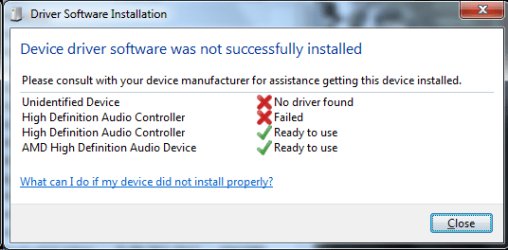
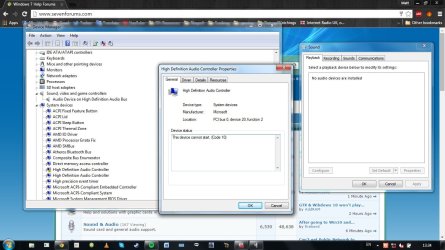
As described there, I have no audio on my laptop anymore (an ASUS x53z) Following his advice I have uninstalled the chipset drivers using the installer from the ASUS website. Nothing has changed. I have two devices listed under System devices called High Definition Audio Controller, one has an error "This device was unable to start (code 10)" which i understand to be bad drivers, but these are now the generic windows drivers, surely?
I'm very confused and frustrated!
My Computer
At a glance
Windows 7 Home Premium SP1 64BitAMD A6-3420M16GBRadeon HD 6520G
I have just remembered what I think may have caused the problem. When attempting to fix the problem with my CD-DVD drive not working under windows 10 I foolishly installed the latest intel chipset drivers, completely forgetting i'm on an AMD chipset. May this have caused the issue?
I'm still confused though,as I've now uninstalled and reinstalled the latest AMD chipset drivers twice with no change, and as I understand it one chipset driver would overwrite the other, surely?
Hope this sheds light on a possible solution. I really need audio back up and running on this machine
Matt
My Computer
At a glance
Windows 7 Home Premium SP1 64BitAMD A6-3420M16GBRadeon HD 6520G
The Intel chipset drivers would (should) not have installed if it didn't detect an Intel chipset.
Go to the Device Manager, Uninstall everything in the Sound section (DO NOT uninstall any drivers). Restart the PC and after Windows starts check the device manager to see if that changes anything.
My Computer
At a glance
Windows 10 64 bitIntel i7 6700K16GB Corsair DominatorIntel CPU Graphics
Computer type
PC/Desktop
Computer Manufacturer/Model Number
My Own Build
OS
Windows 10 64 bit
CPU
Intel i7 6700K
Motherboard
ASUS ROG Maximus VIII Hero
Memory
16GB Corsair Dominator
Graphics Card(s)
Intel CPU Graphics
Sound Card
RealTek
Monitor(s) Displays
27" Dell S2719dgf
Screen Resolution
2560X1440
Hard Drives
1 TB Samsung 850 EVO SSD for Win 10 Pro
500GB Samsung 850 EVO SSD for Win 10 Insider
2 TB drive for backup
PSU
EVGA Supernova 750G2
Case
BeQuiet Silent Base 600
Cooling
Deepcool Captain 120EX
Keyboard
Microsoft Wireless 2000
Mouse
Microsoft wireless
Internet Speed
100 MB/sec (Cable)
Antivirus
Microsoft Defender and Malwarebytes
Browser
Edge/Firefox
Other Info
Cakewalk (Sonar) by BandLab and Studio One 4.1 Pro recording studio software. MOTU 896Mk3 Hybrid recording interface, Frontier Tranzport wireless control unit, Behringer X-Touch Control Surface.
Five USB connected optical drives for CD Audio production using Nero BurningROM
Nope, the only difference is that now instead of just having the HDMI Audio Output in the Playback devices, there are now NO devices, as you can see from the screenshot. Still same error and yellow triangle on that Audio Controller.
Attachments
latestss.jpg
130.6 KB
· Views: 3
My Computer
At a glance
Windows 7 Home Premium SP1 64BitAMD A6-3420M16GBRadeon HD 6520G
Do you think this issue would be solved by doing a fresh install of Windows? If i do that, I'll probably do 10 as it seems silly to install 7 again just to upgrade it. This would be a last resort as I'd like not to lose all my programs, etc. but I'm starting to consider it.
Matt
My Computer
At a glance
Windows 7 Home Premium SP1 64BitAMD A6-3420M16GBRadeon HD 6520G
You can't do a fresh install of Windows 10 (free version) without first upgrading. After you have successfully upgraded you can then do a clean install.
Those errors seem to suggest devices are not being detected either because of a BIOS problem or the chipset drivers.
How did you install the Intel chipset drivers? If you used what you have on a motherboard install disc they may be out of date. Best to go to Intel: Tablet, 2in1, Laptop, Desktop, Smartphone, Server, Embedded and download and run their Intel Driver Update Utility.
My Computer
At a glance
Windows 10 64 bitIntel i7 6700K16GB Corsair DominatorIntel CPU Graphics
Computer type
PC/Desktop
Computer Manufacturer/Model Number
My Own Build
OS
Windows 10 64 bit
CPU
Intel i7 6700K
Motherboard
ASUS ROG Maximus VIII Hero
Memory
16GB Corsair Dominator
Graphics Card(s)
Intel CPU Graphics
Sound Card
RealTek
Monitor(s) Displays
27" Dell S2719dgf
Screen Resolution
2560X1440
Hard Drives
1 TB Samsung 850 EVO SSD for Win 10 Pro
500GB Samsung 850 EVO SSD for Win 10 Insider
2 TB drive for backup
PSU
EVGA Supernova 750G2
Case
BeQuiet Silent Base 600
Cooling
Deepcool Captain 120EX
Keyboard
Microsoft Wireless 2000
Mouse
Microsoft wireless
Internet Speed
100 MB/sec (Cable)
Antivirus
Microsoft Defender and Malwarebytes
Browser
Edge/Firefox
Other Info
Cakewalk (Sonar) by BandLab and Studio One 4.1 Pro recording studio software. MOTU 896Mk3 Hybrid recording interface, Frontier Tranzport wireless control unit, Behringer X-Touch Control Surface.
Five USB connected optical drives for CD Audio production using Nero BurningROM
They came from a post on the tenforums site. But as I have an AMD based system, i shouldn't have been installing these at all surely? I have downloaded the Update utility, but was reticent to run it because of being AMD.
Would you recommend a fresh install at this point? I can't see why BIOS would be a problem as I haven't changed anything in the BIOS settings at all.
My Computer
At a glance
Windows 7 Home Premium SP1 64BitAMD A6-3420M16GBRadeon HD 6520G
...and if so, should i fresh install windows 7 -> then upgrade to 10 -? then fresh install 10, or just skip the windows 7 re-install, and upgrade back to 10 again and do the fresh install from there?
My Computer
At a glance
Windows 7 Home Premium SP1 64BitAMD A6-3420M16GBRadeon HD 6520G
No, don't install Intel, I thought that was what you had.
A BIOS reset is worth a try. If you have any custom BIOS settings you will have to reset those after the BIOS reset.
A clean Win 7 install will probably fix things, but a last resort. If you do a clean Win 7 install and it works, and want Win 10 again do the upgrade with just Win 7 installed. Add whatever programs you want after the 10 upgrade.
My Computer
At a glance
Windows 10 64 bitIntel i7 6700K16GB Corsair DominatorIntel CPU Graphics
Computer type
PC/Desktop
Computer Manufacturer/Model Number
My Own Build
OS
Windows 10 64 bit
CPU
Intel i7 6700K
Motherboard
ASUS ROG Maximus VIII Hero
Memory
16GB Corsair Dominator
Graphics Card(s)
Intel CPU Graphics
Sound Card
RealTek
Monitor(s) Displays
27" Dell S2719dgf
Screen Resolution
2560X1440
Hard Drives
1 TB Samsung 850 EVO SSD for Win 10 Pro
500GB Samsung 850 EVO SSD for Win 10 Insider
2 TB drive for backup
PSU
EVGA Supernova 750G2
Case
BeQuiet Silent Base 600
Cooling
Deepcool Captain 120EX
Keyboard
Microsoft Wireless 2000
Mouse
Microsoft wireless
Internet Speed
100 MB/sec (Cable)
Antivirus
Microsoft Defender and Malwarebytes
Browser
Edge/Firefox
Other Info
Cakewalk (Sonar) by BandLab and Studio One 4.1 Pro recording studio software. MOTU 896Mk3 Hybrid recording interface, Frontier Tranzport wireless control unit, Behringer X-Touch Control Surface.
Five USB connected optical drives for CD Audio production using Nero BurningROM
Yeah, the BIOS reset didn't do anything unfortunately. Oh well, I guess a reinstall is my last option. I'll have to some backing up of stuff first (not too much as i use Dropbox for anything important) and then i'll get back to you on the other side!
My Computer
At a glance
Windows 7 Home Premium SP1 64BitAMD A6-3420M16GBRadeon HD 6520G
So..I did a factory reset from the restore partition. Being a pre-installed ASUS laptop I was unable to download the installation disc from Microsoft so the F9 approach was my only option. Now I am back to a "clean" install (plus all the other gumph ASUS include) but still no sound
Back to just having one device installed - AMD High Definition Audio device. And the device manager still looks exactly the same, under System Devices, "High Definition Audio Driver" has a yellow triangle still, and it still reports as "unable to start (error code 10)
I'm devestated. I assume this means it's a hardware issue
My Computer
At a glance
Windows 7 Home Premium SP1 64BitAMD A6-3420M16GBRadeon HD 6520G
It does sound like a hardware problem, considering everything that you have done.
I haven't looked into your ASUS but some PC vendors have a small "daughter" board for the audio and I/O jacks. If that's the case you could consider replacing that board. The other option is to use USB connected headset or speakers. USB devices do not need a sound card. Another alternative is a USB connected sound card.
My Computer
At a glance
Windows 10 64 bitIntel i7 6700K16GB Corsair DominatorIntel CPU Graphics
Computer type
PC/Desktop
Computer Manufacturer/Model Number
My Own Build
OS
Windows 10 64 bit
CPU
Intel i7 6700K
Motherboard
ASUS ROG Maximus VIII Hero
Memory
16GB Corsair Dominator
Graphics Card(s)
Intel CPU Graphics
Sound Card
RealTek
Monitor(s) Displays
27" Dell S2719dgf
Screen Resolution
2560X1440
Hard Drives
1 TB Samsung 850 EVO SSD for Win 10 Pro
500GB Samsung 850 EVO SSD for Win 10 Insider
2 TB drive for backup
PSU
EVGA Supernova 750G2
Case
BeQuiet Silent Base 600
Cooling
Deepcool Captain 120EX
Keyboard
Microsoft Wireless 2000
Mouse
Microsoft wireless
Internet Speed
100 MB/sec (Cable)
Antivirus
Microsoft Defender and Malwarebytes
Browser
Edge/Firefox
Other Info
Cakewalk (Sonar) by BandLab and Studio One 4.1 Pro recording studio software. MOTU 896Mk3 Hybrid recording interface, Frontier Tranzport wireless control unit, Behringer X-Touch Control Surface.
Five USB connected optical drives for CD Audio production using Nero BurningROM
OK, so I think you're right, I've investigated USB sound cards and they aren't so expensive. However I have a new problem!
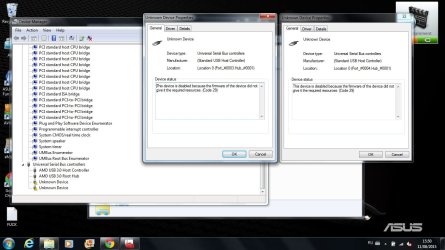
My USB ports aren't working now! I noticed there were 2 more devices showing with yellow triangles, so I deleted them to see if they would reinstall. I installed the latest chipset drivers (something I've got a lot of practice at recently) and now when i reboot they show as two Unknown Devices with the error code 29 as shown in the screenshot. Trying to update drivers says that the best drivers are installed, and deleting them and scanning for hardware changes gives a failed installation
I've given up on the audio problem, because I thought I could cope with using a USB sound card until i can afford a new machine, but if the USB won't work now, i'm a bit stuffed!
Any ideas?
Attachments
Untitled.jpg
118.3 KB
· Views: 1
My Computer
At a glance
Windows 7 Home Premium SP1 64BitAMD A6-3420M16GBRadeon HD 6520G
Looking at threads for the Code 29, one thing that pops up that I don't think you have tried. "Clear CMOS". I know you reset the BIOS but this does a deeper reset (and may even help the audio problem).
In most PC's the Clear CMOS requires removing the CMOS backup battery (with the PC powered off) on the motherboard for AT LEAST 10 minutes. In most newer PC's the battery is a CR2032 coin cell battery. Some disassembly of the PC case may be required to access the battery. Observe battery polarity when reinstalling.
At this point, worth a try.
My Computer
At a glance
Windows 10 64 bitIntel i7 6700K16GB Corsair DominatorIntel CPU Graphics
Computer type
PC/Desktop
Computer Manufacturer/Model Number
My Own Build
OS
Windows 10 64 bit
CPU
Intel i7 6700K
Motherboard
ASUS ROG Maximus VIII Hero
Memory
16GB Corsair Dominator
Graphics Card(s)
Intel CPU Graphics
Sound Card
RealTek
Monitor(s) Displays
27" Dell S2719dgf
Screen Resolution
2560X1440
Hard Drives
1 TB Samsung 850 EVO SSD for Win 10 Pro
500GB Samsung 850 EVO SSD for Win 10 Insider
2 TB drive for backup
PSU
EVGA Supernova 750G2
Case
BeQuiet Silent Base 600
Cooling
Deepcool Captain 120EX
Keyboard
Microsoft Wireless 2000
Mouse
Microsoft wireless
Internet Speed
100 MB/sec (Cable)
Antivirus
Microsoft Defender and Malwarebytes
Browser
Edge/Firefox
Other Info
Cakewalk (Sonar) by BandLab and Studio One 4.1 Pro recording studio software. MOTU 896Mk3 Hybrid recording interface, Frontier Tranzport wireless control unit, Behringer X-Touch Control Surface.
Five USB connected optical drives for CD Audio production using Nero BurningROM
I removed the backup battery and left it out while i went to work, and reinserted it when I cam e back. Still no joy with Audio or USB. Out of interest I thought i'd boot from a Linux liveCD (Knoppix) and neither are functioning there either. So I think taking it to the repair shop might be in order....I'm amazed that both could just stop working like that. The laptop's done a lot of travelling in the last month, but it was stationary when this problem first occurred, seems strange.
My Computer
At a glance
Windows 7 Home Premium SP1 64BitAMD A6-3420M16GBRadeon HD 6520G
Before i take it in (i haven't found time) some new information that might tickle a grey cell of yours into suggesting what might be wrong. I've noticed in the last few days that also the SD Card Reader on the front of the laptop and the webcam are also not functioning, and when I look in device manager they are neither detected nor have drivers installed...
Any clues? It feels like all these issues - non-functioning audio, USB, memory card reader and now webcam - are down to one unifying issue.
My Computer
At a glance
Windows 7 Home Premium SP1 64BitAMD A6-3420M16GBRadeon HD 6520G