After monitor off + on: "No imput signal" + black screen

pstein

New member
Member
VIP
Local time
4:38 AM
Messages
244
I started successfully my Windows 7+SP1 with newest patches
and can work normally.

Then I turn off my TFT monitor (not the running computer).
Win7 continues to work (as hard disc LED indicator and remote control tools prove).

Later I try to turn on my monitor again.
But much to my surprise the screen stays dark.
Just a moving indicator tells me now "No input signal".

Whats worng?

On a WinXP and another WIndows 7 computer (all with the same monitor) everything works fine. The desktop is shown again after returning to on.
So the hardware is not damaged.
I always have to reboot again to re-show the Windows desktop.

As far as I can rememeber in the first time the Win7 in focus system works as well but then I must have changed some settings.

I am using a motherboard with a core-i5 and H67 chipset with built-in graphic processor. So I have no separate graphic card.

Peter
 

My Computer My Computer

At a glance

win7pro 64bit
Computer type
PC/Desktop
OS
win7pro 64bit
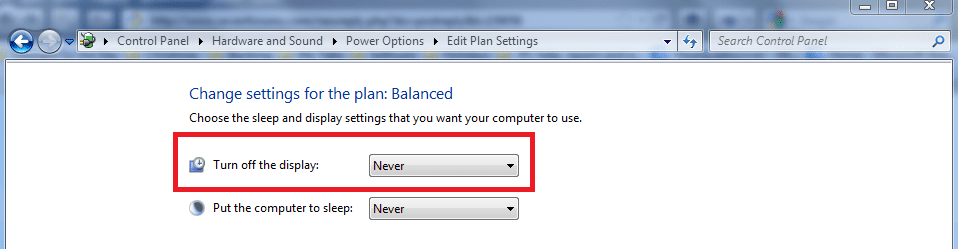
It is likely to be the power settings for your monitor:

Press Start:
Type in the 'Search Programs and Files' box "Power Options" (without the " ").

Select the Power Options link offered in the list.
Then, 'Change when the computer sleeps' and from the drop-down menu for your monitor choose 'Never'.
.
.
 

Attachments

  • power settings.PNG
    power settings.PNG
    42.1 KB · Views: 49
  • monitor options.PNG
    monitor options.PNG
    22.8 KB · Views: 50

My Computer My Computer

At a glance

Windows 7 Home Premium 64bitIntel(R) Core(TM) i3-2120 CPU @ 3.30GHz3.00 GB(1) Intel(R) HD Graphics (2) VNC Mirror Driver
Computer type
PC/Desktop
Computer Manufacturer/Model Number
Packard Bell
OS
Windows 7 Home Premium 64bit
CPU
Intel(R) Core(TM) i3-2120 CPU @ 3.30GHz
Motherboard
Packard Bell IPISB-AG
Memory
3.00 GB
Graphics Card(s)
(1) Intel(R) HD Graphics (2) VNC Mirror Driver
Sound Card
Realtek High Definition Audio
Monitor(s) Displays
AIO LCD
Screen Resolution
1920 x 1080
Hard Drives
WDC WD10EADX-22TDHB0 ATA Device
Fixed hard disk media
4 partitions
931.51 GB
Keyboard
Wireless
Mouse
Wireless
Antivirus
Microsoft Security Essentials
Browser
IE; Firefox
Other Info
Also:
Samsung N220 Plus Netbook - Windows 7 Home
HP laptop
iPad 5
I tried the power options comment above and it did not work,, my screen will display a white square with the works no imput signal in it and 3 colored bars on bottom of square and it stays on all night long it wont let my screen go to sleep ! but when I hit the space bar the homepage comes up and I can use the pc,,,,,, it just wont go to sleep it flashes the no imput signal 24/7
 

My Computer My Computer

At a glance

windows 7 home premium
OS
windows 7 home premium
Whatever type cable you are using try a different type. For example, if you are using an HDMI cable, change to a DVI cable from your card to the monitor. I had a very similar problem once. After pulling my hair out, I changed the cable and also the input type on the monitor, and the problem went away and has never returned. I have no idea of the cause as I tried 3 of the HDMI cables. But when I changed from a HDMI to a DVD it worked perfect and has not returned.....so far.
 

My Computers My Computers

  • At a glance

    Windows 11 ProRyzen 9 5900X32GB G Skill DDR4-3600EVGA RTX 3080 FTW 3 Ultra
    Computer type
    PC/Desktop
    Computer Manufacturer/Model Number
    ALWAYS UNDER CONSTRUCTION
    OS
    Windows 11 Pro
    CPU
    Ryzen 9 5900X
    Motherboard
    Asus X570 Crosshair Viii Hero
    Memory
    32GB G Skill DDR4-3600
    Graphics Card(s)
    EVGA RTX 3080 FTW 3 Ultra
    Sound Card
    On Board/Sennheiser PC37X Headset
    Monitor(s) Displays
    3 X Asus 27"
    Screen Resolution
    2560x1440
    Hard Drives
    2 X 1 TB NVME drives
    PSU
    EVGA 850
    Case
    Phanteks Eclipse P400A
    Cooling
    EVGA 280 AIO
    Keyboard
    Logitech G510s/ Logitech G13
    Mouse
    Logitech G502
    Internet Speed
    24/1
    Antivirus
    ESET/MBAM Pro/SAS Pro
    Browser
    Chrome/ Firefox/ Edge
  • At a glance

    Windows 11 ProIntel Ultra 9 288V32 GB LPDDR5X 8533
    Computer type
    Laptop
    System Manufacturer/Model Number
    Dell 16 Plus
    OS
    Windows 11 Pro
    CPU
    Intel Ultra 9 288V
    Memory
    32 GB LPDDR5X 8533
    Monitor(s) Displays
    16" Mini-LED HDR600 Touch 90 Hz
    Screen Resolution
    2560X1600
    Hard Drives
    1 TB NVME
Hi there
I've answered this type of problem before

1) On the computer ( I KNOW you can't see the screen) press the Windows and P button.
2) Press the DOWN arrow 3 times (for external monitor or just press ENTER for the internal monitor)
3) press enter (if you want the external monitor).

Hey like magic your video will appear on the screen again (Internal screen)

What you are doing is activating this (screenshot enc). Actually can't find the image but look at my post in this thread for the screenshot

( I KNOW you don't have a screen but this mechanism WORKS!!!!).

http://www.sevenforums.com/general-discussion/234016-help-logging-broken-monitor-3.html

I'm actually on Windows 8 at the moment but it's the same on W7.

Cheers
jimbo
 

My Computer My Computer

At a glance

Linux CENTOS 7 / various Windows OS'es and se...Intel i7 Intel i58GB, 16GBOn Motherboard
Computer type
PC/Desktop
Computer Manufacturer/Model Number
Custom built, several laptops HP/ASUS
OS
Linux CENTOS 7 / various Windows OS'es and servers
CPU
Intel i7 Intel i5
Memory
8GB, 16GB
Graphics Card(s)
On Motherboard
Sound Card
Realtek HD audio
Monitor(s) Displays
Apple Cinema display, Samsung LCD
Screen Resolution
1920 X 1080
Hard Drives
4 X 1TB SATA
Mouse
Toshiba wireless laser
Internet Speed
> 20MB up
hi..

i tried the windows + p option still it didn't work.. my problem about the external monitor occured after installing new operating system..
can anyone help me with this...

thankx,
paolo
 

My Computer My Computer

At a glance

windows 7 ultimate 32-bit
OS
windows 7 ultimate 32-bit
Back
Top