after reinstalling windows 7

kjl4life44

New member
Local time
4:39 PM
Messages
27
sorry i dont know much about computers
why is that i only have 588GB free but i have 698GB total?
 

My Computer

OS
Windows 7 Home Premium 64-bit (6.1, Build 7600)
CPU
AMD Phenom(tm) 9750 Quad-Core Processor (4 CPUs), ~2.4GHz
Motherboard
HP-Pavilion p6130y
Memory
8192MB RAM
Graphics Card(s)
NVIDIA GeForce 9100
Sound Card
Realtek Semiconductor Corp
Monitor(s) Displays
W2361 LG
Screen Resolution
1920 x 1080 (32 bit) (59Hz)
Keyboard
HP
Mouse
HP
Internet Speed
AT&T Elite 6.0 MPBS
Other Info
DirectX 11
You have a 750GB HD.

Whats the problem?
 

My Computer

Computer Manufacturer/Model Number
I trust nobody!
OS
Windows 7 Ultimate x64/x86 Windows 7 Pro x64/x86 Windows 7 Home Premium x64/x86
CPU
Intel C2Q 9650
Motherboard
Intel
Memory
8GB DDR2800 Corsair
Graphics Card(s)
NVIDIA 260 GTX
Sound Card
Onboard
Monitor(s) Displays
Dell 2409w
Screen Resolution
1920x1080
Hard Drives
10 of em!
PSU
600 Watt FSP Group
Case
Antec
Cooling
Fresh Air
Keyboard
Microsoft
Mouse
Razer
Internet Speed
Fast enough
I suppose you talk about your disk. Why don't you post a snip of your Computer window in tiles view. Then we can have a look.
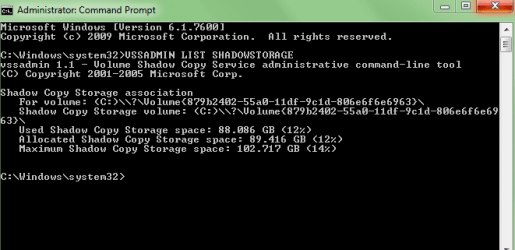
There are apparently 110GBs taken. Part is the operating system and your files. The other part may be shadows (restore points). To see what they are do the following:

Find Command Prompt (in All Programs > Accessories > Command Prompt), right click on it and Open as Administrator. Into the little black window type VSSADMIN LIST SHADOWSTORAGE and hit ENTER. It will show 3 numbers:
Allocated - that is the amount that it has grabbed from your OS partition at this time
Used - this is the amount currently used
Maximum - this is the ultimate amount it will allocate and use
Once you reach "maximum", it will reuse the space deleting the oldest shadows for the storage of the newest shadows.

It is the allocated number we are interested in. Please post that.
 

My Computer

Computer Manufacturer/Model Number
HP, Dell, Gateway, Toshiba - 4 laptops and 2 desktops
OS
Vista, Windows7, Mint Mate, Zorin, Windows 8
CPU
from 1.6GHz Duo to i7
Monitor(s) Displays
2x HP w2207
Hard Drives
5x HDD, 7x SSD, 12x Externals
Keyboard
with trackball - no mices
Mouse
Trackball mice
Internet Speed
DSL 6000
ok here

ok here
what should i do now, can i free up space?
 

Attachments

  • Capture.PNG
    Capture.PNG
    8.7 KB · Views: 10
  • Capture2.PNG
    Capture2.PNG
    5.5 KB · Views: 8

My Computer

OS
Windows 7 Home Premium 64-bit (6.1, Build 7600)
CPU
AMD Phenom(tm) 9750 Quad-Core Processor (4 CPUs), ~2.4GHz
Motherboard
HP-Pavilion p6130y
Memory
8192MB RAM
Graphics Card(s)
NVIDIA GeForce 9100
Sound Card
Realtek Semiconductor Corp
Monitor(s) Displays
W2361 LG
Screen Resolution
1920 x 1080 (32 bit) (59Hz)
Keyboard
HP
Mouse
HP
Internet Speed
AT&T Elite 6.0 MPBS
Other Info
DirectX 11
What do you need more space for?

Why does it matter? You have tons of free space now.

What programs do you have installed?

Are there any you do not need?

If so uninstall them.

Without knowing the contents of your HD we can't really tell what to dump.
 

My Computer

Computer Manufacturer/Model Number
I trust nobody!
OS
Windows 7 Ultimate x64/x86 Windows 7 Pro x64/x86 Windows 7 Home Premium x64/x86
CPU
Intel C2Q 9650
Motherboard
Intel
Memory
8GB DDR2800 Corsair
Graphics Card(s)
NVIDIA 260 GTX
Sound Card
Onboard
Monitor(s) Displays
Dell 2409w
Screen Resolution
1920x1080
Hard Drives
10 of em!
PSU
600 Watt FSP Group
Case
Antec
Cooling
Fresh Air
Keyboard
Microsoft
Mouse
Razer
Internet Speed
Fast enough
That clarifies it. You have about 90GBs of shadows and the remaining 20GBs are your OS and your files. You can, of course, reduce the shadowstorage. But given that you have so much free space on the disk, I would not do that. Some of these shadows (restore points) may come in handy one day. They are needed of you want to restore your system from a bad situation (e.g. Virus) or if you want to recover a lost file, etc. I think you are in great shape and no action is needed. If you have any further questions, please ask.
 

My Computer

Computer Manufacturer/Model Number
HP, Dell, Gateway, Toshiba - 4 laptops and 2 desktops
OS
Vista, Windows7, Mint Mate, Zorin, Windows 8
CPU
from 1.6GHz Duo to i7
Monitor(s) Displays
2x HP w2207
Hard Drives
5x HDD, 7x SSD, 12x Externals
Keyboard
with trackball - no mices
Mouse
Trackball mice
Internet Speed
DSL 6000
alright thanx guys.
 

My Computer

OS
Windows 7 Home Premium 64-bit (6.1, Build 7600)
CPU
AMD Phenom(tm) 9750 Quad-Core Processor (4 CPUs), ~2.4GHz
Motherboard
HP-Pavilion p6130y
Memory
8192MB RAM
Graphics Card(s)
NVIDIA GeForce 9100
Sound Card
Realtek Semiconductor Corp
Monitor(s) Displays
W2361 LG
Screen Resolution
1920 x 1080 (32 bit) (59Hz)
Keyboard
HP
Mouse
HP
Internet Speed
AT&T Elite 6.0 MPBS
Other Info
DirectX 11
Back
Top