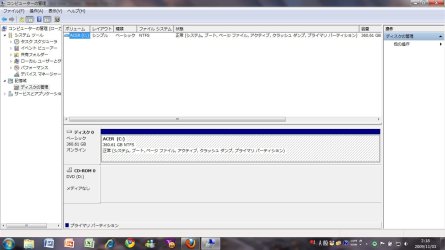
I m using windows7 ultimate. i tried to create a partition today following the steps written on microsoft website. i hav only c drive in my hdd nd it was showing 450GB...i pressed the volume shrink button and it showed that i can shrink 90 GB..then i pressed shrink but it does not create any unallocated space. so i cant create a partition..rather my c drive lost 90GB space and showing 360GB now..what should i do to get back that 90 GB?
All of my systems still run fastest on XP 32-bit for the most part. Win7 is fun to play with, but I still prefer XP for raw speed, security, and functionality.
Thanks for ur quick reply. yes, thats my current screenshot of disk management. as u can see, there is no unallocated partition..thats the main problem..what i hav done is exactly like the links u gave..but same result..
For example:
"5. In the middle pane, right click on the empty unallocated partition or volume and click on New Simple Volume. (See screenshot above)"
I dont hav this empty unallocated partition/volume even if i do the shrink..so cant proceed further
i dont wanna use a third party software, but it seems i have to..
could u plz tell me which is the best nd free soft for partition?