After windows 7 updates (no internet access)

Javier

New member
Local time
7:29 AM
Messages
3
Well I installed windows 7 with no problems but as soon as I install the updates for it, it says I have no internet access.
The only way to be able to go into the internet is if I do a system restore to when I just finished installing.
I am using a 2 Wire modem (at&t)

Is their a way to fix this problem?
 

My Computer My Computer

OS
Windows 7 & Windows XP
win updates

Well I installed windows 7 with no problems but as soon as I install the updates for it, it says I have no internet access.
The only way to be able to go into the internet is if I do a system restore to when I just finished installing.
I am using a 2 Wire modem (at&t)

Is their a way to fix this problem?

Hi javier

WElcome to sevenforums

You can of course turn off windows updates. You can also look at your update history to see which update kills your internet and uncheck it to prevent it downloading again.

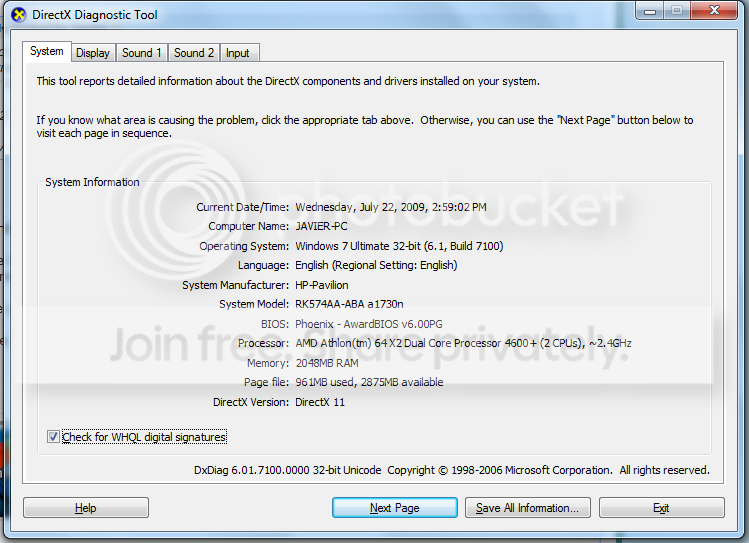
We could also use you system specs

Thanks in advance

Ken
 

My Computer My Computer

Computer Manufacturer/Model Number
HP Pavillion dv-7 1005 Tx
OS
Win 8 Release candidate 8400
CPU
[email protected]
Memory
4 gigs
Graphics Card(s)
Nvidia 9600M
Sound Card
HD built-in
Monitor(s) Displays
17" Wxga
Screen Resolution
1440x900
Cooling
none
Internet Speed
45Mb down 5Mb up
Here are my system specs
Untitled-13.png
 

My Computer My Computer

OS
Windows 7 & Windows XP
By what uve described, it sound like its installed Drivers for your Ethernet Port, this can be fixed by simply unticking the Ethernet driver update, from the Windows Update "To be downloaded" section.
 

My Computer My Computer

Computer Manufacturer/Model Number
Custom Build
OS
W7 RTM Ultimate x64
CPU
Intel Q8400 @ 2.66GHZ
Motherboard
Gigabyte GA-EG45M-UD2H
Memory
4GB DDR2-800
Graphics Card(s)
Gainward GTS 450 GLH 1GB Edition
Sound Card
Integrated 8 Channel
Monitor(s) Displays
AOC 23.6 Inch Widescreen LCD
Screen Resolution
1920x1080
Hard Drives
Seagate 500GB Internal
Western Digital 1TB Internal

Hitachi 1TB External
PSU
Apevia Java Power 500W
Case
Cooler Master HAF 922 Black
Cooling
Stock Intel CPU Fan
Keyboard
HP SK-2960 Multimedia Keyboard
Mouse
Logitech M350 Wireless Gaming Mouse
Internet Speed
1.5MB
By any chance is Windows Update picking up an updated driver for your modem/network card? What happens after a restart?

If indeed the adapter has been updated Windows will disconnect because it has to install new device software.

If you don't want to update that particular device you can right-click & 'hide' it in Windows Update ;)
 

My Computer My Computer

Computer Manufacturer/Model Number
Compaq Desktop
OS
Windows 7 Ultimate x64
CPU
AMD Sempron Dual Core
Memory
3GB
Graphics Card(s)
NVIDIA GeForce 6150SE nForce 430
Screen Resolution
1024x768
Hard Drives
150GB Sata
Thing is that in the updates their is nothing that involves ethernet updaters or anyhting that would effect my internet conection, well at least thats what i saw in the update descriptions.
 

My Computer My Computer

OS
Windows 7 & Windows XP
If you run a new 'Check for Updates' and post a screenshot that might help. Also, there's normally 2 types of update, 'Optional' and 'Important'
 

My Computer My Computer

Computer Manufacturer/Model Number
Compaq Desktop
OS
Windows 7 Ultimate x64
CPU
AMD Sempron Dual Core
Memory
3GB
Graphics Card(s)
NVIDIA GeForce 6150SE nForce 430
Screen Resolution
1024x768
Hard Drives
150GB Sata
I have the same thing where Windows Update gives me this different driver for my wireless adapter that doesn't work, so, I stay with my original drivers. XD
 

My Computer My Computer

OS
Windows 7 Ultimate x86
CPU
AMD Athlon X2 4850e (2.8 GHz OC)
Motherboard
ECS MCP61-HM (nForce 430a)
Memory
2x1 GB DDR-667
Graphics Card(s)
EVGA 9600GT 512MB
Sound Card
ASUS Xonar D1
Monitor(s) Displays
Acer X193W+ 19" (1680x1050)
Hard Drives
WD Caviar 320 GB SATA II
PSU
Rosewill RP550-2 (34A total 12V)
Case
Chieftec Dragon ATX Mid Tower (Black)
Cooling
Air
Keyboard
Compaq OEM
Mouse
Logitech LX3 Optical
Internet Speed
3mb/512k ADSL
I have the same thing where Windows Update gives me this different driver for my wireless adapter that doesn't work, so, I stay with my original drivers. XD

It's the best option for now, thankfully 'System Restore' works well in case of driver failure'

I've been luck in that ANY driver i've gotten from MU has worked 100%, i must be in the very select few :p
 

My Computer My Computer

Computer Manufacturer/Model Number
Compaq Desktop
OS
Windows 7 Ultimate x64
CPU
AMD Sempron Dual Core
Memory
3GB
Graphics Card(s)
NVIDIA GeForce 6150SE nForce 430
Screen Resolution
1024x768
Hard Drives
150GB Sata
You can simply uninstall your network card and then reinstall with the original/old working drivers. After that you can turn off the windows update's automatic install feature (only checking for updates) so you will be able to choose witch update you want to install and witch not.
 

My Computer My Computer

Computer Manufacturer/Model Number
home made
OS
Windows 7 RTM x64
CPU
AMD X2 5000+
Motherboard
Asrock
Memory
4GB
Graphics Card(s)
Nvidia 9400GT
Sound Card
onboard 6Ch
Monitor(s) Displays
Medion 22" + HannSpree 22"
Screen Resolution
1680X1050 + 1920X1080
Hard Drives
Intel SSD 80GB
WD 1.5 TB
WD 1 TB
Samsung 1TB X 3
PSU
noname
Case
noname
Cooling
Zalman
Keyboard
DeLUX multimedia keyboard
Mouse
Microsoft
Internet Speed
25MB/s
It's the best option for now, thankfully 'System Restore' works well in case of driver failure'

I've been luck in that ANY driver i've gotten from MU has worked 100%, i must be in the very select few :p
Same here Jeff...except the driver for my GFX they provide works but it makes flip3d, aero peek, and minimizing/maximizing very sluggish. A prompt visit from nVidia fixes the issue correctly
 

My Computer My Computer

Computer Manufacturer/Model Number
Compal JFT02 (Custom Build Laptop)
OS
Windows 7 Home Premium x64 - Mac OS X 10.6.4 x64
CPU
Intel Core 2 Duo T9300 2.5 GHz
Motherboard
JFT02
Memory
4GB Kingston DDR2-800
Graphics Card(s)
NVIDIA Geforce 8600M GT (512MB Model)
Sound Card
Realtek HD Audio
Monitor(s) Displays
WUXGA Standard Laptop Display
Screen Resolution
1680*1050
Hard Drives
Toshiba 320GB 5400RPM Laptop HD
PSU
Standard Laptop Power Supply
Case
Standard Laptop Case
Cooling
Standard Laptop Cooling
Keyboard
Standard Laptop 105 Key-Keyboard
Mouse
Synaptics Touchpad
Internet Speed
Verizion Online DSL 3360/864 kbs (dl/up)
I manually install all my drivers, and when it comes to checking WU, theres nothing to download, except Maybe Windows defender updates.... That's the life ;)
 

My Computer My Computer

Computer Manufacturer/Model Number
Custom Build
OS
W7 RTM Ultimate x64
CPU
Intel Q8400 @ 2.66GHZ
Motherboard
Gigabyte GA-EG45M-UD2H
Memory
4GB DDR2-800
Graphics Card(s)
Gainward GTS 450 GLH 1GB Edition
Sound Card
Integrated 8 Channel
Monitor(s) Displays
AOC 23.6 Inch Widescreen LCD
Screen Resolution
1920x1080
Hard Drives
Seagate 500GB Internal
Western Digital 1TB Internal

Hitachi 1TB External
PSU
Apevia Java Power 500W
Case
Cooler Master HAF 922 Black
Cooling
Stock Intel CPU Fan
Keyboard
HP SK-2960 Multimedia Keyboard
Mouse
Logitech M350 Wireless Gaming Mouse
Internet Speed
1.5MB
I manually install all my drivers, and when it comes to checking WU, theres nothing to download, except Maybe Windows defender updates.... That's the life ;)

Me too! ;)
 

My Computer My Computer

Computer Manufacturer/Model Number
home made
OS
Windows 7 RTM x64
CPU
AMD X2 5000+
Motherboard
Asrock
Memory
4GB
Graphics Card(s)
Nvidia 9400GT
Sound Card
onboard 6Ch
Monitor(s) Displays
Medion 22" + HannSpree 22"
Screen Resolution
1680X1050 + 1920X1080
Hard Drives
Intel SSD 80GB
WD 1.5 TB
WD 1 TB
Samsung 1TB X 3
PSU
noname
Case
noname
Cooling
Zalman
Keyboard
DeLUX multimedia keyboard
Mouse
Microsoft
Internet Speed
25MB/s
Back
Top