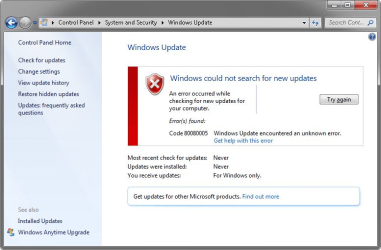
Windows 7 updates no longer download

MisterEd

New member
Guru
VIP
Local time
5:35 AM
Messages
546
My Windows 7 computer stopped downloading and installing updates 4 weeks ago.

My computer now says it has the following updates:

Important (6)
- Windows 7 (5)


  1. 2019-05 Update for Windows 7 for x86-based Systems (KB4493132)
  2. 2019-09 Security Monthly Quality Rollup for Windows 7 for x86-based Systems (KB4516065)
  3. 2019-05 Security Update for Windows 7 for x86-based Systems (KB4474419)
  4. 2020-01 Security and Quality Rollup for .NET Framework 3.5.1, 4.5.2, 4.6, 4.6.1, 4.6.2, 4.7, 4.7.1, 4.7.2, 4.8 for - Windows 7 (KB4535102)
  5. Security Update for Windows 7 (KB3075226)
- Microsoft Defender Antivirus (1)

  1. Security Intelligence Update for Windows Defender Antivirus (Version 1.359.1535.0) (KB915597)
Optional (4)

  1. 2019-09 Preview of Monthly Rollup for Windows 7 for x86-based Systems (KB4516048)
  2. Marvel – Network – Marvel Yukon 88E001/8003/8010 PCI Gigabit Ethernet Controller
  3. NVIDIA – system – NVIDIA nForce PCI System Management
  4. NVIDIA Corporation – media – NVIDIA nForce MCP Audio Processing Unit

Windows Update won't download anything even after many hours of trying.

Is this normal? Does it mean no more updates will be available to download?
 

My Computers My Computers

System One System Two

  • Computer type
    PC/Desktop
    Computer Manufacturer/Model Number
    Custom build
    OS
    Windows 7 Home Premium 64-bits
    CPU
    AMD FX-8350
    Motherboard
    Gigabyte GA-990FXA-UD3 (AM3+)
    Memory
    GSKILL Ripjaw-X PC3 12800 8GB (2x4GB)
    Graphics Card(s)
    ASUS ROG STRIX GTX 1060 6GB
    Sound Card
    Integrated
    Monitor(s) Displays
    Asus VE228H (21.5-in)
    Screen Resolution
    1920x1080 60Hz
    Hard Drives
    SAMSUNG 870 EVO 2.5 Inch SATA SSD (1TB)
    SAMSUNG 870 EVO 2.5 Inch SATA SSD (1TB)
    SAMSUNG 870 EVO 2.5 Inch SATA SSD (1TB)
    PSU
    Corsair RM750x (750 watts)
    Case
    Corsair Carbide Series 200R
    Cooling
    Corsair Hydro Series H60 (CWCH60)
    Keyboard
    Logitech Elite
    Mouse
    Logitech M510 Wireless Mouse
    Internet Speed
    Comcast Gigabit Extra (1200Mbps down / 35Mbps up)
    Antivirus
    Malwarebytes
    Browser
    Firefox, Edge, Chrome
    Other Info
    ASUS DRW-24B1ST DVD-RW (24X) optical drive
    Seagate Expansion Desk (5TB) external SATA/USB HDD
    Comcast XB8 Internet Gateway
  • Computer type
    PC/Desktop
    System Manufacturer/Model Number
    Custom
    OS
    Windows 7 Pro (64-bit)
    CPU
    AMD Phenom II 960T X4
    Motherboard
    ASUS M4N82 Deluxe
    Memory
    Corsair XMS2 DDR2-800 8GB (4x2GB)
    Graphics Card(s)
    ASUS ENGTX560 DCII OC/2DI/1GD5 1GB
    Monitor(s) Displays
    Samsung 930B 19-inch LCD
    Screen Resolution
    1280x1024
    Hard Drives
    Samsung SSD 870 EVO 1000 GB (Windows 10)
    Seagate ST1000DM003 1000 GB (Windows 7)
    PSU
    Antec TruePower (new) TP-650
    Case
    Antec Three Hundred
    Cooling
    AMD stock cooler from FX8350
    Mouse
    Logitech M100
    Internet Speed
    Xfinity Gigabit Extra 1200/35 Mbps
MisterEd

What have you tried to rectify your win update issue?

Snick
 

My Computer My Computer

Computer type
PC/Desktop
Computer Manufacturer/Model Number
HP Desktop & Compaq Laptop
OS
Win 10 x64, Linux Lite, Win 7 x64, BlackArch, & Kali
Hard Drives
Samsung 850 Pro 256Gb,
Hitachi HDD 1Tb,
Crucial MX SSD 250Gb
Segate 3Tb USB 3.0 Ext. Backup HDD
Internet Speed
150Mbps dn, 20Mbps up
Antivirus
Avast Free, Malwarebytes Anti-Exploit & Anti-Ransomware
Browser
Firefox, Chrome, Opera, & VPN
MisterEd

What have you tried to rectify your win update issue?

Snick
Nothing. If I knew what to do I wouldn't be posting here. My automatic updates were working fine until a few weeks ago.

I don't use this computer very often. If I don't get any responses I will have to wait until I get time to do a deep dive and try to figure out what is going on myself.

BTW, I have several computers with Windows 7. I will have to check on them to see if they are still getting any updates.
 

My Computers My Computers

System One System Two

  • Computer type
    PC/Desktop
    Computer Manufacturer/Model Number
    Custom build
    OS
    Windows 7 Home Premium 64-bits
    CPU
    AMD FX-8350
    Motherboard
    Gigabyte GA-990FXA-UD3 (AM3+)
    Memory
    GSKILL Ripjaw-X PC3 12800 8GB (2x4GB)
    Graphics Card(s)
    ASUS ROG STRIX GTX 1060 6GB
    Sound Card
    Integrated
    Monitor(s) Displays
    Asus VE228H (21.5-in)
    Screen Resolution
    1920x1080 60Hz
    Hard Drives
    SAMSUNG 870 EVO 2.5 Inch SATA SSD (1TB)
    SAMSUNG 870 EVO 2.5 Inch SATA SSD (1TB)
    SAMSUNG 870 EVO 2.5 Inch SATA SSD (1TB)
    PSU
    Corsair RM750x (750 watts)
    Case
    Corsair Carbide Series 200R
    Cooling
    Corsair Hydro Series H60 (CWCH60)
    Keyboard
    Logitech Elite
    Mouse
    Logitech M510 Wireless Mouse
    Internet Speed
    Comcast Gigabit Extra (1200Mbps down / 35Mbps up)
    Antivirus
    Malwarebytes
    Browser
    Firefox, Edge, Chrome
    Other Info
    ASUS DRW-24B1ST DVD-RW (24X) optical drive
    Seagate Expansion Desk (5TB) external SATA/USB HDD
    Comcast XB8 Internet Gateway
  • Computer type
    PC/Desktop
    System Manufacturer/Model Number
    Custom
    OS
    Windows 7 Pro (64-bit)
    CPU
    AMD Phenom II 960T X4
    Motherboard
    ASUS M4N82 Deluxe
    Memory
    Corsair XMS2 DDR2-800 8GB (4x2GB)
    Graphics Card(s)
    ASUS ENGTX560 DCII OC/2DI/1GD5 1GB
    Monitor(s) Displays
    Samsung 930B 19-inch LCD
    Screen Resolution
    1280x1024
    Hard Drives
    Samsung SSD 870 EVO 1000 GB (Windows 10)
    Seagate ST1000DM003 1000 GB (Windows 7)
    PSU
    Antec TruePower (new) TP-650
    Case
    Antec Three Hundred
    Cooling
    AMD stock cooler from FX8350
    Mouse
    Logitech M100
    Internet Speed
    Xfinity Gigabit Extra 1200/35 Mbps
When I find Windows Update is stalled/being temperamental I open a command prompt (admin) and use the commands:

Net stop bits
Net stop wuauserv

Then check for updates in Windows Update, it usually works this time.

- - - Updated - - -

Windows Update won't download anything even after many hours of trying.

Is this normal? Does it mean no more updates will be available to download?


Do you have the SHA-2 signing update installed? They are a prerequisite for '2019-09 Security Monthly Quality Rollup for Windows 7 for x86-based Systems (KB4516065)'.


Microsoft said:
Before installing this update

You must install the updates listed below and restart your device before installing the latest Rollup. Installing these updates improves the reliability of the update process and mitigates potential issues while installing the Rollup.


  1. The March 12, 2019 servicing stack update (SSU) (KB4490628). To get the standalone package for this SSU, search for it in the Microsoft Update Catalog.
  2. The latest SHA-2 update (KB4474419) released September 10, 2019. If you are using Windows Update, the latest SHA-2 update will be offered to you automatically. For more information on SHA-2 updates, see 2019 SHA-2 Code Signing Support requirement for Windows and WSUS.
September 10, 2019—KB4516065 (Monthly Rollup)
 

My Computers My Computers

System One System Two

  • Computer type
    Laptop
    Computer Manufacturer/Model Number
    Toshiba satellite C650D
    OS
    Windows 7 Home Premium x64
    CPU
    AMD V120
    Memory
    4GB
    Internet Speed
    150 Mbps
    Antivirus
    MSE
    Browser
    IE11, Edge, Firefox
    Other Info
    I also have W7 Pro on my System Two, and several W7 Hyper-V VMs. My other machines run Windows 10/11. Their specs are in my Ten Forums & Eleven Forum profiles.
  • Computer type
    Laptop
    System Manufacturer/Model Number
    Lenovo Thinkpad T430
    OS
    Windows 7 Pro x64
    CPU
    Intel i5-3320M
    Memory
    8 GB
    Hard Drives
    250GB Samsung SSD 860 EVO
    Antivirus
    MSE
Thanks for your response.

When I find Windows Update is stalled/being temperamental I open a command prompt (admin) and use the commands:

Net stop bits
Net stop wuauserv

Then check for updates in Windows Update, it usually works this time.
I tried that but it didn't help. It was still at "Downloading 6 updates (0KB total, 0 % complete)" after almost two hours so I aborted the update.
Do you have the SHA-2 signing update installed? They are a prerequisite for '2019-09 Security Monthly Quality Rollup for Windows 7 for x86-based Systems (KB4516065)'.

September 10, 2019—KB4516065 (Monthly Rollup)
I came across that information yesterday so I already knew about it. Yesterday I downloaded several updates from the Microsoft Update Catalog including the following:
windows6.1-kb4490628-x86_3cdb3df55b9cd7ef7fcb24fc4e237ea287ad0992.msu
windows6.1-kb4474419-v3-x86_0f687d50402790f340087c576886501b3223bec6.msu
windows6.1-kb4516065-x86_662c716c417149d39d5787b1ff849bf7e5c786c3.msu

I ran update KB4490628 but after a while it exited with the message: "This update is not applicable to your computer."

I then ran update KB4474419. It started with the message "Searching for updates on this computer...". That hadn't changed after about one hour. Before I could check on it again I had a power outage.

I just restarted update KB4474419 again. After maybe 15 minutes it exited with the message: "This update is not applicable to your computer.". I guess that means that it had completed last time but I didn't know about it.

I am now trying update KB4516065. I will post back when it finishes. Failed with Error Code 80010108.

Update: Going back into update history I noticed this:

Last successful update of any kind was: KB4490628 on March 9, 2022

Update KB4474419 has failed numerous time with various error codes. The last time was: April 6, 2022 10:26AM with Error Code 80010108.
 
Last edited:

My Computers My Computers

System One System Two

  • Computer type
    PC/Desktop
    Computer Manufacturer/Model Number
    Custom build
    OS
    Windows 7 Home Premium 64-bits
    CPU
    AMD FX-8350
    Motherboard
    Gigabyte GA-990FXA-UD3 (AM3+)
    Memory
    GSKILL Ripjaw-X PC3 12800 8GB (2x4GB)
    Graphics Card(s)
    ASUS ROG STRIX GTX 1060 6GB
    Sound Card
    Integrated
    Monitor(s) Displays
    Asus VE228H (21.5-in)
    Screen Resolution
    1920x1080 60Hz
    Hard Drives
    SAMSUNG 870 EVO 2.5 Inch SATA SSD (1TB)
    SAMSUNG 870 EVO 2.5 Inch SATA SSD (1TB)
    SAMSUNG 870 EVO 2.5 Inch SATA SSD (1TB)
    PSU
    Corsair RM750x (750 watts)
    Case
    Corsair Carbide Series 200R
    Cooling
    Corsair Hydro Series H60 (CWCH60)
    Keyboard
    Logitech Elite
    Mouse
    Logitech M510 Wireless Mouse
    Internet Speed
    Comcast Gigabit Extra (1200Mbps down / 35Mbps up)
    Antivirus
    Malwarebytes
    Browser
    Firefox, Edge, Chrome
    Other Info
    ASUS DRW-24B1ST DVD-RW (24X) optical drive
    Seagate Expansion Desk (5TB) external SATA/USB HDD
    Comcast XB8 Internet Gateway
  • Computer type
    PC/Desktop
    System Manufacturer/Model Number
    Custom
    OS
    Windows 7 Pro (64-bit)
    CPU
    AMD Phenom II 960T X4
    Motherboard
    ASUS M4N82 Deluxe
    Memory
    Corsair XMS2 DDR2-800 8GB (4x2GB)
    Graphics Card(s)
    ASUS ENGTX560 DCII OC/2DI/1GD5 1GB
    Monitor(s) Displays
    Samsung 930B 19-inch LCD
    Screen Resolution
    1280x1024
    Hard Drives
    Samsung SSD 870 EVO 1000 GB (Windows 10)
    Seagate ST1000DM003 1000 GB (Windows 7)
    PSU
    Antec TruePower (new) TP-650
    Case
    Antec Three Hundred
    Cooling
    AMD stock cooler from FX8350
    Mouse
    Logitech M100
    Internet Speed
    Xfinity Gigabit Extra 1200/35 Mbps

My Computers My Computers

System One System Two

  • Computer type
    PC/Desktop
    Computer Manufacturer/Model Number
    Custom build
    OS
    Windows 7 Home Premium 64-bits
    CPU
    AMD FX-8350
    Motherboard
    Gigabyte GA-990FXA-UD3 (AM3+)
    Memory
    GSKILL Ripjaw-X PC3 12800 8GB (2x4GB)
    Graphics Card(s)
    ASUS ROG STRIX GTX 1060 6GB
    Sound Card
    Integrated
    Monitor(s) Displays
    Asus VE228H (21.5-in)
    Screen Resolution
    1920x1080 60Hz
    Hard Drives
    SAMSUNG 870 EVO 2.5 Inch SATA SSD (1TB)
    SAMSUNG 870 EVO 2.5 Inch SATA SSD (1TB)
    SAMSUNG 870 EVO 2.5 Inch SATA SSD (1TB)
    PSU
    Corsair RM750x (750 watts)
    Case
    Corsair Carbide Series 200R
    Cooling
    Corsair Hydro Series H60 (CWCH60)
    Keyboard
    Logitech Elite
    Mouse
    Logitech M510 Wireless Mouse
    Internet Speed
    Comcast Gigabit Extra (1200Mbps down / 35Mbps up)
    Antivirus
    Malwarebytes
    Browser
    Firefox, Edge, Chrome
    Other Info
    ASUS DRW-24B1ST DVD-RW (24X) optical drive
    Seagate Expansion Desk (5TB) external SATA/USB HDD
    Comcast XB8 Internet Gateway
  • Computer type
    PC/Desktop
    System Manufacturer/Model Number
    Custom
    OS
    Windows 7 Pro (64-bit)
    CPU
    AMD Phenom II 960T X4
    Motherboard
    ASUS M4N82 Deluxe
    Memory
    Corsair XMS2 DDR2-800 8GB (4x2GB)
    Graphics Card(s)
    ASUS ENGTX560 DCII OC/2DI/1GD5 1GB
    Monitor(s) Displays
    Samsung 930B 19-inch LCD
    Screen Resolution
    1280x1024
    Hard Drives
    Samsung SSD 870 EVO 1000 GB (Windows 10)
    Seagate ST1000DM003 1000 GB (Windows 7)
    PSU
    Antec TruePower (new) TP-650
    Case
    Antec Three Hundred
    Cooling
    AMD stock cooler from FX8350
    Mouse
    Logitech M100
    Internet Speed
    Xfinity Gigabit Extra 1200/35 Mbps
Hi

silly question time you did select the >>X86<< version of KB4474419

the failure code 80010108 generally relates to an internet server problem....

lets dig a little deeper, first the Update problem logs/files
can you post the following logs AFTER running KB947821.... X86 (SURT)

from C >> Windows >> logs >> CBS.... from tihs folder post ONLY the top cbs Text and the bottom SURT logs
zip them first please

now lets see whats going on in the background, run these 2 tools.... ignore the titles im looking for specific info

Blue Screen of Death (BSOD) Posting Instructions

and
Windows Genuine and Activation Issue Posting Instructions
 

My Computer My Computer

Computer type
PC/Desktop
Computer Manufacturer/Model Number
medionl/Aspire 6930G/acer x55a
OS
W7 home premium 32bit/W7HP 64bit/w10 tp insider ring
CPU
E5300 dual core
Motherboard
medion MS7366
Memory
3gb
Graphics Card(s)
Nvidia Geforce 7100 Nforce 630i
Monitor(s) Displays
avixc
Internet Speed
n (isp resticted to 72)
Antivirus
mse/pands
Browser
palemoon
Other Info
Belkin Fd7050 n USB using Railink RT2870 drivers, more upto date

My Computer My Computer

Computer type
PC/Desktop
Computer Manufacturer/Model Number
HP Desktop & Compaq Laptop
OS
Win 10 x64, Linux Lite, Win 7 x64, BlackArch, & Kali
Hard Drives
Samsung 850 Pro 256Gb,
Hitachi HDD 1Tb,
Crucial MX SSD 250Gb
Segate 3Tb USB 3.0 Ext. Backup HDD
Internet Speed
150Mbps dn, 20Mbps up
Antivirus
Avast Free, Malwarebytes Anti-Exploit & Anti-Ransomware
Browser
Firefox, Chrome, Opera, & VPN
Hi

silly question time you did select the >>X86<< version of KB4474419
the failure code 80010108 generally relates to an internet server problem....
Yes. The proof is post #5.
ets dig a little deeper, first the Update problem logs/files
can you post the following logs AFTER running KB947821.... X86 (SURT)

from C >> Windows >> logs >> CBS.... from tihs folder post ONLY the top cbs Text and the bottom SURT logs
zip them first please
now lets see whats going on in the background, run these 2 tools.... ignore the titles im looking for specific info

Blue Screen of Death (BSOD) Posting Instructions
and
Windows Genuine and Activation Issue Posting Instructions
Dropbox - THOROUGHBRED-CheckSURLogs.zip - Simplify your life

Dropbox - THOROUGHBRED-Fri_04_08_2022__00707_37.zip - Simplify your life
Code:
Diagnostic Report (1.9.0027.0):
-----------------------------------------
Windows Validation Data-->

Validation Code: 0
Cached Online Validation Code: N/A, hr = 0xc004f012
Windows Product Key: *****-*****-GGMM7-RQTDG-XCF98
Windows Product Key Hash: qOyCSEAHN6CGoYEy8/pWSLawsho=
Windows Product ID: 00359-030-4943796-85647
Windows Product ID Type: 5
Windows License Type: Retail
Windows OS version: 6.1.7601.2.00010300.1.0.003
ID: {1D1065C2-8620-45D7-9DDB-C4A806E94686}(1)
Is Admin: Yes
TestCab: 0x0
LegitcheckControl ActiveX: N/A, hr = 0x80070002
Signed By: N/A, hr = 0x80070002
Product Name: Windows 7 Home Premium
Architecture: 0x00000000
Build lab: 7601.win7sp1_ldr.170913-0600
TTS Error: 
Validation Diagnostic: 
Resolution Status: N/A

Vista WgaER Data-->
ThreatID(s): N/A, hr = 0x80070002
Version: N/A, hr = 0x80070002

Windows XP Notifications Data-->
Cached Result: N/A, hr = 0x80070002
File Exists: No
Version: N/A, hr = 0x80070002
WgaTray.exe Signed By: N/A, hr = 0x80070002
WgaLogon.dll Signed By: N/A, hr = 0x80070002

OGA Notifications Data-->
Cached Result: N/A, hr = 0x80070002
Version: N/A, hr = 0x80070002
OGAExec.exe Signed By: N/A, hr = 0x80070002
OGAAddin.dll Signed By: N/A, hr = 0x80070002

OGA Data-->
Office Status: 109 N/A
OGA Version: N/A, 0x80070002
Signed By: N/A, hr = 0x80070002
Office Diagnostics: 025D1FF3-364-80041010_025D1FF3-229-80041010_025D1FF3-230-1_025D1FF3-517-80040154_025D1FF3-237-80040154_025D1FF3-238-2_025D1FF3-244-80070002_025D1FF3-258-3

Browser Data-->
Proxy settings: N/A
User Agent: Mozilla/4.0 (compatible; MSIE 8.0; Win32)
Default Browser: C:\Program Files\Mozilla Firefox\firefox.exe
Download signed ActiveX controls: Prompt
Download unsigned ActiveX controls: Disabled
Run ActiveX controls and plug-ins: Allowed
Initialize and script ActiveX controls not marked as safe: Disabled
Allow scripting of Internet Explorer Webbrowser control: Disabled
Active scripting: Allowed
Script ActiveX controls marked as safe for scripting: Allowed

File Scan Data-->
File Mismatch: C:\Windows\system32\wat\watadminsvc.exe[Hr = 0x80070003]
File Mismatch: C:\Windows\system32\wat\npwatweb.dll[Hr = 0x80070003]
File Mismatch: C:\Windows\system32\wat\watux.exe[Hr = 0x80070003]
File Mismatch: C:\Windows\system32\wat\watweb.dll[Hr = 0x80070003]

Other data-->
Office Details: <GenuineResults><MachineData><UGUID>{1D1065C2-8620-45D7-9DDB-C4A806E94686}</UGUID><Version>1.9.0027.0</Version><OS>6.1.7601.2.00010300.1.0.003</OS><Architecture>x32</Architecture><PKey>*****-*****-*****-*****-XCF98</PKey><PID>00359-030-4943796-85647</PID><PIDType>5</PIDType><SID>S-1-5-21-3175846304-984137067-2717612982</SID><SYSTEM><Manufacturer>ASUSTeK Computer INC.</Manufacturer><Model>A7N8X-E</Model></SYSTEM><BIOS><Manufacturer>Phoenix Technologies, LTD</Manufacturer><Version>ASUS A7N8X-E Deluxe ACPI BIOS Rev 1013 </Version><SMBIOSVersion major="2" minor="2"/><Date>20041112000000.000000+000</Date></BIOS><HWID>156A3F07018400FA</HWID><UserLCID>0409</UserLCID><SystemLCID>0409</SystemLCID><TimeZone>Central Standard Time(GMT-06:00)</TimeZone><iJoin>0</iJoin><SBID><stat>3</stat><msppid></msppid><name></name><model></model></SBID><OEM/><GANotification/></MachineData><Software><Office><Result>109</Result><Products/><Applications/></Office></Software></GenuineResults>  

Spsys.log Content: 0x80070002

Licensing Data-->
Software licensing service version: 6.1.7601.23403

Name: Windows(R) 7, HomePremium edition
Description: Windows Operating System - Windows(R) 7, RETAIL channel
Activation ID: 2e7d060d-4714-40f2-9896-1e4f15b612ad
Application ID: 55c92734-d682-4d71-983e-d6ec3f16059f
Extended PID: 00359-00170-030-494379-01-1033-7600.0000-0642022
Installation ID: 009874345356244926046904289765790555901324220641055836
Processor Certificate URL: http://go.microsoft.com/fwlink/?LinkID=88338
Machine Certificate URL: http://go.microsoft.com/fwlink/?LinkID=88339
Use License URL: http://go.microsoft.com/fwlink/?LinkID=88341
Product Key Certificate URL: http://go.microsoft.com/fwlink/?LinkID=88340
Partial Product Key: XCF98
License Status: Licensed
Remaining Windows rearm count: 4
Trusted time: 4/8/2022 2:30:54 AM

Windows Activation Technologies-->
HrOffline: 0x00000000
HrOnline: N/A
HealthStatus: 0x0000000000000000
Event Time Stamp: N/A
ActiveX: Not Registered - 0x80040154
Admin Service: Not Registered - 0x80040154
HealthStatus Bitmask Output:


HWID Data-->
HWID Hash Current: MAAAAAEAAQABAAEAAAACAAAAAwABAAEAJJTYmy5msEzsLNwFkoo6LXiC4lqKl+5k

OEM Activation 1.0 Data-->
N/A

OEM Activation 2.0 Data-->
BIOS valid for OA 2.0: yes, but no SLIC table
Windows marker version: N/A
OEMID and OEMTableID Consistent: N/A
BIOS Information: 
  ACPI Table Name    OEMID Value    OEMTableID Value
  APIC            Nvidia        AWRDACPI
  FACP            Nvidia        AWRDACPI
 

My Computers My Computers

System One System Two

  • Computer type
    PC/Desktop
    Computer Manufacturer/Model Number
    Custom build
    OS
    Windows 7 Home Premium 64-bits
    CPU
    AMD FX-8350
    Motherboard
    Gigabyte GA-990FXA-UD3 (AM3+)
    Memory
    GSKILL Ripjaw-X PC3 12800 8GB (2x4GB)
    Graphics Card(s)
    ASUS ROG STRIX GTX 1060 6GB
    Sound Card
    Integrated
    Monitor(s) Displays
    Asus VE228H (21.5-in)
    Screen Resolution
    1920x1080 60Hz
    Hard Drives
    SAMSUNG 870 EVO 2.5 Inch SATA SSD (1TB)
    SAMSUNG 870 EVO 2.5 Inch SATA SSD (1TB)
    SAMSUNG 870 EVO 2.5 Inch SATA SSD (1TB)
    PSU
    Corsair RM750x (750 watts)
    Case
    Corsair Carbide Series 200R
    Cooling
    Corsair Hydro Series H60 (CWCH60)
    Keyboard
    Logitech Elite
    Mouse
    Logitech M510 Wireless Mouse
    Internet Speed
    Comcast Gigabit Extra (1200Mbps down / 35Mbps up)
    Antivirus
    Malwarebytes
    Browser
    Firefox, Edge, Chrome
    Other Info
    ASUS DRW-24B1ST DVD-RW (24X) optical drive
    Seagate Expansion Desk (5TB) external SATA/USB HDD
    Comcast XB8 Internet Gateway
  • Computer type
    PC/Desktop
    System Manufacturer/Model Number
    Custom
    OS
    Windows 7 Pro (64-bit)
    CPU
    AMD Phenom II 960T X4
    Motherboard
    ASUS M4N82 Deluxe
    Memory
    Corsair XMS2 DDR2-800 8GB (4x2GB)
    Graphics Card(s)
    ASUS ENGTX560 DCII OC/2DI/1GD5 1GB
    Monitor(s) Displays
    Samsung 930B 19-inch LCD
    Screen Resolution
    1280x1024
    Hard Drives
    Samsung SSD 870 EVO 1000 GB (Windows 10)
    Seagate ST1000DM003 1000 GB (Windows 7)
    PSU
    Antec TruePower (new) TP-650
    Case
    Antec Three Hundred
    Cooling
    AMD stock cooler from FX8350
    Mouse
    Logitech M100
    Internet Speed
    Xfinity Gigabit Extra 1200/35 Mbps
Hi

Unfortunately not all of the info was picked up from the BSOD,,,, however from what i can see

Mgadiag
system is NOT fully Activated 2 phase operation your Licenced but not Registered

From an elevated command promt run the following text

SLUI4

CBS/SURT

there appears to be a "loop" hang on your system, again from an elevated command run this text


REG LOAD HKLM\COMPONENTS C:\Windows\System32\config\COMPONENTS
REG DELETE HKLM\COMPONENTS /V PendingRequired

reboot and then attempt Windows Update again.


there is also a warning regarding your discs health status, please run
chkdsk /r

If it still fails to update, i would like to see the results from MSINFO32, via a run command
(zip it and upload i >>here<< please)

notes
if your drive is failing, then i would suggest its time for a new machine
The BIOS date is from 2004 looks like this little baby has served you well
As you a using a Retail product key you can use it on another comp
 

My Computer My Computer

Computer type
PC/Desktop
Computer Manufacturer/Model Number
medionl/Aspire 6930G/acer x55a
OS
W7 home premium 32bit/W7HP 64bit/w10 tp insider ring
CPU
E5300 dual core
Motherboard
medion MS7366
Memory
3gb
Graphics Card(s)
Nvidia Geforce 7100 Nforce 630i
Monitor(s) Displays
avixc
Internet Speed
n (isp resticted to 72)
Antivirus
mse/pands
Browser
palemoon
Other Info
Belkin Fd7050 n USB using Railink RT2870 drivers, more upto date
Hi

Unfortunately not all of the info was picked up from the BSOD,,,, however from what i can see

Mgadiag
system is NOT fully Activated 2 phase operation your Licenced but not Registered

From an elevated command promt run the following text

SLUI4

CBS/SURT

there appears to be a "loop" hang on your system, again from an elevated command run this text


REG LOAD HKLM\COMPONENTS C:\Windows\System32\config\COMPONENTS
REG DELETE HKLM\COMPONENTS /V PendingRequired

reboot and then attempt Windows Update again.


there is also a warning regarding your discs health status, please run
chkdsk /r

If it still fails to update, i would like to see the results from MSINFO32, via a run command
(zip it and upload i >>here<< please)

notes
if your drive is failing, then i would suggest its time for a new machine
The BIOS date is from 2004 looks like this little baby has served you well
As you a using a Retail product key you can use it on another comp
I can't continue until I get clarification on a few things
Code:
SLUI4
SLUI4 gave an error. Did you mean SLUI 4 ?
SLUI 4 brought up Windows phone activation. That failed like the first time which ended up with Microsoft support coming on the phone. They said, Why am I calling them because your computer is already activated?"

Code:
CBS/SURT
CBS/SURT gave an error? Did you mean something else

REG LOAD HKLM\COMPONENTS C:\Windows\System32\config\COMPONENTS
This completed successfully
Code:
REG DELETE HKLM\COMPONENTS /V PendingRequired
Message was not found

About the computer hard drive...

I hadn't run this computer for a long time. When I booted it a couple months ago it had numerous crashes and errors.

I ran disk diagnostics on the two drives. The first one I think had an unrecoverable sector on it. Running the Seagate Seatools Long Scan corrected the error, It passed the Seagate diagnostics after that. I realized that is probably only a temporary fix. I may end up just putting another old drive in its place and reinstalling Windows 7. If I don't get Windows update working again in the next couple days I will probably do that. BTW, the other drive passed Seagate Seatools diagnostics.

Note I have one copy of Windows 7 Home and one of Windows 7 Family. Windows 7 Family is like Windows 7 Home except that the key that came with it will activate up to three computers. That makes it unique in doing this. With 4 licenses for Windows 7 Home I have more licenses than computers to put them on.

I have had home computers since 1979. When I built this PC in 2002 I spent more money on it than any other ones up until then so keeping it going has some sentimental value. Right now since I am retired maybe I have more time than sense so I intend to keep this old computer going as long as possible. When that is not possible then I will go back to tinkering with my other computers. Fortunately, I am not having any problems with them.

I have three other desktops with Windows 10 on them. The newest is five years old. I tried Windows 11 on it but went back to Windows 10 because I didn't like Windows 11. I plan to build another computer within the next year after AMD's Zen 4 comes out later this year. Naturally, it will have Windows 11 on it.

BTW this computer I have been using with Windows 7 is not the only project I am working on. I have another computer about as old that has Windows XP Pro on it but that is another story...
 

My Computers My Computers

System One System Two

  • Computer type
    PC/Desktop
    Computer Manufacturer/Model Number
    Custom build
    OS
    Windows 7 Home Premium 64-bits
    CPU
    AMD FX-8350
    Motherboard
    Gigabyte GA-990FXA-UD3 (AM3+)
    Memory
    GSKILL Ripjaw-X PC3 12800 8GB (2x4GB)
    Graphics Card(s)
    ASUS ROG STRIX GTX 1060 6GB
    Sound Card
    Integrated
    Monitor(s) Displays
    Asus VE228H (21.5-in)
    Screen Resolution
    1920x1080 60Hz
    Hard Drives
    SAMSUNG 870 EVO 2.5 Inch SATA SSD (1TB)
    SAMSUNG 870 EVO 2.5 Inch SATA SSD (1TB)
    SAMSUNG 870 EVO 2.5 Inch SATA SSD (1TB)
    PSU
    Corsair RM750x (750 watts)
    Case
    Corsair Carbide Series 200R
    Cooling
    Corsair Hydro Series H60 (CWCH60)
    Keyboard
    Logitech Elite
    Mouse
    Logitech M510 Wireless Mouse
    Internet Speed
    Comcast Gigabit Extra (1200Mbps down / 35Mbps up)
    Antivirus
    Malwarebytes
    Browser
    Firefox, Edge, Chrome
    Other Info
    ASUS DRW-24B1ST DVD-RW (24X) optical drive
    Seagate Expansion Desk (5TB) external SATA/USB HDD
    Comcast XB8 Internet Gateway
  • Computer type
    PC/Desktop
    System Manufacturer/Model Number
    Custom
    OS
    Windows 7 Pro (64-bit)
    CPU
    AMD Phenom II 960T X4
    Motherboard
    ASUS M4N82 Deluxe
    Memory
    Corsair XMS2 DDR2-800 8GB (4x2GB)
    Graphics Card(s)
    ASUS ENGTX560 DCII OC/2DI/1GD5 1GB
    Monitor(s) Displays
    Samsung 930B 19-inch LCD
    Screen Resolution
    1280x1024
    Hard Drives
    Samsung SSD 870 EVO 1000 GB (Windows 10)
    Seagate ST1000DM003 1000 GB (Windows 7)
    PSU
    Antec TruePower (new) TP-650
    Case
    Antec Three Hundred
    Cooling
    AMD stock cooler from FX8350
    Mouse
    Logitech M100
    Internet Speed
    Xfinity Gigabit Extra 1200/35 Mbps
Hi

the response from MS is not surprising,, unlikely they are versed in W7 activation problems, you would require a higher level responder... granted they viewed your comps status and told you it was licenced, BUT i did tell you its a 2 factor validation .... Licenced but not Activated, did you mention this??
(1st responder would have been level 1, working to a script)

Please try
SLUI3

The CBS/SURT -- apoligies should have bolded it its new header, not to be run

Im unsure about the Unrecoverable sectors on your drive, not my area, but i suspect the Seagate scan "mitigated" it rather than fixing it
 

My Computer My Computer

Computer type
PC/Desktop
Computer Manufacturer/Model Number
medionl/Aspire 6930G/acer x55a
OS
W7 home premium 32bit/W7HP 64bit/w10 tp insider ring
CPU
E5300 dual core
Motherboard
medion MS7366
Memory
3gb
Graphics Card(s)
Nvidia Geforce 7100 Nforce 630i
Monitor(s) Displays
avixc
Internet Speed
n (isp resticted to 72)
Antivirus
mse/pands
Browser
palemoon
Other Info
Belkin Fd7050 n USB using Railink RT2870 drivers, more upto date
Back
Top