

v1nc3nttan
New member
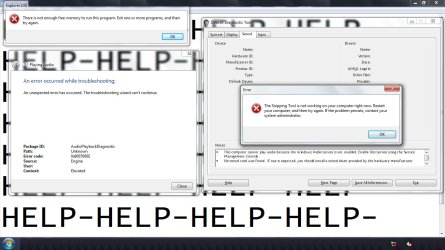
Hi folks I need help. I installed AoE3 in my computer but when I restart, Windows Audio service won't run and all programs that checks system specs can't run. My Computer (the desktop shortcut) keeps on saying:
"There is not enough free memory to run this program. Exit one or more programs, and then try again.
But if I right click and select Open then it opens normally. What should I do?
Extra info:
Attempt to start Audio Service error:
Package ID:AudioPlaybackDiagnostic
Error code:0x8007000E
Source:Engine
Network icon keeps on showing not connected even when I am connected to a wireless network.
"There is not enough free memory to run this program. Exit one or more programs, and then try again.
But if I right click and select Open then it opens normally. What should I do?
Extra info:
Attempt to start Audio Service error:
Package ID:AudioPlaybackDiagnostic
Error code:0x8007000E
Source:Engine
Network icon keeps on showing not connected even when I am connected to a wireless network.
Attachments
My Computer
At a glance
Windows 7 Home Premium x64 OriginalAMD Athlon 64 X2 L310 1.2GhzElpida DDR2 4GB (Dual)ATI Radeon HD 3200
- Computer Manufacturer/Model Number
- Acer
- OS
- Windows 7 Home Premium x64 Original
- CPU
- AMD Athlon 64 X2 L310 1.2Ghz
- Motherboard
- AMD M780G Chipset
- Memory
- Elpida DDR2 4GB (Dual)
- Graphics Card(s)
- ATI Radeon HD 3200
- Monitor(s) Displays
- Acer CineCrystal™ LED-backlit TFT LCD
- Hard Drives
- 240GB C:
7GB D:
15GB F:
23GB U:
- PSU
- Netbook Adaptor


