Age of Empires 2 no longer compatible?

lordtemplar

New member
Local time
2:30 PM
Messages
3
I've been searching google for the last few hours and have come up with nothing as to why AOE2 no longer works with windows.

Here's what happens.

My friends and I select TCP/IP (the non-LAN one) and I host. My friends can see my game but when they try to connect, it always gives them an "Unable to join game". When they try to host, same result. I know my ports are forwarded, I've got the DMZ set to my computer. My firewall is off. Why can't I connect to my friends?

From my research it seems to be exclusive to Windows 7. Windows XP machines can play the game(lost) between each other. One of my friends is using Windows XP, one of them is using Windows Vista and the other two are using Windows 7. We're all pissed that this game isn't working. Also, from my research every post I've read anywhere was never successfully answered. I intend to, hopefully, fix that with this thread.

Would it be best if I somehow call their tech support? It pisses me off that this old, great classic won't work with my computer, and it is still being sold in stores, but Ensemble Studios was disbanded!
 

My Computer My Computer

At a glance

Windows 7 Home Premium 64 Bit
OS
Windows 7 Home Premium 64 Bit

My Computer My Computer

At a glance

Windows 7 Professional x64Intel i7 2600K OC'd @ 4620 MHz16GB GSkill Sniper 2133 Mhz (4x4GB)EVGA GeForce GTX 480 SuperClocked+
Computer Manufacturer/Model Number
Custom
OS
Windows 7 Professional x64
CPU
Intel i7 2600K OC'd @ 4620 MHz
Motherboard
Asus P8Z68-V Pro
Memory
16GB GSkill Sniper 2133 Mhz (4x4GB)
Graphics Card(s)
EVGA GeForce GTX 480 SuperClocked+
Sound Card
Realtek High Definition Audio
Monitor(s) Displays
2x Acer S273HLbmii 27"
Screen Resolution
2 x 1920x1080
Hard Drives
64GB Crucial M4 SSD

Storage: Hitachi 1TB 5400RPM, Samsung 1.5TB 5400RPM
PSU
Corsair HW Series 750w (modular)
Case
Cooler Master HAF 932 Advanced Blue Edition
Cooling
CM Hyper 212+ CPU cooler, 3x 230mm + 1x 140mm case fans
Keyboard
Logitech MK320 (wireless)
Mouse
Logitech MK320 (wireless)
Internet Speed
30 Mb/s : 2 Mb/s
Well I just tried and it works for me. Heres how to do it.

Run AOE II, once you get the main screen press CTRL-SHIFT-ESC
It should take you to task manager on your desktop. Go to processes and end explorer.exe for your user.
Once finished just exit the game and open task manager again. Go to applications, click new task, and type in explorer. Press enter and you'll have everything back.

This fixes the grass/water discoloration at least. If it won't run at all then I don't know.. works fine for me.

EDIT: Make a batch file that does this automatically!

Code:
taskkill /F /IM Explorer.exe
age2_x1.exe
Start explorer.exe

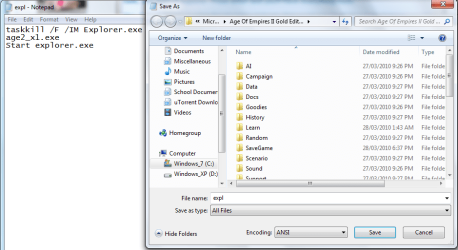
put that it in a text document, save it as all files with .bat at the end of the name. Example of mine

aoe2 fix.PNG

Oh and make sure to save it into the directory your age2_x1.exe is. Then you can make a shortcut to it so you don't have to navigate there all the time!
 

My Computer My Computer

At a glance

Windows 7 Ultimate 32 bitIntel Core 2 Duo CPU E4500 2.20 GHz1.99 GBIntel G33/G31 Express Chipset Family (256 MB)
Computer Manufacturer/Model Number
Seanix Desktop PC
OS
Windows 7 Ultimate 32 bit
CPU
Intel Core 2 Duo CPU E4500 2.20 GHz
Memory
1.99 GB
Graphics Card(s)
Intel G33/G31 Express Chipset Family (256 MB)
Sound Card
Realtek ALC888/1200
Monitor(s) Displays
DELL
Screen Resolution
1280 X 1024
Hard Drives
320GB Internal
200GB External
Case
Seanix
Keyboard
Seanix USB Keyboard
Mouse
Seanix USB Keyboard
Internet Speed
Broadband
Other Info
Getting close to 3 years old.
Running in compatibility mode does not work.

Thanks for the fix for the graphics, but that doesn't fix the connection issue.
 

My Computer My Computer

At a glance

Windows 7 Home Premium 64 Bit
OS
Windows 7 Home Premium 64 Bit
Well I just tried and it works for me. Heres how to do it.

Run AOE II, once you get the main screen press CTRL-SHIFT-ESC
It should take you to task manager on your desktop. Go to processes and end explorer.exe for your user.
Once finished just exit the game and open task manager again. Go to applications, click new task, and type in explorer. Press enter and you'll have everything back.

This fixes the grass/water discoloration at least. If it won't run at all then I don't know.. works fine for me.

EDIT: Make a batch file that does this automatically!

Code:
taskkill /F /IM Explorer.exe
age2_x1.exe
Start explorer.exe
put that it in a text document, save it as all files with .bat at the end of the name. Example of mine

View attachment 63726

Oh and make sure to save it into the directory your age2_x1.exe is. Then you can make a shortcut to it so you don't have to navigate there all the time!

Wouldn't it be nice if Microsoft fixed this properly so that their games ran on their OS properly :mad:
 

My Computer My Computer

At a glance

MSDN Home PremiumIntel i54GbATI Radeon HD 5770
Computer Manufacturer/Model Number
Novatech (UK) iRush Pro
OS
MSDN Home Premium
CPU
Intel i5
Motherboard
Intel DP55WB
Memory
4Gb
Graphics Card(s)
ATI Radeon HD 5770
Sound Card
On Board
Monitor(s) Displays
Philips 170B
Hard Drives
1 x 1Tb
(7 Partitions)
PSU
750W
Case
Antec 300
Cooling
Tricool Fans
Keyboard
Microsoft 3000 Wireless
Mouse
Microsoft 5000 Wireless BlueTrack
Internet Speed
6.1 Mbps
Well I just tried and it works for me. Heres how to do it.

Run AOE II, once you get the main screen press CTRL-SHIFT-ESC
It should take you to task manager on your desktop. Go to processes and end explorer.exe for your user.
Once finished just exit the game and open task manager again. Go to applications, click new task, and type in explorer. Press enter and you'll have everything back.

This fixes the grass/water discoloration at least. If it won't run at all then I don't know.. works fine for me.

EDIT: Make a batch file that does this automatically!

Code:
taskkill /F /IM Explorer.exe
age2_x1.exe
Start explorer.exe
put that it in a text document, save it as all files with .bat at the end of the name. Example of mine

View attachment 63726

Oh and make sure to save it into the directory your age2_x1.exe is. Then you can make a shortcut to it so you don't have to navigate there all the time!

Wouldn't it be nice if Microsoft fixed this properly so that their games ran on their OS properly :mad:

Well yah, But let's face it. The game's too old. I'm really upset about age of empires 3. It won't work and it's like a year or two old.
 

My Computer My Computer

At a glance

Windows 7 Ultimate 32 bitIntel Core 2 Duo CPU E4500 2.20 GHz1.99 GBIntel G33/G31 Express Chipset Family (256 MB)
Computer Manufacturer/Model Number
Seanix Desktop PC
OS
Windows 7 Ultimate 32 bit
CPU
Intel Core 2 Duo CPU E4500 2.20 GHz
Memory
1.99 GB
Graphics Card(s)
Intel G33/G31 Express Chipset Family (256 MB)
Sound Card
Realtek ALC888/1200
Monitor(s) Displays
DELL
Screen Resolution
1280 X 1024
Hard Drives
320GB Internal
200GB External
Case
Seanix
Keyboard
Seanix USB Keyboard
Mouse
Seanix USB Keyboard
Internet Speed
Broadband
Other Info
Getting close to 3 years old.
On topic, LordTemplar, fill out your system specs.

Go to your start menu, all programs, accessories, system tools, then click system information. This will give you a bit of info, mostly the stuff we want to know like hardware. We don't really care what mouse your using but hey, fill it out!
 

My Computer My Computer

At a glance

Windows 7 Ultimate 32 bitIntel Core 2 Duo CPU E4500 2.20 GHz1.99 GBIntel G33/G31 Express Chipset Family (256 MB)
Computer Manufacturer/Model Number
Seanix Desktop PC
OS
Windows 7 Ultimate 32 bit
CPU
Intel Core 2 Duo CPU E4500 2.20 GHz
Memory
1.99 GB
Graphics Card(s)
Intel G33/G31 Express Chipset Family (256 MB)
Sound Card
Realtek ALC888/1200
Monitor(s) Displays
DELL
Screen Resolution
1280 X 1024
Hard Drives
320GB Internal
200GB External
Case
Seanix
Keyboard
Seanix USB Keyboard
Mouse
Seanix USB Keyboard
Internet Speed
Broadband
Other Info
Getting close to 3 years old.
Processor:
AMD Phenom(tm) II X4 810 Processor (4 CPUs), ~2.6GHz
Memory:
6144MB RAM
Hard Drive:
640 GB + 250 GB + 1 TB
Video Card:
ATI Radeon HD 4800 Series
Operating System:
Windows 7 Home Premium 64-bit
Motherboard:
GIGABYTE GA-MA770T-UD3P AM3 AMD 770 ATX AMD Motherboard
Computer Case:
Antec 300 Black Steel ATX Mid-tower

I also have a DVD+RW drive and a BD-R drive.
 

My Computer My Computer

At a glance

Windows 7 Home Premium 64 Bit
OS
Windows 7 Home Premium 64 Bit
Sweet! I don't see how you should have any problem, I have a similiar computer (in labtop form though) and it works on it. I know you video card at least should work.

Also go to your account settings and update your specs there. Sorry i couldn't help but it will help in future problems as they can just click "My system specs" and see them instead of you posting them everytime!
 

My Computer My Computer

At a glance

Windows 7 Ultimate 32 bitIntel Core 2 Duo CPU E4500 2.20 GHz1.99 GBIntel G33/G31 Express Chipset Family (256 MB)
Computer Manufacturer/Model Number
Seanix Desktop PC
OS
Windows 7 Ultimate 32 bit
CPU
Intel Core 2 Duo CPU E4500 2.20 GHz
Memory
1.99 GB
Graphics Card(s)
Intel G33/G31 Express Chipset Family (256 MB)
Sound Card
Realtek ALC888/1200
Monitor(s) Displays
DELL
Screen Resolution
1280 X 1024
Hard Drives
320GB Internal
200GB External
Case
Seanix
Keyboard
Seanix USB Keyboard
Mouse
Seanix USB Keyboard
Internet Speed
Broadband
Other Info
Getting close to 3 years old.
Would this also work for Star Wars Pod Racer?
 

My Computer My Computer

At a glance

Windows 7
OS
Windows 7

My Computer My Computer

At a glance

Windows 7 Ultimate 64 bitIntel i5 2400 @ 3.80 GHzMushkin Silverline 996768 4GBMSI GTX 460 760MB Cyclone Overclocked
Computer Manufacturer/Model Number
Self-built on 31/1/11
OS
Windows 7 Ultimate 64 bit
CPU
Intel i5 2400 @ 3.80 GHz
Motherboard
Ashrock P67 Extreme 4
Memory
Mushkin Silverline 996768 4GB
Graphics Card(s)
MSI GTX 460 760MB Cyclone Overclocked
Sound Card
Integrated
Monitor(s) Displays
Asus VH202T 20" Widescreen
Screen Resolution
1600x900
Hard Drives
SSD: OCZ Vertex 2 60GB
HDD: Hitachi Deskstar 7K1000.C 500GB
PSU
Silverstone Strider 500W
Case
Zalman Z9 Plus
Cooling
Cooler Master Hyper 212 Plus
Keyboard
Logitech Wireless Keyboard MK520
Mouse
Logitech M310
Internet Speed
3 Mbps
Other Info
UEFI: Ashrock P67/
Network Card :TP-Link WN350GD/
WEI: 7.4/
ODD: Lite-On IHAS324
Back
Top