Age of Empires II color problem (not the common one)

armiv

New member
Local time
7:30 PM
Messages
1
hey! I'm having trouble with age of empires II: the conquerors =/ I got laptop (win 7 home premium x64) and all I have to do is kill explorer.exe to run the game without any trouble (the common color bug).

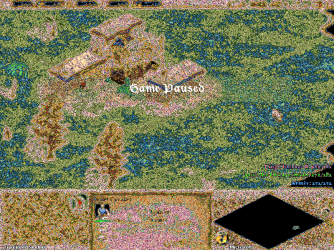
but I recently bought a new stationary computer (also win 7 home premium x64). the problem is that this computer get another kind of color bug, not the normal one and killing explorer.exe wont work at all. I can barely see anything.. including text, health on units, the option menu, and so on.. I will link a screenshot i took to see if any of you could help me out! very appreciated !! ^^

ImageShack® - Online Photo and Video Hosting
 

My Computer My Computer

At a glance

Windows 7 Home Premium x64
OS
Windows 7 Home Premium x64

My Computer My Computer

At a glance

Microsoft Windows 7 Ultimate: x64 (SP1)Intel® Core™ i5-2500K ProcessorKingston DDR3 HyperX 1600MHz 8GBASUS GTX 560 TI DirectCU II 900MHz
Computer Manufacturer/Model Number
Brewed
OS
Microsoft Windows 7 Ultimate: x64 (SP1)
CPU
Intel® Core™ i5-2500K Processor
Motherboard
ASUS P8Z68-V PRO
Memory
Kingston DDR3 HyperX 1600MHz 8GB
Graphics Card(s)
ASUS GTX 560 TI DirectCU II 900MHz
Sound Card
Realtek® ALC892 8-Channel High Definition Audio CODEC
Monitor(s) Displays
ACER LCD P246HBD 1920x1080 (24") - Dell 1280x800
Screen Resolution
ACER LCD P246HBD ~ [1920X1080] - DELL ~ [1280x800]
Hard Drives
500 GB WD Caviar SE116 7200rpm SATA2
PSU
Corsair 750W Power Supply
Case
Coolermaster CM Scout
Cooling
Zalman FS-C77 Fatal1ty CPU Cooler
Keyboard
Logitech G15
Mouse
Coolermaster Sentinel Advanced
Internet Speed
[↓ 10 MB/s DL] [↑ 1 MB/s UL]
Other Info
- ROCCAT™ Kave – Solid 5.1 Surround Sound Gaming Headset
- Not overclocking
Still nothing working

Hi Guys

Ive been having the exact same colour problems with AOE2. ive tried updating my drivers and and directx, .DLL patching mods, terminating explorer, but nothing at all is working.

When running on lower resolutions it only has the classic "red grass, purple water" issue, (which can be solved by terminating explorer) but as soon as i try to turn it up to 1024, the whole thing goes haywire beyond repair to this more uncommon problem.

Has anyone found a solution?

Cheers
 

My Computer My Computer

At a glance

Windows 7 Starter 32b
OS
Windows 7 Starter 32b
No these methods dont seems to work.
the process displayed in that video is to close explorer on opening Empires2.exe and re-open it on close. this does work, for the Red grass, purple water colour issue (as displayed in the video), but not this one. this is different.
take a look at this screen shot below, originally posted in this thread, this is what i am suffering from too, you cant see a thing, and so far all the most common fixes do nothing.

aok001.png

im at an absolute loss for what to do about it.
 

My Computer My Computer

At a glance

Windows 7 Starter 32b
OS
Windows 7 Starter 32b
I have read in a few places online that older games are messed up by some of the settings that make windows pretty, but you can disable these to get the games to work better. Go to Start, right click computer and select properties. Go to advanced system settings and under performance click settings. In here select adjust for best performance. Make sure to apply these settings and press ok. my computer had both issues, so I still have to exit explorer.exe to make the color perfect.

Hope this helps
 

My Computer My Computer

At a glance

Windows 7 Home Premium 64 bitAMD FX 835016 GB 1600mhzNvidia GeForce GTX 650 Ti Boost
Computer type
PC/Desktop
Computer Manufacturer/Model Number
Custom built
OS
Windows 7 Home Premium 64 bit
CPU
AMD FX 8350
Motherboard
GIGABYTE GA-990FXA-UD3 Rev 3.0
Memory
16 GB 1600mhz
Graphics Card(s)
Nvidia GeForce GTX 650 Ti Boost
Monitor(s) Displays
Asus
Screen Resolution
1920x1080
Hard Drives
2 1tb hard drives
Cooling
Default Air Cooler with CPU
Keyboard
Logitech K360
Mouse
Perixx MX-3000
Antivirus
MSE
Browser
Firefox
FIX

To fix the color issue
1.change your window theme to windows 7 basic
2.go to screen resolution(leave this window open,do not close)
3.open the game and the color will be fixed :cool:

To fix full screen issue:
1.change the resolution to 1024x768
2.open the game and play
the opening page doesnt fit but the game does so start a game you'll understand:cool:

I tried so much and found these answers:-)
 

My Computer My Computer

At a glance

Windows 7 Ultimate x32
OS
Windows 7 Ultimate x32
Any solution to this?
 

My Computer My Computer

At a glance

W7 64
Computer type
PC/Desktop
OS
W7 64
Back
Top