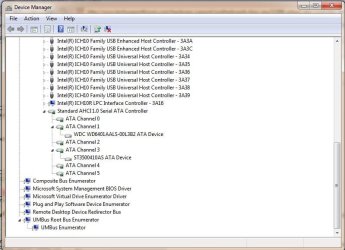
I recently discovered that my system had defaulted to IDE when install Windows 7 Pro 64bit for the first time from an ASUS P6T SE.
I found that you could edit the registry to enable SATA and AHCI after the fact, so I was able to perform this. I installed the SATA drivers for JMicron controller, rebooted windows, then rebooted and enabled AHCI and SATA for the drives (WD SATA & Samsung SATA). This seemed to work correctly as I can now see my SATA drives as hotplugged (eject from taskbar). When I go into device manager, I still see a whole whack of IDE channels with the HDDs under them along with the MS AHCI driver and the JMicron Controller in Storage Controllers.
Here's, a screenshot to see if I did this correctly. Should I uninstall the IDE controllers and let Windows sort it out on reboot.. I'm a little lost at this. I don't really want to format and reinstall everything, but I'm willing to do it if necessary.
Thanks.
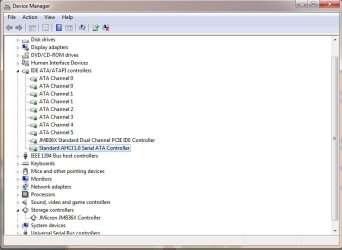
I found that you could edit the registry to enable SATA and AHCI after the fact, so I was able to perform this. I installed the SATA drivers for JMicron controller, rebooted windows, then rebooted and enabled AHCI and SATA for the drives (WD SATA & Samsung SATA). This seemed to work correctly as I can now see my SATA drives as hotplugged (eject from taskbar). When I go into device manager, I still see a whole whack of IDE channels with the HDDs under them along with the MS AHCI driver and the JMicron Controller in Storage Controllers.
Here's, a screenshot to see if I did this correctly. Should I uninstall the IDE controllers and let Windows sort it out on reboot.. I'm a little lost at this. I don't really want to format and reinstall everything, but I'm willing to do it if necessary.
Thanks.
Attachments
My Computer
- OS
- Windows 7 Professional 64-bit
- CPU
- Core i7 920 D0 @4.05GHz
- Motherboard
- ASUS P6T SE
- Memory
- 6GB DDR3 1600 G.Skill
- Graphics Card(s)
- Sapphire Radeon 5850
- Monitor(s) Displays
- Samsung SyncMaster 2253LW
- Screen Resolution
- 1680x1050
- Hard Drives
- Western Digital Black 640GB
Seagate 7200.12 500GB
- PSU
- Antec TruePower Blue 750W
- Case
- Antec 902
- Cooling
- Thermalright Ultra 120 Extreme 1366
- Internet Speed
- Bell Aliant High-Speed Ultra 7Mbps
- Other Info
- Pioneer DVR-116DBK Burner