Solved AHCI-mode on Marvell 9128 controller in Windows 7 Ultimate x64

And the way the bench tests are set up can favor 1 over the other. As a fact in many/most bench tests they are set up to favor the intel over the marvel.

Actually, very good point. Again, I can only wonder why a thorough guy like me haven't already run several different benchmarks to get the best picture of my drive's performance. Will post more results later.
 

My Computer My Computer

At a glance

Windows 7 Ultimate x64Intel Core i7 930 @ stock=2.8 GhzCorsair DDR3 PC1600 3x2GB kit (CMP6GX3M3A1600C7)Asus Radeon PCI-E HD4350
OS
Windows 7 Ultimate x64
CPU
Intel Core i7 930 @ stock=2.8 Ghz
Motherboard
Asus P6X58D-E, BIOS: 0502
Memory
Corsair DDR3 PC1600 3x2GB kit (CMP6GX3M3A1600C7)
Graphics Card(s)
Asus Radeon PCI-E HD4350
Sound Card
On-board
Monitor(s) Displays
Samsung 17" TFT
Hard Drives
1 x Intel 510 SSD Sata III (SSDSC2MH120A2K5) 120 GB,
1 x WD HDD Sata II 1 TB,
1 x WD HDD Sata II 2 TB,
1 x External: Samsung S2 Portable USB 3.0 640 GB
PSU
Chill Innovation 450 W
Case
Antec Solo
Cooling
CPU: Scythe Ninja 2 Rev. B
Internet Speed
50 Mbit/s
Ya that info link is another ssd- but you might get some general info from it- and seems folks like to run 4 blocks or something. Seems if or when I get a ssd I will need to educate my self more and seems might be some added software I might need too?

Any way my mobo use the se9128 but I bought this mobo it has a added chip that is said will let the sataIII and usb3 run at full speeds with no hit on the pcie [plx?]- If I understand that right. I know it is least one gigabyte mobo with a like chip. Best I understand it. I can be running sataIII and usb3 while gaming and my pcie or vid card will not be bumped to 8x speeds from 16x. I am not sure if my se9128 is caped at 5gigs or not or will run the full 6gigs- I think I read marvel caps it at 5 and can say it is a true 5.

As said normally benches are more set up to favor the intel- Folks argue and say marvel is faster- again I guess who is setting it up or trying to favor 1 over the other. I would guess either or marvel or intel is not above fudging in his favor and if can get away with it. I have read older marvel had more troubles or could drop raids or something- but is fixed with the 9128 or se anyway- I think I read it is a 9182 also? My mobo uses these Marvell® SE9128 / JMicron 363 chipsets.

http://www.msi.com/product/mb/P55A-GD65.html

Best I understand it sataIII on many mobos uses part of the pcie lanes and can put a hit on the vid cards performance - I should not have that prob on this mobo- the msi p55 gd85 has the same chip as my mobo.

So I guess I am saying- these such things might hinder your performance a lil too- I am not sure but I guess could make your bench tests not be what you think they should be or could be.

I am just killing time- maybe will learn something too.. Take a break from gaming- hell most days I game like 15 hours a day. Been watching a lot of movies on the net lately and being I can only hear my tv can not watch it the picture has gone on it.. I like freemoviesaddict.com- lots of movies but I have seen most of them or now any way. Wish I could find more kung fu movies I have seen them all at youtube and crackle- love them movies- been looking for the heros of shaolin with jet li- it has 2 other names but I can not find it other than some give me a virus site crap.. I seen the new movie Hanna a few hours ago- it was pretty good- the lil girl kicks butt.. I am waiting for the green lantern and hobo with a shotgun- Hobo with a shotgun looks like a flipping trip for reals..
 
Last edited:

My Computer My Computer

At a glance

w7
OS
w7
Thinking about my last post. If or when you are in testing mode or care or have the time. Maybe you should lower your desk top or display settings to standard if using areo glass etc. I guess glass runs in dx10 or dx11 and might put more a hit on the pcie in general- maybe the ssd scores will be more high if glass/areo was dropped and if using standard..

I do not know- Your mobo might not get the hit some others do- Your mobo might handle such things with a north or south bridge maybe and not the cpu? Or your cpu might have more lanes to work with etc..

Its a thought anyway..
 
Last edited:

My Computer My Computer

At a glance

w7
OS
w7
I am approx 66 MB/s from the specified read speed of my SSD (400 mb/s). Is this due to the 5 Gbit/s Marvell controller or just the usual over-stated performance numbers from the manufacturer?

ezeht has already explained
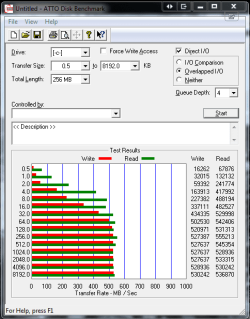
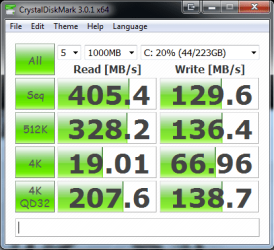
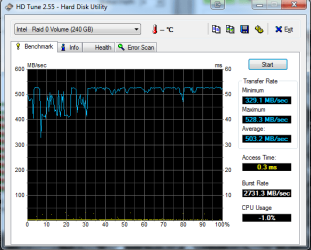
Have a look at these, all from the same drive, Its no wonder I prefer HDTune and ATTO over Crystal Disk Mark
At the end of the day tho you have a fast drive, no doubt about that :)
 

Attachments

  • Capture.PNG
    Capture.PNG
    15.6 KB · Views: 63
  • Capture1.PNG
    Capture1.PNG
    19.1 KB · Views: 29
  • Capture2.PNG
    Capture2.PNG
    18.1 KB · Views: 37

My Computer My Computer

At a glance

Windows 7 Ultimate x64Intel Core i7-2600K16 GB G Skill F3-10666 CL9D-4GBRLATI Radeon HD 6870
Computer Manufacturer/Model Number
Something I threw together
OS
Windows 7 Ultimate x64
CPU
Intel Core i7-2600K
Motherboard
Asus P8P67
Memory
16 GB G Skill F3-10666 CL9D-4GBRL
Graphics Card(s)
ATI Radeon HD 6870
Sound Card
ATI Radeon HDMI / Realtek ALC892
Monitor(s) Displays
2 x 22" standard monitors / LG32LC56v TV to watch films
Screen Resolution
1920 x1080
Hard Drives
2 x OCZ Vertex2 111.79GB
3 x Samsung103SJ
1 x Samsung103UJ
1 x WD3200BEVT
1 x Hitachi5K320-160
PSU
Thermaltake Toughpower Cable Management 750W
Case
Antec 300
Cooling
Noctua NH-U12P SE2 and 5 120mm Case fans
Keyboard
Microsoft Comfort Curve Keyboard 2000
Mouse
Hama M3110 / Logitech M305
Internet Speed
16000
Other Info
I have also used Fedora, Suse, Ubuntu Linux
And all other Windows from 95 to date except ME
Thinking about my last post. If or when you are in testing mode or care or have the time. Maybe you should lower your desk top or display settings to standard if using areo glass etc. I guess glass runs in dx10 or dx11 and might put more a hit on the pcie in general- maybe the ssd scores will be more high if glass/areo was dropped and if using standard..

I do not know- Your mobo might not get the hit some others do- Your mobo might handle such things with a north or south bridge maybe and not the cpu? Or your cpu might have more lanes to work with etc..

Its a thought anyway..
Its a good thought ezeht :) the less running in the background the better :)
 

My Computer My Computer

At a glance

Windows 7 Ultimate x64Intel Core i7-2600K16 GB G Skill F3-10666 CL9D-4GBRLATI Radeon HD 6870
Computer Manufacturer/Model Number
Something I threw together
OS
Windows 7 Ultimate x64
CPU
Intel Core i7-2600K
Motherboard
Asus P8P67
Memory
16 GB G Skill F3-10666 CL9D-4GBRL
Graphics Card(s)
ATI Radeon HD 6870
Sound Card
ATI Radeon HDMI / Realtek ALC892
Monitor(s) Displays
2 x 22" standard monitors / LG32LC56v TV to watch films
Screen Resolution
1920 x1080
Hard Drives
2 x OCZ Vertex2 111.79GB
3 x Samsung103SJ
1 x Samsung103UJ
1 x WD3200BEVT
1 x Hitachi5K320-160
PSU
Thermaltake Toughpower Cable Management 750W
Case
Antec 300
Cooling
Noctua NH-U12P SE2 and 5 120mm Case fans
Keyboard
Microsoft Comfort Curve Keyboard 2000
Mouse
Hama M3110 / Logitech M305
Internet Speed
16000
Other Info
I have also used Fedora, Suse, Ubuntu Linux
And all other Windows from 95 to date except ME
Oh ya- I had forgot until just seen in one of pooch screens. The said max speeds for hdd is burst speeds not 24/7 speeds. Even then I think the said max speeds are only in a raid. I am not sure about the last part tho- I do know they do not run top speeds 24/7 it is burst speeds. Or best I understand it any way..
 

My Computer My Computer

At a glance

w7
OS
w7
Ya now that I am thinking about it. It is professional benchers or hard core benchers just like gamers- and whole sites dedicated to mostly just bench marks- the raptorpit for one. Them guys buy top end pc's and vid cards normally for gaming and just to bench on and for contests and do not even game on them.

They install just windows and the bare basics not even security and tweak the systems for best performance and run them lean and turn off all extra they can and then run bench marks.

So I would guess many bench marks would be better than a normal user- seems like common sense to me..

Some of the same guys will do same things build high end systems just to fold with also..

I need a nap.

Laters..
 

My Computer My Computer

At a glance

w7
OS
w7
Guys, sorry, new to this forum, but rather than start a new thead I believe my question is pertinent here. As you can see from my system specs, I'm running a Gigabyte mb with the Marvell 9128. I can't find the "1051 driver" you guys are referring to. The Gigabyte website has only "Marvell Console Driver (SATA3) vers. 1.0.0.1027" and "Marvell RAID Utility (SATA3) vers. 4.1.0.1700" available. I'm assuming the "Console Driver" is what we're talking about here.

The French website cited earlier in this thread doesn't have any "1051" version; rather it has "drivers" vers. 1.2.0.1003 and "Marvell Storage Utility 4.1.0.1915". Has anyone tried these, or do you have another location for "1051"?
 

My Computer My Computer

At a glance

Windows 7 Professional SP1 64-bitCore i7-960 3.2GHz LGA 13666GB OCZ Gold XTC 6GB DDR3-1333eVGA GeForce GTX 460 SE 768MB
OS
Windows 7 Professional SP1 64-bit
CPU
Core i7-960 3.2GHz LGA 1366
Motherboard
Gigabyte GA-X58A-UD5
Memory
6GB OCZ Gold XTC 6GB DDR3-1333
Graphics Card(s)
eVGA GeForce GTX 460 SE 768MB
Sound Card
Onboard
Monitor(s) Displays
AOC 20"
Hard Drives
2x WD Caviar Blue 1TB 7,200 RPM SATA 6.0Gb/s
Hitachi Deskstar 1TB 7,200 RPM SATA
PSU
EliteXStream 800 Watt ATX
Case
Antec Three Hundred ATX Mid Tower
Cooling
Lotsa fans
Hello Rick, welcome to the forum
Its always best to start a new thread, but now I am here perhaps you would like to say what this is about?
 

My Computer My Computer

At a glance

Windows 7 Ultimate x64Intel Core i7-2600K16 GB G Skill F3-10666 CL9D-4GBRLATI Radeon HD 6870
Computer Manufacturer/Model Number
Something I threw together
OS
Windows 7 Ultimate x64
CPU
Intel Core i7-2600K
Motherboard
Asus P8P67
Memory
16 GB G Skill F3-10666 CL9D-4GBRL
Graphics Card(s)
ATI Radeon HD 6870
Sound Card
ATI Radeon HDMI / Realtek ALC892
Monitor(s) Displays
2 x 22" standard monitors / LG32LC56v TV to watch films
Screen Resolution
1920 x1080
Hard Drives
2 x OCZ Vertex2 111.79GB
3 x Samsung103SJ
1 x Samsung103UJ
1 x WD3200BEVT
1 x Hitachi5K320-160
PSU
Thermaltake Toughpower Cable Management 750W
Case
Antec 300
Cooling
Noctua NH-U12P SE2 and 5 120mm Case fans
Keyboard
Microsoft Comfort Curve Keyboard 2000
Mouse
Hama M3110 / Logitech M305
Internet Speed
16000
Other Info
I have also used Fedora, Suse, Ubuntu Linux
And all other Windows from 95 to date except ME
Windows MSAHCI drivers will work with the Marvell chipset. You don't need drivers. I have run with both the Marvell and Microsoft drivers and the Marvell are slightly faster for a SATA 3 SSD.

Also, you are using very old versions of the Marvell drivers. Try the 1.2.0.1002 at Marvell drivers I have been running them for months.

Having said that, your SATA 2 SSD will not see any benefit from The Marvell port. You will get better performance using one of your board's Intel SATA 2 ports and the Intel iastor drivers.
 

My Computer My Computer

At a glance

Windows 10 Pro. EFI boot partition, full EFI ...i7 4770k 4.4GHz (44-44-43-43 turbo) @ 1.248V16GB (8GBx2) @2200 MHz G.skill Sniper 10-11-1...MSI GTX 970 Gaming 4G
Computer type
PC/Desktop
Computer Manufacturer/Model Number
Home built (GeneO industries)/Model 4
OS
Windows 10 Pro. EFI boot partition, full EFI boot
CPU
i7 4770k 4.4GHz (44-44-43-43 turbo) @ 1.248V
Motherboard
ASUS Maximus VI Hero
Memory
16GB (8GBx2) @2200 MHz G.skill Sniper 10-11-10-30-1, 1.6V
Graphics Card(s)
MSI GTX 970 Gaming 4G
Sound Card
Onboard SupremeFX Audio
Monitor(s) Displays
NEC Spectraview 2490WUXi-SV
Screen Resolution
1920 x 1200
Hard Drives
Samsung 850 Pro 256GB (OS), Samsung 2x 128GB 840 Pro SSD in RAID0, 3x WD Blue 6Gb/s 1TB RAID0, WD 2TB Black external USB 3.0, 2TB WD20EARS Green external USB 3.0, 2x 500GB Seagate and 1 750 GB external USB, 1x 350GB external USB3
PSU
Seasonic X-850 (2012 KM3 model)
Case
Fractal Design Define R4
Cooling
NH-D14, NF-F12, NF-A15; NF-P14, NF-P12,NF-A14, S12A PWM
Keyboard
Cooler Master Storm Quickfire Rapid - Brown
Mouse
Logitech G602
Internet Speed
126.4 Mb/s down, 24.3 Mb/s up
Other Info
USB 3.0 x8 , SATA III x8, eSATA, USB 2.0 x6. Samsung DVD R/W drive.

WEI: CPU 7.8, Memory 7.9, Graphics 7.9, Disk 7.9
Guys, sorry, new to this forum, but rather than start a new thead I believe my question is pertinent here. As you can see from my system specs, I'm running a Gigabyte mb with the Marvell 9128. I can't find the "1051 driver" you guys are referring to. The Gigabyte website has only "Marvell Console Driver (SATA3) vers. 1.0.0.1027" and "Marvell RAID Utility (SATA3) vers. 4.1.0.1700" available. I'm assuming the "Console Driver" is what we're talking about here.

The French website cited earlier in this thread doesn't have any "1051" version; rather it has "drivers" vers. 1.2.0.1003 and "Marvell Storage Utility 4.1.0.1915". Has anyone tried these, or do you have another location for "1051"?

Use the 1.2.0.1002 drivers from that French site. The 1.2.0.1003 drivers have a bug in that a unchecking "Enable Safely Remove Disk" has no effect and all of your internal drives will appear as hot swappable and removable in the "Safely Remove Hardware" system tray utility.
 

My Computer My Computer

At a glance

Windows 10 Pro. EFI boot partition, full EFI ...i7 4770k 4.4GHz (44-44-43-43 turbo) @ 1.248V16GB (8GBx2) @2200 MHz G.skill Sniper 10-11-1...MSI GTX 970 Gaming 4G
Computer type
PC/Desktop
Computer Manufacturer/Model Number
Home built (GeneO industries)/Model 4
OS
Windows 10 Pro. EFI boot partition, full EFI boot
CPU
i7 4770k 4.4GHz (44-44-43-43 turbo) @ 1.248V
Motherboard
ASUS Maximus VI Hero
Memory
16GB (8GBx2) @2200 MHz G.skill Sniper 10-11-10-30-1, 1.6V
Graphics Card(s)
MSI GTX 970 Gaming 4G
Sound Card
Onboard SupremeFX Audio
Monitor(s) Displays
NEC Spectraview 2490WUXi-SV
Screen Resolution
1920 x 1200
Hard Drives
Samsung 850 Pro 256GB (OS), Samsung 2x 128GB 840 Pro SSD in RAID0, 3x WD Blue 6Gb/s 1TB RAID0, WD 2TB Black external USB 3.0, 2TB WD20EARS Green external USB 3.0, 2x 500GB Seagate and 1 750 GB external USB, 1x 350GB external USB3
PSU
Seasonic X-850 (2012 KM3 model)
Case
Fractal Design Define R4
Cooling
NH-D14, NF-F12, NF-A15; NF-P14, NF-P12,NF-A14, S12A PWM
Keyboard
Cooler Master Storm Quickfire Rapid - Brown
Mouse
Logitech G602
Internet Speed
126.4 Mb/s down, 24.3 Mb/s up
Other Info
USB 3.0 x8 , SATA III x8, eSATA, USB 2.0 x6. Samsung DVD R/W drive.

WEI: CPU 7.8, Memory 7.9, Graphics 7.9, Disk 7.9
Yesterday I clicked update driver in Device Manager and Windows 7 updated my 9128 driver from v1.2.0.1002 to v1.2.0.1003. I can confirm the 1.2.0.1003 drivers for the Marvell 9128 have the bug GeneO mentioned.
I just noticed Station Drivers now has a v1.2.0.1006 driver on their site.
I will give it a try when I get time.
 

My Computer My Computer

At a glance

Windows 7 Ultimate 64-bitIntel Core i7 3770KG.Skill ARES DDR3 1600 - 3 x 4GBASUS HD7770-DC-1GD5-V2
Computer type
PC/Desktop
Computer Manufacturer/Model Number
Me
OS
Windows 7 Ultimate 64-bit
CPU
Intel Core i7 3770K
Motherboard
Asus P8Z77-V PRO
Memory
G.Skill ARES DDR3 1600 - 3 x 4GB
Graphics Card(s)
ASUS HD7770-DC-1GD5-V2
Sound Card
on board
Monitor(s) Displays
ASUS PB278Q PLS LED LCD 6ms
Screen Resolution
2560 x 1440
Hard Drives
Samsung 840 EVO SSD 500GB
2 x Seagate SATA3 2TB 64Mb Cache (ST2000DM001)
PSU
Corsair HX-650
Case
Coolermaster Centurion 5 II
Cooling
Coolermaster Hyper 212 Plus
Keyboard
Logitech K290
Mouse
MS Wireless Laser Mouse 5000
Internet Speed
100Mb down / 2.5Mb up
Other Info
Leadtek DTV2000DS Dual HD TV Tuner
USB3 kit for 2 front panel USB3 ports
Both of these are from station-drivers' website where I downloaded them:

APRIL 25, 2011 - - - - marvell_91xx_1.2.0.1200_1.1.0.6(www . station-drivers .com).exe

Today, Nov 5, 2011 - marvell_91xx_1.2.0.1006-WHQL(www . station-drivers . com).exe

(w/out the spaces of course)

Am I crazy or does the previous release have a higher number? (I suppose both could be true :) )

I saved both on my HDD so I know I typed their names correctly.

I finally gave up on the Marvell 91xx back in April, switched to the msahci driver.
I really hope you have better experiences with them than I did.
 

My Computer My Computer

At a glance

Win7 Pro 64-bit sp1core i7 980XG.Skill 4Gx3 F3-10666CL9T-12GBRL (x2)EVGA 06G-P4-3787-KR
Computer type
PC/Desktop
OS
Win7 Pro 64-bit sp1
CPU
core i7 980X
Motherboard
MSI Big-Bang XPower X58
Memory
G.Skill 4Gx3 F3-10666CL9T-12GBRL (x2)
Graphics Card(s)
EVGA 06G-P4-3787-KR
Monitor(s) Displays
HP LP2475w (x2)
Screen Resolution
3840x1200
Hard Drives
Crucial RealSSD CTFDDAC128MAG-1G1 (boot drive);
Crucial m4 128GB;
Samsung 1TB HD103SJ 32M 7200rpm (x2);
WD Black WD2002FAEX 2TB (x2)
PSU
Corsair CMPSU-850HX
Case
HAF X
Cooling
Intel DBX-B (stock)
Both of these are from station-drivers' website where I downloaded them:

APRIL 25, 2011 - - - - marvell_91xx_1.2.0.1200_1.1.0.6(www . station-drivers .com).exe

Today, Nov 5, 2011 - marvell_91xx_1.2.0.1006-WHQL(www . station-drivers . com).exe

(w/out the spaces of course)

Am I crazy or does the previous release have a higher number? (I suppose both could be true :) )

I saved both on my HDD so I know I typed their names correctly.

I finally gave up on the Marvell 91xx back in April, switched to the msahci driver.
I really hope you have better experiences with them than I did.

I'm using the driver v1.2.0.1006. It still has the "Safely Remove Hardware" icon in the system tray but it doesn't let me disconnect my SSD accidentally - says "drive in use" so I have just left it. I'm used to it now.
 

My Computer My Computer

At a glance

Windows 7 Ultimate 64-bitIntel Core i7 3770KG.Skill ARES DDR3 1600 - 3 x 4GBASUS HD7770-DC-1GD5-V2
Computer type
PC/Desktop
Computer Manufacturer/Model Number
Me
OS
Windows 7 Ultimate 64-bit
CPU
Intel Core i7 3770K
Motherboard
Asus P8Z77-V PRO
Memory
G.Skill ARES DDR3 1600 - 3 x 4GB
Graphics Card(s)
ASUS HD7770-DC-1GD5-V2
Sound Card
on board
Monitor(s) Displays
ASUS PB278Q PLS LED LCD 6ms
Screen Resolution
2560 x 1440
Hard Drives
Samsung 840 EVO SSD 500GB
2 x Seagate SATA3 2TB 64Mb Cache (ST2000DM001)
PSU
Corsair HX-650
Case
Coolermaster Centurion 5 II
Cooling
Coolermaster Hyper 212 Plus
Keyboard
Logitech K290
Mouse
MS Wireless Laser Mouse 5000
Internet Speed
100Mb down / 2.5Mb up
Other Info
Leadtek DTV2000DS Dual HD TV Tuner
USB3 kit for 2 front panel USB3 ports
Good to hear it's working for you Z -

I guess I'm the only one bothered by the numbering scheme.
 

My Computer My Computer

At a glance

Win7 Pro 64-bit sp1core i7 980XG.Skill 4Gx3 F3-10666CL9T-12GBRL (x2)EVGA 06G-P4-3787-KR
Computer type
PC/Desktop
OS
Win7 Pro 64-bit sp1
CPU
core i7 980X
Motherboard
MSI Big-Bang XPower X58
Memory
G.Skill 4Gx3 F3-10666CL9T-12GBRL (x2)
Graphics Card(s)
EVGA 06G-P4-3787-KR
Monitor(s) Displays
HP LP2475w (x2)
Screen Resolution
3840x1200
Hard Drives
Crucial RealSSD CTFDDAC128MAG-1G1 (boot drive);
Crucial m4 128GB;
Samsung 1TB HD103SJ 32M 7200rpm (x2);
WD Black WD2002FAEX 2TB (x2)
PSU
Corsair CMPSU-850HX
Case
HAF X
Cooling
Intel DBX-B (stock)
New: trying to install Win 7 on Marvell 9128 RAID-1 SSD array.

I'm frustrated at how it seems that they never try the obvious configuration, and then say that their stuff is "compatible".

My board is a Gigabyte GA-P55A-UD6
I've disconnected all other hard drives. Only working with the Marvell 9128.
On the Marvell, I have two SanDisk Extreme 120GB SSD, set as RAID-1.

I figure that should give some serious throughput - two 6 GB/s drives/channels in RAID 1 should be VERY fast for read, and decent for write but I don't expect that much writing will happen.

But... Windows 7 won't install. I would NEVER leave a customer site with my software not working. Yet, windows 7 won't install on this obvious win of an installation. Nor an error message except "Doesn't work. Try something else." Why is it that all the cutting edge technology is great for promises and sales, yet doesn't work? And how do they get away with that? Sigh.
 

My Computer My Computer

At a glance

Windows 7 Ultimate x64
OS
Windows 7 Ultimate x64
can somebody tell me the max (write) speeds you ever had with the marvell controller?
i can't get out more than about 180mb/s write speed (max i ever saw was 185 in crystal disk mark).
on intel i've got +/- 300mb/s with my 2hdd raid 0.

with my kingston hyperX ssds i saw more read speed but even less write speed, even if they are much faster!

thanks for your infos!
 

My Computer My Computer

At a glance

Win8 x64
Computer type
PC/Desktop
OS
Win8 x64
Back
Top